හැඳින්වීම
The Sonance DSP 2-750 MKII amplifier is designed to deliver high-fidelity audio performance with advanced digital signal processing (DSP) capabilities. It features SonARC (Sonance Advanced Room Correction) for optimized sound output tailored to Sonance speakers, and a 10-band parametric EQ for further customization. This amplifier is engineered for efficiency and clarity, supporting audio from standard MP3 to High Resolution Audio formats.
වැදගත් ආරක්ෂක තොරතුරු
Please read and understand all safety instructions before operating this device. Failure to follow these instructions may result in electric shock, fire, or damage to the unit.
- මෙම උපකරණය වර්ෂාවට හෝ තෙතමනයට නිරාවරණය නොකරන්න.
- කිසිදු වාතාශ්රය විවරයක් අවහිර නොකරන්න. නිෂ්පාදකයාගේ උපදෙස් අනුව ස්ථාපනය කරන්න.
- රේඩියේටර්, තාප රෙජිස්ටර්, ලිප, හෝ වෙනත් උපකරණ (ඇතුළුව) වැනි තාප ප්රභවයන් අසල ස්ථාපනය නොකරන්න. ampලිෆයර්) තාපය නිපදවන.
- විදුලි රැහැන ඇවිදීමෙන් හෝ ඇණ ගැසීමෙන්, විශේෂයෙන් ප්ලග්, පහසුව සඳහා භාජන සහ ඒවා උපකරණයෙන් පිටවන ස්ථානයේ ආරක්ෂා කරන්න.
- නිෂ්පාදකයා විසින් නිශ්චිතව දක්වා ඇති ඇමුණුම්/උපාංග පමණක් භාවිතා කරන්න.
- අකුණු කුණාටු වලදී හෝ දිගු කාලයක් භාවිතා නොකළ විට මෙම උපකරණය විසන්ධි කරන්න.
- සියලුම සේවා සුදුසුකම් ලත් සේවා පුද්ගලයින් වෙත යොමු කරන්න. බල සැපයුම් ලණුවකට හෝ ප්ලග් එකට හානි වූ විට, දියර කාන්දු වී ඇති විට හෝ උපකරණයට වස්තූන් වැටී ඇති විට, උපකරණය වර්ෂාවට හෝ තෙතමනයට නිරාවරණය වී ඇති විට, සාමාන්යයෙන් ක්රියා නොකරන විට, උපකරණයට යම් ආකාරයකින් හානි වී ඇති විට, සේවා සැපයීම අවශ්ය වේ. , හෝ අතහැර දමා ඇත.
This product contains materials, including copper, lead, and rubber, which may be subject to Proposition 65 warnings in California.
පෙට්ටියේ ඇති දේ
ඇසුරුම් ඉවත් කිරීමෙන් පසු, කරුණාකර පහත සඳහන් සියලුම සංරචක ඇතුළත් කර ඇති බව තහවුරු කරගන්න:
- විදුලි රැහැන්
- උපදෙස් (මෙම අත්පොත)
- Rubber Feet (for surface mounting)
- රාක්ක කන් (රාක්ක සවි කිරීම සඳහා)
සැකසුම සහ ස්ථාපනය
The Sonance DSP 2-750 MKII amplifier can be installed as a surface mount unit using the included rubber feet or rack-mounted using the provided rack ears.
භෞතික ස්ථානගත කිරීම
අවට ප්රමාණවත් වාතාශ්රයක් සහතික කරන්න amplifier. Avoid placing it in enclosed spaces without airflow. Maintain a minimum of 4 inches (10 cm) of clear space around the top and sides for proper heat dissipation.
Connecting Audio Sources and Speakers
Refer to the rear panel diagram for proper connection of audio input sources and speakers. The amplifier supports 2.0 channel audio configuration.
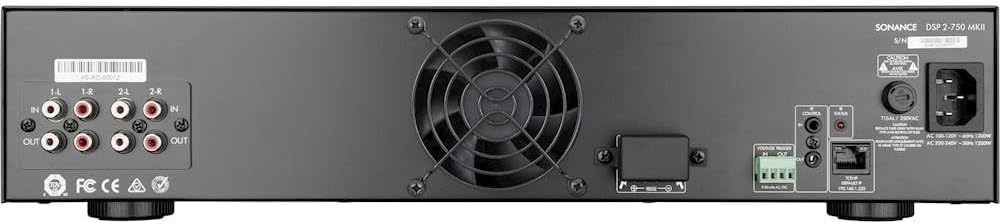
රූපය 1: පසුපස පැනල් සම්බන්ධතා. This image displays the rear panel of the Sonance DSP 2-750 MKII amplifier, highlighting the various input and output ports, including RCA audio inputs, speaker terminals, control ports, and the power inlet. Proper connection of these ports is essential for system operation.
- ශ්රව්ය යෙදවුම්: Connect your audio source (e.g., pre-amplifier, receiver) to the RCA input jacks.
- කථික නිමැවුම්: Connect your speakers to the appropriate speaker terminals. Ensure correct polarity (+ to + and - to -). The amplifier is rated for 750W x 2 @ 4 ohms.
- පාලන වරාය: Utilize the control ports for integration with control systems or for advanced network features.
බල සම්බන්ධතාවය
Connect the provided power cord to the amplifier's power inlet and then to a suitable AC power outlet. Ensure the power source matches the amplifier's voltage requirements (AC 100-120V/220-240V, 50/60Hz).
මෙහෙයුම් උපදෙස්
The Sonance DSP 2-750 MKII amplifier is designed for straightforward operation, with advanced features accessible via its DSP capabilities.
ඉදිරිපස පුවරුව අවසන්view

රූපය 2: ඉදිරිපස පුවරුව. This image shows the front of the Sonance DSP 2-750 MKII amplifier, featuring the central power button/indicator and ventilation grilles. The power button controls the unit's on/off state, and indicator lights provide status feedback.
- බල බොත්තම: හැරවීමට ඔබන්න ampලයිෆයර් සක්රිය හෝ අක්රිය කරන්න. දර්ශක ආලෝකය බල තත්ත්වය පෙන්වයි.
- තත්ව දර්ශක: Lights on the front panel provide information about the amplifier's operational status (e.g., power on, protection mode).
SonARC and DSP Features
ද amplifier incorporates SonARC (Sonance Advanced Room Correction) for optimal sound. This system provides access to hundreds of EQ presets specifically designed for Sonance speakers, accessible through intuitive menus. For advanced users, a 10-band parametric EQ is available for fine-tuning the audio performance to any specific acoustic environment.
Access to SonARC and DSP settings is typically done via a network connection and a dedicated software interface or web-based control panel. Refer to the detailed software manual for comprehensive instructions on configuring these advanced features.
නඩත්තු කිරීම සහ රැකවරණය
To ensure the longevity and optimal performance of your Sonance DSP 2-750 MKII ampලිෆයර්, මෙම නඩත්තු මාර්ගෝපදේශ අනුගමනය කරන්න:
- පිරිසිදු කිරීම: Use a soft, dry cloth to clean the exterior surfaces. Do not use liquid cleaners or aerosol sprays, as they may damage the finish or internal components.
- වාතාශ්රය: Regularly check that the ventilation openings are clear of dust and debris. Blocked vents can lead to overheating.
- සම්බන්ධතා: Periodically inspect all cable connections to ensure they are secure and free from corrosion.
- ගබඩා: ගබඩා කරන්නේ නම් amplifier for an extended period, disconnect it from power and store it in a cool, dry place, away from direct sunlight and extreme temperatures.
දෝෂගවේෂණය
This section provides solutions to common issues you might encounter with your amplifier. If the problem persists, please contact Sonance customer support.
බලය නැත
- Ensure the power cord is securely connected to both the amplifier and a working electrical outlet.
- වෙනත් උපාංගයක් සම්බන්ධ කිරීමෙන් බල සැපයුම පරීක්ෂා කරන්න.
- තහවුරු කරන්න amplifier's power switch is in the 'On' position.
Sound Output නැත
- Confirm that audio input cables are correctly connected to the ampලිෆයර් සහ ප්රභව උපාංගය.
- දෙකෙහිම ස්පීකර් වයර් සම්බන්ධතා පරීක්ෂා කරන්න amplifier and the speakers for proper polarity and secure contact.
- Ensure the audio source device is playing and its volume is turned up.
- Verify that the correct input source is selected on the amplifier (if applicable via network control).
විකෘති ශබ්දය
- Reduce the volume level on both the ampලිෆයර් සහ ප්රභව උපාංගය.
- Check speaker impedance compatibility with the ampජීවිතාරක්ෂකයා.
- Inspect speaker wires for any fraying or short circuits.
- If using DSP settings, try resetting them to default or adjusting the EQ settings.
තාක්ෂණික පිරිවිතර
| විශේෂාංගය | පිරිවිතර |
|---|---|
| ආදර්ශ අංකය | DSP 2-750 |
| මුළු බල ප්රතිදානය | 1500W |
| RMS Rating | 750W x 2 @ 4 ohms (2 channels driven) |
| සැපයුම් ධාරාව | 15.0 amps |
| සරවුන්ඩ් සවුන්ඩ් චැනල් වින්යාසය | 2.0 |
| සංඛ්යාත ප්රතිචාරය | 20 Hz |
| සවිකිරීමේ වර්ගය | මතුපිට සවි කිරීම |
| අයිතම මානයන් (L x W x H) | අඟල් 17.25 x 3.87 x 17.21 |
| අයිතමයේ බර | රාත්තල් 23.8 කි |
| ද්රව්ය | Copper, Lead, Rubber |
| ගැළපෙන උපාංග | Gaming Console, Home Theater, Karaoke Machine, Television |
| පාලන ක්රමය | Touch (likely referring to network/software control) |
| රැහැන් රහිත සන්නිවේදන තාක්ෂණය | Bluetooth (for control/streaming, if applicable) |
| බලශක්ති ප්රභවය | රැහැන්ගත විදුලි |
| UPC | 041093933790 |
වගකීම් සහ සහාය
For detailed warranty information and technical support, please refer to the official Sonance webවෙබ් අඩවියට හෝ ඔවුන්ගේ පාරිභෝගික සේවා දෙපාර්තමේන්තුවට සම්බන්ධ වන්න. වගකීම් හිමිකම් සඳහා මිලදී ගැනීමේ සාක්ෂියක් ලෙස ඔබේ මිලදී ගැනීමේ රිසිට්පත තබා ගන්න.
Sonance Official Webඅඩවිය: www.sonance.com