සාදරයෙන් පිළිගනිමු
Thank you for choosing the BYTECH BICONIC True Wireless Earbuds. This manual provides essential information on how to set up, operate, maintain, and troubleshoot your new earbuds. Please read this manual thoroughly before use to ensure optimal performance and longevity of your device.
වැදගත් ආරක්ෂක උපදෙස්
- ඉයර්බඩ් හෝ ආරෝපණ පෙට්ටිය අධික උෂ්ණත්වයන්ට, ආර්ද්රතාවයට හෝ ද්රවවලට නිරාවරණය නොකරන්න.
- උපාංගය බිම දැමීම, බලපෑම් කිරීම හෝ විසුරුවා හැරීමෙන් වළකින්න.
- Do not use abrasive cleaners or harsh chemicals to clean the earbuds or case.
- Listen at moderate volume levels to prevent hearing damage. Prolonged exposure to loud sounds can cause irreversible hearing loss.
- ළමයින්ට සහ සුරතල් සතුන්ට ළඟාවිය නොහැකි ලෙස තබා ගන්න.
- Dispose of the device responsibly according to local regulations. Do not dispose of with household waste.
ඇතුළත් කර ඇති දේ
සියලුම අයිතම පවතින බව සහතික කර ගැනීමට කරුණාකර පැකේජයේ අන්තර්ගතය පරීක්ෂා කරන්න:
- BYTECH BICONIC True Wireless Earbuds (Left and Right)
- අයකිරීමේ නඩුව
- ආරෝපණ කේබලය
- පරිශීලක අත්පොත
නිෂ්පාදනය අවසන්view
Familiarize yourself with the components of your BYTECH BICONIC True Wireless Earbuds.

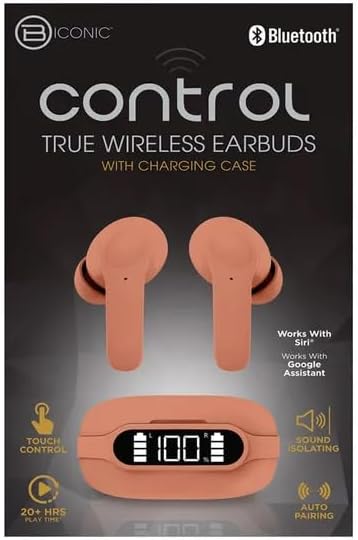
ඇරඹේ
ඉයර්බඩ් සහ කේස් ආරෝපණය කිරීම
The BYTECH BICONIC earbuds come with a rechargeable battery in both the earbuds and the charging case. Ensure both are fully charged before first use.
- Place the earbuds into the charging case, ensuring they are correctly seated in their respective slots (L for left, R for right).
- Connect the provided charging cable to the charging port on the case and the other end to a USB power source (e.g., computer USB port, wall adapter).
- The digital display on the charging case will show the battery level. Allow sufficient time for a full charge.
- සම්පුර්ණයෙන්ම ආරෝපණය වූ පසු, ආරෝපණ කේබලය විසන්ධි කරන්න.
බ්ලූටූත් යුගලනය
ඔබගේ බ්ලූටූත් සක්රීය උපාංගය සමඟ ඔබගේ ඉයර්බඩ් යුගල කිරීමට මෙම පියවර අනුගමනය කරන්න:
- ඉයර්බඩ් ආරෝපණය වී ඇති බවත් ආරෝපණ පෙට්ටිය තුළ ඇති බවත් සහතික කර ගන්න.
- ආරෝපණ පෙට්ටිය විවෘත කරන්න. ඉයර්බඩ් ස්වයංක්රීයව යුගල කිරීමේ ප්රකාරයට ඇතුළු වන අතර, ඉයර්බඩ් මත දර්ශක ආලෝකයක් දැල්වෙනු ඇත.
- ඔබගේ උපාංගයේ (ස්මාර්ට්ෆෝන්, ටැබ්ලටය, ආදිය), බ්ලූටූත් සැකසුම් වෙත ගොස් බ්ලූටූත් ක්රියාත්මක කරන්න.
- ඒ සඳහා සොයන්න available devices. You should see "BYTECH BICONIC" or a similar name appear in the list.
- Select "BYTECH BICONIC" to connect. Once connected, a voice prompt will confirm the successful pairing, and the indicator lights on the earbuds will stop flashing.
- උපාංගයේ බ්ලූටූත් සක්රීය කර ඇත්නම්, ඉයර්බඩ් නඩුවෙන් පිටතට ගත් විට අවසන් වරට යුගල කළ උපාංගයට ස්වයංක්රීයව නැවත සම්බන්ධ වේ.
මෙහෙයුම් උපදෙස්
ස්පර්ශ පාලන
The BYTECH BICONIC earbuds feature intuitive touch controls for easy management of your audio and calls.
| ක්රියාව | කාර්යය |
|---|---|
| තනි තට්ටු කිරීම (වම්/දකුණු ඉයර්බඩ්) | සංගීතය වාදනය කරන්න/විරාම කරන්න, පිළිතුරු දෙන්න/ඇමතුම අවසන් කරන්න |
| දෙවරක් තට්ටු කරන්න (දකුණු ඉයර්බඩ්) | ඊළඟ ධාවන පථය |
| දෙවරක් තට්ටු කරන්න (වම් ඉයර්බඩ්) | පෙර ධාවන පථය |
| ත්රිත්ව තට්ටු කිරීම (වම්/දකුණු ඉයර්බඩ්) | හඬ සහායක (සිරි/ගූගල් සහායක) සක්රිය කරන්න. |
| දිගු ඔබන්න (වම්/දකුණු ඉයර්බඩ්) | ඇමතුම ප්රතික්ෂේප කරන්න |
බල ගැන්වීම සහ අක්රිය කිරීම
- බල ගැන්වීම: ආරෝපණ පෙට්ටියෙන් ඉවත් කළ විට ඉයර්බඩ් ස්වයංක්රීයව ක්රියාත්මක වේ.
- විදුලිය විසන්ධි කිරීම: ඉයර්බඩ් නැවත ආරෝපණ පෙට්ටියට දමා පියන වසා දමන්න. ඒවා ස්වයංක්රීයව ක්රියා විරහිත වී ආරෝපණය වීමට පටන් ගනී.
නඩත්තු කිරීම සහ රැකවරණය
Proper care will extend the life of your BYTECH BICONIC True Wireless Earbuds.
- පිරිසිදු කිරීම: Use a soft, dry, lint-free cloth to clean the earbuds and charging case. Do not use liquids or aerosol cleaners.
- ගබඩා: භාවිතයේ නොමැති විට, ඉයර්බඩ් ආරක්ෂා කර ගැනීමට සහ ආරෝපණය කර තබා ගැනීමට සෑම විටම ඒවායේ ආරෝපණ පෙට්ටියේ ගබඩා කරන්න.
- ආන්තික තත්වයන් වළක්වා ගන්න: Do not expose the device to extreme heat, cold, or direct sunlight.
- ජල ප්රතිරෝධය: These earbuds are not waterproof. Avoid contact with water or excessive moisture.
දෝෂගවේෂණය
If you encounter any issues with your earbuds, refer to the following common solutions:
| ගැටලුව | විසඳුම |
|---|---|
| ඉයර්බඩ් යුගල නොවේ | ඉයර්බඩ් ආරෝපණය කර ඇති බවට වග බලා ගන්න. ඔබගේ උපාංගයේ බ්ලූටූත් ක්රියා විරහිත කර ක්රියාත්මක කරන්න. බ්ලූටූත් සැකසුම් තුළ උපාංගය අමතක කර නැවත යුගල කරන්න. |
| එක් ඉයර්බඩ් එකක් පමණක් ක්රියා කරයි | Place both earbuds back into the charging case, close the lid, wait a few seconds, then take them out again. Ensure both are charged. |
| ශබ්දයක් නැත | Check volume levels on both your device and the earbuds. Ensure earbuds are properly connected. Try playing different audio. |
| ආරෝපණ නඩුව ආරෝපණය නොවේ | Ensure the charging cable is securely connected to both the case and the power source. Try a different USB port or power adapter. |
තාක්ෂණික පිරිවිතර
Detailed specifications for your BYTECH BICONIC True Wireless Earbuds:
| විශේෂාංගය | විස්තර |
|---|---|
| ආදර්ශ අංකය | BC-AU-BE-144-TN |
| සම්බන්ධතා තාක්ෂණය | රැහැන් රහිත (බ්ලූටූත්) |
| ආකෘති සාධකය | කණ අභ්යන්තරය (ඉන්ට්රායුරල්ස්) |
| වර්ණය | කැෆේ |
| විශේෂ ලක්ෂණ | Rechargeable Battery, Touch Control, Sound Isolating, Auto Pairing |
| ඇතුළත් සංරචක | කේබල් |
| Estimated Play Time | 20+ Hours (with charging case) |
වගකීම් තොරතුරු සහ පාරිභෝගික සහාය
BYTECH products are designed and manufactured to the highest quality standards. For information regarding warranty coverage, please refer to the warranty card included with your purchase or visit the official BYTECH webඅඩවිය.
If you require further assistance or have questions not covered in this manual, please contact BYTECH customer support through their official channels. Please have your model number (BC-AU-BE-144-TN) and purchase details ready when contacting support.


