හැඳින්වීම
The Instrukart Keller LEO2 Digital Pressure Gauge is a battery-powered, compact, and highly accurate instrument designed for various industrial applications, servicing, calibration, and testing. It features a robust piezoresistive pressure cell that has undergone extensive pressure and temperature tests, with individual adjustments for each unit to ensure an accuracy of 0.1% FS. This specific model is designed for a pressure range of 0 to 212 psi (0 to 100 Bar). The internal battery provides up to 1,000 hours of continuous operation, making it suitable for extended use in the field.

රූපය: ඉදිරිපස view of the Instrukart Keller LEO2 Digital Pressure Gauge, displaying pressure readings and control buttons.
සැලසුම
1. බැටරි ස්ථාපනය
The Keller LEO2 gauge operates on a 3V CR 2430 battery. To install or replace the battery:
- උපාංගයේ පිටුපස බැටරි මැදිරි කවරය සොයා ගන්න.
- Carefully open the cover by twisting or unlatching as indicated.
- Insert the CR 2430 battery, ensuring the correct polarity (+/-).
- Securely close the battery compartment cover to maintain the IP65 protection rating.

රූපය: පසුපස view of the Keller LEO2 Digital Pressure Gauge, highlighting the battery compartment for installation.
2. Pressure Connection
The gauge is equipped with a 7/16”-20 UNF pressure connection. An adapter for G 1/4” is included for common applications.
- Ensure the pressure system is depressurized before connecting the gauge.
- Thread the gauge directly onto the pressure source or use the provided G 1/4” adapter if necessary.
- Tighten the connection firmly by hand, then use a wrench for a final snug fit, avoiding overtightening.
- Check for any leaks after pressurizing the system.

රූපය: පැත්ත view of the Keller LEO2 Digital Pressure Gauge, showing the pressure connection point.
මෙහෙයුම් උපදෙස්
1. බලය සක්රිය / අක්රිය කරන්න
ඔබා අල්ලාගෙන සිටින්න ඇතුල් කරන්න button to power on the device. The gauge will automatically power off after a period of inactivity to conserve battery life. To manually power off, press and hold the ඇතුල් කරන්න නැවතත් බොත්තම.
2. Display Readings
The LEO2 features a dual display:
- ද top display indicates the current, actual pressure reading.
- ද bottom display shows either the maximum (MAX) or minimum (MIN) pressure recorded since the last reset.
The pressure is measured and updated twice per second.
3. Navigating Display Modes (MAX/MIN)
භාවිතා කරන්න තෝරන්න button to toggle between displaying the MAX and MIN pressure values on the bottom display.
4. Resetting MAX/MIN Values
To reset the recorded maximum and minimum pressure values:
- මිනුම ක්රියාත්මක කර ඇති බවට වග බලා ගන්න.
- ඔබා අල්ලාගෙන සිටින්න තෝරන්න button until the MAX/MIN values on the bottom display reset to the current pressure.

රූපය: කෝණික view of the Keller LEO2 Digital Pressure Gauge, showing the clear digital display with current and recorded pressure values.
නඩත්තු කිරීම
1. බැටරි ප්රතිස්ථාපනය
When the battery indicator shows low power or the display becomes dim, replace the 3V CR 2430 battery as described in the Setup section. Always use a fresh, high-quality battery for optimal performance and to ensure the stated 1000-hour operating life.
2 පිරිසිදු කිරීම
Clean the exterior of the gauge with a soft, damp cloth. Do not use abrasive cleaners, solvents, or immerse the device in liquids. Ensure the pressure connection port is free from debris before and after use.
3. ගබඩා කිරීම
Store the Keller LEO2 in a dry, cool environment, away from direct sunlight and extreme temperatures. If storing for an extended period, it is recommended to remove the battery to prevent leakage. The gauge comes with a protective case for safe storage and transport.
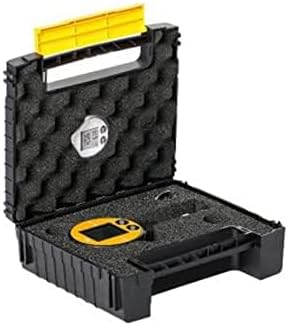
Image: The Instrukart Keller LEO2 Digital Pressure Gauge stored securely within its protective carrying case.
දෝෂගවේෂණය
| ගැටලුව | විය හැකි හේතුව | විසඳුම |
|---|---|---|
| මාපකය ක්රියාත්මක නොවේ | මිය ගිය හෝ වැරදි ලෙස ස්ථාපනය කර ඇති බැටරිය | Replace battery (CR 2430) and ensure correct polarity. |
| වැරදි පීඩන කියවීම් | Gauge not properly connected; Sensor contamination; Calibration required | Check pressure connection for leaks. Ensure sensor port is clean. If issues persist, contact support for calibration. |
| සංදර්ශකය අඳුරු හෝ දිලිසෙන සුළුය | අඩු බැටරි | බැටරිය ප්රතිස්ථාපනය කරන්න. |
| MAX/MIN values not resetting | වැරදි බොත්තම තද කිරීමේ අනුපිළිවෙල | ඔබා අල්ලාගෙන සිටින්න තෝරන්න button until values reset. |
තාක්ෂණික පිරිවිතර
- පීඩන පරාසය: 0 සිට 212 psi (0 සිට 100 බාර්)
- අධික පීඩනය: 145.0 psi (10 බාර්)
- විභේදනය: 0.014 psi (1 mbar)
- නිරවද්යතාව: < 0.1 %FS
- බල සැපයුම: 3V battery, Type CR 2430
- බැටරි ආයු කාලය: පැය 1000 ක අඛණ්ඩ මෙහෙයුම
- මෙහෙයුම් උෂ්ණත්වය: -4 to 158°F (-20 to 70 °C) for electronics; 32 to 122 °F (0 to 50 °C) for display
- Dimensions (Diameter x Height x Depth): 59 x 95 x 32 මි.මී
- බර: රාත්තල් 0.27 (ග්රෑම් 125)
- ආරක්ෂණ ශ්රේණිගත කිරීම: IP 65
- පීඩන සම්බන්ධතාවය: 7/16”-20 UNF (Adapter G 1/4” included)
- ද්රව්ය: ඇලෝයි වානේ
- ආදර්ශ අංකය: IK-KE-o2
වගකීම් තොරතුරු
For detailed warranty information regarding your Instrukart Keller LEO2 Digital Pressure Gauge, please refer to the documentation provided at the time of purchase or visit the official Instrukart webවෙබ් අඩවිය. වගකීම් කොන්දේසි සාමාන්යයෙන් සාමාන්ය භාවිත තත්වයන් යටතේ නිෂ්පාදන දෝෂ ආවරණය කරයි.
පාරිභෝගික සහාය
If you require further assistance, have questions about the operation, or need technical support for your Instrukart Keller LEO2 Digital Pressure Gauge, please contact Instrukart customer service or your authorized local distributor. Contact details can typically be found on the Instrukart official webවෙබ් අඩවිය හෝ ඔබේ මිලදී ගැනීමේ ඉන්වොයිසිය.


