1. හැඳින්වීම
This manual provides essential information for the proper use and maintenance of your MOOKA B-D03 Official Air Purifier Filter. This filter is designed to work exclusively with the MOOKA B-D03 air purifier model, ensuring optimal performance and air quality.

Image: The MOOKA B-D03 Official Air Purifier Filter, a cylindrical white filter with a black top and bottom ring, featuring a "Genuine" seal.
Using genuine MOOKA replacement filters is crucial for maintaining the efficiency and longevity of your air purifier. Non-genuine filters may not fit correctly, reduce purification effectiveness, or potentially damage the device.

Image: The MOOKA B-D03 air purifier standing next to its genuine replacement filter, illustrating compatibility.
2. නිෂ්පාදන ලක්ෂණ
The MOOKA B-D03 replacement filter is a 3-in-1 filtration system designed to capture various airborne particles and odors.
- සියුම් මූලික පෙරහන: දූවිලි, ලින්ට් සහ සුරතල් සතුන්ගේ හිසකෙස් වැනි විශාල අංශු අල්ලා ගනී.
- H13 සත්ය HEPA පෙරහන: Traps 99.97% of airborne particles 0.3 microns in size, including pollen, dust mites, pet dander, and smoke particles.
- සක්රිය කාබන් පෙරහන: Absorbs household odors from cooking, pets, and smoke, as well as volatile organic compounds (VOCs).

Image: A cutaway diagram illustrating the three layers of the filter: Pre-Filter, H13 HEPA Filter, and Activated Carbon Filter, showing how air passes through them to remove various pollutants.

රූපය: පුපුරා ගිය එකක් view of the MOOKA B-D03 air purifier, highlighting the 3-stage filter and the 360-degree air intake and purification process.
3. ස්ථාපනය සහ ප්රතිස්ථාපනය
Follow these steps to replace the filter in your MOOKA B-D03 air purifier. It is recommended to replace the filter every 3-6 months, depending on usage and air quality.
- පියවර 1: වායු පවිතකාරකය සකස් කරන්න. Unplug the air purifier from the power outlet. Gently flip the air purifier upside down.
- පියවර 2: පෙරහන් කවරය ඉවත් කරන්න. Rotate the base cover counter-clockwise to unlock it, then lift it off.
- Step 3: Remove the Old Filter. Carefully pull out the old filter from the air purifier housing. Dispose of the used filter responsibly.
- Step 4: Install the New Filter. Remove the new filter from its protective packaging. Insert the new filter into the air purifier housing, ensuring it is seated correctly.
- Step 5: Secure the Base Cover. Place the base cover back onto the air purifier and rotate it clockwise to lock it securely in place.
- Step 6: Reset the Filter Indicator. Plug the air purifier back into the power outlet. Power on the unit. Press and hold the "Check Filter" or "Reset" button on the control panel for 3 seconds until the indicator light turns off or resets.

Image: A four-step visual guide demonstrating how to replace the filter: unplugging and removing the cover, taking out the old filter, inserting the new filter, and resetting the filter indicator.

Image: A detailed four-step visual guide showing the process of unlocking the base cover, removing the old filter, fitting the base cover, and resetting the filter button.
4. නඩත්තු කිරීම
Regular filter replacement is essential for maintaining the air purifier's performance and ensuring clean air. The MOOKA B-D03 filter is designed for a lifespan of 3 to 6 months under normal operating conditions.
- පෙරහන් ආයු කාලය: The actual lifespan may vary based on air quality, usage frequency, and environmental factors.
- පෙරහන් දර්ශකය: Your MOOKA B-D03 air purifier is equipped with a filter replacement indicator light. This light will illuminate when it's time to replace the filter.
- දෘශ්ය පරීක්ෂාව: Periodically inspect the filter for visible signs of dirt and debris. A heavily soiled filter indicates a need for replacement, even if the indicator light has not yet activated.

Image: A visual comparison showing a clean, new filter next to a filter that has been used for approximately three months, demonstrating the accumulation of trapped pollutants.

Image: An illustration of the MOOKA B-D03 air purifier's control panel, highlighting the filter replacement indicator light, which illuminates when a filter change is due.
5. පිරිවිතර
| විශේෂාංගය | විස්තර |
|---|---|
| ආදර්ශ අංකය | B-D03 Air Purifier Replacement Filter |
| පෙරීමේ වර්ගය | 3-in-1 True H13 HEPA Filter |
| පෙරහන් ස්ථර | Fine Preliminary, H13 True HEPA, Activated Carbon |
| අංශු ඉවත් කිරීමේ කාර්යක්ෂමතාව | මයික්රෝන 0.3 සහ ඊට වැඩි අංශු වලින් 99.97% ක් |
| මානයන් (ආසන්න) | අඟල් 6.3 (උස) x අඟල් 7.36 (විෂ්කම්භය) |
| අයිතමයේ බර | අවුන්ස 11.3 කි |
| නිර්දේශිත ආදේශනය | සෑම මාස 3-6 කට වරක් |
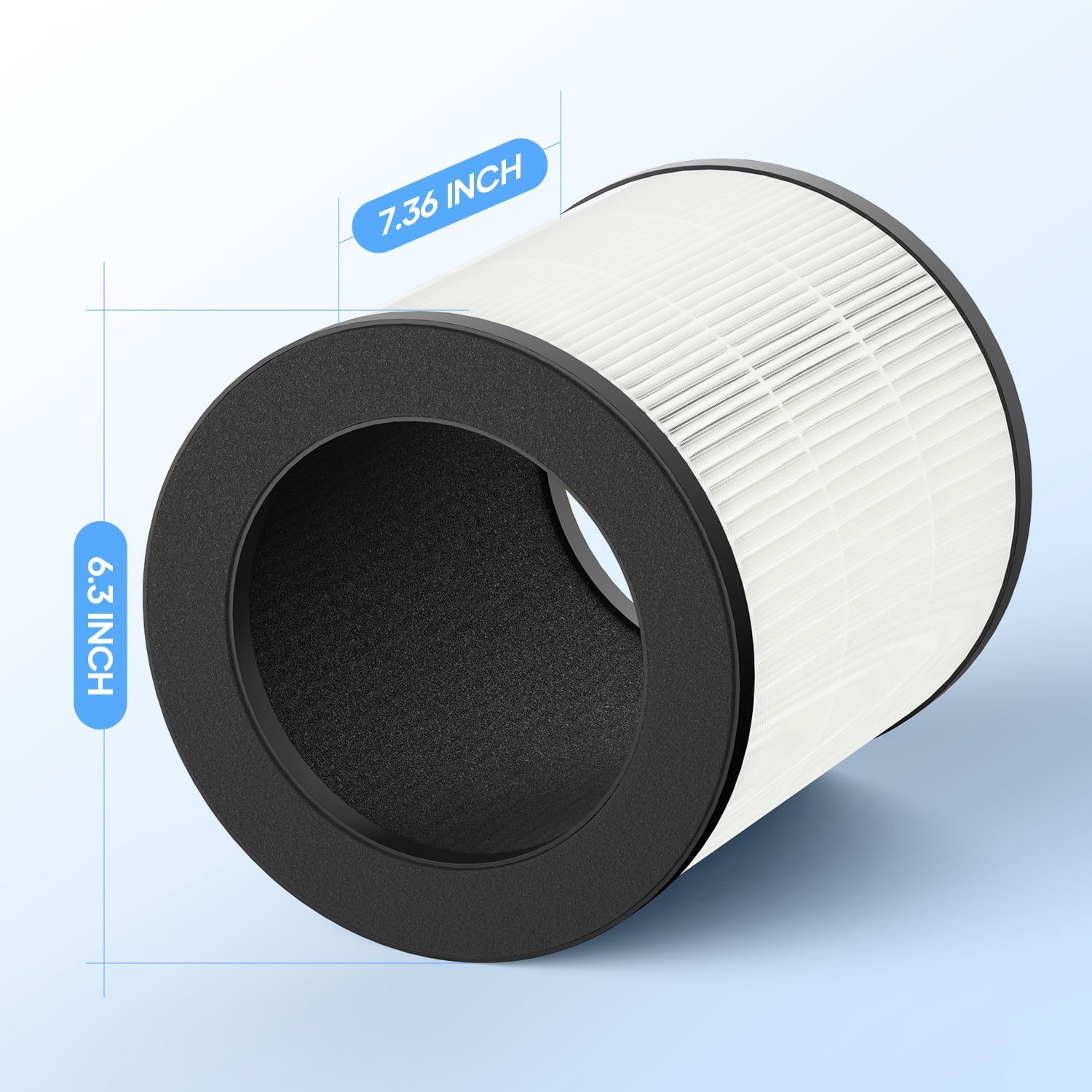
Image: A diagram showing the approximate dimensions of the MOOKA B-D03 filter, indicating a height of 6.3 inches and a diameter of 7.36 inches.
6. දෝශ නිරාකරණය
This section addresses common issues related to the filter replacement process.
- ප්රතිස්ථාපනය කිරීමෙන් පසු පෙරහන් දර්ශක ආලෝකය දැල්වී පවතී: Ensure the filter is correctly installed and the base cover is securely locked. Then, press and hold the "Check Filter" or "Reset" button on the air purifier's control panel for 3 seconds to reset the indicator.
- Reduced Airflow or Odor Persistence: If you notice reduced airflow or persistent odors shortly after replacing the filter, verify that the new filter's protective plastic packaging has been completely removed before installation. Also, ensure the filter is seated properly.
- පෙරහන නොගැලපේ: Confirm that you have purchased the correct replacement filter for the MOOKA B-D03 air purifier. Refer to the model number on your air purifier and the filter packaging.

Image: A comparison graphic showing a genuine MOOKA filter with "Perfect Size, High Performance, Reliable Quality" versus an unofficial filter with "Wrong Size, Poor Performance, Low Quality," emphasizing the importance of using genuine parts.
7. වගකීම් සහ සහාය
MOOKA provides support for its products. For assistance with your MOOKA B-D03 Air Purifier Filter or any related products, please contact MOOKA customer support.
- සබඳතා තොරතුරු: Refer to the official MOOKA website or the documentation included with your MOOKA air purifier for the most current customer support contact details.
- තෘප්තිමත් සහතිකය: MOOKA offers a 100% satisfaction guarantee. If you require additional assistance, helpful MOOKA support is available.
For more information about MOOKA products and services, visit the official MOOKA store: MOOKA Store on Amazon.


