1. හැඳින්වීම
This manual provides detailed instructions for the installation, operation, and maintenance of your Geloo Wireless CarPlay Android Auto Retrofit Kit Decoder Box. This device integrates Apple CarPlay and Android Auto functionalities into your BMW's original NBT system, enhancing your driving experience with modern connectivity features while retaining the factory interface.
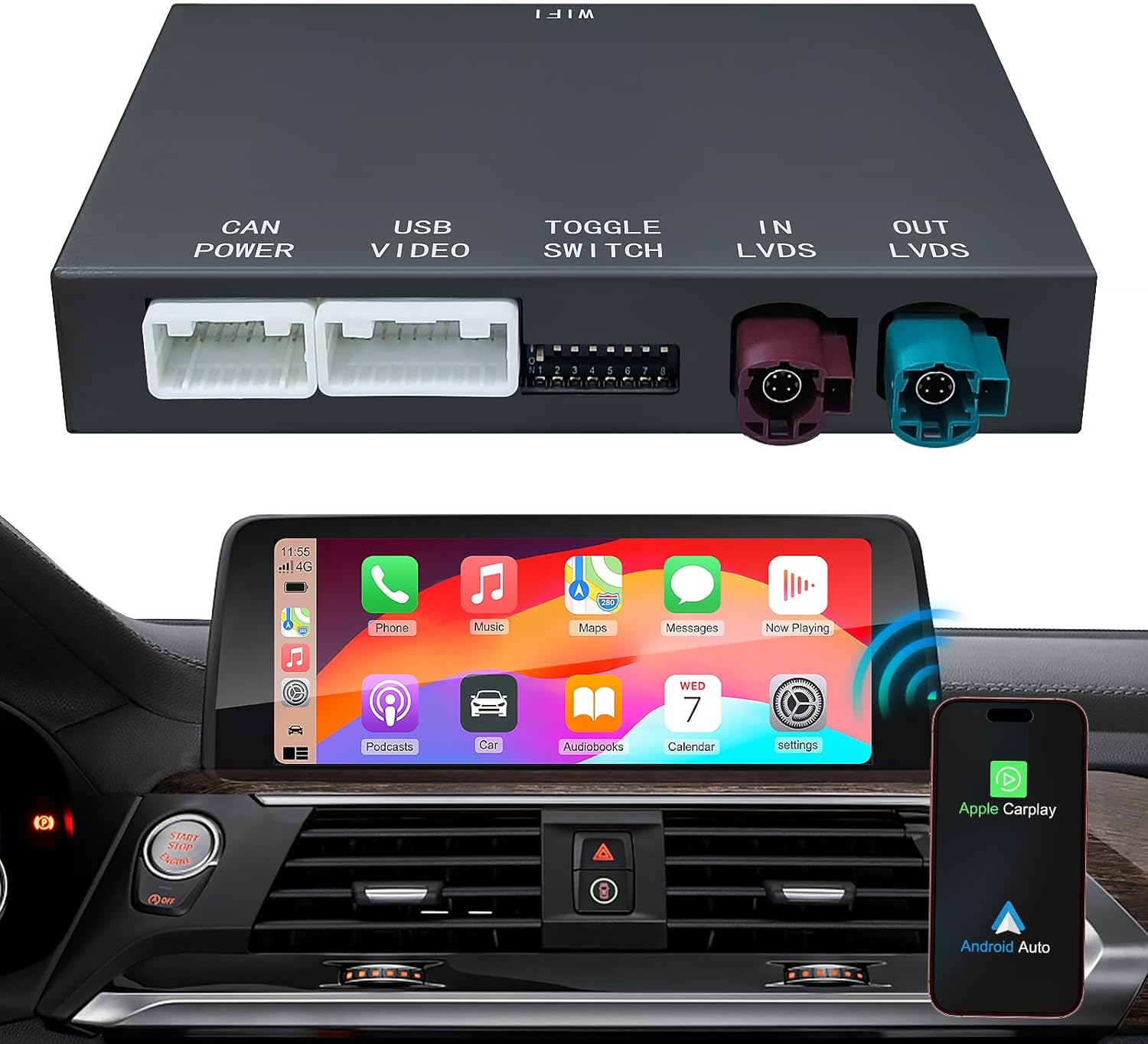
රූපය 1.1: The Geloo Wireless CarPlay Android Auto Retrofit Kit Decoder Box shown with a BMW iDrive screen displaying the CarPlay interface. This image illustrates the main unit and its integration with the vehicle's display.
2. ගැළපුම
This retrofit kit is designed for specific BMW models equipped with the NBT system සහ ඒ 6-pin LVDS port on the factory screen. It is නොගැලපේ with CIC or EVO systems.
2.1. Compatible BMW Models and Years:
- BMW 1 Series (F20/F21): 2013-2015
- BMW 2 Series (F22): 2013-2015
- BMW 3 Series (F30/F31/F34/F80): 2012-2015
- BMW 4 Series (F32/F33/F36): 2013-2015
- BMW 5 Series (F07/F10/F11/F18): 2012-2015
- BMW 6 Series (F06/F12/F13): 2013-2016
- BMW 7 Series (F01/F02/F03): 2012-2014
- BMW X3 (F25): 2013-2016
- BMW X4 (F26): 2014-2016
- BMW X5 (F15/F85): 2014-2016
- BMW X6 (F16/F86): 2014-2016
- BMW MINI (F56): 2014-2016
වැදගත් සටහන:
මිලදී ගැනීමට පෙරasing, verify your car's system is NBT and the LVDS port of your factory screen is 6 pins. If your original radio system displays a CIC System Interface but has a 6-pin LVDS port, this adapter is still compatible. If unsure, please contact support with a picture of your car's system interface.

රූපය 2.1: Visual guide for identifying your BMW's system (NBT, CIC, EVO) by checking the LVDS port (6-pin vs. 4-pin) and the on-screen interface. This is crucial for ensuring compatibility before installation.
3. පෙට්ටියේ ඇති දේ
Your Geloo Wireless CarPlay Android Auto Retrofit Kit Decoder Box package includes the following components:
- Wireless CarPlay Android Auto Retrofit Kit Decoder Box (Main Unit)
- බල කේබලය
- RCA/USB කේබල්
- බාහිර මයික්රොෆෝනය
- LVDS Cable (1 piece)
- WiFi ඇන්ටනාව

රූපය 3.1: ඕවර් එකක්view of the components included in the Geloo Retrofit Kit. This image shows the main decoder box, various cables, and accessories required for installation.
4. පිහිටුවීම සහ ස්ථාපනය
Installation of this retrofit kit is designed to be non-destructive, utilizing original car wire plug-and-play connections. No wire cutting or breaking is required. It is recommended to watch YouTube videos for similar unit installations for visual guidance.
4.1. Pre-Installation Notes:
- Power off the vehicle completely before beginning installation.
- Ensure all functions are confirmed to be working correctly after installation before reassembling the dashboard.
- Tools required typically include a trim removal kit and a T20 Torx screwdriver.
4.2. රැහැන් සටහන:
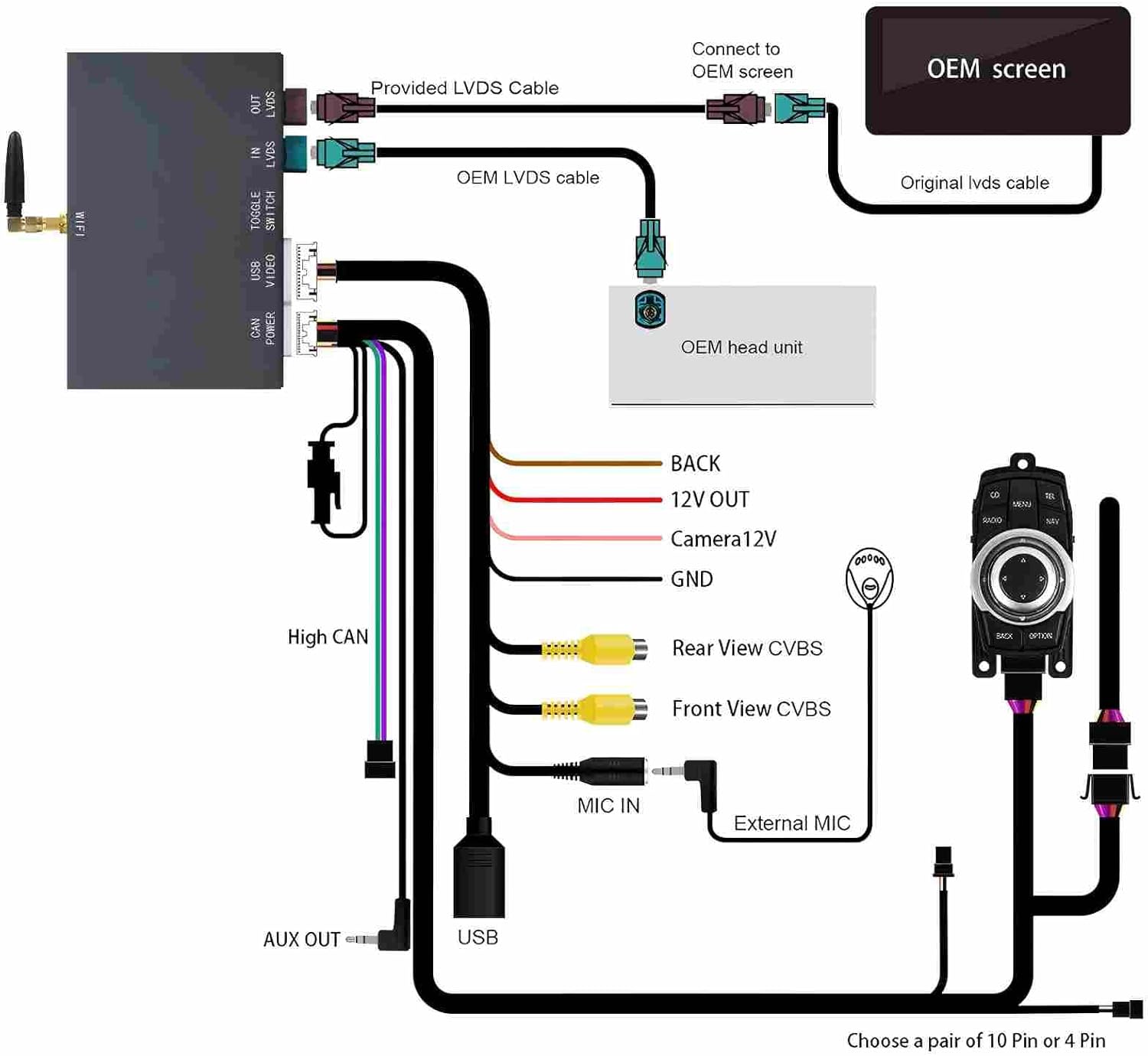
රූපය 4.1: A comprehensive wiring diagram illustrating how to connect the retrofit kit to your BMW's OEM screen, head unit, power, microphone, and various camera inputs. Follow this diagram carefully for correct connections.
4.3. පියවරෙන් පියවර ස්ථාපන මාර්ගෝපදේශය:
- Remove the trim panel of the air conditioning outlet.
- Remove the air outlet of the air conditioner.
- Remove the air conditioning board and the lower cover panel.
- හිස ඒකකය ඉවත් කරන්න.
- Unplug the original car power cord.
- Unplug the LVDS cable and remove the original car screen.
- Plug the LVDS cable from the OEM screen into the new unit's LVDS IN port.
- Plug the straight end of the new LVDS cable into the new unit's LVDS OUT port.
- Insert the curved end of the new LVDS cable into the OEM screen.
- විදුලි රැහැන ප්ලග් කරන්න.
- Plug in the WiFi antenna and position it away from metal components for optimal signal.
- Plug in the AV/USB cable.
- Set the DIP code (refer to specific vehicle settings if applicable), check connections, and power on to test.
- Install the head unit back into its position.
- Fix the air conditioner control panel.
- Fix the lower cover panel.
- ස්ථාපනය සම්පූර්ණ කරන්න.

රූපය 4.2: A visual step-by-step guide demonstrating the installation process of the retrofit kit within the BMW dashboard. Each panel shows a distinct action, from removing trim to connecting cables and reassembling.
5. මෙහෙයුම් උපදෙස්
The Geloo Retrofit Kit provides seamless integration with your car's original controls, offering a rich set of features.
5.1. Wireless/Wired CarPlay & Android Auto:
Enjoy wireless or wired connectivity for Apple CarPlay and Android Auto, depending on your smartphone's capabilities. This allows access to navigation, music, calls, and messaging directly on your car's screen.

රූපය 5.1: The car's display showing both Apple CarPlay and Android Auto interfaces, highlighting the wireless connectivity. The image also demonstrates the Mirror Link function, mirroring a smartphone screen onto the car's display.
5.2. Voice Control (Siri/Google Assistant):
Utilize voice commands for hands-free operation. The system supports Siri for Apple devices and Google Assistant for Android devices, allowing you to control music, navigation, calls, and more without taking your hands off the wheel.
5.3. Mirror Link & USB Play:
The Mirror Link function allows you to synchronize your smartphone's screen to your car's display, enabling access to apps like Netflix, YouTube, and other content. Additionally, the USB port supports media playback from a USB drive.
5.4. Camera Functionality:
The kit supports your original reversing camera and parking radar. It also allows for the integration of aftermarket reversing cameras, 360-degree cameras, and front camera DVRs (CVBS input). The camera view activates automatically when reversing.
5.5. Original Car Functionality:
All original functions of your BMW's console are retained. The CarPlay system supports control via the original buttons, steering wheel controls (Siri button, telephone button, voice +/- buttons), and the iDrive knob. Touch screen control is also supported if your vehicle has a compatible touch screen.

රූපය 5.2: Demonstrates various control methods for the system, including voice commands (Siri/Google Assistant), touch screen interaction, steering wheel buttons, and the OEM iDrive knob. It also shows the integration of camera functions.
6. නඩත්තු කිරීම
To ensure optimal performance and longevity of your Geloo Retrofit Kit, follow these general maintenance guidelines:
- Keep the unit dry: Avoid exposing the decoder box to moisture or liquids.
- මෘදු ලෙස පිරිසිදු කරන්න: Use a soft, dry cloth to clean the unit. Do not use harsh chemicals or abrasive cleaners.
- නිතිපතා මෘදුකාංග යාවත්කාලීන කිරීම්: නිෂ්පාදකයා පරීක්ෂා කරන්න website or contact support for any available firmware updates to improve performance and compatibility.
- අධික උෂ්ණත්වයෙන් වළකින්න: Do not expose the unit to extreme heat or cold, as this can affect its electronic components.
7. දෝශ නිරාකරණය
If you encounter issues with your Geloo Retrofit Kit, please refer to the following common problems and solutions:
- "No Signal" Message:
- Ensure all LVDS cable connections are secure and correctly seated.
- Verify the DIP switch settings on the decoder box match your vehicle's configuration.
- Confirm the original car screen is properly connected to the kit's output.
- Microphone Not Working or Intermittent:
- Check the connection of the external microphone to the decoder box.
- මයික්රෆෝනය නිවැරදිව ස්ථානගත කර ඇති බවත් අවහිර නොවන බවත් සහතික කර ගන්න.
- Some users have reported issues; if the problem persists after checking connections, contact technical support.
- Lag or Slow Switching Between Systems:
- ඔබගේ ස්මාර්ට් ජංගම දුරකථනයේ මෙහෙයුම් පද්ධතිය යාවත්කාලීනව පවතින බවට වග බලා ගන්න.
- Check for any available firmware updates for the retrofit kit.
- A stable WiFi connection (2.4G or 5.8G) is crucial for wireless performance. Ensure the WiFi antenna is properly installed and not near metal.
- CarPlay/Android Auto රැහැන් රහිතව සම්බන්ධ නොවීම:
- Verify Bluetooth is enabled on your phone and paired with the kit.
- Ensure your phone's WiFi is on and connected to the kit's WiFi hotspot.
- ඔබගේ දුරකථනය සහ මෝටර් රථයේ තොරතුරු රසාස්වාදය පද්ධතිය නැවත ආරම්භ කිරීමට උත්සාහ කරන්න.
මෙම පියවර මගින් ගැටළුව විසඳා නොගන්නේ නම්, වැඩිදුර සහාය සඳහා කරුණාකර සහාය අංශය වෙත යොමු වන්න.
8. පිරිවිතර
| විශේෂාංගය | පිරිවිතර |
|---|---|
| ආදර්ශ අංකය | RM-BM3005W ග්රැෆික් |
| නිෂ්පාදන මානයන් | අඟල් 6.89 x 4.49 x 8.9 |
| අයිතමයේ බර | රාත්තල් 2.05 කි |
| සම්බන්ධතා තාක්ෂණය | Bluetooth (BT), USB, Wi-Fi |
| විශේෂ ලක්ෂණ | Built-in 2.4G and 5.8G WIFI, Built-In BT 5.0 Technology |
| වර්ණය | කළු |

රූපය 8.1: A visual representation of the dual-band WiFi (2.4GHz and 5GHz) and Bluetooth 5.0 technology integrated into the device, highlighting enhanced anti-interference capabilities for a stable connection.
9 වගකීම් සහතිකය
Please refer to your purchase documentation or contact the seller for specific warranty information regarding your Geloo Wireless CarPlay Android Auto Retrofit Kit Decoder Box. Standard warranties typically cover manufacturing defects for a specified period from the date of purchase.
10. සහාය
For any compatibility concerns, installation assistance, or operational issues, please contact Geloo customer support. Our technical team is available to provide online guidance and solutions.
You can reach us via Amazon Messages or through the contact information provided with your product packaging. We are committed to continuously enhancing product quality and user experience, and your feedback is valuable.


