1. හැඳින්වීම
The Auronic Electric Air Dehumidifier AU3270 is designed to effectively remove excess moisture from indoor environments, helping to prevent mold growth and maintain a healthy humidity level. This appliance is suitable for spaces up to 15 square meters and can extract up to 10 liters of moisture per day. This manual provides essential information for the safe and efficient use of your dehumidifier.

Image: The Auronic Electric Air Dehumidifier AU3270 positioned in a living room, illustrating its compact design and 10-liter daily capacity for optimal dehumidification.
2. ආරක්ෂිත උපදෙස්
තුවාල හෝ හානි වළක්වා ගැනීම සඳහා උපකරණය භාවිතා කිරීමට පෙර කරුණාකර සියලු ආරක්ෂක උපදෙස් හොඳින් කියවන්න.
- බල සැපයුම් පරිමාව සහතික කරන්නtage ආර්ද්රතාකාරකයේ ශ්රේණිගත කිරීමේ ලේබලයට ගැලපේ.
- හානියට පත් විදුලි රැහැනකින් හෝ ප්ලග් එකකින් ඩියුමිඩිෆයර් ක්රියාත්මක නොකරන්න.
- උපකරණය තාප ප්රභවයන්ගෙන්, සෘජු හිරු එළියෙන් සහ දැවෙන ද්රව්ය වලින් ඈත් කර තබන්න.
- වාතය ඇතුල්වීම හෝ පිටවීම අවහිර නොකරන්න. ඒකකය වටා අවම වශයෙන් සෙන්ටිමීටර 20 ක නිෂ්කාශනයක් පවත්වා ගන්න.
- ජලය කාන්දු වීම වැළැක්වීම සඳහා සෑම විටම විජලනය කරන්නා ස්ථාවර, සමතලා මතුපිටක් මත තබන්න.
- පිරිසිදු කිරීමට, නඩත්තු කිරීමට පෙර හෝ දීර්ඝ කාලයක් භාවිතයේ නොමැති විට උපකරණය විසන්ධි කරන්න.
- ඒකකය, විදුලි රැහැන හෝ ප්ලග් එක ජලයේ හෝ වෙනත් ද්රවවල ගිල්වන්න එපා.
- මෙම උපකරණය ඔවුන්ගේ ආරක්ෂාව සඳහා වගකිව යුතු පුද්ගලයෙකු විසින් උපාංගය භාවිතා කිරීම සම්බන්ධයෙන් අධීක්ෂණය හෝ උපදෙස් ලබා දී ඇත්නම් මිස, අඩු ශාරීරික, සංවේදී හෝ මානසික හැකියාවන් හෝ අත්දැකීම් සහ දැනුම නොමැති පුද්ගලයින් (ළමයින් ඇතුළුව) භාවිතා කිරීමට අදහස් නොකෙරේ.
- ළමයින් උපකරණය සමඟ සෙල්ලම් නොකරන බව සහතික කිරීම සඳහා ඔවුන් අධීක්ෂණය කළ යුතුය.
3. පිහිටුවීම
3.1 ඇසුරුම් ඉවත් කිරීම සහ අන්තර්ගතය
Carefully remove the dehumidifier from its packaging. Check that all components are present and undamaged. The package typically includes the dehumidifier unit, a drainage hose, and this user manual.

Image: Contents of the Auronic Dehumidifier package, displaying the main unit, continuous drainage hose, and user manual, along with key product dimensions.
3.2 ස්ථානගත කිරීම
Place the dehumidifier on a firm, level surface in the desired location. Ensure there is at least 20 cm of free space around the air inlet and outlet for optimal airflow. The unit is effective for rooms up to 15 square meters. Avoid placing it in direct sunlight or near heat-emitting appliances.
3.3 බල සම්බන්ධතාවය
Plug the power cord into a grounded electrical outlet. Ensure the outlet meets the power requirements specified on the appliance's rating label.
3.4 ජලාපවහන විකල්ප
ආර්ද්රතාකාරකය ජලාපවහන ක්රම දෙකක් ඉදිරිපත් කරයි:
- ජල ටැංකිය: The unit collects condensed water in its internal 2-liter water tank. The appliance will automatically stop operating when the tank is full, and an indicator will illuminate.
- අඛණ්ඩ ජලාපවහනය: For uninterrupted operation, attach the included drainage hose to the continuous drainage port on the back of the unit. Route the hose to a suitable drain or larger container, ensuring it is sloped downwards to allow water to flow freely by gravity.
4. මෙහෙයුම් උපදෙස්
4.1 පාලන පැනලය අවසන්view
The dehumidifier features an intuitive digital LED display and control buttons for easy operation.
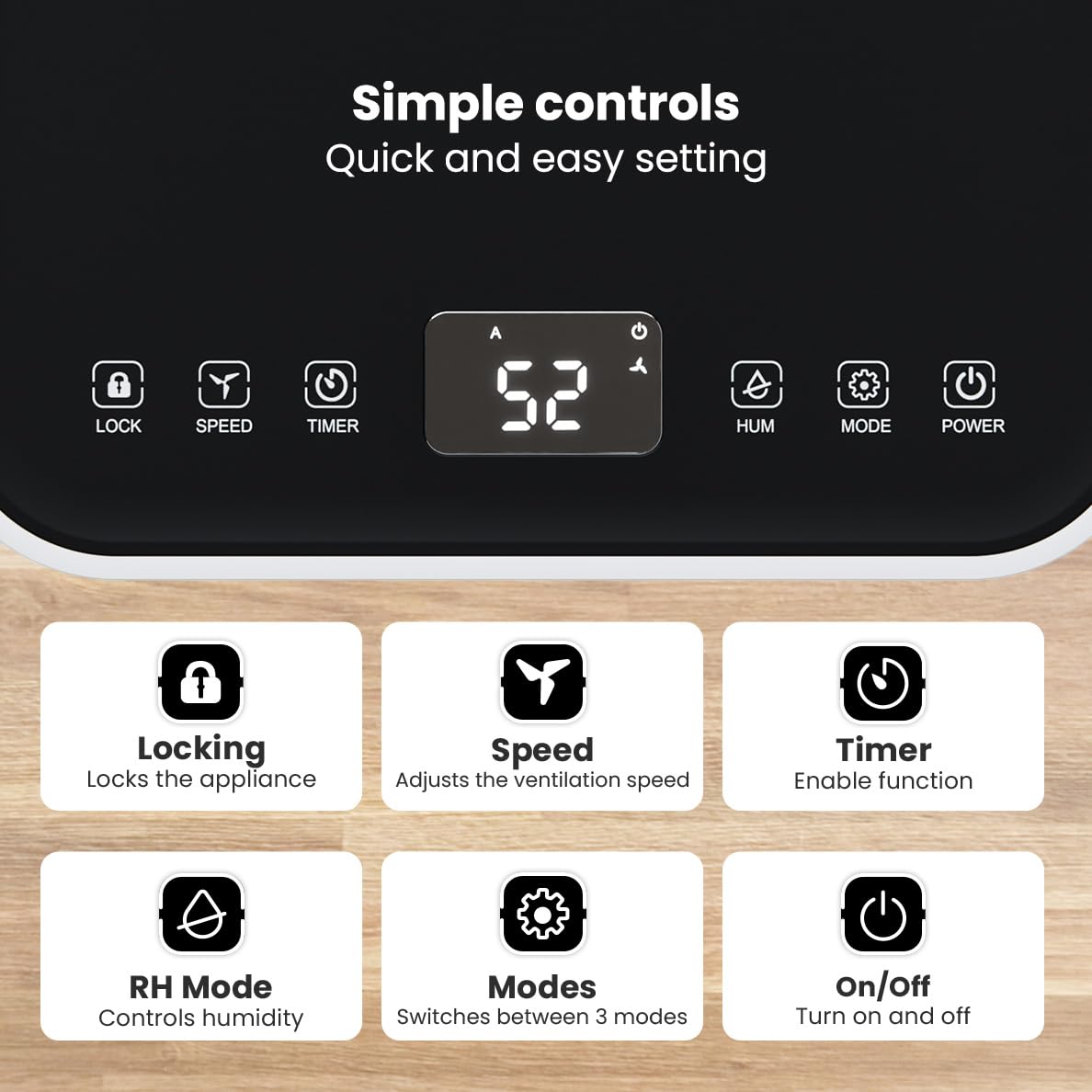
රූපය: විස්තරාත්මක view of the dehumidifier's control panel, highlighting each button's function for easy setting adjustments.
- බල බොත්තම (⏻ ⏻ ශ්රේණිය): උපකරණය සක්රිය හෝ අක්රිය කරයි.
- ප්රකාර බොත්තම (⚙ ⚙ დანანა დ): Switches between the three operating modes: Automatic, Continuous, and Quiet.
- RH Mode Button (💧 💧): Controls the desired relative humidity level. Press to set the target humidity.
- ටයිමර් බොත්තම (⏱ ⏱ დარ): Enables the timer function for scheduled operation.
- වේග බොත්තම (⇋ ⇋ ශ්රව්ය): Adjusts the ventilation speed (fan speed).
- අගුළු බොත්තම (🔒): අහම්බෙන් සිදුවන වෙනස්කම් වැළැක්වීම සඳහා පාලක පැනලය අගුළු දමයි.
4.2 මෙහෙයුම් ආකාර
පවතින මෙහෙයුම් මාතයන් හරහා චක්රීය කිරීමට ප්රකාර බොත්තම ඔබන්න:
- ස්වයංක්රීය ප්රකාරය: The device automatically adjusts its operation based on the current room humidity to maintain a comfortable level.
- අඛණ්ඩ මාදිලිය: ඉතා d සඳහා කදිමයිamp environments like wet basements. The dehumidifier operates continuously regardless of the humidity level until the water tank is full or continuous drainage is active.
- නිහඬ මාදිලිය: Designed for night-time use or in areas where low noise is preferred. The dehumidifier operates at a reduced fan speed, ensuring a peaceful environment with a noise level below 36dB.

Image: A chart comparing the noise level of the Auronic Dehumidifier (42dB) to common sounds like breathing, whispering, and loud conversation, highlighting its quiet operation.
4.3 Humidity Sensor and Display
The integrated humidity sensor monitors the room's humidity level, which is displayed on the digital screen. The color of the display indicates the current humidity status:
- නිල්: Humidity level is below 45%.
- කොළ: Humidity level is between 45% and 64%.
- රතු: Humidity level is above 65%.
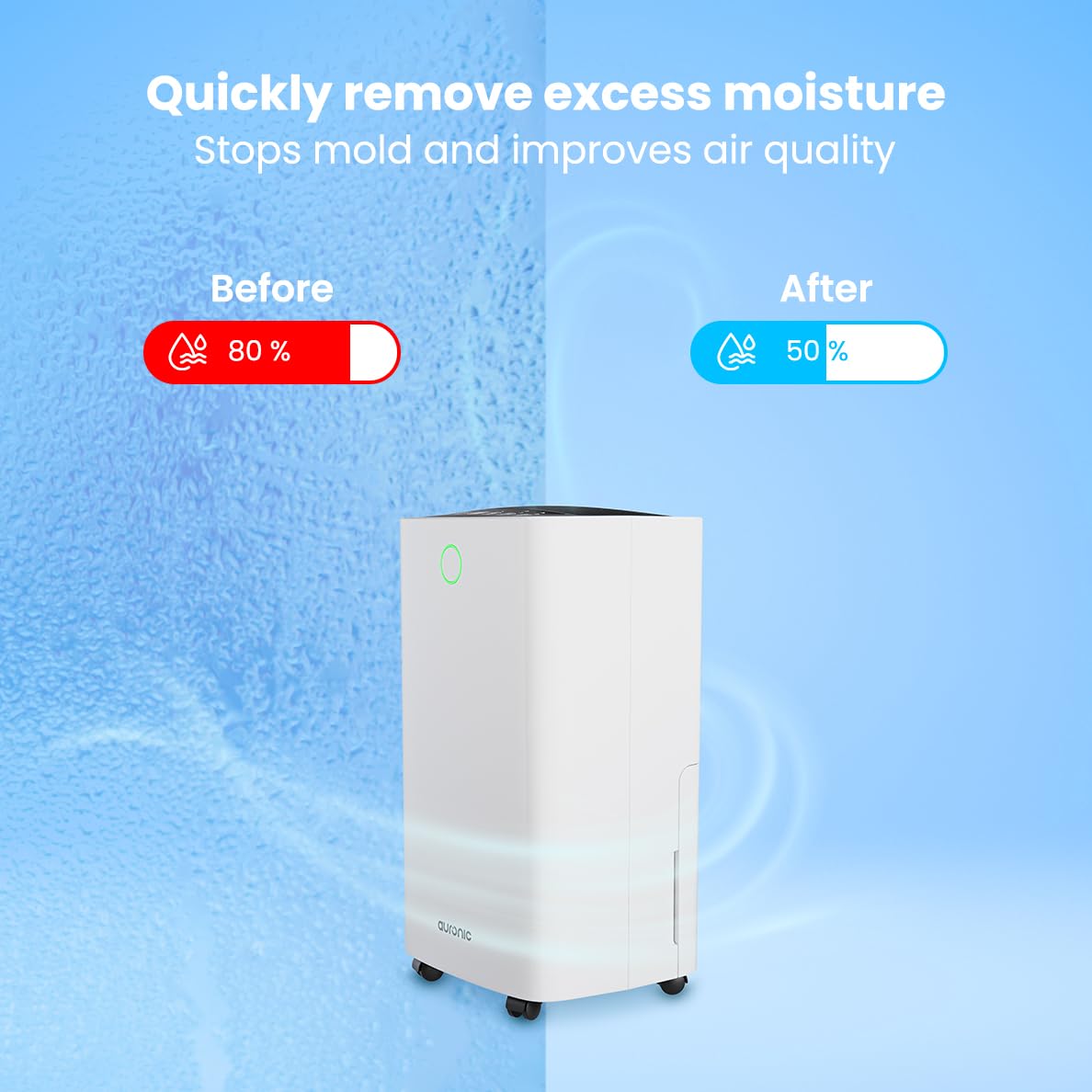
Image: A visual representation demonstrating the dehumidifier's effectiveness, showing a reduction in humidity from 80% to 50% in a room.
4.4 රෙදි සේදීමේ කාර්යය
The Auronic dehumidifier includes a laundry drying function to assist in reducing the drying time of clothes, sheets, and towels. Place the appliance in your laundry room or near drying clothes to utilize this feature, which helps to remove moisture from the air and accelerate the drying process.

Image: The dehumidifier in a bathroom setting, demonstrating its ability to extract up to 10 liters of moisture and its suitability for rooms up to 15 square meters, alongside its intelligent humidity meter, wash-dry function, and silent operation.
5. නඩත්තු කිරීම
නිතිපතා නඩත්තු කිරීම ඔබේ විජලනය කිරීමේ යන්ත්රයේ දීර්ඝ ආයු කාලය සහ කාර්යක්ෂම ක්රියාකාරිත්වය සහතික කරයි.
5.1 ජල ටැංකිය හිස් කිරීම
When the water tank is full, the dehumidifier will stop operating, and an indicator light will turn on. Carefully pull out the water tank from the unit, empty the collected water, and then reinsert the tank firmly until it clicks into place. Ensure the tank is properly seated to resume operation.
5.2 වායු පෙරහන පිරිසිදු කිරීම
The air filter should be cleaned regularly (e.g., every two weeks or as needed) to maintain optimal performance. A dirty filter can reduce efficiency and increase energy consumption.
- විදුලිබල අලෙවිසැලෙන් ආර්ද්රතාකාරකය විසන්ධි කරන්න.
- Locate and remove the air filter (typically on the back or side of the unit).
- Clean the filter using a vacuum cleaner to remove dust and debris. For heavily soiled filters, wash gently with lukewarm water and a mild detergent.
- Allow the filter to air dry completely before reinserting it into the dehumidifier.
5.3 සාමාන්ය පිරිසිදු කිරීම සහ ගබඩා කිරීම
මෘදු, d සමග dehumidifier පිටත පිස දමන්නamp cloth. Do not use abrasive cleaners or solvents. For long-term storage, ensure the water tank is empty and clean, the filter is clean and dry, and the unit is unplugged. Store the dehumidifier in a cool, dry place, preferably in its original packaging.
6. දෝශ නිරාකරණය
ඔබේ ආර්ද්රතාකාරකය සමඟ ගැටළු ඇති වුවහොත්, පහත පොදු ගැටළු සහ විසඳුම් වෙත යොමු වන්න:
| ගැටලුව | විය හැකි හේතුව | විසඳුම |
|---|---|---|
| ඩියුමිඩිෆයර් ක්රියාත්මක නොවේ. | බල සැපයුමක් නැත; විදුලි රැහැන සම්බන්ධ කර නැත; බල බොත්තම ඔබා නැත. | Check power connection; Ensure outlet is functional; Press the Power button. |
| ජලය එකතු කර නොමැති අතර ආර්ද්රතාවය අඩුය. | Room temperature too low; Humidity level already low; Air filter clogged; Air inlet/outlet blocked; Water tank not properly inserted. | Ensure room temperature is above 5°C; Check current humidity; Clean the air filter; Clear any obstructions; Reinsert water tank correctly. |
| ඒකකය ඝෝෂාකාරී ය. | සමතලා මතුපිටක නොමැති ඒකකය; වායු පෙරහන අවහිර වී ඇත; අභ්යන්තර සංරචක කම්පනය වේ. | Place on a stable, level surface; Clean the air filter; If noise persists, contact customer support. |
| ජල ටැංකියේ සම්පූර්ණ මට්ටම පෙන්වන දර්ශකය ක්රියාත්මකයි, නමුත් ටැංකිය පිරී නැත. | Float switch malfunction; Water tank not properly seated. | Remove and reinsert the water tank; Check float switch for obstructions. |
| සංදර්ශකය දෝෂ කේතයක් පෙන්වයි. | අභ්යන්තර සංවේදක දෝෂයක් හෝ අක්රියතාවයක්. | Unplug the unit for 5 minutes, then plug back in. If error persists, contact customer support. |
7. පිරිවිතර
Technical specifications for the Auronic Electric Air Dehumidifier AU3270:
| විශේෂාංගය | විස්තර |
|---|---|
| වෙළඳ නාමය | අවුරොනික් |
| මාදිලියේ නම | AU3270 |
| ධාරිතාව | දිනකට ලීටර් 10 කි |
| ජල ටැංකි ධාරිතාව | ලීටර් 2 යි |
| බිම් ප්රදේශ ආවරණය | Up to 15 m² (150000 Square Centimeters) |
| වට්tage | වොට් 185 |
| නිෂ්පාදන මානයන් (D x W x H) | 50D x 30.5W x 26.5H සෙන්ටිමීටර |
| අයිතමයේ බර | කිලෝ ග්රෑම් 10 යි |
| වර්ණය | සුදු |
| ශබ්ද මට්ටම | Below 36dB (in Quiet Mode) |
8. වගකීම් සහ සහාය
8.1 වගකීම් තොරතුරු
Your Auronic Electric Air Dehumidifier AU3270 comes with a standard manufacturer's warranty. Please refer to the warranty card included in your package for specific terms, conditions, and duration. Keep your proof of purchase for warranty claims.
8.2 පාරිභෝගික සහාය
For any questions, technical assistance, or warranty claims, please contact Auronic customer support. Contact details can typically be found on the product packaging, the official Auronic webවෙබ් අඩවිය, හෝ වගකීම් කාඩ්පත.


