හැඳින්වීම
This manual provides detailed instructions for the QCOQ T60 Smart Watch. It covers setup, operation, maintenance, and troubleshooting to ensure optimal use of your device. The QCOQ T60 Smart Watch features a 1.91-inch display, Bluetooth call functionality, heart rate monitoring, and IP68 water resistance.
පැකේජයේ අන්තර්ගතය
කරුණාකර පහත අයිතම සඳහා පැකේජය පරීක්ෂා කරන්න:
- QCOQ T60 Smart Watch (1 unit)
- ආරෝපණ කේබලය
- පරිශීලක අත්පොත
සැලසුම
1. උපාංගය ආරෝපණය කිරීම
Before first use, fully charge the smart watch. Connect the magnetic charging cable to the charging contacts on the back of the watch and plug the USB end into a standard USB power adapter (not included).

Image: The QCOQ T60 Smart Watch connected to its magnetic charging cable, illustrating the charging process. The watch display shows an 80% battery level, indicating partial charge.
- ආරෝපණ කාලය: සම්පූර්ණ ආරෝපණයක් සඳහා ආසන්න වශයෙන් පැය 2 ක්.
- Battery Life: Up to 7 days of typical usage on a full charge.
2. යෙදුම් ස්ථාපනය සහ යුගල කිරීම
To utilize all features of your QCOQ T60 Smart Watch, download and install the companion application on your smartphone.
- Scan the QR code provided in the quick start guide or search for the app name (usually indicated in the watch's initial setup screen or manual) in your smartphone's app store (App Store for iOS, Google Play Store for Android).
- ඔබගේ ස්මාර්ට් ජංගම දුරකතනයේ බ්ලූටූත් සබල කර ඇති බව සහතික කර ගන්න.
- Open the installed app and follow the on-screen instructions to create an account or log in.
- Within the app, navigate to the device pairing section and select your QCOQ T60 Smart Watch from the list of available devices.
- ඔබගේ ස්මාර්ට් ජංගම දුරකථනයේ සහ ස්මාර්ට් ඔරලෝසුවේ යුගල කිරීමේ ඉල්ලීම තහවුරු කරන්න.
මෙහෙයුම් උපදෙස්
1. මූලික සංචාලනය
The QCOQ T60 Smart Watch features a touchscreen display and a side button for navigation.
- ඉහළට/පහළට ස්වයිප් කරන්න: මෙනු සහ දැනුම්දීම් හරහා අනුචලනය කරන්න.
- වමට/දකුණට ස්වයිප් කරන්න: ඉක්මන් කාර්යයන් හෝ විවිධ විජට් වෙත ප්රවේශ වන්න.
- තට්ටු කරන්න: අයිතමයක් තෝරන්න හෝ ක්රියාවක් තහවුරු කරන්න.
- පැති බොත්තම: මුල් තිරයට ආපසු යාමට හෝ උපාංගය අවදි කිරීමට ඔබන්න. බල විකල්ප සඳහා දිගු ඔබන්න.
2. බ්ලූටූත් ඇමතුම් ක්රියාකාරීත්වය
Once paired with your smartphone, the QCOQ T60 Smart Watch allows you to make and answer calls directly from your wrist.
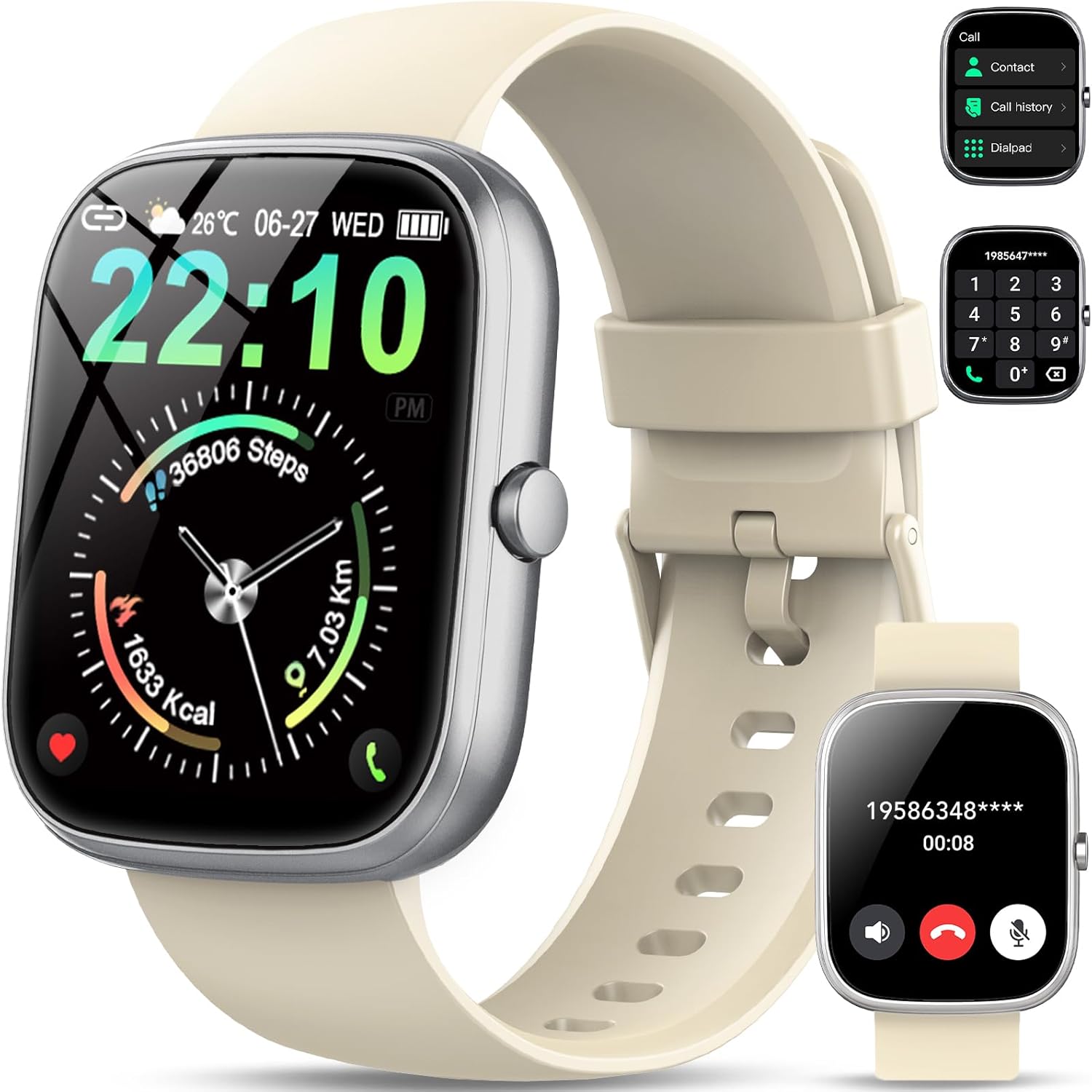
Image: The QCOQ T60 Smart Watch screen showing the call interface, including options to access contacts, view call history, and use a dialpad. A separate inset shows an incoming call notification.
- ඇමතුම්වලට පිළිතුරු දීම: ලැබෙන ඇමතුමක් ලැබුණු විට, ඔරලෝසු තිරයේ ඇති කොළ පැහැති පිළිතුරු නිරූපකය තට්ටු කරන්න.
- ඇමතුම් ලබා ගැනීම: Access the 'Call' menu on the watch, then select from contacts, call history, or use the dialpad to enter a number.
3. දැනුම්දීම්
ඔබගේ ස්මාර්ට් ජංගම දුරකථනයෙන් දැනුම්දීම් කෙලින්ම ඔබගේ ඔරලෝසුවට ලබා ගන්න.

Image: The QCOQ T60 Smart Watch screen showing notifications from various social media and messaging applications. Adjacent to it, a smartphone displays an incoming call, demonstrating the watch's Bluetooth call feature.
- Ensure notification permissions are enabled for the companion app on your smartphone.
- ඔරලෝසු මුහුණතේ ඉහළ සිට පහළට ස්වයිප් කරන්න view මෑත දැනුම්දීම්.
4. යෝග්යතා ලුහුබැඳීම
The QCOQ T60 Smart Watch monitors various fitness metrics.

Image: A visual representation of the QCOQ T60 Smart Watch's fitness capabilities, highlighting over 110 sport modes, step counting, calorie expenditure tracking, IP68 water resistance, and comprehensive daily activity data.
- හෘද ස්පන්දන වේගය නිරීක්ෂණය කිරීම: The watch provides real-time heart rate data. Access the heart rate function on the watch or through the app.
- Step Count & Calories: ඔබගේ දෛනික පියවර, දුර සහ ඇස්තමේන්තුගත කැලරි දහනය කරයි.
- ක්රීඩා ක්රම: Select from over 110 sport modes to track specific activities.
5. නින්ද නිරීක්ෂණය
The watch automatically monitors your sleep patterns.

Image: The QCOQ T60 Smart Watch screen showing detailed sleep monitoring data, including deep, light, and awake sleep stages. Another section displays a 7-day weather forecast.
- Wear the watch while sleeping for accurate data.
- View detailed sleep analysis in the companion app, including deep sleep, light sleep, and awake times.
6. වෙනත් විශේෂාංග
- කාලගුණ අනාවැකිය: View current weather and a 7-day forecast.
- සංගීත පාලනය: ඔබගේ ස්මාර්ට් ජංගම දුරකතනයේ සංගීත වාදනය පාලනය කරන්න (වාදනය කරන්න, විරාම කරන්න, ධාවන පථ මඟ හරින්න).
- කැමරා දුරස්ථ: ඔබගේ ස්මාර්ට්ෆෝන් කැමරාව සඳහා දුරස්ථ ෂටරයක් ලෙස ඔරලෝසුව භාවිතා කරන්න.
- හ oice සහකාර: ඔබගේ ස්මාර්ට් ජංගම දුරකථනයේ හඬ සහායක වෙත ප්රවේශ වන්න.
- වාඩි වී සිටින මතක් කිරීම: අක්රිය කාල පරිච්ඡේදයකින් පසු චලනය වීමට ඇඟවීම් ලබා ගන්න.
- අනතුරු ඇඟවීම: ඔරලෝසුවෙන් කෙලින්ම අනතුරු ඇඟවීම් සකසන්න.
- රුධිර ඔක්සිජන් අධීක්ෂණය: ඔබේ රුධිරයේ ඔක්සිජන් මට්ටම මැන බලන්න.
- කාන්තා සෞඛ්යය: ඔසප් චක්ර සහ අදාළ දත්ත නිරීක්ෂණය කරන්න.
- කැල්කියුලේටරය: මූලික ගණක යන්ත්ර කාර්යය.
7. ඔරලෝසු මුහුණත් අභිරුචිකරණය කිරීම
විවිධ ඔරලෝසු මුහුණු සමඟ ඔබේ ඔරලෝසුව පුද්ගලීකරණය කරන්න.

Image: A collage of various watch faces available for the QCOQ T60 Smart Watch, demonstrating the range of styles and information displays, including options for personalized backgrounds.
- Long press on the current watch face to enter the watch face selection menu.
- Swipe left or right to browse available watch faces. Tap to select.
- More watch faces and customization options (including custom backgrounds) are available through the companion app.
නඩත්තු කිරීම
1 පිරිසිදු කිරීම
- ඔරලෝසු තිරය සහ බඳ මෘදු, ලින්ට් රහිත රෙද්දකින් පිස දමන්න.
- For the strap, use a mild soap and water solution if necessary, then rinse thoroughly and dry completely before wearing.
- දරුණු රසායනික ද්රව්ය හෝ උල්ෙල්ඛ ද්රව්ය භාවිතා කිරීමෙන් වළකින්න.
2. ජල ප්රතිරෝධය (IP68)
The QCOQ T60 Smart Watch is IP68 rated, meaning it is resistant to dust and can withstand immersion in water up to 1.5 meters for up to 30 minutes. It is suitable for daily use, such as hand washing or light rain.
- Do not use the watch for diving, hot showers, saunas, or in environments with high-pressure water.
- ජල ප්රතිරෝධය ස්ථිර තත්වයක් නොවන අතර සාමාන්ය ගෙවී යාමත් සමඟ කාලයත් සමඟ අඩු විය හැක.
3. බැටරි රැකවරණය
- බැටරි ක්රියාකාරිත්වය පිරිහීමට ලක් කළ හැකි අධික උෂ්ණත්වයන්ගෙන් වළකින්න.
- ඔරලෝසුව නිතිපතා ආරෝපණය කරන්න; දිගු කාලයක් බැටරිය සම්පූර්ණයෙන්ම බැස යාමට ඉඩ නොදෙන්න.
දෝෂගවේෂණය
- ඔරලෝසුව ක්රියාත්මක නොවීම: ඔරලෝසුව සම්පූර්ණයෙන්ම ආරෝපණය කර ඇති බවට වග බලා ගන්න. අවම වශයෙන් විනාඩි 10ක්වත් එය චාජරයට සම්බන්ධ කරන්න.
- ස්මාර්ට් ජංගම දුරකථනය සමඟ යුගල කළ නොහැක:
- ඔබගේ දුරකථනයේ සහ ඔරලෝසුවේ බ්ලූටූත් සක්රීය කර ඇති බව සහතික කර ගන්න.
- ඔරලෝසුව ඔබගේ දුරකථනයේ පරාසය තුළ ඇති බවට වග බලා ගන්න.
- ඔරලෝසුව සහ දුරකථනය නැවත ආරම්භ කරන්න.
- Check if the companion app has necessary permissions.
- නොලැබුණු දැනුම්දීම්:
- Verify that notifications are enabled in the watch's settings and the companion app.
- ඔරලෝසුව බ්ලූටූත් හරහා නිසි ලෙස සම්බන්ධ කර ඇති බවට වග බලා ගන්න.
- යෙදුම සඳහා ඔබගේ දුරකථනයේ දැනුම්දීම් සැකසුම් පරීක්ෂා කරන්න.
- නිවැරදි නොවන හෘද ස්පන්දන වේගය/ක්රියාකාරකම් දත්ත: ඔරලෝසුව ඔබේ මැණික් කටුවෙහි හොඳින් පැළඳ සිටින බවටත්, ඕනෑවට වඩා තද හෝ ලිහිල් නොවන බවටත් සහතික වන්න. සංවේදකය නිතිපතා පිරිසිදු කරන්න.
පිරිවිතර
| විශේෂාංගය | පිරිවිතර |
|---|---|
| වෙළඳ නාමය | QCOQ යනු කුමක්ද? |
| ආකෘතිය | T60 |
| සංදර්ශක ප්රමාණය | අඟල් 1.91 |
| සංදර්ශක තාක්ෂණය | LCD |
| විභේදනය | 240 x 240 |
| සම්බන්ධතාවය | බ්ලූටූත් |
| ගැළපෙන උපාංග | ස්මාර්ට් ජංගම දුරකථනය |
| ජල ප්රතිරෝධය | IP68 |
| විශේෂ ලක්ෂණ | Heart Rate Monitor, Notifications, Camera Remote, Voice Assistant |
| මානව අතුරු මුහුණත් ආදානය | ස්පර්ශ තිරය |
| GPS | GPS නැත |
| බැටරි වර්ගය | ලිතියම් අයන (1ක් අවශ්යයි) |
| මානයන් (පාර්සලය) | 17.4 x 9.4 x 1.8 සෙ.මී |
| බර (පාර්සලය) | 38.19 ග්රෑම් |
| වර්ණය | ක්රීම් සුදු |
ආරක්ෂිත තොරතුරු
- Consult your doctor before starting any new exercise regimen or if you have pre-existing health conditions.
- ඔරලෝසුව විසුරුවා හැරීමට හෝ වෙනස් කිරීමට උත්සාහ නොකරන්න.
- Keep the device away from extreme heat or cold.
- දේශීය රෙගුලාසි වලට අනුව උපාංගය සහ එහි බැටරිය බැහැර කරන්න.
වගකීම් සහ සහාය
For warranty information and customer support, please refer to the documentation included with your purchase or visit the official QCOQ website. Ensure you have your purchase receipt and product model number (T60) available when contacting support.


