1. හැඳින්වීම
This manual provides essential information for the proper use and care of your SUAAT S3 10-inch Android 14 Tablet. Please read this manual thoroughly before operating the device to ensure optimal performance and longevity. Keep this manual for future reference.
2. පැකේජ අන්තර්ගතය
පහත ලැයිස්තුගත කර ඇති සියලුම අයිතම ඔබේ පැකේජයට ඇතුළත් කර ඇති බව තහවුරු කරගන්න. කිසියම් අයිතමයක් අස්ථානගත වී හෝ හානි වී ඇත්නම්, කරුණාකර පාරිභෝගික සහාය අමතන්න.
- SUAAT S3 ටැබ්ලට්
- ටැබ්ලට් නඩුව
- තිර ආරක්ෂණ චිත්රපටය
- යතුරු පුවරුව
- මූසිකය
- Type-C to USB Adapter (OTG)
- Type-C කේබල්
- European Standard Charger
- SIM Ejector පින්
- පරිශීලක අත්පොත

රූපය 2.1: All items included in the SUAAT S3 Tablet package.
3. නිෂ්පාදන අවසන්view
The SUAAT S3 tablet features a sleek design with a 10-inch display and a robust set of accessories to enhance your user experience.

රූපය 3.1: SUAAT S3 Tablet and its accessories.
ප්රධාන ලක්ෂණ:
- මෙහෙයුම් පද්ධතිය: Android 14
- සකසනය: Octa-core 1.8 GHz (A523)
- RAM: 20GB (6GB භෞතික + 14GB පුළුල් කිරීම)
- ROM: 128GB
- සංදර්ශකය: 10.1-inch IPS, 1280 x 800 pixels
- සම්බන්ධතාවය: Dual-band WiFi (2.4G/5G), Bluetooth 5.0
- බැටරි: 6000 mAh
- සහතික කිරීම: GMS Certified, Widevine L1
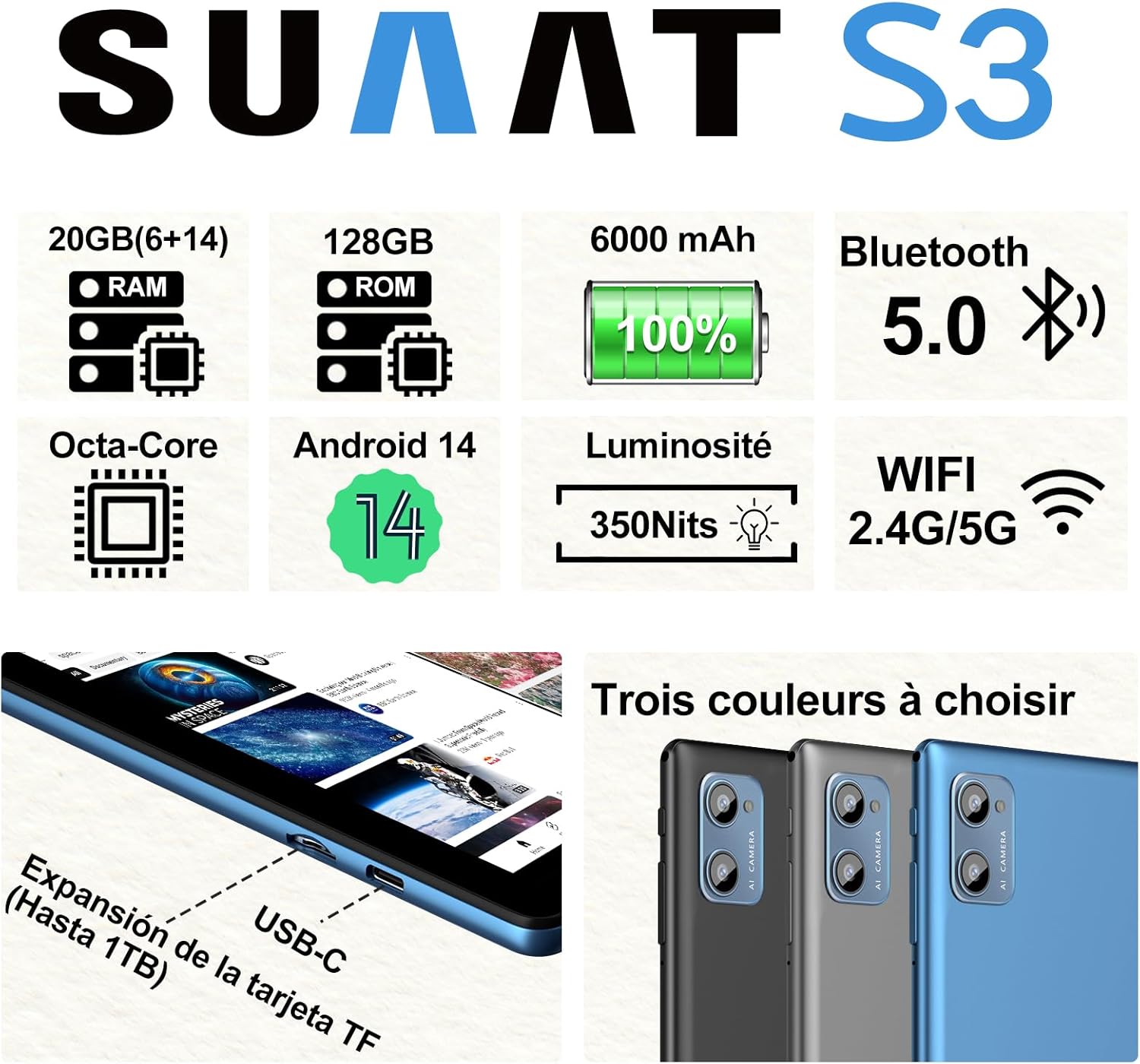
රූපය 3.2: SUAAT S3 Tablet key specifications.
4. මූලික සැකසුම
4.1 ටැබ්ලටය ආරෝපණය කිරීම
Before first use, fully charge the tablet using the provided Type-C cable and European standard charger. The charging port is located on the side of the tablet.

රූපය 4.1: Tablet charging via USB-C.
4.2 බල ගැන්වීම සක්රිය / අක්රිය කිරීම
- බල ගැන්වීමට: තිරය දැල්වෙන තුරු බල බොත්තම ඔබාගෙන සිටින්න.
- බලය අක්රිය කිරීමට: බල බොත්තම ඔබා අල්ලාගෙන සිටින්න, ඉන්පසු තිරයේ ඇති විකල්ප වලින් 'පවර් ඕෆ්' තෝරන්න.
- නැවත ආරම්භ කිරීමට: බල බොත්තම ඔබා අල්ලාගෙන සිටින්න, ඉන්පසු විකල්ප වලින් 'නැවත ආරම්භ කරන්න' තෝරන්න.
4.3 මූලික වින්යාසය
Upon first power-on, follow the on-screen prompts to set up your tablet. This includes selecting your language, connecting to a Wi-Fi network, setting up your Google account, and configuring security options.
5. මෙහෙයුම් උපදෙස්
5.1 Android 14 විශේෂාංග
Your SUAAT S3 tablet runs on Android 14, offering enhanced privacy, customization, and productivity features:
- මාපිය පාලන: Manage screen time, app access, and content filters for children.
- Multi-Account Mode: වෙනම පරිශීලක වෘත්තිකයෙකු සාදන්නfiles for different users, each with their own apps, settings, and data.
- ස්ප්ලිට් තිර ප්රකාරය: Use two applications simultaneously by dividing the screen.
- අභිරුචි තේමා: Personalize your tablet's appearance with various themes and wallpapers.
- විජට්: Add calendar, weather, and other widgets to your home screen for quick information access.

රූපය 5.1: Tablet in split-screen mode.
5.2 මූලික සංචාලනය
- මුල් තිරය: මුල් තිර අතර සැරිසැරීමට වමට හෝ දකුණට ස්වයිප් කරන්න.
- යෙදුම් ලාච්චුව: ස්ථාපනය කර ඇති සියලුම යෙදුම් වෙත ප්රවේශ වීමට තිරයේ පහළ සිට ඉහළට ස්වයිප් කරන්න.
- දැනුම්දීම් සහ ඉක්මන් සැකසුම්: තිරයේ ඉහළ සිට පහළට ස්වයිප් කරන්න view දැනුම්දීම් සහ ප්රවේශ ඉක්මන් සැකසුම් ටොගල්.
- මෑත යෙදුම්: Tap the square navigation button (or swipe up and hold from the bottom if using gesture navigation) to see recently opened applications.
6. සම්බන්ධතාවය
6.1 Wi-Fi සම්බන්ධතාවය
The tablet supports dual-band Wi-Fi (2.4G and 5G) for faster and more stable internet connectivity.
- වෙත යන්න සැකසීම් > ජාලය සහ අන්තර්ජාලය > Wifi.
- Wi-Fi ටොගල් කරන්න On.
- ලැයිස්තුවෙන් ඔබට අවශ්ය ජාලය තෝරා අවශ්ය නම් මුරපදය ඇතුළත් කරන්න.
6.2 බ්ලූටූත් උපාංග
Connect Bluetooth accessories like the included keyboard and mouse, or headphones, using Bluetooth 5.0.
- වෙත යන්න සැකසීම් > සම්බන්ධිත උපාංග > බ්ලූටූත්.
- බ්ලූටූත් ටොගල් කරන්න On.
- ඔබගේ බ්ලූටූත් උපාංගය යුගල කිරීමේ මාදිලියේ ඇති බව සහතික කර ගන්න.
- Select the device from the 'Available devices' list to pair.
6.3 හෙඩ්ෆෝන් ජැක්
A 3.5mm headphone jack is provided for wired audio connections.
7. Display and Multimedia
7.1 10.1-inch IPS Display
The tablet features a 10.1-inch IPS display with a resolution of 1280 x 800 pixels, offering clear and vibrant visuals with wide viewing කෝණ.

රූපය 7.1: 10.1-inch IPS Display.
7.2 Widevine L1 සහාය
With Widevine L1 support, the tablet can stream high-definition content from popular streaming services, providing a clear and immersive viewඅත්දැකීමෙන්.
7.3 GMS Certification
The tablet is GMS (Google Mobile Services) certified, ensuring full access to the Google Play Store and all Google applications, along with robust security and privacy features.
8. ගබඩා කිරීම සහ කාර්ය සාධනය
8.1 RAM and ROM
The SUAAT S3 comes with 20GB of RAM (6GB physical + 14GB virtual expansion) and 128GB of internal storage (ROM). This ample memory allows for smooth multitasking and storage of numerous applications, videos, images, and files.

රූපය 8.1: Tablet showcasing large memory for apps and media.
8.2 Octa-Core Processor
Equipped with an Octa-core 1.8 GHz A523 processor, the tablet delivers stable and responsive performance for everyday tasks, gaming, and multimedia consumption.
8.3 පුළුල් කළ හැකි ගබඩාව
The tablet supports expandable storage via a TF (microSD) card, allowing you to increase storage capacity up to 1TB for even more files සහ මාධ්ය.
9. බැටරි කළමනාකරණය
9.1 බැටරි ධාරිතාව
The SUAAT S3 is powered by a 6000 mAh battery, providing extended usage time. Actual battery life may vary based on usage patterns and settings.
9.2 අයකිරීම් මාර්ගෝපදේශ
- Use only the original charger and cable provided with the tablet.
- Avoid exposing the tablet to extreme temperatures during charging.
- Do not leave the tablet charging for excessively long periods after it has reached 100% to prolong battery health.
10. නඩත්තු කිරීම
10.1 ටැබ්ලටය පිරිසිදු කිරීම
- ටැබ්ලටයේ තිරය සහ ශරීරය පිරිසිදු කිරීමට මෘදු, ලින්ට් රහිත රෙද්දක් භාවිතා කරන්න.
- මුරණ්ඩු පැල්ලම් සඳහා, තරමක් dampරෙදි කැබැල්ල වතුරෙන් හෝ තිර පිරිසිදු කරන්නෙකුගෙන් සෝදන්න. රළු රසායනික ද්රව්ය වලින් වළකින්න.
- පිරිසිදු කිරීමට පෙර ටැබ්ලටය ක්රියා විරහිත කර පේනුවෙන් ඉවත් කර ඇති බවට වග බලා ගන්න.
10.2 ගබඩා කිරීම
When not in use for extended periods, store the tablet in a cool, dry place. Avoid direct sunlight and extreme temperatures.
10.3 මෘදුකාංග යාවත්කාලීන
ඔබගේ ටැබ්ලටයේ නවතම විශේෂාංග, ආරක්ෂක පැච් සහ කාර්ය සාධන වැඩිදියුණු කිරීම් ඇති බව සහතික කර ගැනීම සඳහා මෘදුකාංග යාවත්කාලීන කිරීම් නිතිපතා පරීක්ෂා කර ස්ථාපනය කරන්න. වෙත යන්න සැකසීම් > පද්ධතිය > පද්ධති යාවත්කාලීන කිරීම.
11. දෝශ නිරාකරණය
If you encounter issues with your SUAAT S3 tablet, refer to the following common solutions:
| ගැටලුව | හැකි විසඳුම |
|---|---|
| ටැබ්ලටය ක්රියාත්මක නොවේ | බැටරිය ආරෝපණය කර ඇති බවට වග බලා ගන්න. නැවත බලය ක්රියාත්මක කිරීමට උත්සාහ කිරීමට පෙර චාජරය සම්බන්ධ කර මිනිත්තු කිහිපයක් රැඳී සිටින්න. |
| තිරය ප්රතිචාර නොදක්වයි | ටැබ්ලටය නැවත ආරම්භ කරන්න. ගැටලුව දිගටම පවතී නම්, කර්මාන්තශාලා යළි පිහිටුවීමක් සිදු කරන්න (දත්ත නැති වනු ඇත). |
| Wi-Fi වෙත සම්බන්ධ විය නොහැක | Check if Wi-Fi is enabled in settings. Restart your router. Ensure you are entering the correct password. |
| බ්ලූටූත් උපාංගය යුගල නොවේ | Ensure Bluetooth is enabled on both devices and the accessory is in pairing mode. Try restarting both devices. |
| යෙදුම් බිඳ වැටෙමින් හෝ මන්දගාමී වෙමින් පවතී | Close background apps. Clear app cache (Settings > Apps > [App Name] > Storage > Clear cache). Ensure sufficient storage space. |
| බැටරිය ඉක්මනින් බැස යයි | Reduce screen brightness. Disable unused features like Wi-Fi or Bluetooth. Close background apps. Check for power-intensive apps. |
If these solutions do not resolve the issue, please contact SUAAT customer support.
12. පිරිවිතර
| විශේෂාංගය | විස්තර |
|---|---|
| වෙළඳ නාමය | සුආට් |
| ආදර්ශ අංකය | S3 |
| මෙහෙයුම් පද්ධතිය | Android 14 |
| ප්රොසෙසරය | A523 Octa-core 1.8 GHz |
| RAM | 20 GB (6GB installed) |
| ගබඩාව (ROM) | 128 GB |
| පුළුල් කළ හැකි ගබඩාව | TF කාඩ්පත හරහා 1 TB දක්වා |
| තිර ප්රමාණය | අඟල් 10.1 |
| තිර විභේදනය | 1280 x 800 පික්සල |
| රැහැන් රහිත සම්බන්ධතාව | Wi-Fi (802.11n, 2.4G/5G Dual-band) |
| බ්ලූටූත් | බ්ලූටූත් 5.0 |
| සම්බන්ධක වර්ගය | USB-C |
| හෙඩ්ෆෝන් ජැක් | 3.5 මි.මී |
| බැටරි ධාරිතාව | 6000 mAh |
| මානයන් (L x W x H) | 17 x 12 x 0.8 සෙ.මී |
| බර | කිලෝ ග්රෑම් 1.28 කි |
| ඇතුළත් උපාංග | Keyboard, Mouse, Protective Case, Screen Protector |
13. වගකීම් සහ සහාය
SUAAT provides professional technical support and customer service for your S3 tablet. If you require assistance, have questions, or encounter any issues not covered in this manual, please contact our customer support team. Refer to your purchase documentation for specific warranty terms and contact information.


