හැඳින්වීම
The RadioShack Dual-Mode Wireless Bluetooth Mouse offers versatile connectivity and ergonomic comfort for various computing needs. This manual provides instructions for setting up, operating, and maintaining your mouse to ensure optimal performance.

රූපය 1: ඉදිරිපස පැත්ත view of the RadioShack Dual-Mode Wireless Bluetooth Mouse.
පැකේජයේ අන්තර්ගතය
- RadioShack Dual-Mode Wireless Bluetooth Mouse
- USB ග්රාහකය (මූසිකයේ ගබඩා කර ඇත)
- USB ආරෝපණ කේබලය
- පරිශීලක අත්පොත (මෙම ලේඛනය)
සැලසුම
1. මූසිකය ආරෝපණය කිරීම
The mouse features a built-in rechargeable battery. Before first use, or when the battery is low, connect the mouse to a USB power source using the provided USB charging cable. The charging port is located on the front side of the mouse.

රූපය 2: පැත්ත view of the mouse highlighting the USB charging port.

Figure 3: The mouse being charged via a USB connection to a laptop.
2. මූසිකය සම්බන්ධ කිරීම
The mouse supports dual-mode connectivity: 2.4G Wireless (via USB receiver) and Bluetooth 3.0. You can switch between these modes using the switch on the bottom of the mouse.
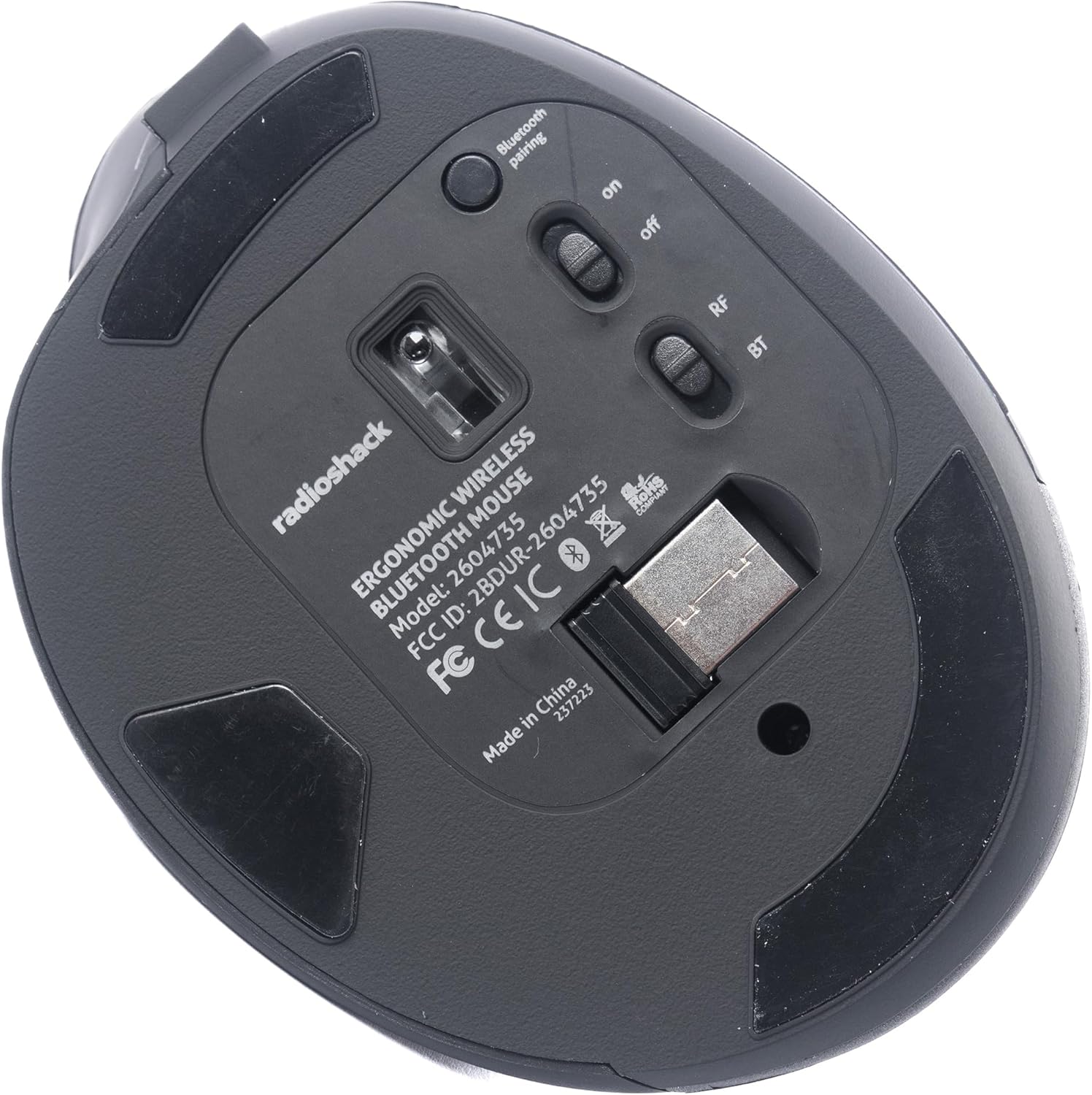
රූපය 4: පහළ view of the mouse, indicating the power switch, mode switch (RF/BT), and USB receiver compartment.
2.1. 2.4G Wireless Mode (USB Receiver)
- මූසිකයේ පතුලේ ඇති මැදිරියේ ගබඩා කර ඇති USB ග්රාහකය සොයා ගන්න.
- ඔබේ පරිගණකයේ තිබෙන USB පෝට් එකකට USB රිසීවරය ඇතුළු කරන්න.
- Slide the mode switch on the bottom of the mouse to the "RF" position.
- Turn on the mouse using the ON/OFF switch. The mouse should connect automatically.
2.2. බ්ලූටූත් ප්රකාරය
- Slide the mode switch on the bottom of the mouse to the "BT" position.
- ON/OFF ස්විචය භාවිතයෙන් මූසිකය ක්රියාත්මක කරන්න.
- Press and hold the Bluetooth pairing button (usually located near the mode switch) for 3-5 seconds until the indicator light flashes, indicating it is in pairing mode.
- ඔබේ පරිගණකයේ හෝ උපාංගයේ, බ්ලූටූත් සැකසුම් වෙත ගොස් නව උපාංග සොයන්න.
- Select "RadioShack Mouse" (or similar name) from the list of available devices to pair.
- යුගල කළ පසු, දර්ශක ආලෝකය දැල්වීම නවත්වනු ඇත.

Figure 5: The mouse positioned wirelessly next to a laptop, ready for use.
මූසිකය ක්රියාත්මක කිරීම
මූලික කාර්යයන්
- වම් බොත්තම: මූලික ක්ලික් කිරීමේ කාර්යය.
- දකුණු බොත්තම: ද්විතියික ක්ලික් ශ්රිතය (සන්දර්භ මෙනුව).
- අනුචලන රෝදය: Scroll up/down, and can also function as a middle click button.
- ඉදිරියට/පසුපසට බොත්තම්: පැත්තේ පිහිටා ඇති මෙම බොත්තම්, ඉක්මන් සංචාලනයකට ඉඩ සලසයි web බ්රව්සර් සහ file ගවේෂකයන්.
මාතයන් අතර මාරු වීම
To switch between 2.4G Wireless and Bluetooth modes, simply slide the mode switch on the bottom of the mouse to the desired position (RF for 2.4G, BT for Bluetooth).
Ergonomic Design
The mouse is designed with a contoured shape and rubber grips to provide comfortable support for your hand and wrist, reducing strain during extended use.

Figure 6: A hand demonstrating the ergonomic grip on the mouse.
නඩත්තු කිරීම
පිරිසිදු කිරීම
- පිරිසිදු කිරීමට පෙර මූසිකය ක්රියා විරහිත කරන්න.
- මූසිකයේ මතුපිට පිස දැමීමට මෘදු වියළි රෙද්දක් භාවිතා කරන්න.
- මුරණ්ඩු අපිරිසිදුකම සඳහා, තරමක් dampරෙදි කැබැල්ල වතුරෙන් හෝ මෘදු පිරිසිදු කිරීමේ ද්රාවණයකින් පිස දමා වහාම වියළා ගන්න.
- දරුණු රසායනික ද්රව්ය හෝ උල්ෙල්ඛ ද්රව්ය භාවිතා කිරීමෙන් වළකින්න.
බැටරි සත්කාර
- බැටරි සෞඛ්යය පවත්වා ගැනීම සඳහා මූසිකය නිතිපතා ආරෝපණය කරන්න.
- බැටරිය නිතර නිතර සම්පූර්ණයෙන්ම විසර්ජනය කිරීමෙන් වළකින්න.
- If storing the mouse for an extended period, charge it to about 50% capacity.
දෝෂගවේෂණය
- මූසිකය ප්රතිචාර නොදක්වයි:
- මූසිකය සක්රිය කර ඇති බවට වග බලා ගන්න.
- බැටරි මට්ටම පරීක්ෂා කර අවශ්ය නම් ආරෝපණය කරන්න.
- For 2.4G mode, ensure the USB receiver is securely plugged into the computer and the mode switch is set to "RF".
- For Bluetooth mode, ensure Bluetooth is enabled on your device, the mouse is in "BT" mode, and it is properly paired. Try re-pairing if necessary.
- Try connecting the mouse to a different USB port or a different device to rule out port or device issues.
- කර්සර චලනය අක්රමවත් හෝ මන්දගාමී වේ:
- Ensure the mouse sensor is clean and free from obstructions.
- පිරිසිදු, පරාවර්තනය නොවන මතුපිටක් මත මූසිකය භාවිතා කරන්න.
- වෙනත් රැහැන් රහිත උපාංගවලින් බාධා කිරීම් සඳහා පරීක්ෂා කරන්න.
- මූසිකය ආරෝපණය නොවේ:
- ආරෝපණ කේබලය මූසිකයට සහ බල ප්රභවයට ආරක්ෂිතව සම්බන්ධ කර ඇති බවට වග බලා ගන්න.
- වෙනස් USB ආරෝපණ කේබලයක් හෝ බල ඇඩැප්ටරයක් උත්සාහ කරන්න.
- බල ප්රභවය සක්රිය බව සහතික කර ගන්න.
පිරිවිතර
| විශේෂාංගය | විස්තර |
|---|---|
| ආදර්ශ අංකය | 2604735 |
| සම්බන්ධතා තාක්ෂණය | 2.4G Wireless, Bluetooth 3.0 (Dual-Mode) |
| චලන හඳුනාගැනීමේ තාක්ෂණය | ඔප්ටිකල් |
| වර්ණය | කළු සහ අළු |
| බලශක්ති ප්රභවය | නැවත ආරෝපණය කළ හැකි ලිතියම් අයන බැටරි (ඇතුළත්) |
| අයිතමයේ බර | අවුන්ස 9.1 කි |
| පැකේජ මානයන් | අඟල් 8.66 x 6.3 x 2.95 |
| නිෂ්පාදකයා | රේඩියෝ ෂැක් |
වගකීම් සහ සහාය
For warranty information and customer support, please refer to the official RadioShack webවෙබ් අඩවියට පිවිසෙන්න හෝ ඔවුන්ගේ පාරිභෝගික සේවය කෙලින්ම අමතන්න. නිෂ්පාදන ලියාපදිංචිය, වගකීම් හිමිකම් සහ තාක්ෂණික සහාය පිළිබඳ විස්තර සාමාන්යයෙන් නිෂ්පාදකයාගේ සහාය පිටුවල සොයාගත හැකිය.


