හැඳින්වීම
The MXR M307 Layers Harmonic Sustain Electric Guitar Effects Pedal is designed to enrich your guitar's sound with organic sustain and harmonic depth. This pedal allows for the creation of multi-layered soundscapes, extending the creative potential of your instrument. It enables complex chord voicings, transcendent melodies, and harmonic ensembles within a compact MXR housing.

Image: The MXR M307 Layers Harmonic Sustain Pedal shown with its included accessories, such as patch cables, a multi-tool, Dunlop picks, and a 9V power supply.
ප්රධාන ලක්ෂණ
- Rich, Organic Sustain: Provides high-fidelity sustain that enhances every note and chord.
- Multi-Layering Capability: Creates up to three simultaneous layers of sustain with natural decay.
- Dynamic Triggering: Layers can be engaged via footswitch or automatically triggered by playing dynamics.
- බුද්ධිමය පාලනයන්: Features Mix, Trig, Attack, and Decay knobs for precise sound shaping.
- Sub Octave Switch: Adds a subterranean octave to one or more layers for a deeper sound.
- උසස් වැඩසටහන්කරණය: Offers customization options for modulation intensity, delay time, diffusion, and more.
- බාහිර පාලන විකල්ප: Supports external sustain pedals or switches (e.g., MXR Split + Tap) and expression pedals.
- බහුකාර්ය සම්බන්ධතාවය: Supports Stereo Input, Stereo Output, and Dry/Wet Split modes.
සැලසුම
Follow these steps to connect your MXR M307 pedal to your guitar and ampජීවිතාරක්ෂකයා.
- බල සම්බන්ධතාවය: Connect a 9V DC power supply (center negative, 300mA minimum) to the power input jack on the side of the pedal.
- ආදාන සම්බන්ධතාවය: Connect your guitar to the "IN" jack on the right side of the pedal using a standard 1/4-inch instrument cable.
- ප්රතිදාන සම්බන්ධතාවය: පැඩලයේ වම් පැත්තේ ඇති "OUT" ජැක් එක ඔබේ එකට සම්බන්ධ කරන්න. amplifier's input using a standard 1/4-inch instrument cable.
- Optional External Control: For advanced functionality, connect an expression pedal or external footswitch to the "CTR" jack on the left side.
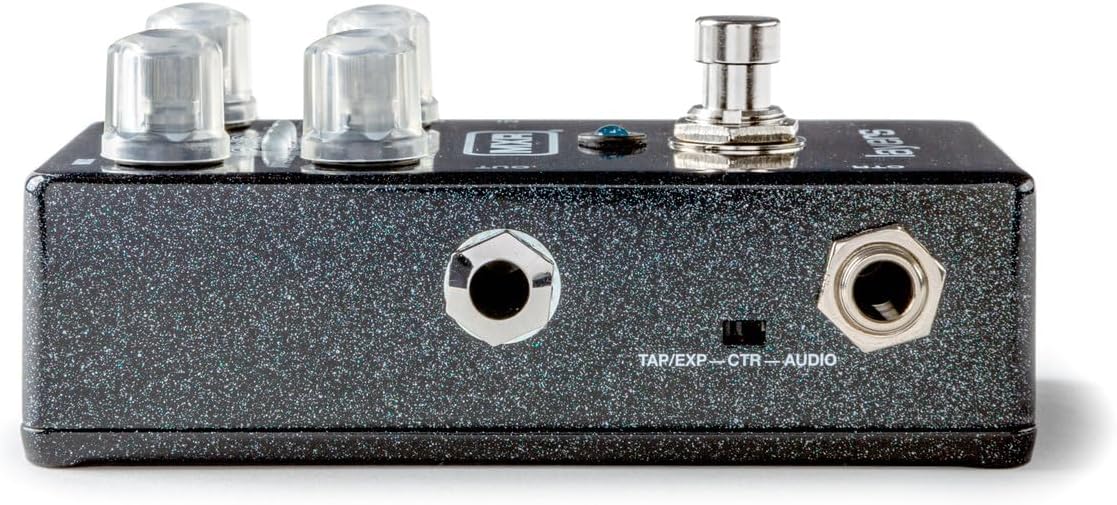
රූපය: දකුණු පැත්ත view of the MXR M307 pedal, illustrating the 9V power input and the instrument input (IN) jack.
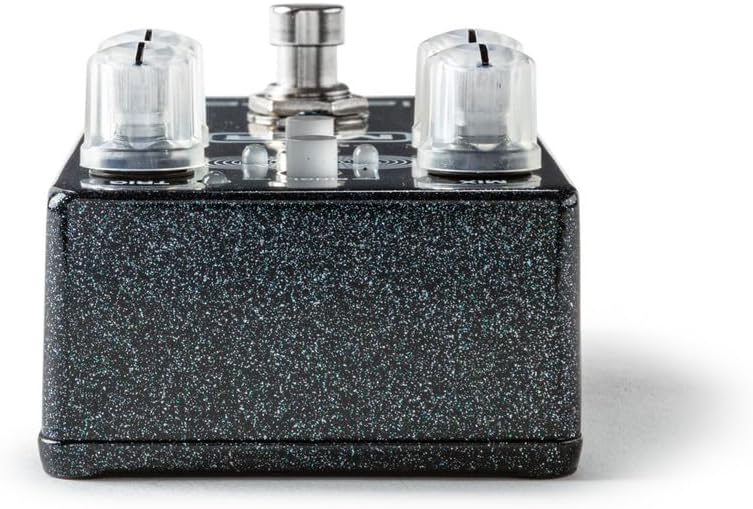
රූපය: වම් පැත්ත view of the MXR M307 pedal, showing the instrument output (OUT) jack and the CTR (Control) jack for external devices.
මෙහෙයුම් උපදෙස්
පාලනය කරයිview

රූපය: ඉහළට view of the MXR M307 pedal, highlighting its various controls with corresponding numbers.
- CTR Jack: Used to connect an expression pedal or external footswitch, or to send a dry output signal when using Dry/Wet Split mode (see Advanced Operation).
- පා මාරුව: Governs the creation and deletion of sustain layers.
- Pressing the footswitch engages a layer.
- Holding the footswitch holds a layer indefinitely until released.
- Upon release, the layer fades out according to the ක්ෂය සැකසීම.
- A double tap clears all layers and bypasses the pedal.
- ප්රහාර බොත්තම: Adjusts the fade-in time of each layer.
- මික්ස් නොබ්: Controls the level of the wet signal (the volume of your layers).
- SINGLE Button: Limits the sustain effect to a single layer. By default, there are three simultaneous layers that can overlap. When තනිකඩ is engaged, only one layer will be active at a time.
- TRIG Knob: Sets the sensitivity for auto-triggering layers with your pick attacks.
- කවදා ද දැඩි is in the OFF position (fully counter-clockwise), auto-triggering is disabled, and only the footswitch can activate layers.
- ද TRIG LED is red by default when auto-triggering is enabled; when the input signal exceeds the set threshold, the TRIG LED කොළ පැහැයට හැරෙනු ඇත.
- For a layer to be triggered, the signal must exceed the threshold (i.e., the TRIG LED is green), and the pedal must detect a pick attack.
- ඩෙකේ බොත්තම: Sets the fade-out time of the layers, mimicking natural string vibrations by decaying high frequencies first.
- SUB OCT Switch: Engages a sub-octave effect, taking one or more of your layers down an octave for a deeper, subterranean sound.
Layering Mechanics
- The pedal supports up to three active layers, each indicated by its own mini LED.
- Layers can be triggered manually by the footswitch or automatically based on your playing dynamics (controlled by the දැඩි බොත්තම).
- To hold a layer with the footswitch: Play a note or chord, then press and hold the footswitch. Release to allow the layer to fade.
- To auto-trigger layers: Adjust the දැඩි knob to set the sensitivity. Layers will be created in response to your attack.
- Combining methods: With තනිකඩ mode disengaged, you can hold a layer with the footswitch and then auto-trigger additional layers over it.
උසස් මෙහෙයුම්
The MXR M307 offers extensive customization through its programming functions. These allow you to adjust parameters beyond the front panel controls.
- වැඩසටහන්ගත කළ හැකි පරාමිතීන්: Adjust modulation intensity, delay time, diffusion, and other advanced settings. Refer to the full MXR M307 manual (available online) for detailed programming instructions.
- External Sustain/Tap Control: Use a keyboard sustain pedal or an off-board switch (e.g., MXR Split + Tap) connected to the CTR jack to trigger layers.
- ප්රකාශන පැඩල් ඒකාබද්ධ කිරීම: Connect an expression pedal to the CTR jack to blend setting configurations, such as with the Volume(X) 8 Pedal.
- Stereo and Dry/Wet Modes: The pedal supports Stereo Input, Stereo Output, and Dry/Wet Split modes for enhanced routing flexibility. Consult the comprehensive manual for setup details on these modes.
නඩත්තු කිරීම
- පිරිසිදු කිරීම: පැඩලයේ බාහිර කොටස පිරිසිදු කිරීම සඳහා මෘදු, වියළි රෙද්දක් භාවිතා කරන්න. උල්ෙල්ඛ පිරිසිදු කරන්නන් හෝ ද්රාවක භාවිතා කිරීමෙන් වළකින්න.
- බල සැපයුම: Always use a regulated 9V DC power supply with a center-negative polarity and a minimum current rating of 300mA. Using an incorrect power supply can damage the unit and void the warranty.
- ගබඩා: භාවිතයේ නොමැති විට සෘජු හිරු එළියෙන් සහ අධික උෂ්ණත්වයන්ගෙන් ඈත්ව සිසිල් වියළි ස්ථානයක පෙඩලය ගබඩා කරන්න.
- කේබල් සම්බන්ධතා: Ensure all cables are securely connected. Periodically check cables for wear and tear.
දෝෂගවේෂණය
| ගැටලුව | විය හැකි හේතුව | විසඳුම |
|---|---|---|
| No sound or weak signal. | Incorrect cable connections, faulty cables, incorrect power supply, pedal in bypass mode. |
|
| Layers are not triggering automatically. | TRIG knob set to OFF, insufficient input signal, SINGLE mode engaged. |
|
| Layers fade too quickly or too slowly. | DECAY knob setting. | සකස් කරන්න ක්ෂය knob to achieve the desired fade-out time. |
| Undesired noise or hum. | Ground loop, faulty power supply, interference from other electronics. |
|
පිරිවිතර
| පරාමිතිය | වටිනාකම |
|---|---|
| ආදර්ශ අංකය | M307 |
| අයිතමයේ බර | රාත්තල් 1.33 (දළ වශයෙන් කිලෝග්රෑම් 0.6) |
| පැකේජ මානයන් | 5.9 x 4.8 x 2.75 අඟල් (ආසන්න වශයෙන් 15 x 12.2 x 7 සෙ.මී.) |
| බලශක්ති ප්රභවය | රැහැන්ගත විදුලි |
| වෙළුමtage | 9 Volts DC |
| Ampකෝපය | 300 මිලිamps (minimum) |
| සංඥා ආකෘතිය | ඇනලොග් |
| දෘඩාංග අතුරුමුහුණත | HP-HSC |
| වර්ණය | Black (sparkle finish) |
වගකීම් සහ සහාය
For specific warranty information, please refer to the documentation included with your purchase or visit the official MXR website. MXR products typically come with a limited warranty covering manufacturing defects.
FCC අනුකූලතාව: මෙම උපාංගය FCC රීති වල 15 වන කොටසට අනුකූල වේ. මෙහෙයුම පහත කොන්දේසි දෙකට යටත් වේ: (1) මෙම උපාංගය හානිකර මැදිහත්වීම් ඇති නොකළ හැකිය, සහ (2) මෙම උපාංගය අනවශ්ය ලෙස ක්රියා කිරීමට හේතු විය හැකි මැදිහත්වීම් ඇතුළුව ලැබෙන ඕනෑම බාධාවක් පිළිගත යුතුය.

රූපය: පහළ view of the MXR M307 pedal, displaying the FCC compliance sticker.
For technical support or further assistance, please contact MXR customer service through their official channels.


