1. හැඳින්වීම
This manual provides comprehensive instructions for the safe and efficient operation of your HTVRONT Auto Heat Press 2. Please read this manual thoroughly before using the device to ensure proper function and to prevent damage or injury. Keep this manual for future reference.
2 ආරක්ෂිත තොරතුරු
අවවාදයයි: මෙම ආරක්ෂක උපදෙස් අනුගමනය කිරීමට අපොහොසත් වීමෙන් ගින්නක්, විදුලි කම්පනයක් හෝ වෙනත් තුවාල හෝ හානි සිදුවිය හැකිය.
- සෑම විටම තාප මුද්රණ යන්ත්රය ස්ථාවර, තාප-ප්රතිරෝධී මතුපිටක් මත ක්රියාත්මක කරන්න.
- Keep hands and fingers clear of the heating plate during operation to avoid burns.
- යන්ත්රය ජලයේ හෝ වෙනත් දියරවල ගිල්වන්න එපා.
- විදුලි රැහැනට හානි නොවන බවත්, භූගත අලෙවිසැලකට නිසි ලෙස සම්බන්ධ කර ඇති බවත් සහතික කර ගන්න.
- භාවිතයේ නොමැති විට හෝ පිරිසිදු කිරීමට පෙර යන්ත්රය විසන්ධි කරන්න.
- ක්රියාන්විතයේ දී යන්ත්රය අවධානයෙන් තොරව තබන්න එපා.
- The machine features an automatic shut-off function after 15 minutes of inactivity to prevent overheating.
- දරුවන්ට ළඟා විය නොහැකි ලෙස තබා ගන්න.
3. නිෂ්පාදන අවසන්view
The HTVRONT Auto Heat Press 2 is designed for efficient and precise heat transfer applications. Familiarize yourself with its main components:
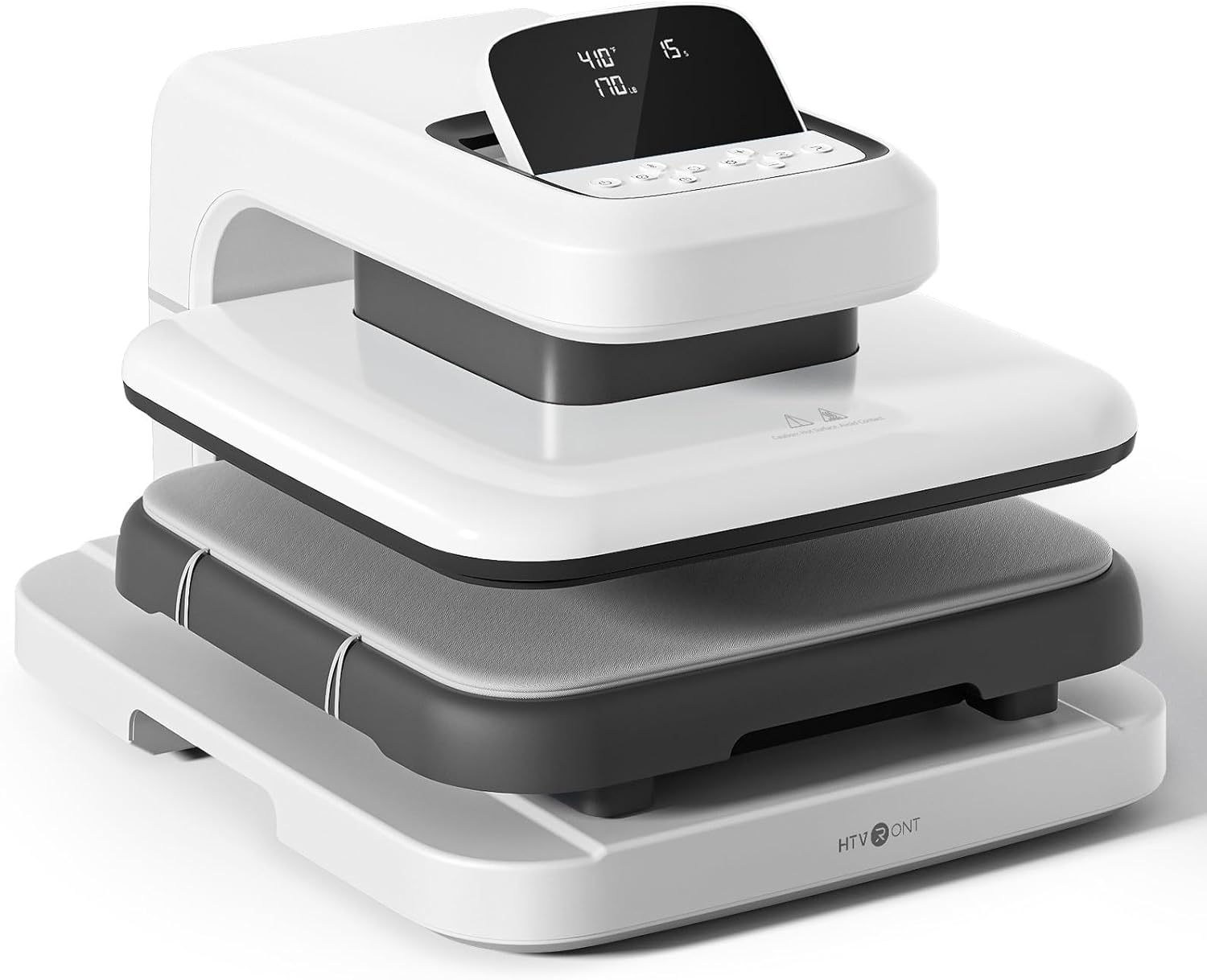

- තාප තහඩුව: The upper heating element that applies heat and pressure.
- Ironing Board (Lower Platen): The surface where materials are placed for pressing. Features a fully pull-out drawer design.
- පදනම: යන්ත්රයට ස්ථාවරත්වයක් ලබා දෙයි.
- LED තිරය: Displays temperature, time, and pressure settings.
- පාලන බොත්තම්: Used to adjust settings and initiate operations.
4. පිහිටුවීම
Follow these steps to set up your HTVRONT Auto Heat Press 2 for first use:
- යන්ත්රය ඉවත් කරන්න: Carefully remove the heat press from its packaging. Retain all packaging materials for potential future transport or storage.
- ස්ථානගත කිරීම: Place the machine on a flat, stable, and heat-resistant surface. Ensure there is adequate clearance around the machine for ventilation and safe operation.
- බල සම්බන්ධතාවය: Connect the power cord to the machine and then plug it into a standard 110V (DC) grounded electrical outlet.
- මූලික බලය සක්රිය කිරීම: Press the power button to turn on the machine. The LED screen will illuminate.

5. මෙහෙයුම් උපදෙස්
5.1. බල ගැන්වීම / අක්රිය කිරීම
- බල ගැන්වීමට, බල බොත්තම ඔබන්න.
- බලය අක්රිය කිරීමට, තිරය නිවී යන තුරු බල බොත්තම ඔබාගෙන සිටින්න.
5.2. Setting Parameters (Temperature, Time, Pressure)
The HTVRONT Auto Heat Press 2 allows for precise control over temperature, time, and pressure to suit various materials and transfer types.
- උෂ්ණත්ව පරාසය: 210°F - 410°F (100°C - 210°C)
- කාල පරාසය: තත්පර 1 - 999
- පීඩන පරාසය: 50 - 170 LB (adjustable)

Use the control buttons on the LED screen to adjust these settings. The machine heats up quickly, reaching 410°F within 5 minutes and 30 seconds.

5.3. Automatic Pressing Cycle
Once parameters are set and the material is in place, the automatic pressing function simplifies operation:
- Place your substrate and transfer material on the ironing board.
- Press the "R" button to initiate the automatic pressing cycle. The heat plate will descend and apply pressure.
- The machine will buzz when the set time is complete and automatically release the heat plate.

5.4. Using the Fully Pull-out Drawer
The ironing board features a fully pull-out drawer, allowing for safe and easy placement of materials without contact with the hot heat plate.
- Pull the drawer completely out before placing or adjusting your items.
- Push the drawer back in before starting the pressing cycle.
5.5. Adjusting Screen Angle
The LED screen can be adjusted to 7 levels within a 0-75° range for improved visibility and ergonomic comfort during operation.

5.6. Material Compatibility and Higher Heating Height
The HTVRONT Auto Heat Press 2 is compatible with various heat transfer materials and features an increased heating height for thicker items.
- ගැළපෙන ද්රව්ය: HTV (Heat Transfer Vinyl), Sublimation Paper, DTF (Direct to Film), Heat Transfer Paper, Puff Heat Transfer Vinyl, Glitter Heat Transfer Vinyl.
- Increased Heating Height: Up to 4.5 cm (1.77 inches), allowing for pressing on thicker items such as hoodies, canvas bags, and pillows, in addition to t-shirts.


6. නඩත්තු කිරීම
නිසි නඩත්තුව ඔබේ තාප මුද්රණ යන්ත්රයේ කල්පැවැත්ම සහ ප්රශස්ත ක්රියාකාරිත්වය සහතික කරයි.
- තාප තහඩුව පිරිසිදු කිරීම: යන්ත්රය සම්පූර්ණයෙන්ම සිසිල් වීමට ඉඩ දෙන්න. මෘදු, d ද්රාවකයක් භාවිතා කරන්න.amp cloth to wipe the heat plate. For stubborn residue, a specialized heat press cleaner can be used, following the cleaner's instructions. Avoid abrasive materials.
- Cleaning the Ironing Board: Wipe the ironing board with a damp රෙදි. ඊළඟ භාවිතයට පෙර එය වියළි බව සහතික කර ගන්න.
- සාමාන්ය පිරිසිදු කිරීම: මෘදු, වියළි රෙද්දකින් යන්ත්රයේ පිටත කොටස පිස දමන්න.
- ගබඩා: භාවිතයේ නොමැති විට වියළි, දූවිලි රහිත පරිසරයක තාප මුද්රණ යන්ත්රය ගබඩා කරන්න.
7. දෝශ නිරාකරණය
If you encounter issues with your HTVRONT Auto Heat Press 2, refer to the following common troubleshooting steps:
| ගැටලුව | විය හැකි හේතුව | විසඳුම |
|---|---|---|
| යන්ත්රය ක්රියාත්මක නොවේ. | විදුලි රැහැන නිසි ලෙස සම්බන්ධ වී නැත; විදුලි පිටවීමේ ගැටලුවක්. | Ensure the power cord is securely plugged into both the machine and a working grounded outlet. Test the outlet with another device. |
| යන්ත්රය රත් නොවේ. | Temperature not set; machine in standby mode. | Verify temperature settings on the LED screen. Allow sufficient time for preheating. If the machine has been idle for 15 minutes, it may have entered auto shut-off mode; power cycle the machine. |
| Uneven heat transfer results. | Incorrect pressure; uneven material placement; faulty transfer material. | Adjust pressure settings as needed (50-170 LB). Ensure material is laid flat and evenly. Test with new transfer material. |
| Automatic press not engaging/releasing. | "R" button not pressed; obstruction. | Ensure the "R" button is pressed firmly. Check for any obstructions preventing the heat plate from moving freely. |
If the problem persists after attempting these solutions, please refer to the support section for further assistance.
8. පිරිවිතර
| විශේෂාංගය | විස්තර |
|---|---|
| ආදර්ශ අංකය | SG-RYJ-0521-එක්සත් ජනපදය |
| තාප තහඩු ප්රමාණය | 15 x 15 අඟල් (38.1 x 38.1 සෙ.මී.) |
| උෂ්ණත්ව පරාසය | 210°F - 410°F (100°C - 210°C) |
| කාල පරාසය | තත්පර 1 - 999 |
| පීඩන පරාසය | 50 - 170 LB |
| Increased Heating Height | සෙන්ටිමීටර 4.5 (අඟල් 1.77) දක්වා |
| බලය | 1500W |
| ආදාන වෙළුමtage | 110 Volts (DC) |
| අයිතමයේ බර | රාත්තල් 47.4 (කිලෝ ග්රෑම් 21.54) |
| නිෂ්පාදන මානයන් | ආසන්න වශයෙන් 20.9"L x 17.1"W x 13"H |
| ස්වයංක්රීයව වසා දැමීම | අක්රිය වීමෙන් විනාඩි 15 කට පසුව |
| තිර කෝණ ගැලපීම | අංශක 0-75 |
9. වගකීම් සහ සහාය
For warranty information, please refer to the documentation included with your purchase or visit the official HTVRONT website. For technical support, product inquiries, or assistance with troubleshooting beyond this manual, please contact HTVRONT customer service through their official channels. Details can typically be found on the manufacturer's webවෙබ් අඩවිය හෝ ඔබේ මිලදී ගැනීමේ වේදිකාව.
Note: The manufacturer is committed to providing support; however, specific contact methods may vary. Always check the latest information on the official HTVRONT webඅඩවිය.


