1. නිෂ්පාදන අවසන්view
The Sunslice Volta Magnetic Wallet is a versatile accessory designed to enhance your smartphone experience. It combines a slim card holder with a powerful Magsafe-compatible wireless power bank and an integrated adjustable stand. This product is engineered for convenience, portability, and efficient charging.

රූපය 1.1: ඉවරයිview of the Sunslice Volta Magnetic Wallet and its detachable power bank, shown with a smartphone.
ප්රධාන ලක්ෂණ:
- චුම්බක ඇමුණුම: Securely attaches to Magsafe-compatible iPhones (12-16 series) and other phones with a metal ring.
- Wireless Power Bank: 5000mAh capacity for on-the-go charging.
- සකස් කළ හැකි ස්ථාවරය: Supports both portrait and landscape viewing with angles from 15° to 170°.
- කාඩ්පත් හිමියා: Three slots for credit, ID, or transport cards, with demagnetization protection.
- වාරික ද්රව්ය: Constructed from high-quality vegan leather for durability and an elegant finish.
- සැහැල්ලු නිර්මාණය: Weighs approximately 65g for easy portability.
2. පිහිටුවීම
2.1 බලශක්ති බැංකුව ආරෝපණය කිරීම
Before first use, fully charge the integrated power bank. Connect the power bank to a USB power source using a compatible charging cable (often included). The LED indicators on the power bank will show the charging status and battery level.
2.2 Attaching to Your Smartphone
The Sunslice Volta is designed for Magsafe-compatible iPhones (iPhone 12, 13, 14, 15, 16 series). Simply align the wallet with the back of your iPhone; the magnets will securely snap it into place.
For other smartphone models or cases without Magsafe, a universal self-adhesive metal ring is included. Attach this ring to the back of your phone or case to enable magnetic compatibility with the Volta wallet.

Image 2.1: The strong magnetic force ensures a stable attachment to your device.
2.3 Inserting Cards
The wallet features three card slots. Gently slide your credit, ID, or transport cards into the designated slots. The design ensures a snug fit to prevent cards from falling out, while a special opening allows for easy retrieval.

Image 2.2: The card slots are designed for easy insertion and retrieval of up to three cards.
3. මෙහෙයුම් උපදෙස්
3.1 රැහැන් රහිත ආරෝපණය
Once the Volta wallet with the power bank is magnetically attached to your compatible smartphone, wireless charging should begin automatically. Ensure the power bank is sufficiently charged. The power bank can also be used for wired charging with a compatible cable (18W Max) for other devices or faster charging.

Image 3.1: The Volta offers both 15W wireless charging and 18W wired charging capabilities.
3.2 Using the Adjustable Stand
ඒකාබද්ධ ස්ථාවරය අත් රහිතව භාවිතා කිරීමට ඉඩ සලසයි viewing. Fold out the stand component from the wallet. You can adjust the angle between 15° and 170° to find your preferred viewing position. The stand supports both portrait and landscape orientations, ideal for watching videos, video calls, or browsing.

Image 3.2: The adjustable stand allows for versatile positioning of your phone in portrait or landscape.
3.3 Accessing Cards
To access your cards, simply slide them out from the card slots. The design ensures that cards are held securely but can be easily retrieved when needed.
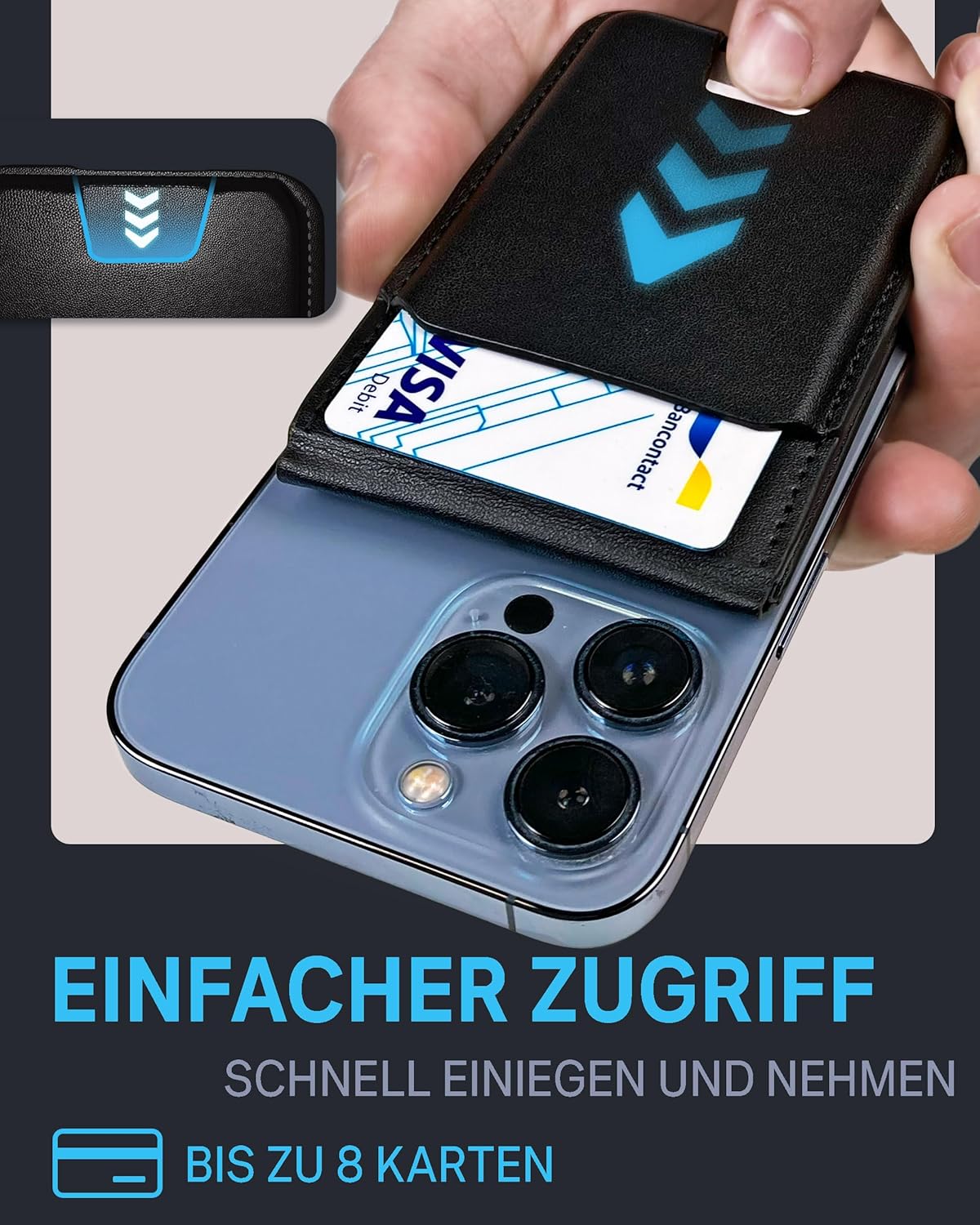
Image 3.3: Cards can be quickly and easily inserted and removed from the wallet.
4. නඩත්තු කිරීම
4.1 පිරිසිදු කිරීම
To clean the vegan leather surface, wipe gently with a soft, damp cloth. Avoid using harsh chemicals or abrasive materials, as these can damage the finish. Ensure the device is dry before use or storage.
4.2 බැටරි සත්කාර
To prolong the life of the power bank's battery, avoid extreme temperatures. Store the device in a cool, dry place. If not used for extended periods, charge the power bank at least once every three months to maintain battery health.
4.3 Card Protection
The Volta wallet includes a special coating to protect your cards from demagnetization. While designed for protection, it is always advisable to keep magnetic cards away from strong external magnetic fields to ensure their longevity.
5. දෝශ නිරාකරණය
5.1 බලශක්ති බැංකුව ආරෝපණය නොවේ
- ආරෝපණ කේබලය බලශක්ති බැංකුවට සහ බල ප්රභවයට ආරක්ෂිතව සම්බන්ධ කර ඇති බවට සහතික වන්න.
- Verify that the power source is active and providing power.
- වෙනස් ආරෝපණ කේබලයක් හෝ බල ඇඩැප්ටරයක් උත්සාහ කරන්න.
5.2 Wireless Charging Not Initiating
- Check if the power bank is sufficiently charged.
- Ensure your smartphone is Magsafe-compatible or has the metal ring correctly applied.
- Verify that the wallet is properly aligned with the charging coil on your phone.
- Remove any thick cases or metallic objects between the phone and the power bank that might interfere with wireless charging.
5.3 Magnetic Attachment is Weak
- Ensure your phone or case is Magsafe-compatible.
- If using the adhesive metal ring, ensure it is securely attached and correctly positioned.
- Avoid placing the wallet over non-magnetic phone cases.
6. පිරිවිතර
| විශේෂාංගය | පිරිවිතර |
|---|---|
| වෙළඳ නාමය | සන්ස්ලයිස් |
| ආදර්ශ අංකය | Volta Brown Powerbank Black |
| මානයන් (L x W x H) | 10 x 6.5 x 2.1 සෙ.මී |
| බර | ග්රෑම් 184 කි |
| බලශක්ති බැංකු ධාරිතාව | 5000mAh (1 Lithium-ion battery included) |
| රැහැන් රහිත ආරෝපණ ප්රතිදානය | 15W දක්වා |
| රැහැන්ගත ආරෝපණ ප්රතිදානය | 5V/2.4A - 9V/2.2A - 12V/1.5A (Up to 18W) |
| කාඩ් කට්ට | 3 |
| Adjustable Stand Angle | 15° සිට 170° දක්වා |
| ද්රව්ය | වීගන් සම් |
| ජල ප්රතිරෝධය | ජල විකර්ෂක |
| ගැලපෙන දුරකථන මාදිලි | iPhone 12, 12 Pro, 12 Pro Max, 12 Mini, 13, 13 Pro, 13 Pro Max, 13 Mini, 14, 14 Pro, 14 Pro Max, 14 Plus, 15, 15 Pro, 15 Pro Max, 15 Plus, 16, 16 Pro, 16 Pro Max, 16 Plus |
7. වගකීම් සහ සහාය
7.1 වගකීම් තොරතුරු
This product comes with a standard manufacturer's warranty. Please refer to the packaging or the official Sunslice webනිශ්චිත වගකීම් නියමයන් සහ කොන්දේසි සඳහා අඩවිය.
7.2 පාරිභෝගික සහාය
For technical assistance, troubleshooting, or any inquiries regarding your Sunslice Volta Magnetic Wallet, please contact Sunslice customer support through their official webවෙබ් අඩවිය හෝ ඔබගේ මිලදී ගැනීම සමඟ සපයා ඇති සම්බන්ධතා තොරතුරු.


