1. හැඳින්වීම
This manual provides detailed instructions for the FINGERS ANC-Paradise TWS Earbuds. Please read this manual carefully before using the product to ensure proper operation and to maximize your listening experience.
The FINGERS ANC-Paradise TWS Earbuds offer high-quality audio with Active Noise Cancellation (ANC) and Surround Noise Cancellation (SNC™) technologies. They feature a sleek design, extended playtime, and intuitive controls for calls and music.
2. පැකේජ අන්තර්ගතය
පහත ලැයිස්තුගත කර ඇති සියලුම අයිතම ඔබේ නිෂ්පාදන පැකේජයේ ඇති බව තහවුරු කර ගන්න:
- 1 x FINGERS ANC-Paradise TWS Earbuds (Charging Case + TWS Pods)
- 1 x USB ආරෝපණ කේබලය
- 2 x Extra Eargels (pairs)
- 1 x ඉක්මන් ආරම්භක මාර්ගෝපදේශය
- 1 x වෙළඳ නාම සටහන
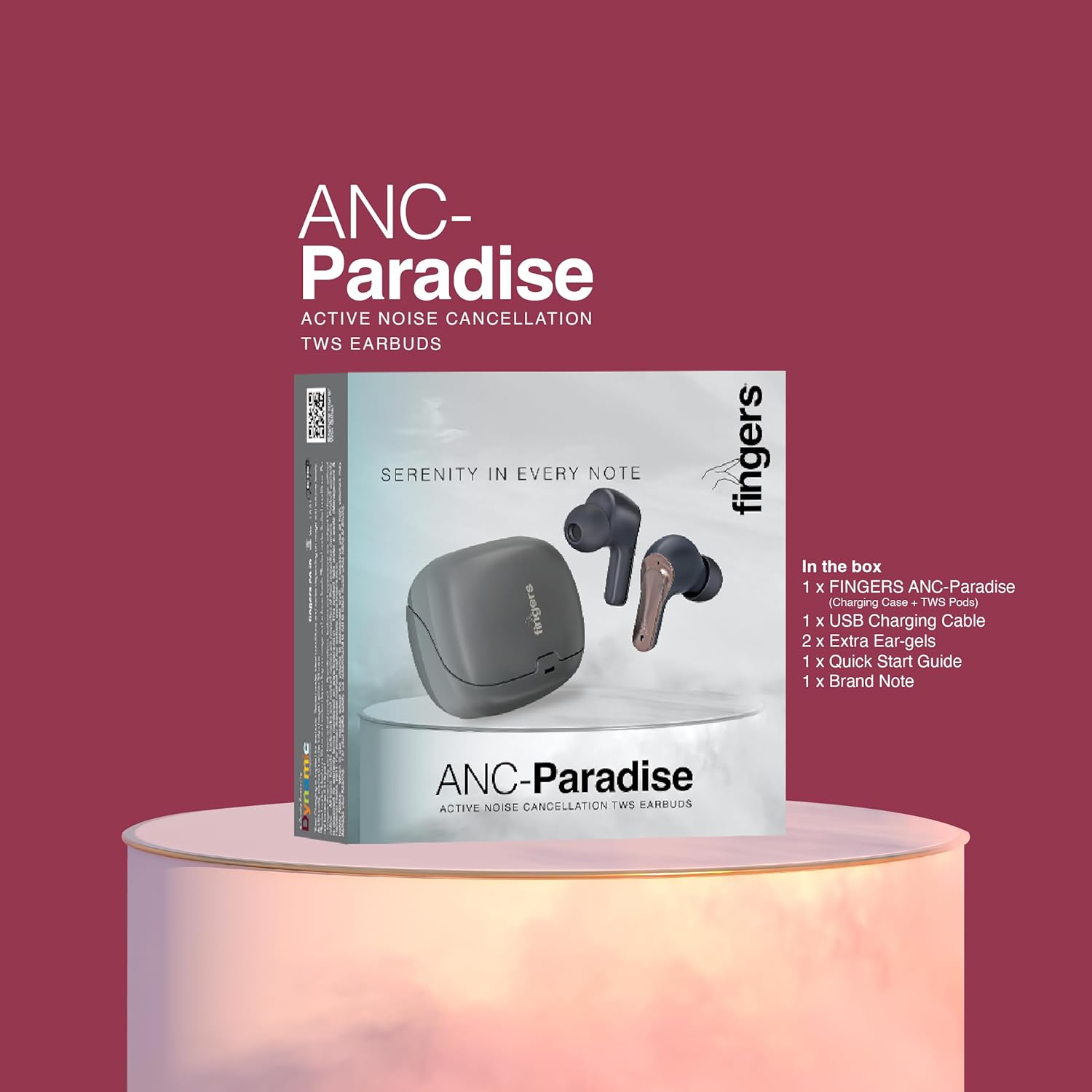
රූපය 2.1: Contents of the FINGERS ANC-Paradise TWS Earbuds package, including earbuds, charging case, USB cable, extra eargels, quick start guide, and brand note.
3. නිෂ්පාදන අවසන්view
The FINGERS ANC-Paradise TWS Earbuds consist of two wireless earbuds and a portable charging case. Each earbud is equipped with a built-in microphone and touch controls.

රූපය 3.1: The FINGERS ANC-Paradise TWS Earbuds shown with their charging case. The earbuds are dark silver and gun metal in color.
4. සැකසුම සහ පළමු භාවිතය
4.1 ඉයර්බඩ් සහ කේස් ආරෝපණය කිරීම
- ඉයර්බඩ් ආරෝපණ පෙට්ටියට දමන්න. ඒවා නිවැරදිව සවි කර ඇති බවට වග බලා ගන්න.
- USB ආරෝපණ කේබලය නඩුවේ ආරෝපණ වරායට සහ බල ප්රභවයකට සම්බන්ධ කරන්න (උදා: USB බිත්ති ඇඩැප්ටරය, පරිගණක USB පෝට් එක).
- නඩුවේ දර්ශක ආලෝකය ආරෝපණ තත්ත්වය පෙන්වයි.
- A 10-minute charge provides approximately 1.5 hours of playtime. A full charge offers up to 32 hours of total playtime with the charging case.

රූපය 4.1: Visual representation of the 32-hour playtime and fast charging capability (10 minutes charge for 1.5 hours playtime).
4.2 බ්ලූටූත් යුගල කිරීම
- ආරෝපණ පෙට්ටිය විවෘත කරන්න. ඉයර්බඩ් ස්වයංක්රීයව යුගල කිරීමේ ප්රකාරයට ඇතුළු වනු ඇත.
- ඔබගේ උපාංගයේ (ස්මාර්ට්ෆෝන්, ටැබ්ලටය, ලැප්ටොප්) බ්ලූටූත් සක්රීය කරන්න.
- ඒ සඳහා සොයන්න available Bluetooth devices and select "FINGERS ANC-Paradise" from the list.
- සම්බන්ධ වූ පසු, ඔබට තහවුරු කිරීමේ ස්වරයක් ඇසෙනු ඇති අතර, ඉයර්බඩ් භාවිතයට සූදානම් වනු ඇත.
- The earbuds can be used as a single unit or as a pair.
5. මෙහෙයුම් උපදෙස්
5.1 ස්පර්ශ පාලන
The earbuds feature intuitive touch controls for managing calls and music playback.
- වාදනය/විරාමය: ඉයර්බඩ් දෙකෙන් එකක් මත එක තට්ටු කරන්න.
- ඊළඟ ධාවන පථය: දකුණු ඉයර්බඩ් එක දෙවරක් තට්ටු කරන්න.
- පෙර ධාවන පථය: වම් ඉයර්බඩ් එක දෙවරක් තට්ටු කරන්න.
- පිළිතුර/අවසන් ඇමතුම: ලැබෙන ඇමතුමක් අතරතුර ඉයර්බඩ් දෙකෙන් එකක් මත එක් වරක් තට්ටු කරන්න.
- ඇමතුම ප්රතික්ෂේප කරන්න: ලැබෙන ඇමතුමක් අතරතුර ඉයර්බඩ් දෙකෙන් එකක් තත්පර 2ක් ඔබාගෙන සිටින්න.
- හ oice සහකාර සක්රිය කරන්න: Triple tap on either earbud (on default OS).

රූපය 5.1: ඉවරයිview of the earbud features including sweat resistance, voice assistant, intuitive touch controls, and flexibility for single or dual earbud use.
5.2 සක්රීය ශබ්ද අවලංගු කිරීම (ANC)
ANC technology reduces ambient noise, providing a more immersive audio experience.
- Enable/Disable ANC: Use the dedicated switch or touch control (refer to quick start guide for specific gesture) to toggle ANC on or off.

රූපය 5.2: The earbuds showcasing the built-in dual microphones, Active Noise Cancellation (ANC) for pure sound, and Surround Noise Cancellation (SNC™) for advanced voice clarity.
5.3 Surround Noise Cancellation (SNC™)
SNC™ technology enhances call clarity by filtering out surrounding ambient noise, focusing on your voice. This feature is automatically active during calls.
5.4 ශබ්ද ප්රයෝග
The earbuds offer three distinct sound effects to customize your listening experience.
- පවතින මාතයන්: Hi-Fi, Bass, Rock.
- මාරු කිරීමේ මාතයන්: Refer to the quick start guide for the specific touch control gesture to cycle through these sound effects.

රූපය 5.3: The earbuds illustrating the three exceptional sound effects: Hi-Fi, Bass, and Rock, allowing users to choose their preferred audio profile.
6. නඩත්තුව සහ රැකවරණය
- පිරිසිදු කිරීම: ඉයර්බඩ් සහ ආරෝපණ පෙට්ටිය පිරිසිදු කිරීමට මෘදු වියළි රෙද්දක් භාවිතා කරන්න. උල්ෙල්ඛ ද්රව්ය හෝ රළු රසායනික ද්රව්ය භාවිතා කිරීමෙන් වළකින්න.
- ජල ප්රතිරෝධය: The earbuds have an IPX4 sweat-resistant rating. This means they are protected from splashing water from any direction. Do not submerge them in water or expose them to heavy rain.
- ගබඩා: භාවිතයේ නොමැති විට, ඉයර්බඩ් ආරක්ෂා කර ගැනීමට සහ ආරෝපණය කර තබා ගැනීමට ඒවායේ ආරෝපණ පෙට්ටියේ ගබඩා කරන්න.
- උෂ්ණත්වය: Avoid exposing the earbuds to extreme temperatures (hot or cold).
7. දෝශ නිරාකරණය
| ගැටලුව | හැකි විසඳුම |
|---|---|
| ඉයර්බඩ් යුගල නොවේ |
|
| එක් ඉයර්බඩ් එකකින් ශබ්දයක් නැත |
|
| ANC ඵලදායී ලෙස ක්රියා නොකරයි |
|
| ඉයර්බඩ් ආරෝපණය නොවේ |
|
8. පිරිවිතර
| විශේෂාංගය | විස්තර |
|---|---|
| මාදිලියේ නම | ANC-Paradise |
| සම්බන්ධතා තාක්ෂණය | රැහැන් රහිත |
| රැහැන් රහිත සන්නිවේදනය | බ්ලූටූත් |
| ශබ්ද පාලනය | සක්රීය ශබ්ද අවලංගු කිරීම (ANC) |
| මයික්රොෆෝන තාක්ෂණය | Dual Mic with SNC™ (Surround Noise Cancellation) |
| බැටරි ආයු කාලය | පැය 32ක් දක්වා (ආරෝපණ නඩුවක් සමඟ) |
| වේගවත් ආරෝපණය | 10 mins charge for 1.5 hours playtime |
| ජල ප්රතිරෝධය | IPX4 දහඩිය ප්රතිරෝධී |
| පාලන ක්රමය | ස්පර්ශය, හඬ සහායක |
| ශබ්ද ප්රයෝග | Hi-Fi, Bass, Rock |
| ගැළපෙන උපාංග | ස්මාර්ට්ෆෝන්, ටැබ්ලට්, ලැප්ටොප් |
| අයිතමයේ බර | ග්රෑම් 43 යි |
| නිෂ්පාදන මානයන් | 1.7 x 2.4 x 3.2 සෙ.මී |
| සම්බාධනය | 32 ඕම් |
| කන් ස්ථානගත කිරීම | කනේ |
| ආකෘති සාධකය | කනේ |
9. වගකීම් සහ සහාය
For warranty information and customer support, please refer to the "Brand Note" included in your package or visit the official FINGERS webඅඩවිය.
You can also contact FINGERS customer service for assistance with product issues or inquiries.
නිෂ්පාදකයා: Dynamic Conglomerate Pvt. Ltd.
මුල් රට: ඉන්දියාව


