1. හැඳින්වීම
This manual provides detailed instructions for the installation, operation, and maintenance of the Axis M3126-LVE Network Surveillance System. Please read this manual thoroughly before using the product to ensure proper functionality and safety. The Axis M3126-LVE is an outdoor-rated, vandal-proof, and weather-resistant network camera designed for reliable surveillance.
2 ආරක්ෂිත තොරතුරු
නිෂ්පාදනයට වන හානිය වැළැක්වීමට සහ පරිශීලක ආරක්ෂාව සහතික කිරීමට පහත ආරක්ෂක පියවරයන් නිරීක්ෂණය කරන්න:
- ස්ථාපනය: Installation must be performed by qualified personnel in accordance with all local codes and regulations.
- බලශක්ති ප්රභවය: Use only the specified Power over Ethernet (PoE) source. Do not use unauthorized power adapters.
- පරිසරය: Although the camera is weather-resistant, avoid direct exposure to extreme conditions beyond its operating specifications.
- පිරිසිදු කිරීම: පිරිසිදු කිරීමට පෙර විදුලිය විසන්ධි කරන්න. මෘදු, වියළි රෙද්දක් භාවිතා කරන්න. දියර හෝ එයරෙසෝල් පිරිසිදු කරන්නන් භාවිතා නොකරන්න.
- සේවා: මෙම නිෂ්පාදනය ඔබම සේවය කිරීමට උත්සාහ නොකරන්න. සියලුම සේවා සුදුසුකම් ලත් සේවකයින් වෙත යොමු කරන්න.
3. පැකේජ අන්තර්ගතය
සියලුම අයිතම පැකේජයේ ඇති බව තහවුරු කරගන්න:
- Axis M3126-LVE Network Surveillance Camera
- ස්ථාපන මාර්ගෝපදේශය
- සවිකරන උපාංග
- සරඹ සැකිල්ල
- Resistorx T20 tool
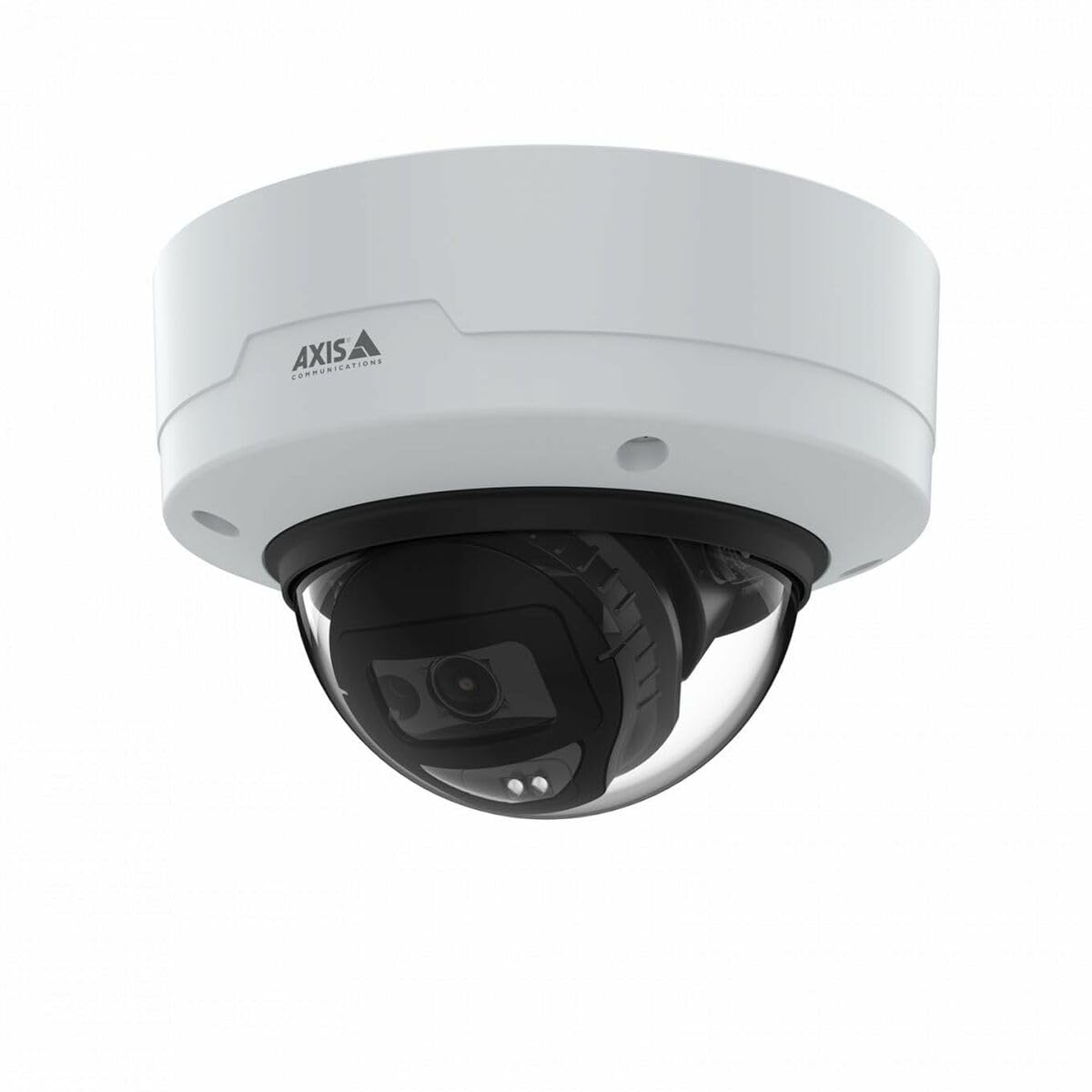
Image: The Axis M3126-LVE Network Surveillance System, a white dome camera, shown with its included mounting accessories.
4. පිහිටුවීම සහ ස්ථාපනය
4.1 කැමරාව සවි කිරීම
The Axis M3126-LVE is designed for ceiling mount installation in outdoor environments. Ensure the mounting surface is strong enough to support the camera's weight (approximately 1.1 kg / 2.42 lbs).
- ස්ථානය තෝරන්න: Choose a suitable outdoor location for optimal surveillance coverage, considering power and network cable access.
- මතුපිට සකස් කරන්න: Use the provided drill template to mark and drill holes for mounting screws and cable routing.
- ආරක්ෂිත සවිකිරීම: Attach the camera's mounting base securely to the ceiling using appropriate screws and anchors.
- කේබල් සම්බන්ධ කරන්න: Route the Ethernet cable through the designated opening. Connect the Ethernet cable to the camera's M12 connection port. This camera supports Power over Ethernet (PoE) for both power and data transmission.
- කැමරා ශරීරය අමුණන්න: Secure the camera body to the mounting base. Ensure all seals are properly seated to maintain weather resistance.
4.2 Network Connection and Initial Configuration
The camera connects to your network via a wired PoE Ethernet connection.
- බල ගැන්වීම: Once connected to a PoE-enabled network switch or injector, the camera will power on automatically.
- කැමරාව සොයා ගන්න: Use the Axis IP Utility or Axis Device Manager software (available on the Axis Communications website) to discover the camera on your network.
- IP ලිපිනය පවරන්න: Assign a static IP address or configure DHCP settings as required by your network infrastructure.
- ප්රවේශය Web අතුරු මුහුණත: a විවෘත කරන්න web browser and enter the camera's IP address to access its web අතුරු මුහුණත.
- මූලික පිවිසුම: Follow the on-screen prompts to set a strong password for the administrator account.
- මූලික සැකසුම්: Configure essential settings such as date, time, and video resolution (up to 4 MP, 2688 x 1512).
5. කැමරාව ක්රියාත්මක කිරීම
The Axis M3126-LVE offers advanced surveillance capabilities. Access the camera's web interface for full control and configuration.
5.1 සජීවී View සහ පටිගත කිරීම
- සජීවීව View: වෙතින් web interface, navigate to the "Live View" section to see real-time video feed.
- වීඩියෝ ගුණාත්මකභාවය: Adjust video stream settings (resolution, frame rate, compression using MJPEG, H.264, H.265, Zipstream) to optimize for network bandwidth and storage.
- පටිගත කිරීම: Configure recording schedules, motion detection triggers, and storage locations (e.g., network-attached storage, SD card if supported).
5.2 උසස් විශේෂාංග
- IR රාත්රී දැක්ම: The camera automatically switches to infrared (IR) night vision in low-light conditions, providing clear black and white video.
- පුළුල් ගතික පරාසය (WDR): WDR technology ensures clear images even in scenes with both very bright and very dark areas.
- ශ්රව්ය: The camera supports audio input for surveillance with sound. Configure audio settings in the web අතුරු මුහුණත.
- සිදුවීම් කළමනාකරණය: Set up event triggers (e.g., motion detection, tampering alarm) and corresponding actions (e.g., send email, start recording, upload video).
6. නඩත්තු කිරීම
නිතිපතා නඩත්තු කිරීම ඔබේ නිරීක්ෂණ පද්ධතියේ ප්රශස්ත ක්රියාකාරිත්වය සහ කල්පැවැත්ම සහතික කරයි.
- කාච පිරිසිදු කිරීම: Periodically clean the camera lens with a soft, lint-free cloth. For stubborn dirt, use a mild lens cleaning solution. Do not use abrasive materials.
- ස්ථිරාංග යාවත්කාලීන කිරීම්: Regularly check the Axis Communications webස්ථිරාංග යාවත්කාලීන කිරීම් සඳහා අඩවිය. ස්ථිරාංග යාවත්කාලීනව තබා ගැනීම නවතම විශේෂාංග, ආරක්ෂක පැච් සහ කාර්ය සාධන වැඩිදියුණු කිරීම් වෙත ප්රවේශය සහතික කරයි.
- කේබල් පරීක්ෂාව: Periodically inspect all cables for signs of wear or damage, especially in outdoor installations.
- සවිකිරීමේ ආරක්ෂාව: Verify that the camera remains securely mounted and that all screws are tight.
7. දෝශ නිරාකරණය
This section addresses common issues you might encounter with the Axis M3126-LVE.
| ගැටලුව | විය හැකි හේතුව | විසඳුම |
|---|---|---|
| වීඩියෝ සංග්රහයක් නැත | No power; Network cable disconnected; Incorrect IP address. | Check PoE connection; Verify network cable is securely connected; Confirm IP address and network settings. |
| රූපයේ ගුණාත්මකභාවය දුර්වලයි | Dirty lens; Incorrect video settings; Insufficient lighting. | Clean the camera lens; Adjust resolution, compression, and WDR settings; Ensure IR night vision is active in low light. |
| ප්රවේශ විය නොහැක web අතුරු මුහුණත | Incorrect IP address; Network connectivity issue; Firewall blocking access. | Verify IP address; Check network cable and switch; Temporarily disable firewall for testing; Use Axis IP Utility to find camera. |
| Camera offline intermittently | Unstable network connection; Faulty PoE injector/switch; Loose cable connection. | Check network infrastructure; Test PoE equipment; Secure all cable connections. |
8. පිරිවිතර
Key technical specifications for the Axis M3126-LVE Network Surveillance System:
- මාදිලියේ නම: AXIS M3126-LVE
- කොටස අංකය: 02918-001
- ගෘහස්ථ/ එළිමහන් භාවිතය: එළිමහන්
- සම්බන්ධතා ප්රොටෝකෝලය: ඊතර්නෙට්
- සවිකිරීමේ වර්ගය: සිවිලින් මවුන්ට්
- වර්ණය: සුදු
- අයිතමයේ බර: කිලෝග්රෑම් 1.1 (රාත්තල් 2.42)
- වීඩියෝ ග්රහණ ආකෘතිය: MPEG-4, H.264, H.265, MJPEG
- නිෂ්පාදකයා: අක්ෂය සන්නිවේදනය
- විශේෂ ලක්ෂණ: 4 MP HD, IR night vision, WDR (Wide Dynamic Range), Zipstream, rugged weather/vandal resistance
- සම්බන්ධතා තාක්ෂණය: Wired PoE Ethernet, extensive network protocol support
- විභේදනය: Up to 2688 x 1512 (4 MP)
- ඇතුළත් සංරචක: Camera, Mounting Accessories
- අවශ්ය බැටරි: නැත
- නිර්දේශිත භාවිතයන්: Outdoor/indoor security, wide-area monitoring, day/night surveillance, smart detection
9. වගකීම් සහ සහාය
For detailed warranty information, please refer to the official Axis Communications website or the warranty card included with your product. Axis Communications provides technical support and resources for their products.
මාර්ගගත සහාය: Visit the official Axis Communications support portal for FAQs, documentation, and software downloads.
සහාය අමතන්න: For direct assistance, contact Axis Communications customer support through their webවෙබ් අඩවිය හෝ ඔබේ නිෂ්පාදන ලියකියවිලිවල සපයා ඇති සම්බන්ධතා තොරතුරු.
සටහන: Protection plans may be available from third-party providers. These are separate from the manufacturer's warranty.


