1. හැඳින්වීම
Thank you for choosing the MOVA E20 Plus Robot Vacuum and Mop. This device is designed to provide efficient and convenient floor cleaning with its advanced features, including an auto-emptying station, precise LDS navigation, powerful suction, and integrated vacuuming and mopping capabilities. Please read this manual thoroughly before use to ensure proper operation and maintenance.

Image: The MOVA E20 Plus robot vacuum and its auto-emptying station, highlighting its automatic features.
2 ආරක්ෂිත තොරතුරු
To reduce the risk of injury or damage, read these safety instructions carefully and keep them for future reference. This appliance is for household use only.
- ළමයින්ට රොබෝ යන්ත්රය සමඟ සෙල්ලම් කිරීමට ඉඩ නොදෙන්න. රොබෝ යන්ත්රය ක්රියාත්මක වන විට ළමයින් සහ සුරතල් සතුන් අධීක්ෂණය කරන්න.
- බලය පරිමාව සහතික කරන්නtage වෙළුමට ගැලපේtage marked on the charging dock.
- තෙත් පරිසරයක හෝ තෙත් මතුපිටක රොබෝව භාවිතා නොකරන්න.
- හිසකෙස්, ලිහිල් ඇඳුම්, ඇඟිලි සහ ශරීරයේ සියලුම කොටස් විවෘත කිරීම් සහ චලනය වන කොටස් වලින් ඈත් කරන්න.
- සිගරට්, ගිනිකූරු හෝ උණු අළු වැනි දැවෙන හෝ දුම් පානය කරන කිසිවක් ගන්න එපා.
- දූවිලි බඳුනක් සහ / හෝ පෙරහන් නොමැතිව භාවිතා නොකරන්න.
- Avoid using the robot to pick up large debris, sharp objects, or liquids.
- විදුලි රැහැනට හානි සිදුවුවහොත්, අනතුරක් වළක්වා ගැනීම සඳහා නිෂ්පාදකයා හෝ එහි සේවා නියෝජිතයා විසින් එය ප්රතිස්ථාපනය කළ යුතුය.
3. පැකේජ අන්තර්ගතය
ඇසුරුම් ඉවත් කිරීමෙන් පසු සියලුම සංරචක පවතින බවත් හොඳ තත්ත්වයේ පවතින බවත් තහවුරු කර ගන්න.
- Robot Vacuum (x1)
- Auto-Emptying Base (x1)
- Mop Pad Holder (x1)
- පැති බුරුසුව (x1)
- පරිශීලක අත්පොත (x1)
- Dust Bag (pre-installed in base)

Image: A visual representation of the MOVA E20 Plus robot, auto-emptying base, mop pad holder, side brush, and user manual.
4. නිෂ්පාදන අවසන්view
ප්රධාන ලක්ෂණ:
- Auto-Emptying Base: Enjoy hands-free cleaning as the robot automatically empties dust and debris into a 4L sealed bag, providing up to 90 days of maintenance-free use.
- Pathfinder Smart Technology: The vacuum precisely maps your interior, even in the dark, using laser sensors for a smooth and uninterrupted cleaning session.
- 5000 Pa Vormax Suction: Powerful 5000 Pa suction adapts quickly to hard floors, carpets, and rugs, easily removing stubborn dirt and reaching hidden corners.
- 2-in-1 Vacuuming and Mopping: The 2-in-1 design combines vacuuming and mopping with a large 245 ml water tank. Select one of three water flow levels for spotless floors throughout your home.
- නම්යශීලී යෙදුම් පාලනය: Customize your cleaning experience with adjustable modes, suction levels, and schedules. Save up to 3 floor plans, define no-go zones, and set virtual boundaries for targeted cleaning control.
සංරචක:
The MOVA E20 Plus consists of the robot vacuum and the auto-emptying charging base.

රූපය: සවිස්තරාත්මක view of the robot vacuum docking with its auto-emptying station, illustrating the dust collection process.

Image: The robot vacuum navigating a room, demonstrating its Pathfinder smart technology for precise mapping.

Image: An illustration showing the powerful 5000 Pa suction of the robot vacuum, effectively lifting debris from the floor.

Image: The robot vacuum simultaneously vacuuming and mopping, demonstrating its dual cleaning capability.
5. පිහිටුවීම
5.1 ඇසිරීම සහ ස්ථානගත කිරීම
- Remove all packaging materials from the robot and the auto-emptying base.
- Place the auto-emptying base against a wall in an open area, ensuring there are no obstacles within 1.5 meters (5 feet) in front and 0.5 meters (1.6 feet) on either side.
- Connect the power cord to the base and plug it into a wall outlet. Ensure the base is powered on.
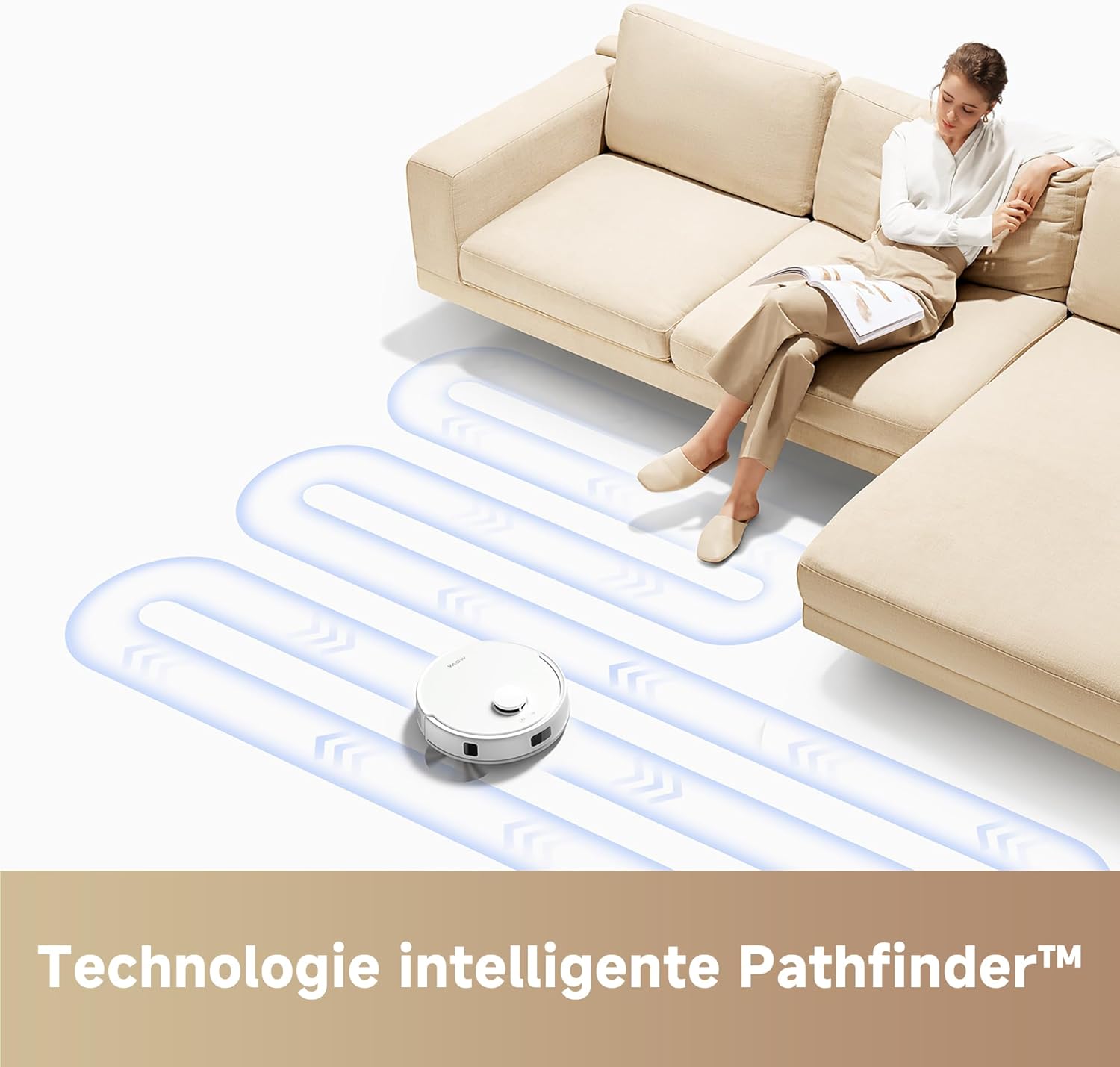
Image: The MOVA E20 Plus robot vacuum positioned next to its auto-emptying base, ready for initial setup.
5.2 මූලික ආරෝපණය
Place the robot onto the charging contacts of the auto-emptying base. The robot will automatically align and begin charging. For first-time use, fully charge the robot before operation (approximately 4-5 hours).
5.3 යෙදුම් බාගත කිරීම සහ සම්බන්ධතාවය
- Download the "MOVA" app from your smartphone's app store (iOS or Android).
- Open the app and follow the on-screen instructions to create an account and add your MOVA E20 Plus device.
- Ensure your Wi-Fi network is 2.4 GHz for successful connection.
6. මෙහෙයුම් උපදෙස්
6.1 පිරිසිදු කිරීමේ චක්රයක් ආරම්භ කිරීම
- රොබෝ හරහා: Press the power button on the robot once to start a cleaning cycle. Press again to pause.
- යෙදුම හරහා: Open the MOVA app, select your device, and tap "Start Cleaning."
6.2 Using the Mopping Function
- Fill the water tank with clean water. Do not use detergents or cleaning solutions not approved by MOVA.
- Attach the mop pad to the mop pad holder and slide it into the designated slot on the robot.
- In the app, select the desired water flow level (low, medium, high) for mopping.
- පිරිසිදු කිරීමේ චක්රයක් ආරම්භ කරන්න. රොබෝවරයා එකවර රික්ත කර පිරිසිදු කරනු ඇත.
6.3 යෙදුම් විශේෂාංග
The MOVA app provides comprehensive control over your robot vacuum:
- සිතියම් කළමනාකරණය: View and edit floor maps, create virtual walls, and set no-go zones.
- පිරිසිදු කිරීමේ මාදිලි: Choose from various cleaning modes (e.g., Auto, Spot, Zone, Edge).
- චූෂණ බලය සහ ජල ප්රවාහය: Adjust suction strength and water output for mopping.
- උපලේඛනගත කිරීම: Set cleaning schedules for automated cleaning.
- හඬ පාලනය: Compatible with Amazon Echo (Alexa) for voice commands.

Image: A smartphone screen displaying the MOVA app interface, showing options for cleaning modes, suction power, and water flow settings.
7. නඩත්තු කිරීම
Regular maintenance ensures optimal performance and extends the lifespan of your MOVA E20 Plus.
7.1 Auto-Emptying Dust Bag
The 4L dust bag in the auto-emptying base typically lasts up to 90 days, depending on usage. Replace the dust bag when the indicator light on the base or the app notifies you.
- Open the top cover of the auto-emptying base.
- සම්පූර්ණ දූවිලි බෑගය ප්රවේශමෙන් ඉවත් කර බැහැර කරන්න.
- Insert a new dust bag, ensuring it is properly seated.
- ඉහළ කවරය වසා දමන්න.
7.2 Cleaning the Dust Bin and Filters (Robot)
Even with auto-emptying, it's recommended to periodically check and clean the robot's internal dust bin and filters.
- Open the robot's top cover and remove the dust bin.
- කුණු බඳුන හිස් කරන්න.
- Remove the filter assembly and tap it gently to remove dust. Rinse the filter with water if necessary, and ensure it is completely dry before re-inserting.
- Reassemble the dust bin and place it back into the robot.
7.3 පිරිසිදු කිරීමේ බුරුසු
- ප්රධාන බුරුසුව: Remove the main brush cover and lift out the brush. Use the cleaning tool to cut and remove any tangled hair or debris.
- පැති බුරුසු: Unscrew the side brush and remove any tangled hair. Reattach securely.
7.4 සංවේදක පිරිසිදු කිරීම සහ සම්බන්ධතා ආරෝපණය කිරීම
Wipe all sensors (cliff sensors, wall sensor, LDS sensor window) and charging contacts on both the robot and the base with a clean, dry cloth.
8. දෝශ නිරාකරණය
If you encounter issues with your MOVA E20 Plus, refer to the following table for common problems and solutions.
| ගැටලුව | විය හැකි හේතුව | විසඳුම |
|---|---|---|
| රොබෝවරයා සක්රිය නොවේ. | බැටරිය අඩුයි; විදුලිය විසන්ධි කර ඇත. | Place robot on charging base; ensure power switch is on. |
| Robot cannot return to charging base. | Charging base obstructed; robot too far from base. | Clear obstacles around the base; manually place robot closer to the base. |
| චූෂණ බලය දුර්වලයි. | Dust bin full; filter clogged; main brush tangled. | Empty dust bin; clean/replace filter; clean main brush. |
| Mopping function is not working. | Water tank empty; mop pad dry; water flow setting too low. | Fill water tank; wet mop pad; adjust water flow in app. |
| යෙදුම් සම්බන්ධතාවය අසාර්ථක විය. | වැරදි Wi-Fi මුරපදය; 5 GHz Wi-Fi ජාලය; රොබෝවරයා රවුටරයෙන් ඉතා දුරින්. | Verify Wi-Fi password; ensure 2.4 GHz network; move robot closer to router. |
9. පිරිවිතර
| විශේෂාංගය | විස්තර |
|---|---|
| වෙළඳ නාමය | මෝවා |
| ආදර්ශ අංකය | RLE22GD |
| නිෂ්පාදන මානයන් (L x W x H) | 32 x 32 x 9.6 cm (12.6 x 12.6 x 3.8 අඟල්) |
| අයිතමයේ බර | 5.41 kg (රාත්තල් 11.9) |
| ජල ටැංකි ධාරිතාව | මිලි ලීටර් 300 යි |
| වෙළුමtage | වෝල්ට් 14.4 |
| ශබ්ද මට්ටම | ඩෙසිබල් 75 යි |
| බැටරි ආයු කාලය | 2 hours and 15 minutes (135 minutes) |
| බැටරි වර්ගය | 1 ලිතියම්-අයන (ඇතුළත්) |
| චූෂණ බලය | 5000 Pa |
| සංචාලන වර්ගය | Precision Laser Mapping and Navigation (LDS) |
| විශේෂ ලක්ෂණ | Low Noise, Wet/Dry Cleaning, Smart Mop Lifting, Logical Navigation, Selective Room Cleaning, Wireless, Obstacle Avoidance |
| පෙරහන් වර්ගය | සුළි සුළඟ |
| ගැළපුම | ඇමසන් එකෝ (ඇලෙක්සා) |

Image: An illustration highlighting the 3200 mAh battery capacity of the MOVA E20 Plus, capable of cleaning up to 175 m² on a single charge.
10. වගකීම් සහ සහාය
MOVA offers a 3-year warranty for quality and reliability. Please refer to the official MOVA website for detailed warranty information and terms and conditions. Some products and parts may not be covered.
For technical support, troubleshooting assistance, or to purchase replacement parts, please visit the official MOVA webවෙබ් අඩවිය හෝ ඔවුන්ගේ පාරිභෝගික සේවාව අමතන්න.

Image: The MOVA brand logo, representing the manufacturer.

Image: A graphic indicating a 3-year warranty for MOVA products, emphasizing quality and reliability.


