1. නිෂ්පාදන අවසන්view
The MILESEEY D5-APP-US is a high-precision laser distance meter designed for various measurement tasks. It features smart app connectivity, an electronic angle sensor, and multiple measurement modes for efficiency and accuracy.
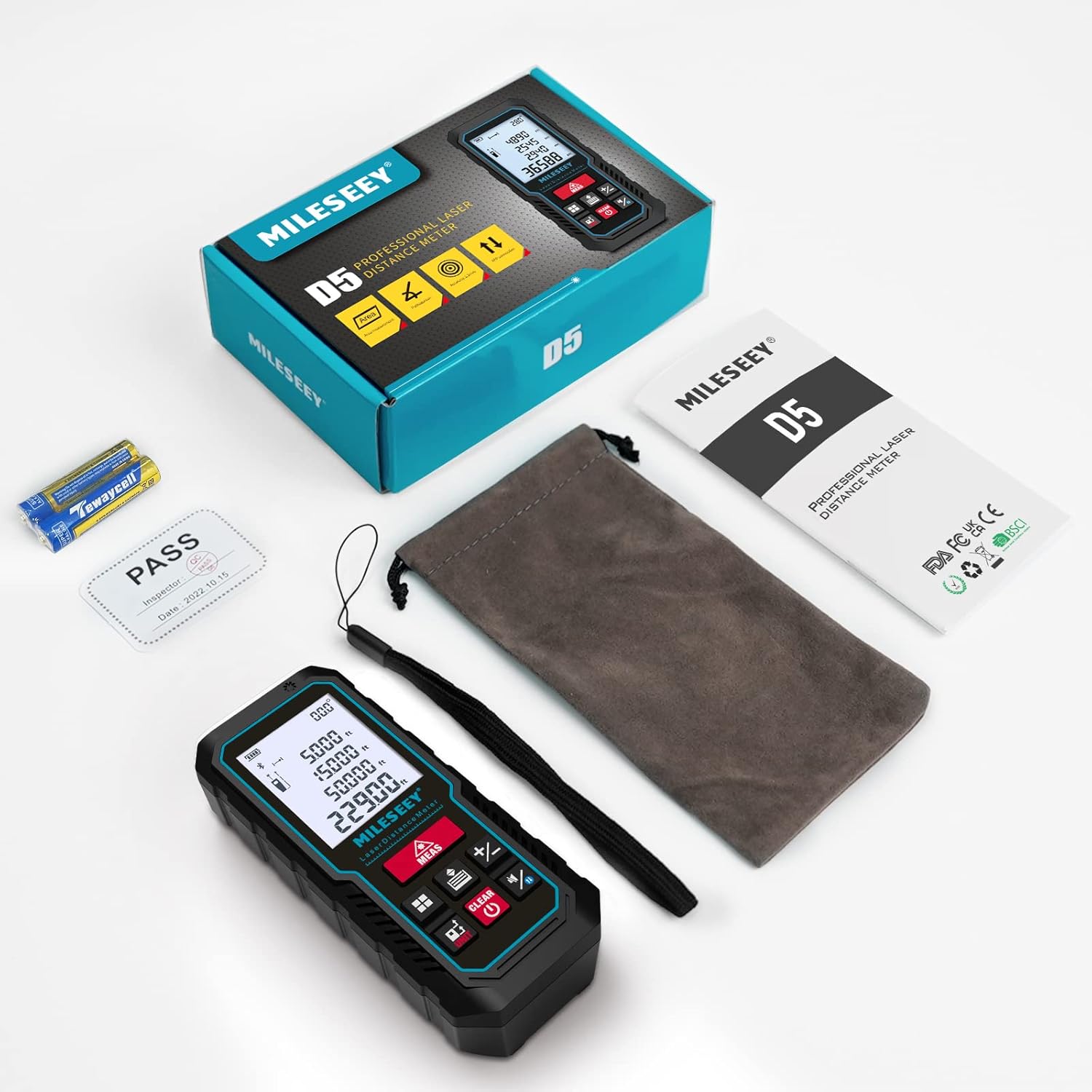
Figure 1: MILESEEY D5-APP-US Laser Measuring Tool and included accessories. The package contains the laser measure, a portable bag, a portable bracelet, a user manual, and 2 x 1.5V AAA batteries.
2. පිහිටුවීම
2.1 බැටරි ස්ථාපනය
The device requires 2 x 1.5V AAA alkaline batteries. Ensure correct polarity when inserting the batteries into the compartment located on the back of the device.
2.2 බලය සක්රිය / අක්රිය
උපාංගය ක්රියාත්මක කිරීමට, ඔබන්න MEAS button. The laser will stand by for measurement. To power off, long-press the අක්රිය/පැහැදිලි button. The device will automatically shut off after 180 seconds of inactivity to conserve power.
2.3 ඒකක මාරු කිරීම
To switch measurement units (M/FT/IN), long-press the ඒකකය button. The device supports various units including meters, feet, inches, and fractional inches. For area and volume measurements, only m² / m³ and ft² / ft³ are available.
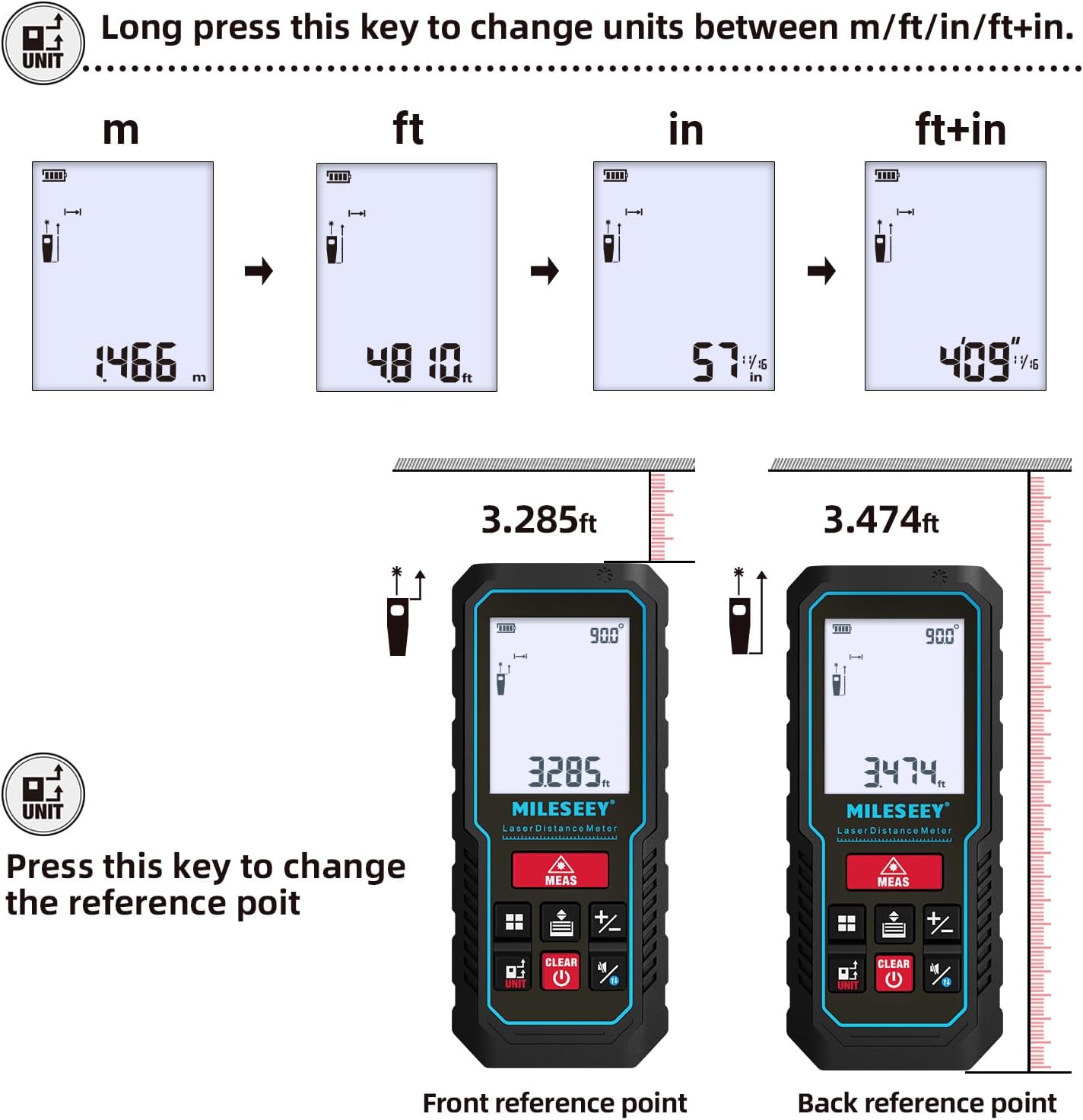
Figure 2: Instructions for changing measurement units and setting reference points. Long-press the UNIT button to cycle through units (m, ft, in, ft+in). Short-press the UNIT button to change the reference point between front and back.
2.4 යොමු ලක්ෂ්ය සැකසුම
The default reference point is the end of the device. To change the reference point (front or back), short-press the ඒකකය button. This is crucial for accurate measurements depending on where the device is placed.
2.5 Buzzer On/Off
To turn the buzzer sound on or off, long-press the sound button. A speaker icon with a cross will appear on the display when the buzzer is off.
2.6 Smart APP Connectivity
The MILESEEY D5-APP-US syncs with the "Smart Life" app for real-time data transfer and storage of up to 1000 sets. The app allows you to create 2D floor plans or annotate images with measurements.
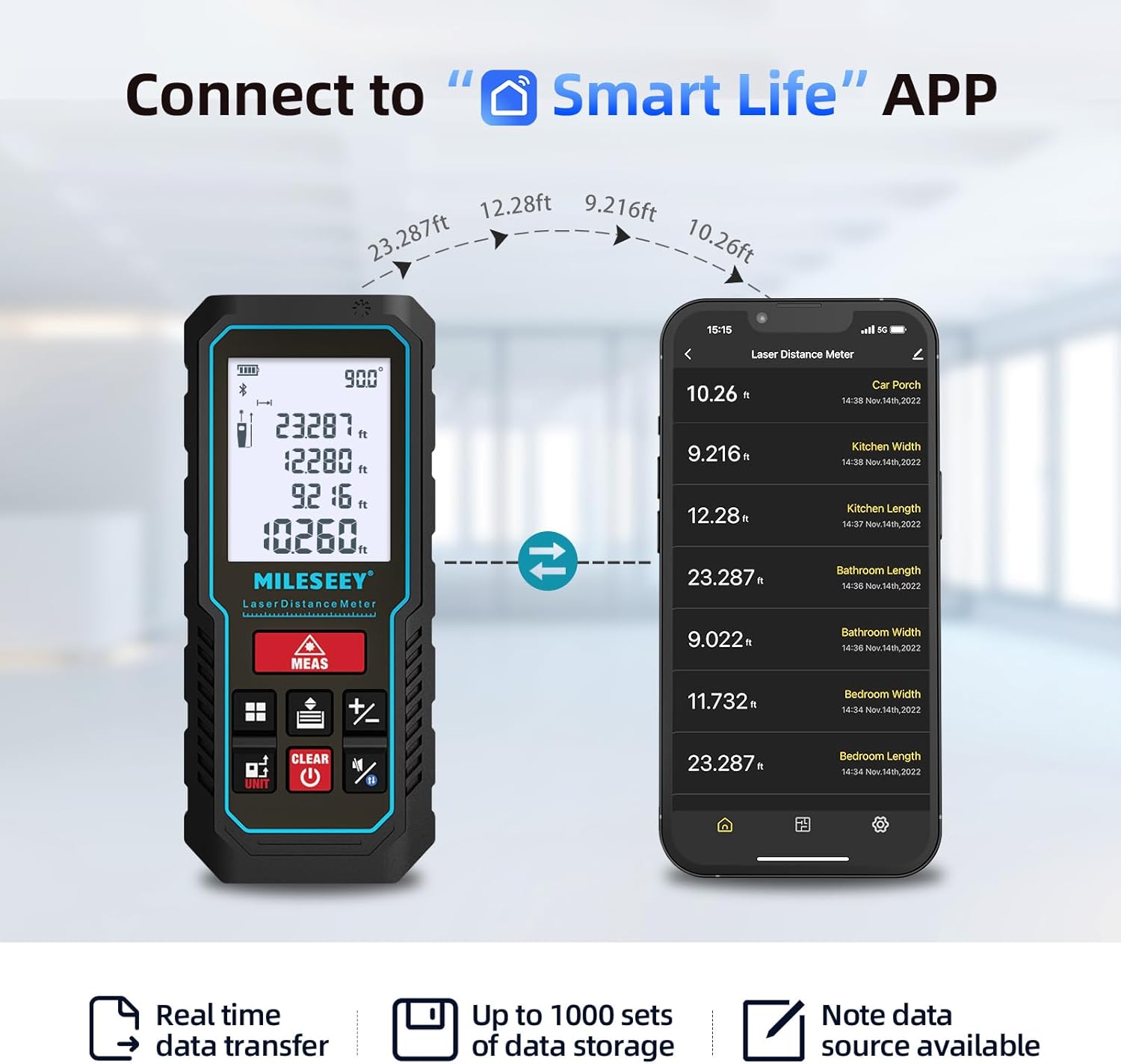
Figure 3: The laser measuring tool connected to the Smart Life app, showing real-time data transfer and storage capabilities.

Figure 4: The Smart Life app allows users to draw on pictures or create hand-drawn floor plans with integrated measurements.
Video 1: This video demonstrates how the Huepar (similar brand) app works with a laser measuring tool, showcasing features like real-time data transfer and floor plan creation. This functionality is comparable to the MILESEEY D5-APP-US with the Smart Life app.
3. මෙහෙයුම් මාතයන්
3.1 තනි මිනුම්
ඔබන්න MEAS ලේසර් සක්රිය කිරීමට බොත්තම වරක් ඔබන්න. තනි දුර මිනුමක් ගැනීමට එය නැවත ඔබන්න. ප්රතිඵලය තිරය මත දිස්වනු ඇත.
3.2 අඛණ්ඩ මිනුම්
දිගු-ඔබන්න MEAS button for 2-3 seconds to enter continuous measurement mode. The device will continuously measure and display the maximum, minimum, and current values. Short-press MEAS again to stop and display the final data.
3.3 ප්රදේශය මැනීම
ඔබන්න මාදිලිය button until the area icon appears. Take two consecutive measurements (length and width). The device will automatically calculate and display the area.
3.4 පරිමාව මැනීම
ඔබන්න මාදිලිය ශබ්ද නිරූපකය දිස්වන තුරු බොත්තම ඔබාගෙන සිටින්න. අඛණ්ඩව මිනුම් තුනක් (දිග, පළල සහ උස) ගන්න. උපාංගය ස්වයංක්රීයව පරිමාව ගණනය කර පෙන්වනු ඇත.
3.5 Pythagorean Measurement (Indirect Length)
The device supports 2-point and 3-point Pythagorean measurements for indirect length calculations. Press the මාදිලිය button until the desired Pythagorean icon appears. Follow the on-screen prompts to take the required measurements. For best accuracy, especially with handheld measurements, using a tripod is recommended.
Video 2: This video provides a detailed guide on various measurement methods for a laser measuring tool, including single, continuous, area, volume, and Pythagorean measurements. This is directly applicable to the MILESEEY D5-APP-US.
3.6 එකතු කිරීම සහ අඩු කිරීම
To add or subtract measurements, take the first measurement, then press the + or - button. Take the next measurement, and the result of the operation will be displayed. This function can be used for length, area, and volume calculations.
3.7 ඉලෙක්ට්රොනික කෝණ සංවේදකය
The device features an advanced electronic angle sensor that provides real-time angle display. This allows for faster and more accurate measurements compared to traditional bubble levels, especially for indirect height and distance calculations.
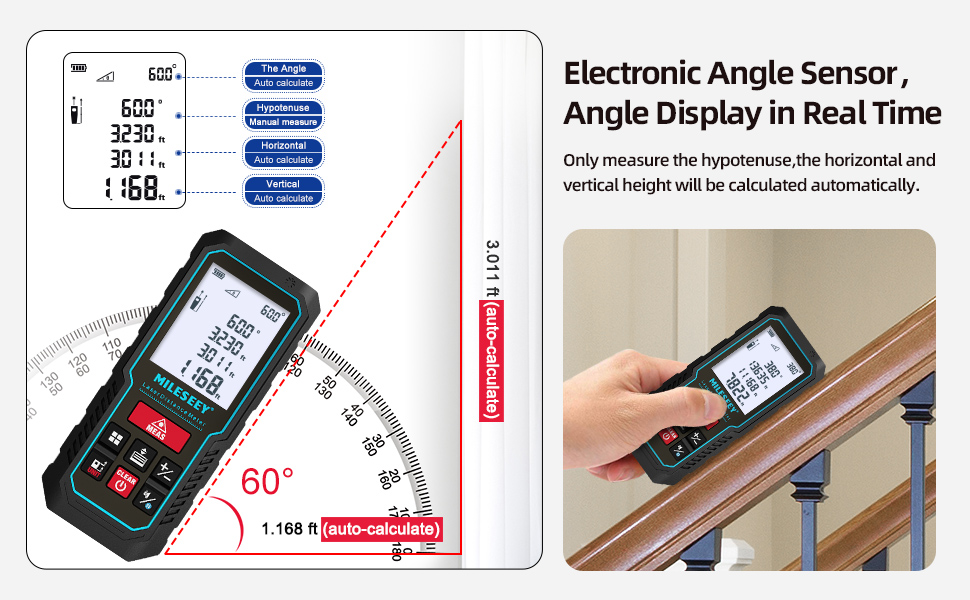
Figure 5: The electronic angle sensor provides real-time angle display, enhancing accuracy for various measurements.
4. නඩත්තු කිරීම
4.1 Accuracy Check
To check the accuracy of the measuring tool, select a permanently unchangeable indoor measuring section (approx. 9.8 to 32 ft or 3 to 10 m long) with weak backlighting and a smooth, reflective target area (e.g., a white-painted wall). Measure the distance 10 times in succession. The deviation of individual measurements from the average value must not exceed ±0.12 in (±2 mm). Record these measurements to compare accuracy at a later date.
4.2 සාමාන්ය රැකවරණය
Keep the device clean and dry. Avoid exposing it to extreme temperatures or direct sunlight for extended periods. The device has an IP54 rating, indicating protection against dust and splashing water, but it is not fully waterproof.

Figure 6: The device features an IP54 rating for dust and splash resistance.
5. දෝශ නිරාකරණය
The device displays error codes for various issues. Refer to the table below for common error codes and their corrective measures.
| දෝෂ කේතය | හේතුව | නිවැරදි කිරීමේ මිනුම |
|---|---|---|
| දෝෂය 10 | බැටරි ගොඩක් අඩුයි | Change batteries or charge the device |
| දෝෂය 15 | පරාසයෙන් පිටත | පරාසය තුළ ඉලක්කය මැනීම |
| දෝෂය 16 | Received signal too weak and measuring time too long | Use high reflectivity reflector |
| දෝෂය 18 | පසුබිම් දීප්තිය ඉතා ඉහළයි | Use low reflectivity reflector |
| දෝෂය 26 | Out of the device's digital display range | Switch units or measure within the digital display range |
6. පිරිවිතර
| විශේෂාංගය | පිරිවිතර |
|---|---|
| මිනුම් පරාසය | අඩි 229 දක්වා |
| නිරවද්යතාව | ± 2 මි.මී |
| මිනුම් වේගය | තත්පර 0.5 යි |
| කෝණ සංවේදකය | Electronic, real-time display |
| ඒකක | Meters (M), Feet (FT), Inches (IN) |
| ප්රදර්ශනය කරන්න | 2" Large Easy Read Backlit LCD |
| යෙදුම් සම්බන්ධතාව | Smart Life app (data transfer, floor plans, image annotation) |
| දත්ත ගබඩා කිරීම | Up to 1000 sets (via app), 30 sets (on device) |
| ස්වයංක්රීයව වසා දැමීම | තත්පර 180 ක් අක්රිය වීම |
| බැටරි වර්ගය | 2 x 1.5V AAA ක්ෂාරීය බැටරි |
| ද්රව්ය | ඇක්රිලෝනිට්රයිල් බුටැඩීන් ස්ටයිරීන් |
| මානයන් | 2.49 x 11 x 4.55 සෙ.මී |
| බර | 200 ග්රෑම් |
| ජල ප්රතිරෝධය | Not Water Resistant (IP54 dust and splash resistant) |
7. වගකීම් සහ සහාය
The MILESEEY D5-APP-US Laser Measuring Tool comes with a 2-year warranty. For technical support or warranty claims, please refer to the contact information provided in the product packaging or on the official MILESEEY webඅඩවිය.


