1. හැඳින්වීම
ස්තූතියි, උදව් කළාටasing the VANBAR BR01 Motorcycle Drive Recorder. This manual provides detailed instructions for the proper installation, operation, and maintenance of your device. Please read this manual thoroughly before use to ensure optimal performance and safety.
2 ආරක්ෂිත තොරතුරු
- Always ensure the device is securely mounted and all cables are properly routed to avoid interference with motorcycle operation.
- Do not attempt to disassemble or modify the device. This may void the warranty and pose a safety risk.
- Ensure all connections are waterproofed as specified, especially in wet conditions.
- This product is designed for use with a dedicated step-down cable for power supply. Do not attempt to power it via a standard USB cable.
- Operate the device only when it is safe to do so. Avoid distractions while riding.
3. පැකේජ අන්තර්ගතය
පහත ලැයිස්තුගත කර ඇති සියලුම අයිතම ඔබේ පැකේජයට ඇතුළත් කර ඇත්දැයි කරුණාකර පරීක්ෂා කරන්න:
| අයිතමය | ප්රමාණය | විස්තරය |
|---|---|---|
| Main Display Unit (Drive Recorder) | 1 | 6.25-inch touchscreen display. |
| ඉදිරිපස කැමරාව | 1 | FHD 1080P recording. |
| පසුපස කැමරාව | 1 | FHD 1080P recording. |
| Main Unit Bracket | 1 | For mounting the display unit. |
| Bracket Inner Diameter Rings | සකසන්න | Various sizes (28mm, 25.4mm, 22mm) for different handlebar diameters. |
| බල කේබලය | 1 | Dedicated step-down power cable. |
| දුරස්ථ පාලකය | 1 | Wired remote for easy operation. |
| මෙවලම් කට්ටලය | 1 | Includes screwdriver and wrenches for installation. |
| Memory Card (64GB) | 1 | Pre-installed or included for recording. |
| සංගීත කණ්ඩායම් | සකසන්න | කේබල් කළමනාකරණය සඳහා. |
| Camera Cleaning Cloth | 1 | For maintaining camera lens clarity. |
| පරිශීලක අත්පොත | 1 | මෙම ලේඛනය. |

Image: All components included in the VANBAR Motorcycle Drive Recorder package.
4. නිෂ්පාදන අවසන්view
The VANBAR BR01 features a 6.25-inch large touch screen display, front and rear FHD 1080P cameras, and supports CarPlay/Android Auto for seamless smartphone integration.

Image: Main unit and key accessories of the VANBAR BR01.
ප්රධාන ලක්ෂණ:
- 6.25-inch Large Touch Screen: Enhanced visibility and easy operation, even with gloves. Supports various display modes including navigation, music playback, and recording views.
- Front & Rear FHD 1080P Simultaneous Recording: Captures clear and vivid images from both cameras.
- WDR/HDR Function: Ensures balanced brightness in high contrast lighting conditions, preventing overexposure or underexposure.
- ස්වයංක්රීය දීප්තිය ගැලපීම: Built-in light sensor adjusts screen brightness based on ambient light.
- Wireless CarPlay/Android Auto: Seamlessly integrates with your smartphone for navigation, calls, and music.
- හඬ පාලනය: Supports Siri/Google Assistant for hands-free operation.
- IP67 Waterproof, Dustproof, and Vibration Resistant: Designed to withstand harsh road conditions and weather.
- තිළැලි WiFi: Connects to a dedicated app for easy video/photo management and sharing.
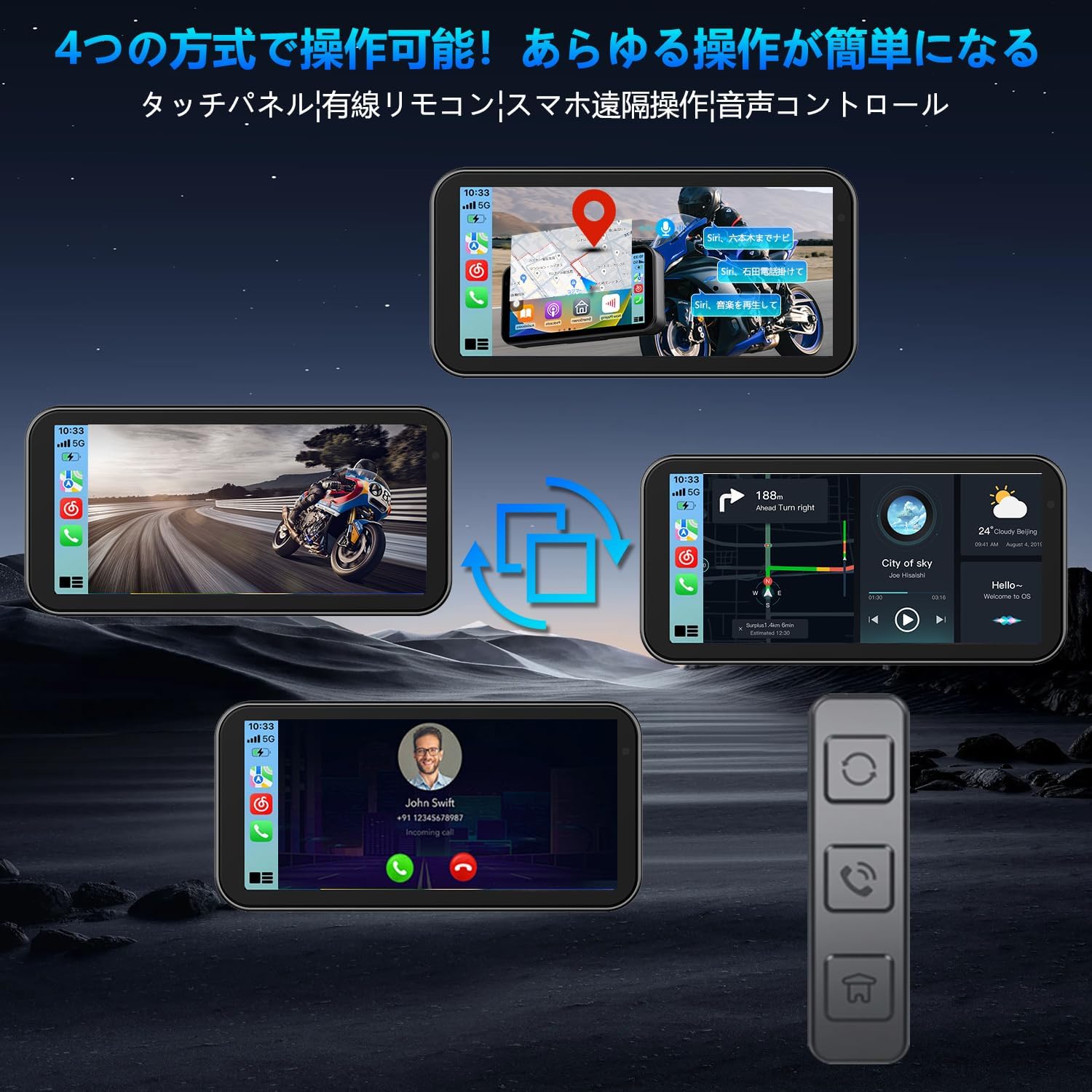
Image: Clear display view on a motorcycle.

Image: Multiple display modes for versatile use.
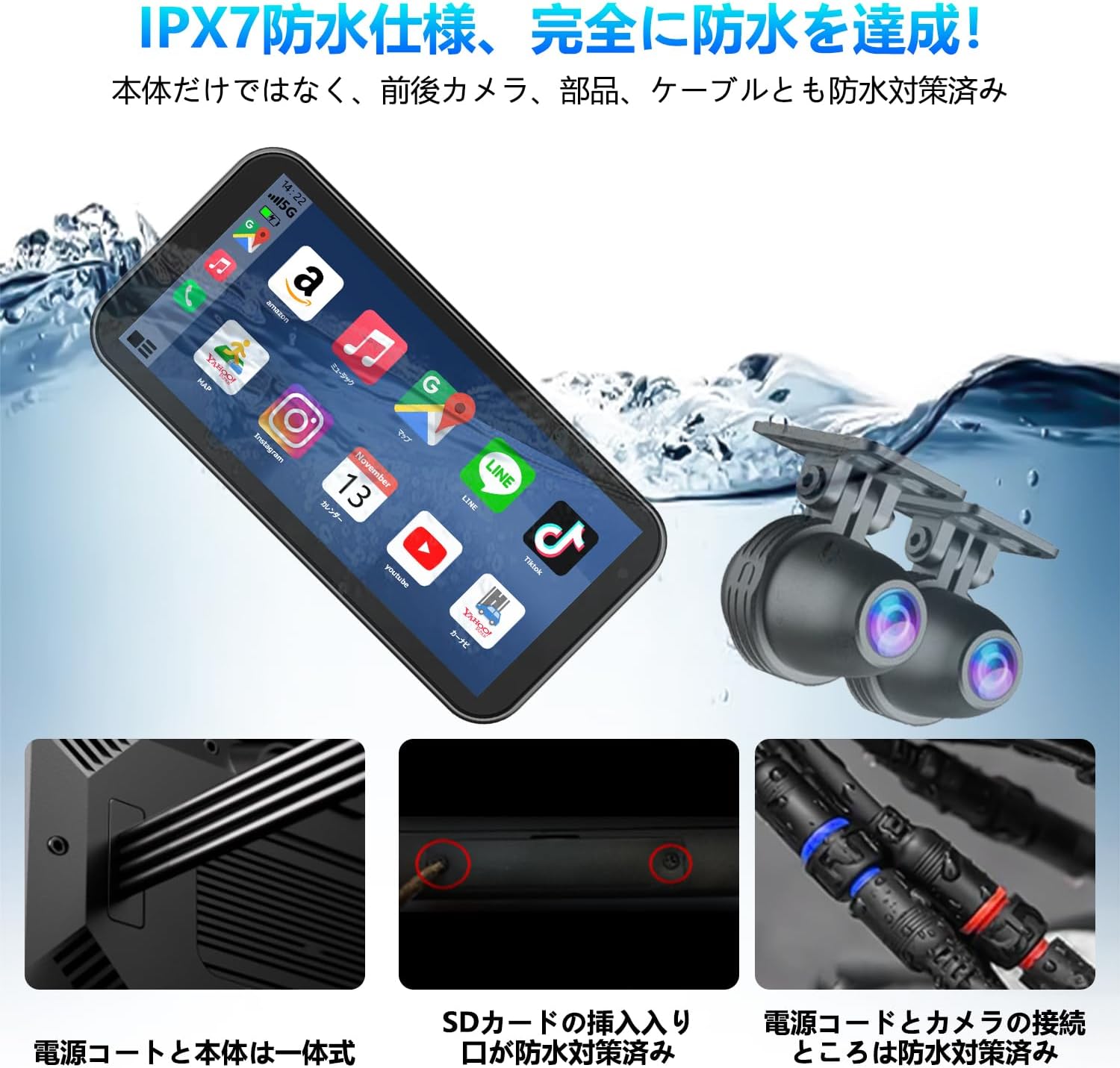
Image: IPX7 waterproof design for all-weather use.
5. පිහිටුවීම සහ ස්ථාපනය
5.1 ප්රධාන ඒකකය සවි කිරීම
- Choose a suitable location on your motorcycle's handlebar for the main display unit. Ensure it does not obstruct your view or interfere with controls.
- Attach the main unit bracket to the handlebar. Use the appropriate inner diameter ring for a secure fit.
- Secure the main display unit to the bracket. Adjust the angle for optimal viewing.
5.2 කැමරා ස්ථාපනය
- ඉදිරිපස කැමරාව: Mount the front camera in a position that provides a clear, unobstructed view ඉදිරි මාර්ගයේ.
- පසුපස කැමරාව: Mount the rear camera at the back of your motorcycle, ensuring it captures a wide view පිටුපස.
- Route the camera cables securely along the motorcycle frame, avoiding moving parts or heat sources. Use the provided bands for cable management.

Image: Front and rear cameras for clear recording.
5.3 බල සම්බන්ධතාවය
The power supply for this product requires the included step-down cable. Do not use a standard USB power cord.
- Connect the dedicated power cable to the main unit.
- Connect the power cable's red wire to an ACC (Accessory) power source (switched power, turns on with ignition).
- Connect the power cable's yellow wire to a constant BAT (Battery) power source (always on).
- Connect the power cable's black wire to a ground point on the motorcycle frame.
- සියලුම සම්බන්ධතා ආරක්ෂිත සහ නිසි ලෙස පරිවරණය කර ඇති බවට සහතික වන්න.

Image: Detailed wiring diagram for installation.
6. මෙහෙයුම් උපදෙස්
6.1 බලය සක්රිය / අක්රිය
The device will automatically power on when the motorcycle ignition is turned on (ACC power is supplied) and power off when the ignition is turned off.
6.2 ස්පර්ශ තිර ක්රියාකාරිත්වය
The 6.25-inch capacitive touch screen is highly sensitive and can be operated comfortably even with gloves. Navigate through menus and functions by tapping and swiping.
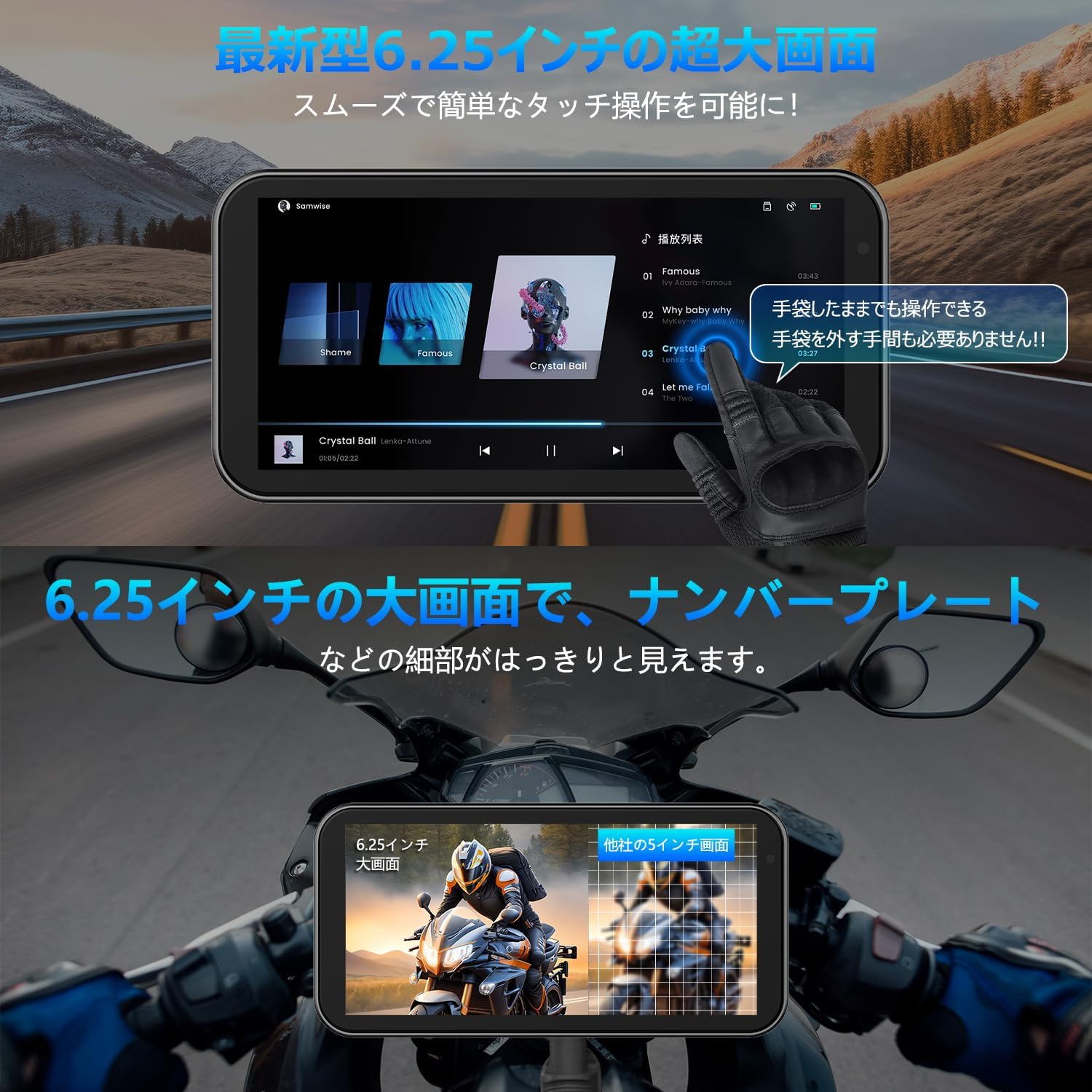
Image: Large display and glove-friendly touch operation.
6.3 CarPlay / Android Auto Connection
The device supports wireless CarPlay and Android Auto, allowing you to use your smartphone's navigation, music, and communication apps directly on the display.
6.3.1 Apple CarPlay Connection Method
- පියවර 1: On the device's home screen, tap the CarPlay icon to enter the connection screen.
- පියවර 2: ඔබගේ ස්මාර්ට් ජංගම දුරකථනයේ Wi-Fi සහ බ්ලූටූත් ක්රියාත්මක කරන්න.
- පියවර 3: The drive recorder's Bluetooth will automatically turn on. Its name will appear as "MT02-XXXX".
- පියවර 4: Connect to the device's Bluetooth from your smartphone.
- පියවර 5: Once connected, Apple CarPlay will function normally.

Image: Apple CarPlay connection steps.
6.3.2 Android Auto Connection Method
- පියවර 1: On the device's home screen, tap the Android Auto icon to enter the connection screen.
- පියවර 2: ඔබගේ ස්මාර්ට් ජංගම දුරකථනයේ Wi-Fi සහ බ්ලූටූත් ක්රියාත්මක කරන්න.
- පියවර 3: The drive recorder's Bluetooth will automatically turn on. Its name will appear as "MT02-XXXX".
- පියවර 4: Connect to the device's Bluetooth from your smartphone.
- පියවර 5: Once connected, Android Auto will function normally.

Image: Android Auto and CarPlay connection steps and icons.
6.4 හඬ පාලනය
Utilize Siri or Google Assistant for hands-free control of navigation, calls, and music playback. This allows for safer operation without touching the display.

Image: Voice control functionality for safe riding.
6.5 පටිගත කිරීමේ කාර්යයන්
The device records simultaneously from both front and rear cameras in FHD 1080P resolution.
- ලූප් පටිගත කිරීම: පැරණිතම foo ස්වයංක්රීයව උඩින් ලියයි.tagමතක කාඩ්පත පිරී ඇති විට, අඛණ්ඩ පටිගත කිරීම සහතික කරයි.
- WDR/HDR Function: Wide Dynamic Range and High Dynamic Range technology improve image quality in varying light conditions, such as tunnels or bright sunlight, by balancing exposure.
- ස්වයංක්රීය දීප්තිය ගැලපීම: The built-in light sensor adjusts the screen brightness automatically to ensure optimal visibility in any environment.

Image: Enhanced recording clarity with WDR/HDR.
6.6 WiFi and Smartphone App
The integrated WiFi allows you to connect the device to a dedicated smartphone app for convenient management of your recordings.
- යෙදුම් විශේෂාංග: View තත්ය කාලීන footage, playback recorded videos, download fileඔබගේ දුරකථනයට සම්බන්ධ වී කැමරා සැකසුම් සකසන්න.
- බෙදාගැනීම: Easily share your travel moments with friends and family.
- යෙදුම් බාගත කිරීම: Scan the QR code or visit the official webයෙදුම බාගත කිරීමට අඩවිය. ඇප් එක මෙතනින් බාගන්න

Image: WiFi connectivity and smartphone app for remote operation.
6.7 බ්ලූටූත් සම්බන්ධතාවය
Connect your Bluetooth earphones or intercom system to the device for audio output, allowing you to hear navigation instructions, music, and calls directly through your helmet.

Image: Simultaneous connection to multiple Bluetooth devices.
7. නඩත්තු කිරීම
- පිරිසිදු කිරීම: Use the provided cleaning cloth or a soft, dry cloth to wipe the display and camera lenses. Do not use abrasive cleaners or solvents.
- ජල ආරක්ෂණය: While the device is IP67 waterproof, ensure all cable connections are properly sealed and secured to maintain water resistance.
- ගබඩා: දිගු කාලයක් භාවිතයේ නොමැති විට, උපාංගය සෘජු හිරු එළියෙන් සහ අධික උෂ්ණත්වයන්ගෙන් ඈත්ව සිසිල් වියළි ස්ථානයක ගබඩා කරන්න.
- මතක කාඩ්පත: Periodically format the memory card (via the device settings or computer) to ensure optimal recording performance and prevent data corruption.
8. දෝශ නිරාකරණය
| ගැටලුව | විය හැකි හේතුව | විසඳුම |
|---|---|---|
| උපාංගය බලගන්වන්නේ නැත. | Incorrect power connection; loose cable; no power from motorcycle. | Check power cable connections (ACC, BAT, Ground). Ensure motorcycle ignition is on. Verify power source. |
| Screen is dark or too bright. | Automatic brightness adjustment; direct sunlight. | The device adjusts brightness automatically. If still an issue, try to shade the screen or adjust manually if an option is available in settings. |
| CarPlay/Android Auto සම්බන්ධ නොවේ. | දුරකථනයේ බ්ලූටූත්/Wi-Fi අක්රියයි; වැරදි යුගලනය; යෙදුම් ගැටළු. | Ensure Wi-Fi and Bluetooth are enabled on your smartphone. Re-pair the devices. Restart both the device and your phone. |
| පටිගත කිරීමේ ගැටළු (උදා: පටිගත කිරීම නැවැත්වීම, දූෂිත වීම) files). | Memory card full or corrupted; low power; faulty camera. | Format the memory card. Check power supply stability. Ensure cameras are securely connected. Replace memory card if issue persists. |
| Image blurry or unclear. | Dirty lens; camera not focused; vibration. | Clean camera lenses with the provided cloth. Ensure cameras are securely mounted and not vibrating excessively. |
9. පිරිවිතර
| විශේෂාංගය | විස්තර |
|---|---|
| වෙළඳ නාමය | වන්බාර් |
| මාදිලියේ නම | Motorcycle recorder (F83) |
| තිර ප්රමාණය | අඟල් 6.25 |
| නිෂ්පාදන මානයන් | 8 x 16.5 x 2 cm; කිලෝ ග්රෑම් 1.01 කි |
| ඇතුළත් සංරචක | පරිශීලක අත්පොත |
| බැටරි ඇතුළත් | නැත |
| බැටරි භාවිතය | නැත |
| ජල ආරක්ෂිත ශ්රේණිගත කිරීම | IP67 |
10. වගකීම් සහ සහාය
VANBAR offers a 3-year extended warranty for this product. For any inquiries, technical support, or warranty claims, please contact our customer service team through the following channels:
- මාර්ගගත සහාය: Visit the VANBAR official webනිතර අසන ප්රශ්න සහ සහාය සම්පත් සඳහා අඩවිය.
- ඊමේල් සහාය: Refer to the contact information provided in your purchase documentation.
- ඇමේසන් විකුණුම්කරු අමතන්න: You can also contact the seller "HUYUEU2020" directly via Amazon for assistance.
Note: This product has obtained technical compliance certification for the Japanese market (Certification Number: 214-240535).


