1. හැඳින්වීම
ස්තූතියි, උදව් කළාටasing the Max Power MPD437 Ultra PRO M2 Portable Bluetooth Speaker. This speaker is designed to provide high-quality audio in various environments, featuring water resistance and dust-proof capabilities for outdoor use. Please read this manual carefully before using the product to ensure proper operation and to maximize its lifespan.
ආරක්ෂිත තොරතුරු
- දීර්ඝ කාලයක් තිස්සේ කථිකයා අධික උෂ්ණත්වයන්ට හෝ සෘජු හිරු එළියට නිරාවරණය නොකරන්න.
- කථිකයා ප්රබල බලපෑම්වලට වැටීමෙන් හෝ යටත් කිරීමෙන් වළකින්න.
- ස්පීකරය විසුරුවා හැරීමට හෝ වෙනස් කිරීමට උත්සාහ නොකරන්න. මෙය වගකීම් අවලංගු කරයි.
- කථිකයා වෛද්ය උපකරණවලින් ඈත් කර තබන්න.
- ලබා දී ඇති ආරෝපණ කේබලය පමණක් භාවිතා කරන්න.
2. පැකේජ අන්තර්ගතය
සියලුම අයිතම පැකේජයේ ඇති බවට වග බලා ගන්න:
- Max Power MPD437 Ultra PRO M2 Portable Bluetooth Speaker
- බල කේබලය
- AUX කේබල්
- පරිශීලක අත්පොත (මෙම ලේඛනය)
3. නිෂ්පාදන අවසන්view
Familiarize yourself with the components of your Max Power MPD437 Ultra PRO M2 speaker.
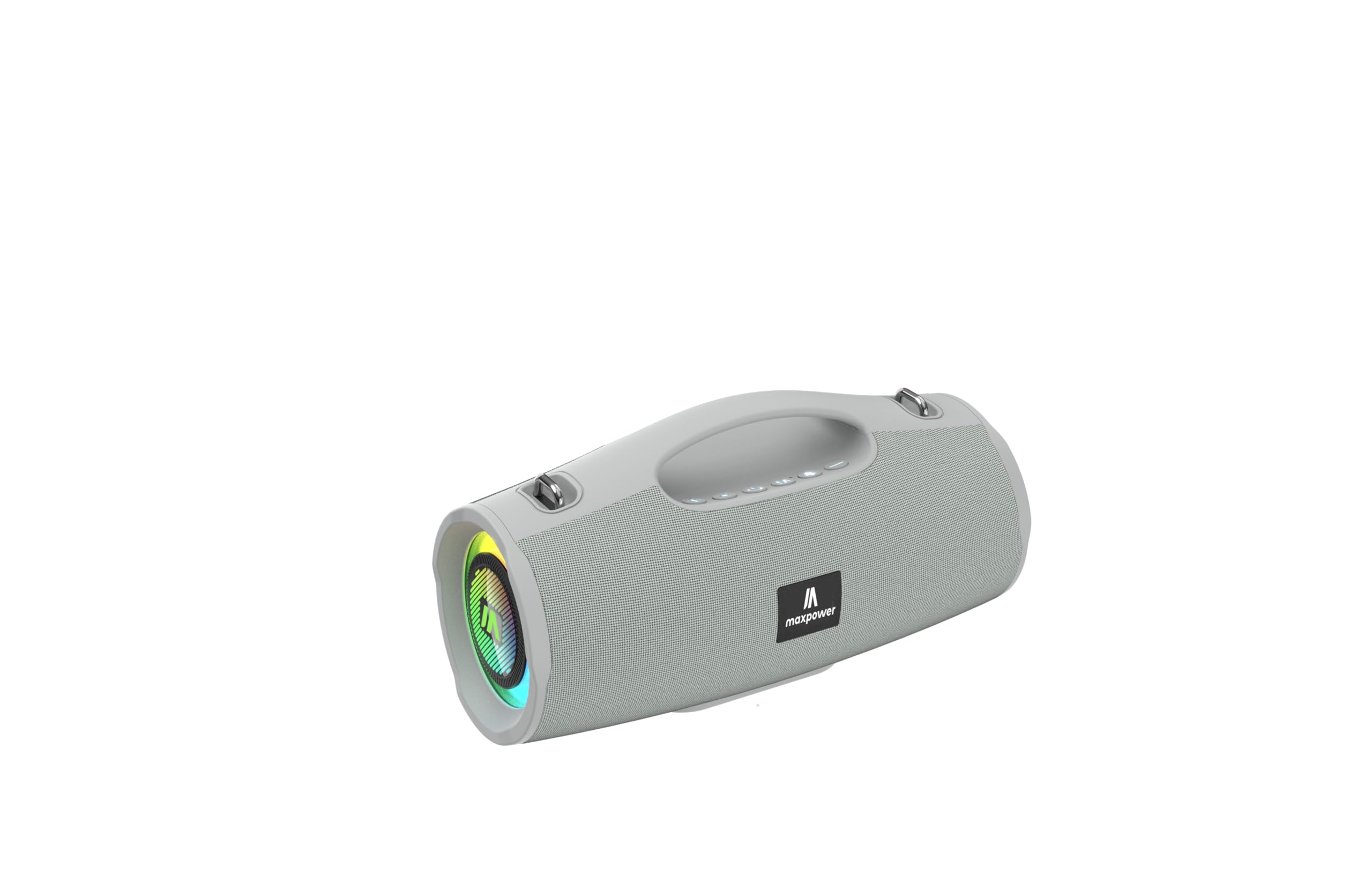
This image displays the Max Power MPD437 Ultra PRO M2 speaker. It features a robust grey casing, an integrated carrying handle at the top, and a series of control buttons. One end of the speaker is equipped with an LED light ring, indicating its operational status and adding visual effects.
ප්රධාන සංරචක:
- ඒකාබද්ධ රැගෙන යන හසුරුව: පහසු අතේ ගෙන යා හැකි සඳහා.
- පාලන බොත්තම්: For power, volume, playback, and mode selection.
- ස්පීකර් ග්රිල්: Protects the speaker drivers.
- LED ආලෝක වළල්ල: Provides visual effects and indicates status.
- ආරෝපණ වරාය: විදුලි රැහැන සම්බන්ධ කිරීම සඳහා.
- AUX ආදානය: රැහැන්ගත ශ්රව්ය සම්බන්ධතාවය සඳහා.
4. පිහිටුවීම
4.1 කථිකයා ආරෝපණය කිරීම
- Connect the provided Power Cable to the charging port on the speaker.
- Plug the other end of the Power Cable into a suitable power source.
- LED දර්ශකය ආරෝපණ තත්ත්වය පෙන්වනු ඇත. සම්පූර්ණ ආරෝපණයක් සඳහා ආසන්න වශයෙන් පැය 3 ක් ගතවේ.
- සම්පූර්ණයෙන්ම ආරෝපණය වූ පසු ආරෝපණ කේබලය විසන්ධි කරන්න.
4.2 බ්ලූටූත් යුගල කිරීම
- Press and hold the Power button to turn on the speaker. The speaker will enter Bluetooth pairing mode, indicated by a flashing LED light.
- ඔබගේ උපාංගයේ (ස්මාර්ට්ෆෝන්, ටැබ්ලටය, ලැප්ටොප්), බ්ලූටූත් සක්රීය කර පවතින උපාංග සොයන්න.
- Select "MPD437 Ultra PRO M2" from the list of devices.
- යුගලනය වූ පසු, ස්පීකරය ශ්රව්ය තහවුරු කිරීමක් නිකුත් කරන අතර, LED ආලෝකය දැල්වීම නවත්වනු ඇත.
- බලගැන්වූ විට ස්පීකරය ස්වයංක්රීයව අවසන් යුගල කළ උපාංගයට නැවත සම්බන්ධ වීමට උත්සාහ කරයි.
4.3 AUX සම්බන්ධතාවය
- Connect one end of the provided AUX Cable to the AUX input port on the speaker.
- Connect the other end of the AUX Cable to the audio output jack of your device.
- ස්පීකරය ස්වයංක්රීයව AUX මාදිලියට මාරු වේ.
5. මෙහෙයුම් උපදෙස්
5.1 බලය සක්රිය / අක්රිය
- බල ගැන්වීම: Press and hold the Power button for 2-3 seconds.
- විදුලිය විසන්ධි කිරීම: Press and hold the Power button for 2-3 seconds.
5.2 වෙළුම් පාලනය
- පරිමාව වැඩි කරන්න: '+' බොත්තම ඔබන්න.
- ශබ්දය අඩු කරන්න: '-' බොත්තම ඔබන්න.
5.3 Playback Control (Bluetooth/AUX Mode)
- වාදනය/විරාමය: Play/Pause බොත්තම ඔබන්න.
- ඊළඟ ධාවන පථය: '+' බොත්තම ඔබා අල්ලාගෙන සිටින්න.
- පෙර ධාවන පථය: '-' බොත්තම ඔබා අල්ලාගෙන සිටින්න.
5.4 මාදිලිය තේරීම
Press the 'M' (Mode) button to switch between Bluetooth, AUX, and FM Radio modes.
5.5 FM රේඩියෝ ක්රියාකාරිත්වය
- 'M' බොත්තම භාවිතයෙන් FM රේඩියෝ මාදිලියට මාරු වන්න.
- පවතින FM මධ්යස්ථාන ස්වයංක්රීයව පරිලෝකනය කර සුරැකීමට Play/Pause බොත්තම ඔබන්න.
- සුරකින ලද ස්ථාන අතර සැරිසැරීමට '+' සහ '-' බොත්තම් භාවිතා කරන්න.
LED ආලෝක මාදිලි 5.6 ක්
The speaker features vibrant LED lights. Press the dedicated LED button (if available, or a long press on a specific button) to cycle through different light modes or turn them off.
6. නඩත්තු කිරීම
6.1 පිරිසිදු කිරීම
- ශබ්ද විකාශන යන්ත්රය මෘදු ලෙස පිස දමන්න, ඩීamp රෙදි.
- උල්ෙල්ඛ පිරිසිදු කරන්නන්, මධ්යසාර හෝ රසායනික ද්රාවක භාවිතා නොකරන්න.
- කේබල් ආරෝපණය කිරීමට හෝ සම්බන්ධ කිරීමට පෙර සියලුම වරායන් වියළී ඇති බවට වග බලා ගන්න.
6.2 ගබඩා කිරීම
- Store the speaker in a cool, dry place away from direct sunlight.
- දිගු කාලයක් ගබඩා කරන්නේ නම්, බැටරි සෞඛ්යය පවත්වා ගැනීම සඳහා සෑම මාස කිහිපයකට වරක් බැටරිය ආසන්න වශයෙන් 50% දක්වා ආරෝපණය කරන්න.
7. දෝශ නිරාකරණය
| ගැටලුව | විය හැකි හේතුව | විසඳුම |
|---|---|---|
| ස්පීකරය ක්රියාත්මක නොවේ. | බැටරිය ක්ෂය වී ඇත. | සපයා ඇති බල කේබලය භාවිතයෙන් ස්පීකරය ආරෝපණය කරන්න. |
| කථිකයාගෙන් ශබ්දයක් නැත. | Volume is too low or muted. Device not paired correctly. AUX cable not fully inserted. | Increase volume on both speaker and connected device. Re-pair Bluetooth. Ensure AUX cable is securely connected. |
| බ්ලූටූත් හරහා යුගල කළ නොහැක. | ස්පීකරය යුගල කිරීමේ මාදිලියේ නැත. උපාංගයේ බ්ලූටූත් ක්රියා විරහිතයි. ස්පීකරය උපාංගයෙන් බොහෝ දුරයි. | Ensure speaker is in pairing mode (flashing LED). Turn on Bluetooth on your device. Move speaker closer to your device (within 35 feet). |
| දුර්වල FM රේඩියෝ පිළිගැනීම. | වත්මන් ස්ථානයේ සංඥාව දුර්වලයි. | Move the speaker to a location with better signal reception. |
8. පිරිවිතර
| මාදිලියේ නම | Ultra Pro M2 |
| අයිතම ආදර්ශ අංකය | MPD437 |
| වෙළඳ නාමය | උපරිම බලය |
| ස්පීකර් වර්ගය | අතේ ගෙන යා හැකි කථානායක |
| සම්බන්ධතා තාක්ෂණය | බ්ලූටූත්, සහායක |
| රැහැන් රහිත සන්නිවේදන තාක්ෂණය | බ්ලූටූත් |
| බ්ලූටූත් පරාසය | අඩි 35 |
| විශේෂ ලක්ෂණ | Dustproof, FM Radio, LED Light, Water Resistant |
| ජල ප්රතිරෝධක මට්ටම | වතුර කාන්දු නොවන |
| බලශක්ති ප්රභවය | බැටරි බලයෙන් |
| බැටරි ධාරිතාව | 3000 මිලිamp පැය |
| ආරෝපණ කාලය | පැය 3 යි |
| ශ්රව්ය ප්රතිදාන ප්රකාරය | ස්ටීරියෝ |
| සං Sign ා සිට ශබ්ද අනුපාතය | 85 dB |
| පාලන ක්රමය | ස්පර්ශ කරන්න |
| නිෂ්පාදන මානයන් | 4.5"D x 5"W x 9.9"H |
| අයිතමයේ බර | පවුම් 2.65ක් |
| ඇතුළත් සංරචක | AUX Cable, Power Cable |
| UPC | 785571466584 |
| GTIN | 785571466584 |
9. වගකීම් සහ සහාය
9.1 සීමිත වගකීම්
The Max Power MPD437 Ultra PRO M2 Portable Bluetooth Speaker comes with a limited warranty. Please refer to the warranty card included in your package or contact Max Power customer support for detailed warranty terms and conditions.
9.2 පාරිභෝගික සහාය
For technical assistance, troubleshooting, or warranty inquiries, please contact Max Power customer support. Contact information can typically be found on the product packaging or the official Max Power webඅඩවිය.


