1. හැඳින්වීම
This manual provides detailed instructions for the installation, operation, and maintenance of your SCS Sentinel HCN0082 Outdoor Programmable Electronic Timer Plug. This device is designed to automate the switching ON and OFF of electrical appliances, helping to manage energy consumption efficiently. Please read this manual thoroughly before using the product to ensure safe and correct operation.
ආරක්ෂිත තොරතුරු
- Ensure the timer is correctly installed and connected to a suitable power source (230V).
- Do not exceed the maximum load capacity of 16A or 3600W.
- This product is designed for outdoor use but should be protected from direct heavy rain or immersion in water.
- උපාංගය ඔබම විවෘත නොකරන්න හෝ අලුත්වැඩියා කිරීමට උත්සාහ නොකරන්න. සියලුම සේවා සුදුසුකම් ලත් පුද්ගලයින් වෙත යොමු කරන්න.
- දරුවන්ට ළඟා විය නොහැකි ලෙස තබා ගන්න.
2. නිෂ්පාදන අවසන්view
The SCS Sentinel HCN0082 is an electronic timer plug featuring a clear digital display and intuitive buttons for programming. It is housed in a robust plastic casing suitable for outdoor environments.
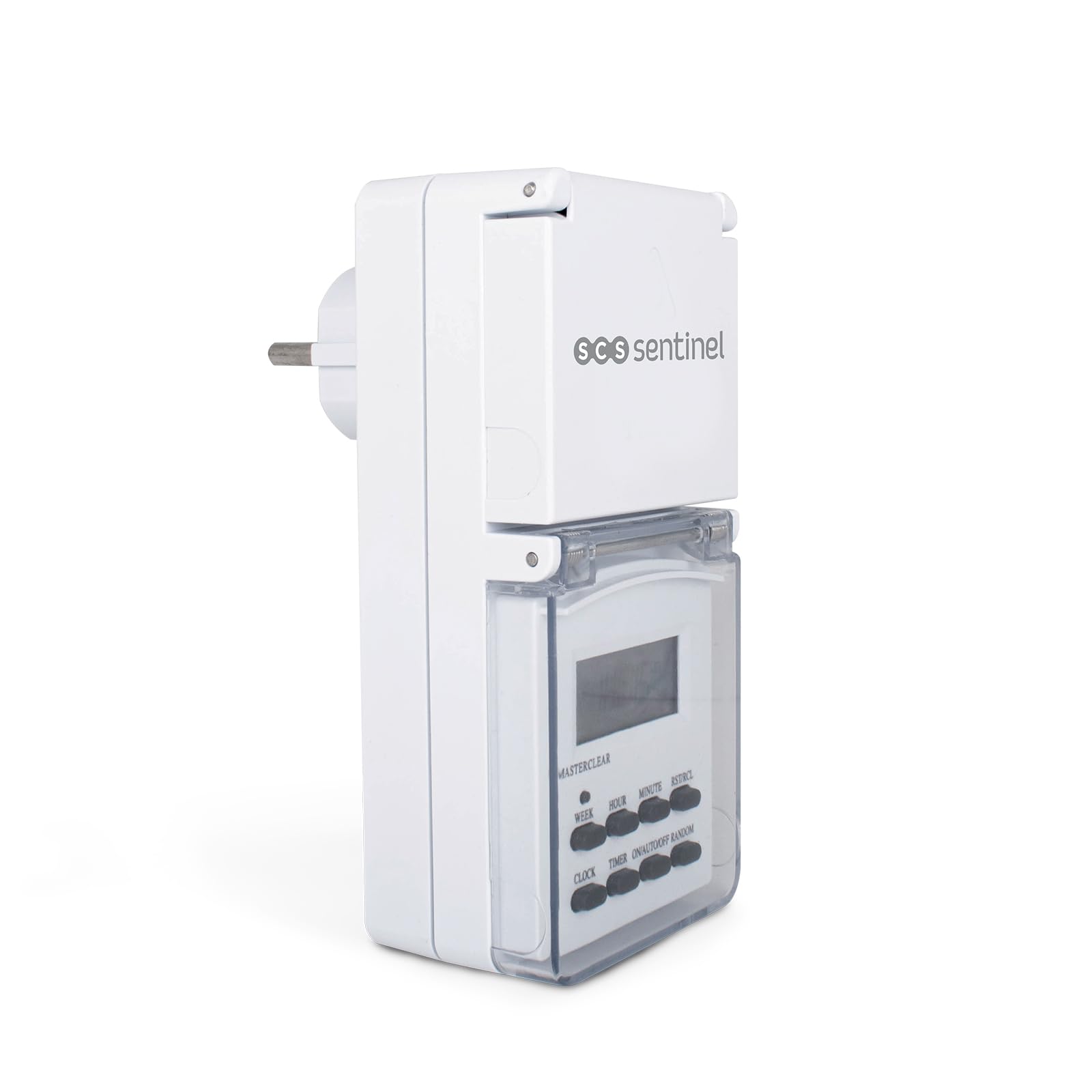
රූපය 2.1: ඉදිරිපස view of the SCS Sentinel HCN0082 timer plug, showing the digital display and control buttons. The protective cover is closed.
සංරචක සහ පාලන
- සංඛ්යාංක දර්ශකය: Shows current time, day, and programming status.
- බොත්තම්:
- සතිය: Selects the day(s) of the week for programming.
- පැය: පැය සකස් කරයි.
- මිනිත්තුව: මිනිත්තුව සකස් කරයි.
- RST/RCL: Reset/Recall button.
- ඔරලෝසුව: ඔරලෝසු සැකසුම් ප්රකාරයට ඇතුළු වේ.
- ටයිමර්: වැඩසටහන් සැකසුම් මාදිලියට ඇතුළු වේ.
- සක්රිය/ස්වයංක්රීය/අක්රිය: මෙහෙයුම් ආකාරය තෝරයි (සැමවිටම ක්රියාත්මකයි, ස්වයංක්රීයයි, සැමවිටම අක්රියයි).
- අහඹු: Activates/deactivates random function.
- ආරක්ෂිත ආවරණය: A hinged cover protects the display and buttons from outdoor elements.
- සොකට්: The output socket for connecting an appliance.
- ප්ලග්: The input plug for connecting to a power outlet.

රූපය 2.2: පැත්ත view of the timer plug, illustrating the protective cover for the output socket in an open position, revealing the socket.

රූපය 2.3: ආපසු view of the timer plug, showing the input plug designed for connection to a wall outlet.
3. පිහිටුවීම
3.1 Initial Charging and Reset
- Before first use, plug the timer into a live electrical outlet for at least 14 hours to charge the internal battery. This battery maintains your settings during power outages or when the timer is unplugged.
- ආරෝපණය කිරීමෙන් පසු, උල් වූ වස්තුවක් (පෑන තුඩක් වැනි) භාවිතා කර ඔබන්න RST/RCL button to clear all previous settings and reset the unit. The display will show "0:00".
3.2 වත්මන් වේලාව සහ දිනය සැකසීම
- ඔබා අල්ලාගෙන සිටින්න ඔරලෝසුව බොත්තම.
- අල්ලාගෙන සිටියදී ඔරලෝසුව, ඔබන්න සතිය සතියේ නිවැරදි දිනය දර්ශනය වන තුරු නැවත නැවතත් බොත්තම ඔබන්න.
- අල්ලාගෙන සිටියදී ඔරලෝසුව, ඔබන්න පැය නිවැරදි පැය දර්ශනය වන තුරු නැවත නැවතත් බොත්තම ඔබන්න.
- අල්ලාගෙන සිටියදී ඔරලෝසුව, ඔබන්න මිනිත්තුව නිවැරදි මිනිත්තුව දර්ශනය වන තුරු නැවත නැවතත් බොත්තම ඔබන්න.
- නිදහස් කරන්න ඔරලෝසුව බොත්තම. වත්මන් වේලාව සහ දිනය දැන් සකසා ඇත.
4. මෙහෙයුම් උපදෙස්
The timer allows for up to 7 programmable ON/OFF cycles per day, with various day combinations.

රූපය 4.1: The timer plug displayed alongside its instruction manual, illustrating the compact design and the detailed guide for programming.
4.1 චක්ර සක්රිය/අක්රිය කිරීම ක්රමලේඛනය කිරීම
- ඔබන්න ටයිමර් button once. The display will show "1 ON" (first ON program).
- ඔබන්න සතිය to select the desired day(s) for this program. Options include individual days, weekdays, weekends, or all days.
- ඔබන්න පැය "ON" වේලාව සඳහා අපේක්ෂිත පැය සැකසීමට.
- ඔබන්න මිනිත්තුව "ON" වේලාව සඳහා අපේක්ෂිත මිනිත්තුව සැකසීමට.
- ඔබන්න ටයිමර් again. The display will show "1 OFF" (first OFF program).
- Repeat steps 2-4 to set the desired day(s), hour, and minute for the "OFF" time.
- දිගටම ඔබන්න ටයිමර් to cycle through and set up to 7 ON/OFF programs. Each program requires both an ON and an OFF setting.
- අවශ්ය සියලුම වැඩසටහන් සැකසීමෙන් පසු, ඔබන්න ඔරලෝසුව වත්මන් කාල සංදර්ශකය වෙත ආපසු යාමට බොත්තම.
4.2 අතින් අභිබවා යාම (සක්රිය/ස්වයංක්රීය/අක්රිය)
ඔබන්න සක්රිය/ස්වයංක්රීය/අක්රිය මෙහෙයුම් මාතයන් හරහා චක්රීය කිරීමට බොත්තම:
- මත: සම්බන්ධිත උපකරණය සියලුම වැඩසටහන් අභිබවා යමින් අඛණ්ඩව ක්රියාත්මකව පවතිනු ඇත.
- ස්වයංක්රීය: The timer will operate according to the programmed ON/OFF cycles. This is the standard operating mode.
- අක්රියයි: සම්බන්ධිත උපකරණය සියලුම වැඩසටහන් අභිබවා යමින් අඛණ්ඩව අක්රියව පවතිනු ඇත.
4.3 අහඹු ශ්රිතය
The random function can be used to simulate presence by turning the connected appliance ON and OFF at irregular intervals within a set period.
- ඔබන්න අහඹු button. The display will show "R" or "RANDOM" to indicate activation.
- When activated, the timer will turn ON and OFF randomly between 6 PM and 6 AM, with delays ranging from 10 to 31 minutes.
- ඔබන්න අහඹු නැවතත් මෙම කාර්යය අක්රිය කිරීමට.
4.4 12/24 Hour Mode
To switch between 12-hour (AM/PM) and 24-hour time display:
- ඔබා අල්ලාගෙන සිටින්න ඔරලෝසුව බොත්තම, පසුව ඔබන්න ටයිමර් button. The display will toggle between 12-hour and 24-hour format.
4.5 Summer Time Adjustment
To adjust for daylight saving time (summer time):
- ඔබා අල්ලාගෙන සිටින්න ඔරලෝසුව බොත්තම, පසුව ඔබන්න සක්රිය/ස්වයංක්රීය/අක්රිය button simultaneously. The display will show "S" and the time will advance by one hour.
- Repeat the action to revert to standard time.
5. නඩත්තු කිරීම
5.1 පිරිසිදු කිරීම
- Always unplug the timer from the power outlet before cleaning.
- මෘදු, ඩී සමග බාහිර පිස දමන්නamp රෙදි. උල්ෙල්ඛ පිරිසිදු කරන්නන්, ද්රාවක භාවිතා නොකරන්න, නැතහොත් උපාංගය ජලයේ ගිල්වන්න එපා.
- Ensure the protective covers for the display and socket are clean and free of debris to maintain their sealing properties.
5.2 ගබඩා කිරීම
- දිගු කාලයක් භාවිතයේ නොමැති විට, ටයිමරය සෘජු හිරු එළියෙන් සහ අධික උෂ්ණත්වයන්ගෙන් ඈත්ව සිසිල් වියළි ස්ථානයක ගබඩා කරන්න.
- It is recommended to fully charge the internal battery periodically if stored for a long time to maintain its lifespan.
6. දෝශ නිරාකරණය
| ගැටලුව | විය හැකි හේතුව | විසඳුම |
|---|---|---|
| සංදර්ශකය හිස් හෝ අඳුරු ය. | අභ්යන්තර බැටරිය අඩු හෝ අඩු වී ඇත. | Plug the timer into a live outlet for at least 14 hours to charge the battery. |
| ක්රමලේඛනය කර ඇති පරිදි උපකරණය සක්රිය/අක්රිය නොවේ. |
|
|
| Timer settings are lost after unplugging. | Internal battery is not holding charge. | Ensure initial charging was sufficient. If the problem persists, the internal battery may need replacement (contact support). |
| බොත්තම් ප්රතිචාර නොදක්වයි. | Temporary software glitch or unit freeze. | ඔබන්න RST/RCL button to perform a full reset. You will need to re-program all settings. |
7. පිරිවිතර
| ආදර්ශ අංකය | HCN0082 |
| වෙළඳ නාමය | SCS සෙන්ටිනල් |
| වෙළුමtage | 230V (Standard European) |
| උපරිම පැටවීම | 16A / 3600W |
| ද්රව්ය | ප්ලාස්ටික් |
| මානයන් (L x W x H) | 16.5 x 16 x 7.5 සෙ.මී |
| බර | 200 ග්රෑම් |
| වැඩසටහන් ගණන | 7 ON/OFF cycles per day |
| භාවිත පරිසරය | Outdoor (with protective cover) |
8. වගකීම් සහ සහාය
8.1 වගකීම් තොරතුරු
The SCS Sentinel HCN0082 Outdoor Programmable Electronic Timer Plug comes with a වසර 2ක වගකීමක්, ensuring the reliability of this innovative technical product. This warranty covers manufacturing defects and ensures the product is easy to install and use as intended.

රූපය 8.1: Product packaging for the SCS Sentinel HCN0082, indicating key features including a 2-year warranty and suitability for outdoor use.
8.2 පාරිභෝගික සහාය
For any questions, technical assistance, or warranty claims, please contact SCS Sentinel customer support. Refer to the product packaging or the official SCS Sentinel webසම්බන්ධතා විස්තර සඳහා අඩවිය.
වගකීම් අරමුණු සඳහා කරුණාකර ඔබේ මිලදී ගැනීමේ සාක්ෂි තබා ගන්න.


