1. හැඳින්වීම
The Teslong NTS430 is a versatile dual-lens endoscope camera designed for detailed visual inspection in various environments. It features a 4.3-inch HD display, a flexible probe with front and side cameras, adjustable LED illumination, and a durable, waterproof design. This manual provides essential information for the safe and effective use of your NTS430 endoscope camera.

Figure 1: Teslong NTS430 Dual Lens Endoscope Camera with flexible probe.
2. පැකේජ අන්තර්ගතය
ඔබගේ පැකේජයේ සියලුම අයිතම ඇති බව තහවුරු කරගන්න:
- NTS430 Monitor
- Dual Lens Probe (available in 3.3FT, 16.5FT, or 50FT lengths)
- USB ආරෝපණ කේබලය
- පරිශීලක අත්පොත (මෙම ලේඛනය)
- Magnet Hook
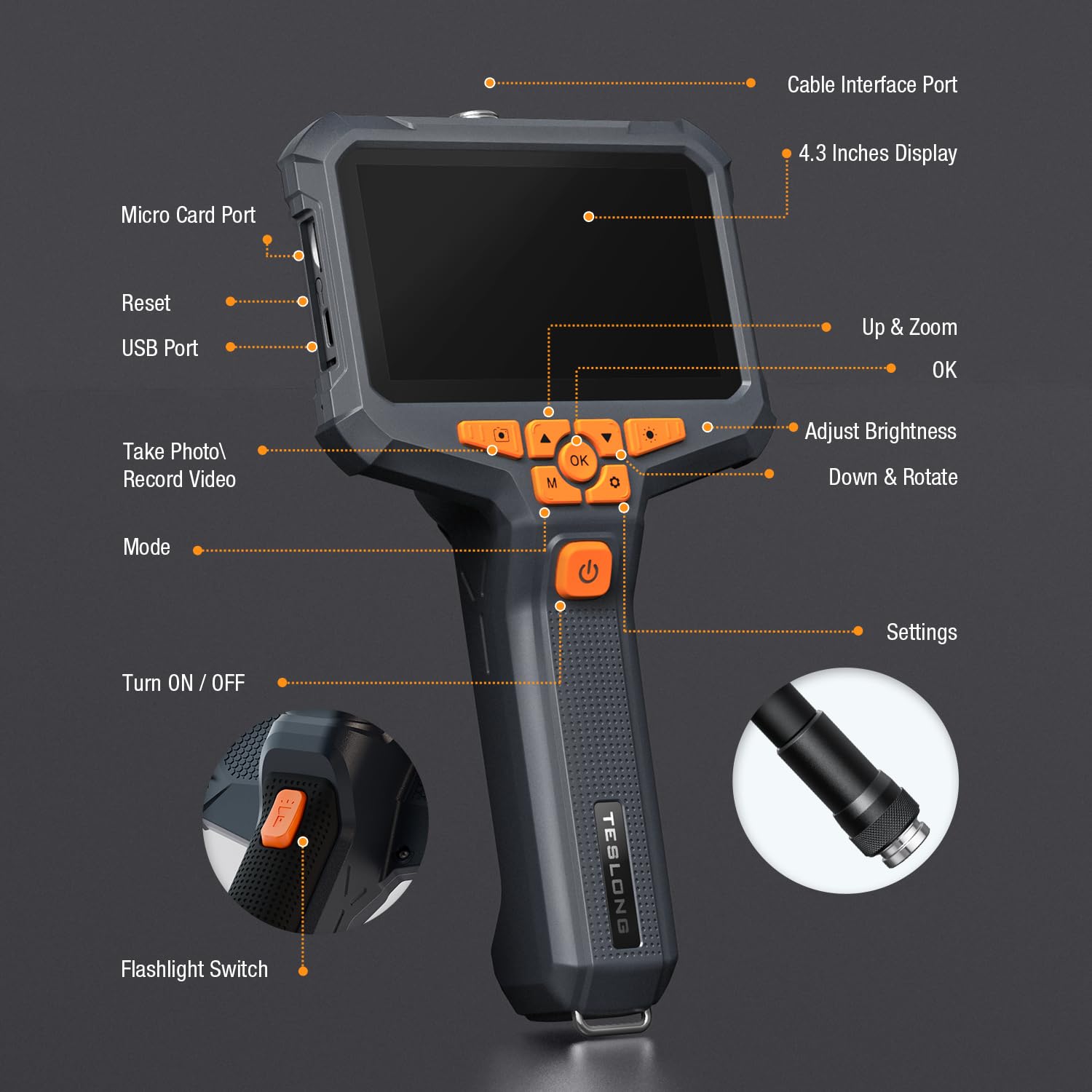
Figure 2: Included components: NTS430 monitor, dual lens probe, USB charging cable, user manual, and magnet hook.
3. නිෂ්පාදන අවසන්view
3.1 උපාංග පිරිසැලසුම

Figure 3: Key components and controls of the NTS430 monitor.
- Cable Interface Port: Connects the flexible probe.
- 4.3 Inches Display: High-definition IPS screen for viewපින්තූර සහ වීඩියෝ.
- Micro Card Port: Slot for inserting a Micro SD card for storage.
- යළි පිහිටුවීමේ බොත්තම: උපාංගය නැවත සැකසීමට භාවිතා කරයි.
- USB Port: For charging and data transfer.
- Up & Zoom Button: Navigates menus upwards and controls digital zoom.
- OK Button: Confirms selections.
- Adjust Brightness Button: Controls the intensity of the LED lights.
- Down & Rotate Button: Navigates menus downwards and rotates images.
- Take Photo / Record Video Button: Captures still images or starts/stops video recording.
- Mode Button: Switches between photo, video, and playback modes.
- Turn ON / OFF Button: Powers the device on or off.
- Settings Button: Accesses system settings.
- Flashlight Switch: Activates the built-in flashlight.
3.2 Dual Lens Probe
The NTS430 features a dual-lens system for comprehensive inspection:
- ඉදිරිපස කැමරාව: Provides a straight-ahead view with 6 adjustable LED lights.
- පැති කැමරාව: Offers a 90-degree side view with 1 additional LED light, ideal for inspecting pipe walls or internal surfaces.

Figure 4: Close-up of the dual-lens probe showing front and side cameras with LED lights.
4. පිහිටුවීම
4.1 උපාංගය ආරෝපණය කිරීම
Before first use, fully charge the NTS430. Connect the USB charging cable to the device's USB port and to a standard USB power adapter (not included). The 3000mAh battery provides over 4.5 hours of continuous usage when fully charged.
4.2 මයික්රෝ එස්ඩී කාඩ්පතක් ඇතුළු කිරීම
To save photos and videos, a Micro SD card (not included) is required. Locate the Micro Card Port on the side of the monitor. Gently insert a compatible Micro SD card until it clicks into place. Ensure the card is correctly oriented to avoid damage. The device supports Class 10 Micro SD cards.
Note: Some users have reported difficulty with card insertion or compatibility. Ensure the card is properly aligned and consider trying a different brand if issues persist.
4.3 පරීක්ෂණය සවි කිරීම
Align the connector of the flexible probe with the Cable Interface Port on the NTS430 monitor. Gently push and twist the connector clockwise until it is securely fastened. Ensure a firm connection for stable image transmission.
5. මෙහෙයුම් උපදෙස්
5.1 බල ගැන්වීම සක්රිය / අක්රිය කිරීම
ඔබා අල්ලාගෙන සිටින්න සක්රිය / අක්රිය කරන්න button (labeled with a power icon) for a few seconds to power the device on or off.
5.2 Switching Between Lenses (Split Screen View)
The NTS430 allows for simultaneous viewing from both the front and side cameras. To switch between views or activate split-screen mode:
- තනිකඩ View: කෙටි ඔබන්න මාදිලිය button to cycle between Front Camera view and Side Camera view.
- Split Screen View: දිගු ඔබන්න ඡායාරූපය / වීඩියෝ පටිගත කරන්න button to activate the split-screen display, showing both front and side camera feeds simultaneously. Long press again to exit split-screen mode.

රූපය 5: උදාample of split-screen view showing both front and side camera perspectives.
5.3 Adjusting LED Illumination
The probe's LED lights provide illumination in dark areas. Press the දීප්තිය සකසන්න button to cycle through different brightness levels. The front camera has 6 LEDs, and the side camera has 1 LED.

Figure 6: Illustration of adjustable LED light intensity on the endoscope probe.
5.4 ඡායාරූප සහ වීඩියෝ ග්රහණය කිරීම
Ensure a Micro SD card is inserted before attempting to record. In live view මාදිලිය:
- ඡායාරූපය ගන්න: කෙටි ඔබන්න ඡායාරූපය / වීඩියෝ පටිගත කරන්න button to capture a still image.
- වීඩියෝ පටිගත කරන්න: දිගු ඔබන්න ඡායාරූපය / වීඩියෝ පටිගත කරන්න button to start video recording. Long press again to stop recording.
5.5 Digital Zoom and Image Rotation
- විශාලනය: භාවිතා කරන්න Up & Zoom button to digitally zoom in on the image.
- කරකවන්න: භාවිතා කරන්න Down & Rotate button to rotate the image on the display.
5.6 උපාංග භාවිතය
The included magnet hook can be attached to the endoscope probe for retrieving small metallic objects from inaccessible areas.

Figure 7: The magnet hook accessory attached to the endoscope probe.
6. නඩත්තු කිරීම
6.1 පිරිසිදු කිරීම
The probe is IP67 waterproof. After use in wet or dirty environments, wipe the probe clean with a damp cloth. For the monitor, use a soft, dry cloth. Do not use abrasive cleaners or solvents.
6.2 ගබඩා කිරීම
Store the NTS430 in a cool, dry place away from direct sunlight and extreme temperatures. Ensure the probe is coiled loosely to prevent damage to the cable.
6.3 බැටරි සත්කාර
බැටරි ආයු කාලය දීර්ඝ කිරීම සඳහා, බැටරිය නිතර නිතර සම්පූර්ණයෙන්ම විසර්ජනය කිරීමෙන් වළකින්න. දිගු කාලයක් ගබඩා කරන්නේ නම්, සෑම මාස කිහිපයකට වරක් බැටරිය ආසන්න වශයෙන් 50% දක්වා ආරෝපණය කරන්න.
7. දෝශ නිරාකරණය
- උපාංගය ක්රියාත්මක නොවේ: බැටරිය ආරෝපණය වී ඇති බවට වග බලා ගන්න. උපාංගය USB බල ප්රභවයකට සම්බන්ධ කර නැවත උත්සාහ කරන්න.
- තිරයේ රූපයක් නැත: Check if the probe is securely connected to the monitor.
- දුර්වල රූපයේ ගුණාත්මකභාවය: Adjust the LED brightness. Clean the camera lenses if they are dirty. Ensure the focus distance (2-8 cm) is appropriate for the object being viewසංස්.
- Cannot take photos/record videos: Verify that a compatible Micro SD card is inserted and has sufficient free space. Reformat the Micro SD card if necessary (this will erase all data).
- Micro SD card not recognized: Ensure the card is inserted correctly. Try a different Micro SD card, preferably a Class 10 card from a reputable brand.
8. පිරිවිතර
| විශේෂාංගය | පිරිවිතර |
|---|---|
| ආකෘතිය | NTS430 |
| ප්රදර්ශනය කරන්න | 4.3-inch HD IPS Display |
| කැමරා වර්ගය | Dual Lens (Front & Side) |
| වීඩියෝ ග්රහණ විභේදනය | 1080p |
| LED විදුලි පහන් | 6 (Front) + 1 (Side) adjustable |
| ජල ආරක්ෂිත ශ්රේණිගත කිරීම | IP67 (පරීක්ෂණය) |
| බැටරි ධාරිතාව | 3000mAh |
| බැටරි ආයු කාලය | පැය 4.5 කට වඩා |
| Macro Focus Range | 2-8 සෙ.මී |
| වෙඩි තැබීමේ මාදිලි | අත්පොත, ස්වයංක්රීය |
| නිරාවරණ පාලන වර්ගය | ස්වයංක්රීය අත්පොත |
| වර්ණය | කළු |
| නිෂ්පාදකයා | ටෙස්ලෝන්ග් |
9. වගකීම් සහ සහාය
For warranty information and technical support, please refer to the documentation included with your purchase or visit the official Teslong webඅඩවිය. ඔබට ද නැරඹිය හැකිය Teslong Store on Amazon අමතර සම්පත් සඳහා.
Teslong is committed to customer satisfaction and provides support for product inquiries and issues.


