1. හැඳින්වීම
Thank you for choosing the Vormooi Digital Voice Recorder. This device is designed for high-quality audio recording, offering features such as ultra-long continuous recording, voice activation, and versatile input options. With its substantial 96GB memory capacity and advanced noise reduction technology, it is an ideal tool for lectures, interviews, meetings, and personal notes. This manual provides detailed instructions to help you set up, operate, and maintain your device for optimal performance.
2. පැකේජ අන්තර්ගතය
කරුණාකර පහත අයිතම සඳහා කොටුව සලකුණු කරන්න:
- 1 x Vormooi Digital Voice Recorder (32GB built-in memory)
- 1 x 64GB TF කාඩ්පත (පෙර ස්ථාපනය කර ඇති හෝ වෙනම)
- 1 x 3.5mm External Microphone
- 1 x 3.5mm Line-in Cable
- 1 x USB C කේබලය
- 1 x පරිශීලක අත්පොත
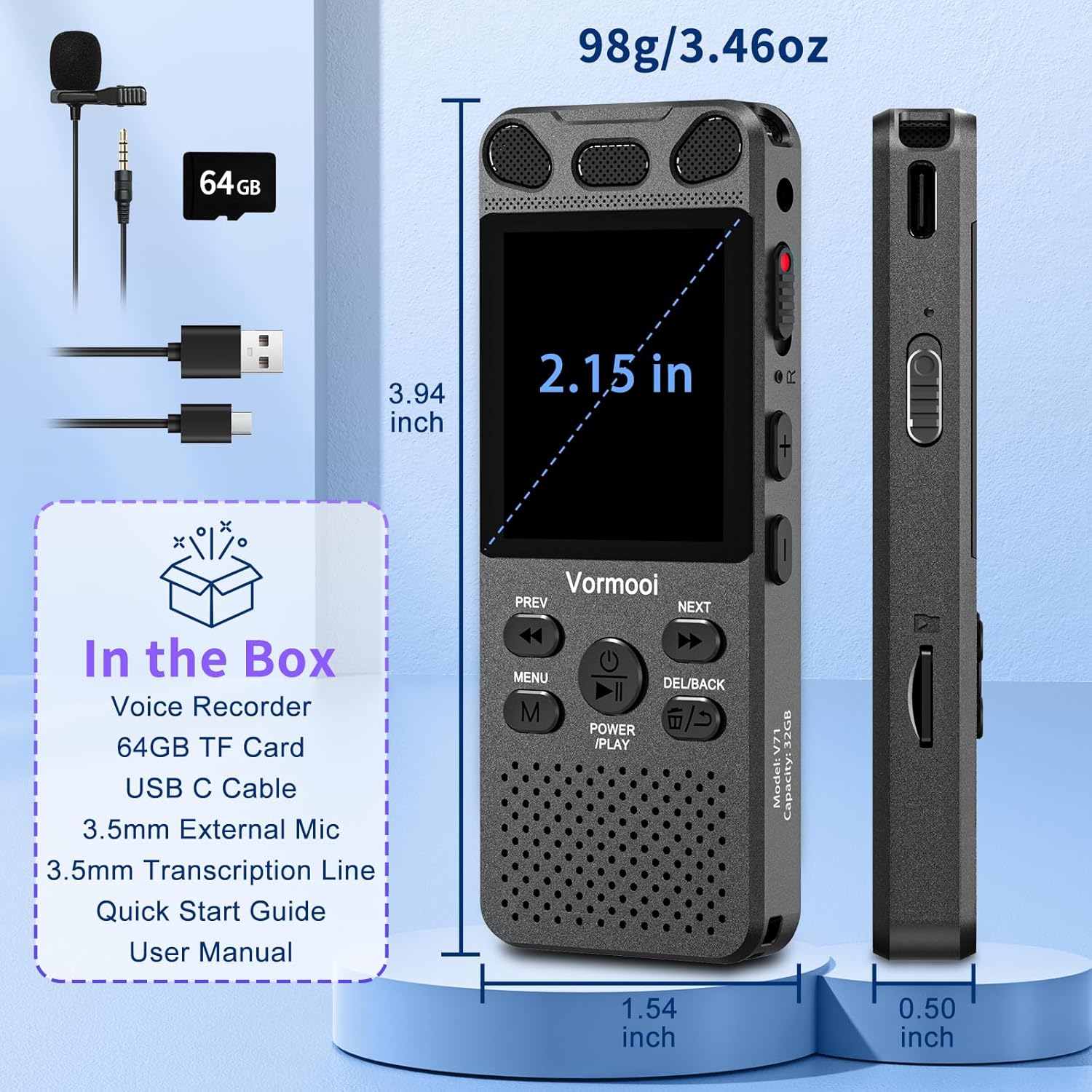
Image: The Vormooi Digital Voice Recorder and its included accessories, such as the external microphone, USB-C cable, and 64GB TF card.
3. නිෂ්පාදන අවසන්view
Familiarize yourself with the various parts and controls of your Vormooi Digital Voice Recorder.

Image: Labeled diagram of the Vormooi Digital Voice Recorder highlighting its USB C Port, Lock/Unlock switch, Previous Song/Fast Rewind button, TF-Card Slot, Menu button, Power/Play/Pause/OK button, 3.5mm Jack, Record/Save (REC) switch, Reset button, Volume +/- buttons, Next Song/Fast Forward button, and Back/Delete Files බොත්තම.
ප්රධාන සංරචක:
- සංදර්ශක තිරය: 2.15-inch color screen for navigation and information display.
- බිල්ට්-ඉන් මයික්රොෆෝන: For omni-directional recording.
- කථානායක: For playback of recordings.
- REC Switch: Slide up to start recording, slide down to save.
- අගුළු බොත්තම: Locks all buttons to prevent accidental operation during recording.
- USB-C වරාය: පරිගණකයක් ආරෝපණය කිරීම සහ සම්බන්ධ කිරීම සඳහා.
- 3.5mm ජැක්: For connecting external microphone or headphones.
- TF-Card Slot: For inserting the 64GB TF card to expand memory.
4. පිහිටුවීම
4.1 උපාංගය ආරෝපණය කිරීම
Before first use, fully charge the voice recorder.
- Connect the provided USB-C cable to the recorder's USB-C port.
- USB-C කේබලයේ අනෙක් කෙළවර USB බල ඇඩැප්ටරයකට (ඇතුළත් කර නැත) හෝ පරිගණකයේ USB පෝට් එකකට සම්බන්ධ කරන්න.
- The battery icon on the screen will indicate charging status. A full charge takes approximately 2 hours.
සටහන: A fully charged battery provides up to 110 hours of continuous recording.
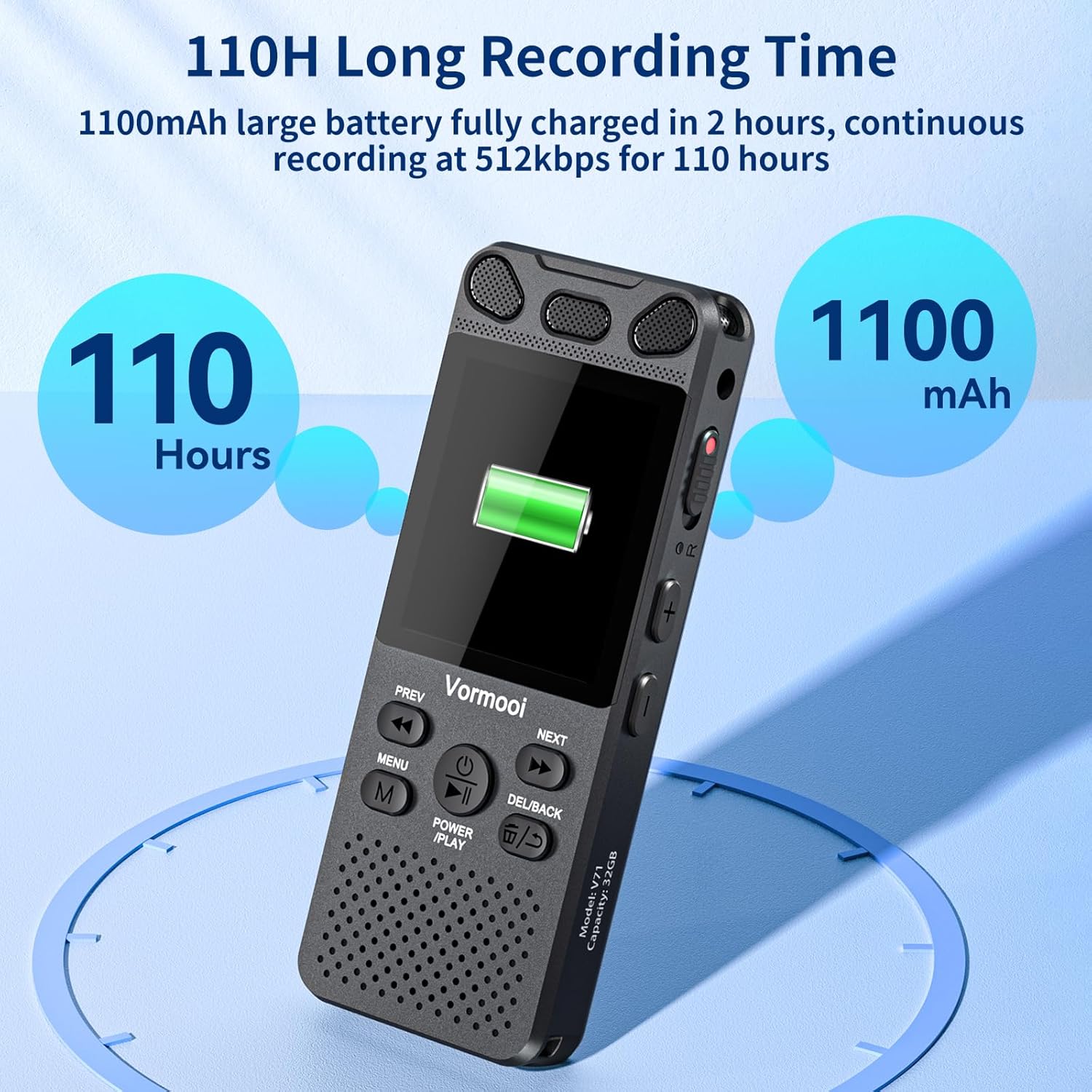
Image: The recorder's screen displaying battery status and highlighting its 110-hour long recording capability and 1100mAh battery.
4.2 TF කාඩ්පත ඇතුළු කිරීම
The device comes with 32GB built-in memory and an additional 64GB TF card for expanded storage.
- Locate the TF-Card Slot on the side of the recorder.
- Gently insert the 64GB TF card into the slot until it clicks into place. Ensure the card is oriented correctly.
- ඉවත් කිරීමට, කාඩ්පත පිටතට එන තුරු මෘදු ලෙස ඇතුළට තල්ලු කරන්න.

Image: Visual representation of the recorder's 96GB storage, composed of 32GB internal memory and an expandable 64GB TF card, capable of storing over 7000 hours of 32kbps recordings.
4.3 බල ගැන්වීම සක්රිය / අක්රිය කිරීම
- බල ගැන්වීම: ඔබා අල්ලාගෙන සිටින්න POWER/PLAY/PAUSE/OK button for a few seconds until the screen lights up.
- විදුලිය විසන්ධි කිරීම: ඔබා අල්ලාගෙන සිටින්න POWER/PLAY/PAUSE/OK තිරය ක්රියා විරහිත වන තුරු බොත්තම ඔබාගෙන සිටින්න.
5. මෙහෙයුම් උපදෙස්
5.1 මූලික පටිගත කිරීම
The Vormooi recorder features a convenient one-touch recording function.
- To start recording, slide the REC switch upwards. The recording indicator will light up, and the screen will show recording in progress.
- To save the recording, slide the REC switch downwards. The recording will be saved automatically.

Image: The recorder's one-touch record/save switch, demonstrating its ease of use, alongside icons representing 1536K clear sound quality and an intelligent noise cancellation chip.
5.2 නැවත ධාවනය
- From the main menu, navigate to "Recordings Library" or "Folders".
- භාවිතා කරන්න පෙර සහ ඊළඟ අපේක්ෂිත පටිගත කිරීම තෝරා ගැනීමට බොත්තම්.
- ඔබන්න POWER/PLAY/PAUSE/OK නැවත ධාවනය ආරම්භ කිරීමට බොත්තම.
- නැවත ධාවනය අතරතුර, ඔබන්න POWER/PLAY/PAUSE/OK විරාම කිරීමට/නැවත ආරම්භ කිරීමට.
- භාවිතා කරන්න පෙර සහ ඊළඟ buttons for fast rewind/fast forward.
- භාවිතා කරමින් පරිමාව සකසන්න වෙළුම +/- බොත්තම්.
5.3 හඬ සක්රිය පටිගත කිරීම (VAR)
The VAR function allows the recorder to start recording automatically when sound is detected and pause when silence occurs, saving memory space.
- "සැකසීම්" මෙනුව වෙත යන්න.
- Select "VAR Mode" or "Voice Activated".
- Choose your desired sensitivity level (e.g., Level 1-7, where 7 is most sensitive).
- Exit the menu. The recorder will now record only when sound is present.

Image: A composite image illustrating key functionalities: Voice Activated Recording, 110-hour battery life, password protection, A-B repeat for specific section playback, and variable speed playback.
5.4 External Microphone Recording
For more precise audio capture, especially in interviews, use the included external microphone.
- Plug the 3.5mm jack of the external microphone into the recorder's 3.5mm jack.
- Ensure the microphone is positioned correctly for optimal sound pickup.
- Proceed with recording as usual using the REC switch. The device will automatically switch to external microphone input.

Image: The Vormooi recorder connected to its external 3.5mm microphone, showing the setup for enhanced audio recording.
5.5 Line-in Recording (Transcription)
The line-in function allows you to record audio directly from other devices like cell phones, MP3 players, or computers.
- Connect one end of the 3.5mm Line-in Cable to the audio output of your external device (e.g., headphone jack of a phone).
- Connect the other end of the 3.5mm Line-in Cable to the recorder's 3.5mm jack.
- Start playback on your external device and then slide the REC switch upwards on the recorder to begin recording.

Image: Setup for line-in recording, showing the recorder connected to a smartphone via a 3.5mm cable, enabling direct audio capture from other devices.
5.6 ශබ්දය අඩු කිරීම
The Vormooi recorder is equipped with an advanced noise reduction chip and adjustable noise reduction levels (7 levels).
- Access the "Settings" menu.
- Find the "Noise Reduction" or "DSP" option.
- Adjust the level to minimize environmental noise during recording. Higher levels provide more aggressive noise reduction.

රූපය: අභ්යන්තරයක් view highlighting the 2159 Intelligent Noise Reduction Chip (DSP) responsible for minimizing environmental noise and enhancing audio clarity.
5.7 අගුළු බොත්තම
To prevent accidental interruption or loss of recording due to unintentional button presses, use the LOCK button.
- ස්ලයිඩ් කරන්න ලොක් කරන්න button (usually on the side) to the "locked" position. All buttons will become unresponsive.
- Slide it back to the "unlocked" position to regain control of the buttons.

Image: The lock switch on the side of the recorder, showing its "UP: Locked" and "DOWN: Unlock" positions, designed to prevent accidental button presses during recording.
5.8 පරිගණකයට සම්බන්ධ වීම
You can transfer recordings to your Windows or macOS computer.
- Connect the recorder to your computer using the provided USB-C cable.
- The recorder will appear as a removable disk drive on your computer.
- You can then drag and drop audio files වෙත සහ උපාංගයෙන්.
6. නඩත්තු කිරීම
- පිරිසිදු කිරීම: උපාංගය පිරිසිදු කිරීම සඳහා මෘදු වියළි රෙද්දක් භාවිතා කරන්න. දියර පිරිසිදු කරන්නන් හෝ ද්රාවක භාවිතා නොකරන්න.
- ගබඩා: උපාංගය සෘජු හිරු එළියෙන් සහ අධික උෂ්ණත්වයන්ගෙන් ඈත්ව සිසිල් වියළි ස්ථානයක ගබඩා කරන්න.
- බැටරි සත්කාර: බැටරි ආයු කාලය දීර්ඝ කිරීම සඳහා, බැටරිය නිතර නිතර සම්පූර්ණයෙන්ම විසර්ජනය කිරීමෙන් වළකින්න. දිගු කාලයක් භාවිතයේ නොතිබුණත්, නිතිපතා එය ආරෝපණය කරන්න.
- දත්ත උපස්ථ: Regularly back up important recordings to your computer to prevent data loss.
7. දෝශ නිරාකරණය
| ගැටලුව | හැකි විසඳුම |
|---|---|
| උපාංගය බලගන්වන්නේ නැත. |
|
| පටිගත කළ නොහැක. |
|
| දුර්වල පටිගත කිරීමේ ගුණාත්මකභාවය. |
|
| පරිගණකය මඟින් උපාංගය හඳුනා නොගන්නා ලදී. |
|
8. පිරිවිතර
| විශේෂාංගය | විස්තර |
|---|---|
| ආදර්ශ අංකය | O1 |
| මතක ධාරිතාව | 96 GB (32GB Built-in + 64GB TF Card) |
| පටිගත කිරීමේ ගුණාත්මකභාවය | Up to 1536Kbps HD |
| බැටරි ආයු කාලය | Up to 110 hours continuous recording |
| තිර ප්රමාණය | අඟල් 2.15 |
| නිෂ්පාදන මානයන් | 1.54"D x 3.94"W x 4.96"H |
| අයිතමයේ බර | අවුන්ස 5.3 කි |
| හෙඩ්ෆෝන් ජැක් | මිලිමීටර් 3.5 කි |
| සහාය දක්වන ආකෘති | MP3 Audio, WAV (also FLAC, OGG, APE, WMA for playback, as per A+ content image) |
| දෘඩාංග අතුරුමුහුණත | USB වර්ගය C |
| ගැළපෙන උපාංග | Windows/macOS Computer |
9. පාරිභෝගික සහාය
For any questions, issues, or assistance with your Vormooi Digital Voice Recorder, please contact our support team.
- Support Response: Vormooi support team will promptly respond and solve the problem within 24 hours on weekdays.
- Please refer to the contact information provided on the product packaging or the official Vormooi webවඩාත්ම යාවත්කාලීන සහාය නාලිකා සඳහා අඩවිය.


