1. හැඳින්වීම
The Fenton Pulse65 is a versatile portable party speaker designed for various events and environments. It delivers powerful sound, offers wireless connectivity, and features dynamic lighting. This manual provides essential information for the safe and optimal use of your Pulse65 speaker.
ප්රධාන ලක්ෂණ:
- 60W RMS (140W max) output for clear, powerful sound with deep bass.
- Bluetooth 5.3 for wireless streaming and stereo pairing (TWS).
- Dynamic multicolour light show synchronized with music.
- IPX4 splashproof design for outdoor use.
- Integrated 12-hour rechargeable battery.
- Includes a wireless UHF microphone and remote control.
- USB playback and FM radio functionality.
2 ආරක්ෂිත තොරතුරු
මෙම නිෂ්පාදනය භාවිතා කිරීමට පෙර කරුණාකර සියලුම ආරක්ෂක උපදෙස් කියවා තේරුම් ගන්න. අනාගත යොමුව සඳහා මෙම අත්පොත තබා ගන්න.
- ජල ප්රතිරෝධය: The Pulse65 is IPX4 splashproof. Do not immerse the speaker in water or expose it to heavy rain. Ensure all port covers are securely closed when used near water.
- බලශක්ති ප්රභවය: Use only the specified charging cable and power adapter. Do not attempt to open or modify the battery compartment.
- වාතාශ්රය: කිසිදු වාතාශ්රය විවරයක් අවහිර නොකරන්න. ස්පීකරය වටා ප්රමාණවත් වායු ප්රවාහයක් සහතික කරන්න.
- පිරිසිදු කිරීම: Disconnect the power before cleaning. Use a soft, dry cloth. Do not use liquid cleaners or aerosols.
- උෂ්ණත්වය: Avoid extreme temperatures. Do not expose to direct sunlight for extended periods or place near heat sources.
- දරුවන්: ළමුන්ගෙන් ඈත් කර තබන්න. මෙම නිෂ්පාදනය සෙල්ලම් බඩුවක් නොවේ.
3. පැකේජ අන්තර්ගතය
සියලුම අයිතම පැකේජයේ ඇති බව තහවුරු කරගන්න:
- Fenton Pulse65 Portable Party Speaker
- රැහැන් රහිත UHF මයික්රෆෝනය
- දුරස්ථ පාලකය
- USB ආරෝපණ කේබලය
- පරිශීලක අත්පොත
4. පිහිටුවීම
4.1. මූලික අයකිරීම
Before first use, fully charge the speaker. Connect the provided USB charging cable to the speaker's charging port and a suitable USB power adapter (not included). The charging indicator will show the charging status. A full charge provides approximately 12 hours of playback, depending on usage volume and light effects.
4.2. බල ගැන්වීම / අක්රිය කිරීම
ඔබා අල්ලාගෙන සිටින්න බලය කථිකයා සක්රිය හෝ අක්රිය කිරීමට පාලක පැනලයේ බොත්තම ඔබන්න.
4.3. Wireless Microphone Setup
The included wireless UHF microphone is pre-paired with the speaker. Ensure the microphone has fresh batteries (not included) and is powered on. The microphone's display will indicate its status.

Image: The Fenton Pulse65 speaker shown with its wireless microphone and remote control, illustrating the complete package.
5. මෙහෙයුම් උපදෙස්
5.1. පාලන පැනලය අවසන්view
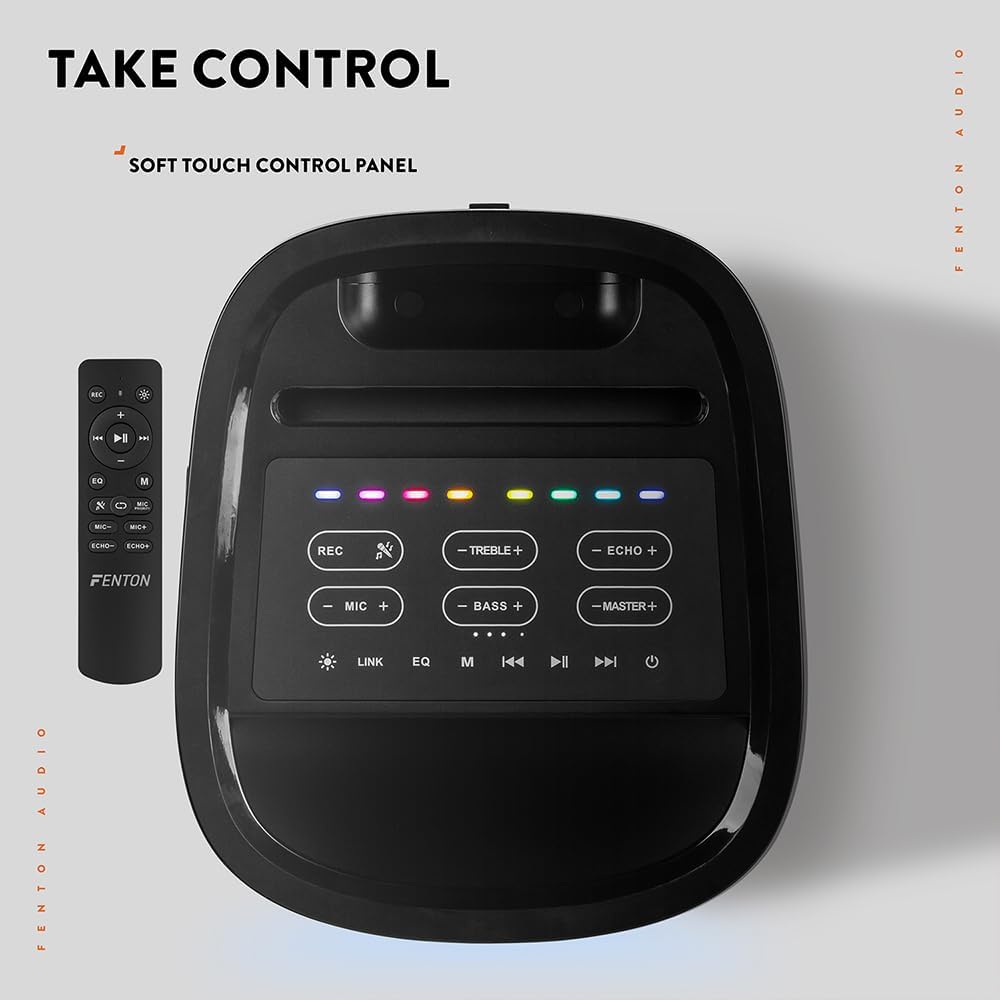
රූපය: ඉහළ-පහළ view of the Fenton Pulse65 speaker's soft-touch control panel, alongside the remote control, highlighting various buttons for audio and light adjustments.
The top panel features soft-touch controls for various functions:
- REC: ශ්රව්ය පටිගත කරන්න.
- ට්රිබල් +/-: ත්රිත්ව මට්ටම් සකසන්න.
- ECHO +/-: Adjust microphone echo effect.
- MIC +/-: මයික්රොෆෝනයේ පරිමාව සකසන්න.
- BASS +/-: බාස් මට්ටම් සකසන්න.
- MASTER +/-: Adjust overall master volume.
- සබැඳිය: Activate TWS (True Wireless Stereo) pairing.
- EQ: සමකරන පෙරසිටුවීම් හරහා චක්රීය කරන්න.
- M (ප්රකාරය): Switch between input modes (Bluetooth, USB, FM Radio, AUX).
- වාදනය/විරාමය: ශ්රව්ය නැවත ධාවනය වාදනය කරන්න හෝ විරාම කරන්න.
- පෙර ඊළඟ: Skip tracks or tune FM radio stations.
- බලය: ස්පීකරය සක්රිය / අක්රිය කරන්න.
5.2. බ්ලූටූත් සම්බන්ධතාවය
- Turn on the Pulse65 speaker.
- ඔබන්න M (ප්රකාරය) button until the Bluetooth indicator lights up or you hear a Bluetooth pairing prompt.
- ඔබගේ ජංගම උපාංගයේ, බ්ලූටූත් සබල කර පවතින උපාංග සොයන්න.
- Select "Fenton Pulse65" from the list.
- Once connected, the speaker will confirm with an audible prompt.

Image: The Fenton Pulse65 speaker with a smartphone placed in its integrated dock, illustrating the Bluetooth streaming and charging capabilities.
5.3. සත්ය රැහැන් රහිත ස්ටීරියෝ (TWS) යුගලනය
To link two Pulse65 speakers for stereo sound:
- Ensure both Pulse65 speakers are powered on and in Bluetooth mode, but not connected to any device.
- එක් ස්පීකරයක (මෙය ප්රාථමික ස්පීකරය වනු ඇත), ඔබන්න ලින්ක් කරන්න button. It will search for another Pulse65.
- The primary speaker will automatically connect to the secondary speaker. Once connected, you will hear a confirmation tone.
- Now, connect your mobile device to the primary Pulse65 speaker via Bluetooth as described in section 5.2.
- දැන් ස්පීකර් දෙකෙහිම ස්ටීරියෝ භාවිතයෙන් ශ්රව්ය වාදනය වේ.
5.4. USB ප්ලේබැක්
MP3 ශ්රව්ය අඩංගු USB ෆ්ලෑෂ් ධාවකයක් ඇතුළු කරන්න. files into the USB port on the back of the speaker. The speaker will automatically switch to USB mode and begin playback. Use the Play/Pause and Previous/Next buttons to control playback.
5.5. එෆ්එම් රේඩියෝව
- ඔබන්න M (ප්රකාරය) FM රේඩියෝ මාදිලියට මාරු වීමට බොත්තම.
- ඔබා අල්ලාගෙන සිටින්න වාදනය / විරාමය පවතින FM මධ්යස්ථාන ස්වයංක්රීයව පරිලෝකනය කර සුරැකීමට බොත්තම.
- භාවිතා කරන්න පෙර/ඊළඟ සුරකින ලද ස්ථාන හරහා සැරිසැරීමට බොත්තම්.
5.6. මයික්රෆෝන සහ ගිටාර් ආදාන
The speaker features dedicated inputs for a wired microphone and a guitar on the rear panel. Connect your devices to these ports. Use the MIC +/- සහ ECHO +/- controls on the top panel to adjust the microphone's volume and echo effect.

Image: A composite image showing the rear panel of the Fenton Pulse65 speaker with its various input ports, and a front view of the speaker with a microphone, illustrating connectivity options.
5.7. ආලෝක මාදිලි
The multicolour LED lights on the speaker can be controlled via the remote control or specific buttons on the control panel (if available, refer to the remote for full control). Cycle through different light patterns or turn them off as desired.

රූපය: සමීප ඡායාරූපයක් view of the Fenton Pulse65 speaker, highlighting its multicolour LED light ring on the front grille, indicating its splashproof design.
6. නඩත්තු කිරීම
6.1 පිරිසිදු කිරීම
ස්පීකරයේ බාහිර කොටස මෘදු, වියලි හෝ තරමක් d පිරිසිදුකාරකයකින් පිස දමන්න.amp cloth. Do not use abrasive cleaners, waxes, or solvents. Ensure all port covers are closed before cleaning if using a damp රෙදි.
6.2. ගබඩා කිරීම
ස්පීකරය සෘජු හිරු එළියෙන් සහ අධික උෂ්ණත්වයන්ගෙන් ඈත්ව සිසිල් වියළි ස්ථානයක ගබඩා කරන්න. දිගු කාලයක් ගබඩා කරන්නේ නම්, බැටරි සෞඛ්යය පවත්වා ගැනීම සඳහා සෑම මාස කිහිපයකට වරක් බැටරිය ආසන්න වශයෙන් 50% දක්වා ආරෝපණය කරන්න.
6.3. බැටරි රැකවරණය
To prolong battery life, avoid fully discharging the battery frequently. Recharge the speaker when the low battery indicator appears. Do not expose the battery to excessive heat.
7. දෝශ නිරාකරණය
If you encounter issues with your Fenton Pulse65, refer to the following common problems and solutions:
| ගැටලුව | විය හැකි හේතුව | විසඳුම |
|---|---|---|
| ස්පීකරය ක්රියාත්මක නොවේ. | බැටරිය අඩුයි; බල බොත්තම නිවැරදිව ඔබා නැත. | Charge the speaker fully. Press and hold the Power button for a few seconds. |
| කථිකයාගෙන් ශබ්දයක් නැත. | ශබ්දය ඉතා අඩුයි; වැරදි ආදාන ප්රකාරය; උපාංගය සම්බන්ධ වී නැත. | Increase master volume. Press 'M' to select correct input mode. Ensure Bluetooth device is connected or USB is inserted correctly. |
| බ්ලූටූත් යුගලනය අසමත් වේ. | ස්පීකරය යුගල කිරීමේ මාදිලියේ නැත; උපාංගය ඕනෑවට වඩා දුරයි; බාධාව. | Ensure speaker is in Bluetooth mode and not connected to another device. Move device closer to speaker. Turn off other Bluetooth devices. |
| මයික්රෆෝනය ක්රියා නොකරයි. | Microphone off; Low battery in mic; Mic volume too low. | Ensure wireless mic is powered on. Replace mic batteries. Increase MIC volume on speaker. |
| TWS යුගලනය අසාර්ථකයි. | Speakers already connected to a device; Speakers too far apart. | Disconnect both speakers from any Bluetooth devices. Ensure both are in Bluetooth mode. Place speakers close together during pairing. |
8. පිරිවිතර
- වෙළඳ නාමය: ෆෙන්ටන්
- ආකෘතිය: ස්පන්දනය65
- ස්පීකර් උපරිම නිමැවුම් බලය: වොට් 140 (උච්ච)
- සංඛ්යාත ප්රතිචාරය: 12000 Hz
- සම්බන්ධතා තාක්ෂණය: බ්ලූටූත් 5.3
- ශ්රව්ය ප්රතිදාන ප්රකාරය: ස්ටීරියෝ
- සවිකිරීමේ වර්ගය: ටැබ්ලටය
- ස්පීකර් වර්ගය: එළිමහන්
- නිෂ්පාදන මානයන්: 49 x 34.5 x 39.5 සෙ.මී
- බර: කිලෝ ග්රෑම් 7.6 කි
- බැටරි: 1 Nonstandard Battery (included), 12-hour playback
- IP ශ්රේණිගත කිරීම: IPX4 (Splashproof)
- නිෂ්පාදකයා: ට්රොනියෝස් බී.වී
- මුල් රට: චීනය

Image: The Fenton Pulse65 speaker displayed with its approximate dimensions (40cm height, 32cm width, 27cm depth) and an icon indicating 12 hours of battery life.
9. වගකීම් සහ සහාය
For warranty information and customer support, please refer to the documentation provided with your purchase or visit the official Fenton brand store. You can find more information and contact details at the Fenton Brand Store.


