හැඳින්වීම
This manual provides essential information for setting up, operating, maintaining, and troubleshooting your Acer TravelLite TL14-42M Business Laptop. Please read this guide thoroughly to ensure proper use and to maximize the lifespan of your device.
ඉදිරිපස view of the Acer TravelLite TL14-42M laptop, showcasing එහි සිනිඳු නිර්මාණය සහ සංදර්ශකය.
සැලසුම
1. Unboxing සහ මූලික පරීක්ෂාව
Carefully remove the laptop and all accessories from the packaging. Verify that the following items are included:
- Acer TravelLite TL14-42M Laptop
- බල ඇඩැප්ටරය
- විදුලි රැහැන්
- පරිශීලක අත්පොත (මෙම ලේඛනය)
කිසියම් භෞතික හානියක් සඳහා ලැප්ටොප් පරිගණකය පරීක්ෂා කරන්න. කිසියම් හානියක් හමු වුවහොත්, වහාම ඔබේ සිල්ලර වෙළෙන්දා අමතන්න.
2. බල ඇඩැප්ටරය සම්බන්ධ කිරීම
Connect the power adapter to the laptop's charging port and then plug the power cord into an electrical outlet. It is recommended to fully charge the battery before initial use.
3. මූලික බලගැන්වීම සහ Windows 11 සැකසුම
Press the power button located on the keyboard deck to turn on the laptop. Follow the on-screen instructions to complete the Windows 11 Home setup process. This includes selecting your region, language, connecting to a Wi-Fi network, and creating a user account.
4. පර්යන්ත සම්බන්ධ කිරීම
Utilize the available ports to connect external devices such as a mouse, external display, or USB drives.

පැත්ත view of the laptop, illustrating the various connectivity ports including USB, HDMI, and LAN.
මෙහෙයුම් උපදෙස්
1. බල කළමනාකරණය
- බල ගැන්වීම: බල බොත්තම ඔබන්න.
- නින්ද ප්රකාරය: පියන වසා දමන්න හෝ බල බොත්තම කෙටියෙන් ඔබන්න.
- වසා දමන්න: ආරම්භක බොත්තම ක්ලික් කරන්න, පසුව බලය > වසා දමන්න.
- යළි අරඹන්න: ආරම්භක බොත්තම ක්ලික් කරන්න, පසුව බලය > නැවත ආරම්භ කරන්න.
2. යතුරු පුවරුව සහ ස්පර්ශ පෑඩ්
The laptop features a multi-language A4 size isolated spill-resistant keyboard and an extra-large touchpad. Use the touchpad for navigation and gestures. Refer to Windows 11 settings for touchpad customization.
3. සංදර්ශක විශේෂාංග
The 14-inch Full HD (1920 x 1080) anti-glare TFT LCD provides clear visuals. Adjust display settings via Windows 11 for brightness and resolution preferences.

The laptop's 14-inch Full HD display offers vivid clarity for various tasks.
4. සම්බන්ධතාවය
The laptop supports 802.11ac and 802.11ax wireless standards for Wi-Fi connectivity. It also includes a Gigabit LAN port for wired network connections.
5. වරායන් අවසන්view
Your TravelLite laptop is equipped with the following ports:
- 1 x HDMI වරාය
- 1 x SD කාඩ් තව්
- 1 x Gigabit LAN Port
- 1 x USB 3.2 Gen 2 Type-C (Full function, supports display over Type-C & charging)
- 2 x USB 3.2 Type-A (1 with power-off charging)
6. රහස්යතා විශේෂාංග
The laptop includes a built-in camera shutter for enhanced privacy and enterprise-level security with TPM 2.0.

The laptop emphasizes privacy with a built-in camera shutter and TPM 2.0 security.
නඩත්තු කිරීම
1. ලැප්ටොප් එක පිරිසිදු කිරීම
මෘදු, ලින්ට් රහිත රෙදි තරමක් භාවිතා කරන්න dampened with water or a specialized screen cleaner to clean the display. For the keyboard and chassis, use a soft, dry cloth. Avoid harsh chemicals or abrasive materials.
2. බැටරි රැකවරණය
To prolong battery life, avoid extreme temperatures. It is recommended to fully discharge and recharge the battery periodically. If storing the laptop for an extended period, ensure the battery is charged to approximately 50%.
3. මෘදුකාංග යාවත්කාලීන
Regularly update your Windows 11 operating system and drivers to ensure optimal performance and security. Windows 11 Home includes automatic updates.
4. ගබඩා කළමනාකරණය
අනවශ්ය දේ වරින් වර පිරිසිදු කරන්න files and applications to maintain sufficient storage space on the 512GB SSD. Utilize cloud storage or external drives for large files.
දෝෂගවේෂණය
මෙම කොටසේදී ඔබේ ලැප්ටොප් පරිගණකය සමඟ ඔබට මුහුණ දීමට සිදුවිය හැකි පොදු ගැටළු සාකච්ඡා කෙරේ.
1. ලැප්ටොප් පරිගණකය ක්රියාත්මක නොවේ
- බල ඇඩැප්ටරය ලැප්ටොප් පරිගණකයට සහ ක්රියාකාරී විදුලි අලෙවිසැලකට ආරක්ෂිතව සම්බන්ධ කර ඇති බවට වග බලා ගන්න.
- වෙනත් උපාංගයක් සම්බන්ධ කිරීමෙන් බල සැපයුම ක්රියාකාරී බව තහවුරු කර ගන්න.
- බැටරිය සම්පූර්ණයෙන්ම බැස ගොස් ඇත්නම්, එය ක්රියාත්මක කිරීමට පෙර අවම වශයෙන් විනාඩි 30ක් ආරෝපණය කිරීමට ඉඩ දෙන්න.
2. සංදර්ශක ගැටළු
- If the screen is blank, try adjusting the brightness settings using the function keys.
- Connect an external monitor to determine if the issue is with the laptop's display or the graphics output.
3. Wi-Fi සම්බන්ධතා ගැටළු
- Windows සැකසුම් තුළ Wi-Fi සක්රීය කර ඇති බවට වග බලා ගන්න.
- ඔබේ රවුටරය සහ මොඩමය නැවත ආරම්භ කරන්න.
- අනෙකුත් උපාංගවලට එකම Wi-Fi ජාලයට සම්බන්ධ විය හැකිදැයි පරීක්ෂා කරන්න.
4. මන්දගාමී කාර්ය සාධනය
- පසුබිමේ ධාවනය වන අනවශ්ය යෙදුම් වසා දමන්න.
- Run a disk cleanup and defragmentation (for HDD, though SSDs manage this differently).
- වින්ඩෝස් සහ ධාවක යාවත්කාලීනව පවතින බවට වග බලා ගන්න.
වඩාත් සංකීර්ණ ගැටළු සඳහා, Acer සහාය වෙත යොමු වන්න. webවෙබ් අඩවිය හෝ පාරිභෝගික සේවාව අමතන්න.
පිරිවිතර
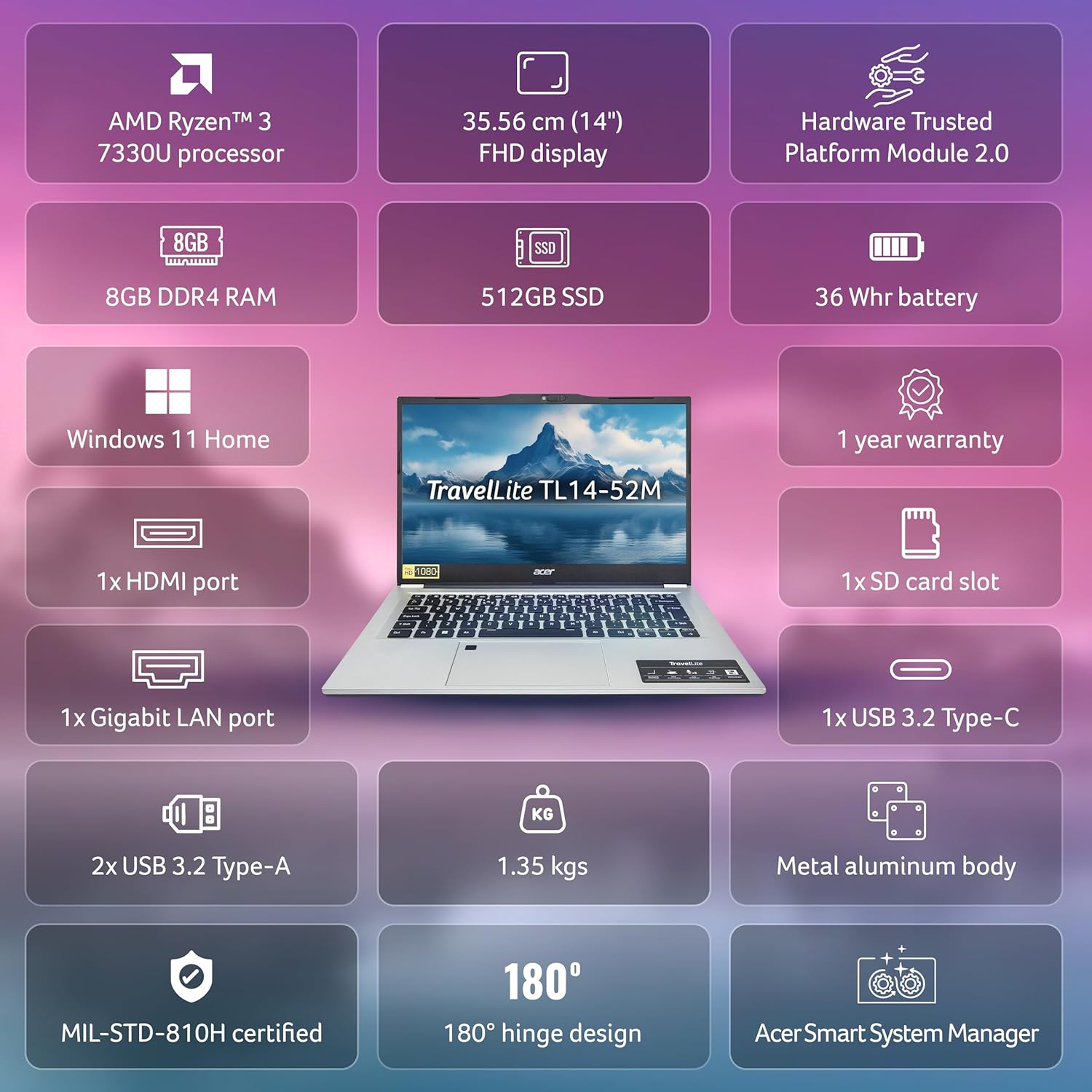
Below are the detailed technical specifications for the Acer TravelLite TL14-42M Business Laptop:

ඕවර් එකක්view of the Acer TravelLite TL14-42M's key features and specifications.
| විශේෂාංගය | පිරිවිතර |
|---|---|
| ආදර්ශ අංකය | TL14-42M හඳුන්වා දීම |
| ප්රොසෙසරය | AMD R3 7330U with AMD Radeon Graphics |
| මෙහෙයුම් පද්ධතිය | Windows 11 Home |
| ප්රදර්ශනය කරන්න | 14-inch Full HD (1920 x 1080) Anti-glare TFT LCD |
| RAM | 8 GB DDR4 |
| ගබඩා කිරීම | 512 GB SSD |
| ග්රැෆික්ස් | ඒකාබද්ධ AMD Radeon R3 |
| වරායන් | 1x HDMI, 1x SD Card Slot, 1x Gigabit LAN, 1x USB 3.2 Gen 2 Type-C, 2x USB 3.2 Type-A |
| රැහැන් රහිත සම්බන්ධතාව | 802.11ac, 802.11ax |
| බැටරි | 36 Watt Hours, 3-cell Lithium Ion (Approx. 4 hours average battery life) |
| මානයන් (LxWxH) | 22 x 32.5 x 1.9 සෙ.මී |
| බර | කිලෝ ග්රෑම් 1.34 කි |
| ඇතුළත් සංරචක | Laptop, Power cord, Adapter, User Manual |
වගකීම් සහ සහාය
Your Acer TravelLite TL14-42M laptop comes with a 1-year manufacturer's warranty. For detailed warranty terms and conditions, please refer to the warranty card included with your product or visit the official Acer support webඅඩවිය.
For technical assistance, driver downloads, or service inquiries, please visit the Acer support portal or contact their customer service department. Keep your product's serial number and proof of purchase readily available when seeking support.


