1. හැඳින්වීම
ස්තූතියි, උදව් කළාටasing the XO F41 Mirror Bluetooth Speaker. This device combines a digital clock display with a portable Bluetooth speaker, offering multiple playback options including Bluetooth, TF card, and FM radio. Please read this manual carefully before use to ensure proper operation and to maximize your experience with the product.

Image 1.1: The XO F41 Mirror Bluetooth Speaker in use, showing its digital clock display.
2. නිෂ්පාදන ලක්ෂණ
- බ්ලූටූත් 5.3 සම්බන්ධතාව: ස්ථාවර සහ කාර්යක්ෂම රැහැන් රහිත ශ්රව්ය ප්රවාහයක් සඳහා.
- දර්පණ සංදර්ශකය: Clear digital time display with adjustable brightness.
- බහු පසුධාවන ක්රම: Supports Bluetooth, TF card, and FM radio.
- ඒකාබද්ධ මයික්රෆෝනය: හෑන්ඩ්ස්-ෆ්රී ඇමතුම් සඳහා.
- දිගු පසුධාවන කාලය: Up to 8 hours at 50% volume, 5 hours at 100% volume.
- සංයුක්ත සහ අතේ ගෙන යා හැකි නිර්මාණය: Easy to carry and place anywhere.
- USB-C ආරෝපණය: නවීන සහ පහසු ආරෝපණ වරායක්.
3. පැකේජ අන්තර්ගතය
කරුණාකර පහත අයිතම සඳහා පැකේජය පරීක්ෂා කරන්න:
- XO F41 Mirror Bluetooth Speaker
- USB-C ආරෝපණ කේබලය
- පරිශීලක අත්පොත

Image 3.1: The XO F41 Mirror Bluetooth Speaker packaging.
4. උපාංග පිරිසැලසුම සහ පාලන
Familiarize yourself with the speaker's buttons and ports:
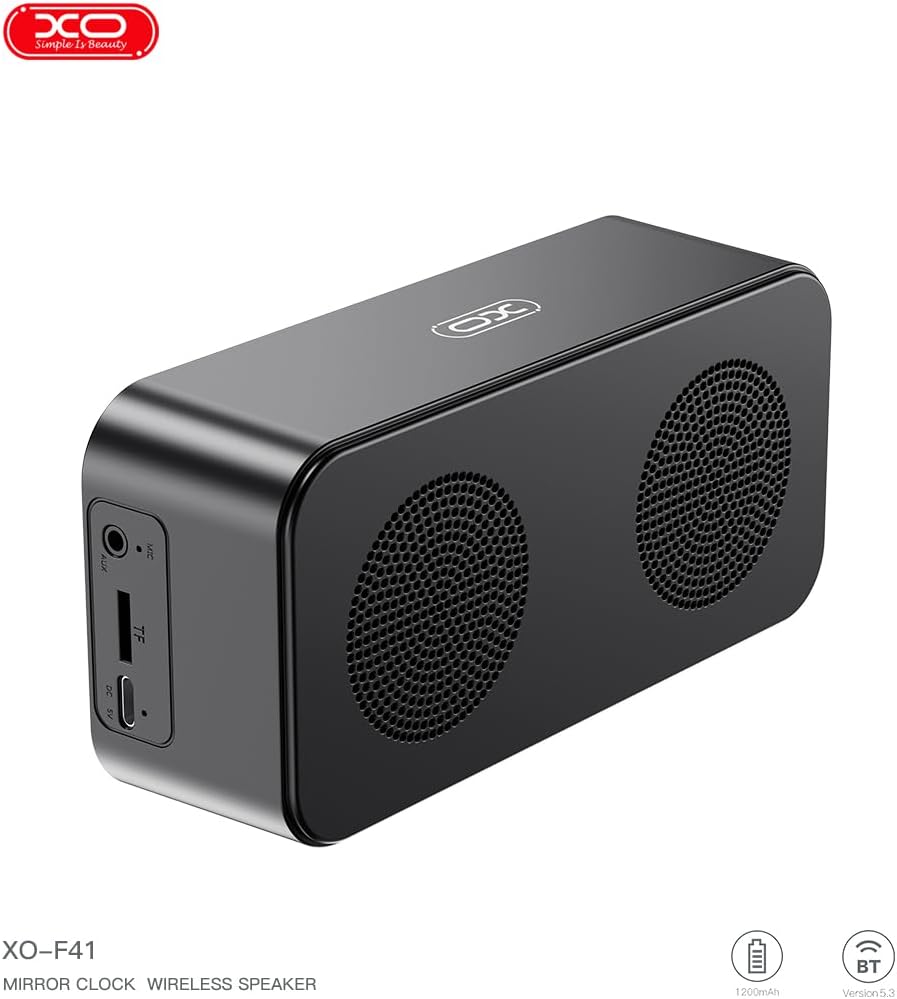
රූපය 4.1: පැත්ත view of the XO F41 with ports labeled.
- බල බොත්තම: Press and hold to power on/off. Short press to switch modes.
- වාදනය/විරාම බොත්තම: ශ්රව්ය වාදනය කරන්න හෝ විරාම කරන්න. ඇමතුම්වලට පිළිතුරු දෙන්න/අවසන් කරන්න.
- ශබ්දය වැඩි කිරීම/ඊළඟ ඛණ්ඩය: ශබ්දය වැඩි කිරීමට කෙටි ඔබන්න, ඊළඟ ධාවන පථය සඳහා දිගු ඔබන්න.
- වෙළුම පහළට/පෙර ඛණ්ඩය: ශබ්දය අඩු කිරීමට කෙටි ඔබන්න, පෙර ධාවන පථය සඳහා දිගු ඔබන්න.
- USB-C වරාය: උපාංගය ආරෝපණය කිරීම සඳහා.
- TF කාඩ් පත: Insert a TF (MicroSD) card for local music playback.
- AUX වරාය: For wired audio input.
5. පිහිටුවීම
5.1 කථිකයා ආරෝපණය කිරීම
- සපයා ඇති USB-C කේබලය ස්පීකරයේ ආරෝපණ වරායට සම්බන්ධ කරන්න.
- කේබලයේ අනෙක් කෙළවර USB බල ඇඩැප්ටරයකට (ඇතුළත් කර නැත) හෝ පරිගණකයේ USB පෝට් එකකට සම්බන්ධ කරන්න.
- The charging indicator will illuminate. It takes approximately 3 hours for a full charge.
- The indicator will turn off or change color once fully charged.
5.2 බලය සක්රිය / අක්රිය
- බල ගැන්වීමට: Press and hold the Power button for approximately 3 seconds. You will hear an audible prompt.
- බලය අක්රිය කිරීමට: Press and hold the Power button for approximately 3 seconds. You will hear an audible prompt.
6. මෙහෙයුම් උපදෙස්
6.1 බ්ලූටූත් යුගල කිරීම
- Ensure the speaker is powered on and in Bluetooth mode. If not, short press the Power button to cycle through modes until "BT" or a Bluetooth icon appears on the display.
- ඔබගේ ජංගම උපාංගයේ, බ්ලූටූත් සබල කර පවතින උපාංග සොයන්න.
- Select "XO-F41" from the list of devices.
- Once paired, the speaker will indicate a successful connection, and you can begin playing audio from your device.
6.2 TF කාඩ් මාදිලිය
- MP3 ශ්රව්ය සහිත TF (MicroSD) කාඩ්පතක් ඇතුළු කරන්න files TF කාඩ් පතට.
- The speaker will automatically switch to TF card mode and begin playing music. If not, short press the Power button to cycle to TF card mode.
- Use the Volume Up/Down buttons for track navigation and the Play/Pause button for playback control.
6.3 FM රේඩියෝ මාදිලිය
- Short press the Power button to switch to FM radio mode. The display will show the FM frequency.
- පවතින FM මධ්යස්ථාන ස්වයංක්රීයව පරිලෝකනය කර සුරැකීමට Play/Pause බොත්තම දිගු වේලාවක් ඔබන්න.
- Short press the Volume Up/Down buttons to switch between saved stations.
6.4 Clock and Alarm Settings
The XO F41 features a digital clock display. Specific instructions for setting the time and alarm are typically found in the detailed manual included with the product. Generally, a dedicated 'M' (Mode) or 'Set' button is used to enter time/alarm setting mode, and volume buttons are used to adjust values.

Image 6.1: The XO F41 speaker functioning as a bedside clock.
6.5 සංදර්ශක දීප්තිය සකස් කිරීම
The display brightness is adjustable. Look for a dedicated button (often labeled with a sun icon or similar) or a combination of button presses (e.g., double-pressing the Power button) to cycle through brightness levels. Refer to the included quick start guide for exact steps.
7. නඩත්තු කිරීම
- පිරිසිදු කිරීම: ස්පීකරයේ මතුපිට පිරිසිදු කිරීම සඳහා මෘදු වියළි රෙද්දක් භාවිතා කරන්න. උල්ෙල්ඛ පිරිසිදු කරන්නන් හෝ ද්රාවක භාවිතා නොකරන්න.
- ගබඩා: දීර්ඝ කාලයක් තිස්සේ භාවිතයේ නොමැති විට සෘජු හිරු එළියෙන් සහ අධික උෂ්ණත්වයන්ගෙන් ඈත්ව සිසිල් වියළි ස්ථානයක ස්පීකරය ගබඩා කරන්න.
- ජල ප්රතිරෝධය: මෙම උපාංගය ජල ආරක්ෂිත නොවේ. ජලයට හෝ අධික තෙතමනයට නිරාවරණය වීමෙන් වළකින්න.
- බැටරි සත්කාර: බැටරි ආයු කාලය දීර්ඝ කිරීම සඳහා, බැටරිය නිතර නිතර සම්පූර්ණයෙන්ම විසර්ජනය කිරීමෙන් වළකින්න. නිරන්තරයෙන් භාවිතයේ නොමැති වුවද, උපාංගය නිතිපතා ආරෝපණය කරන්න.
8. දෝශ නිරාකරණය
| ගැටලුව | විය හැකි හේතුව | විසඳුම |
|---|---|---|
| ස්පීකරය ක්රියාත්මක නොවේ. | අඩු බැටරි. | අවම වශයෙන් විනාඩි 30ක්වත් ස්පීකරය ආරෝපණය කරන්න. |
| බ්ලූටූත් හරහා යුගල කළ නොහැක. | Speaker not in pairing mode; Bluetooth disabled on device; too far from device. | Ensure speaker is in Bluetooth mode. Enable Bluetooth on your device. Move speaker closer to your device (within 10 meters). |
| No sound from TF card. | TF කාඩ්පත නිවැරදිව ඇතුළත් කර නැත; සහාය නොදක්වයි file format; no audio files on card. | TF කාඩ්පත නැවත ඇතුල් කරන්න. සහතික කරගන්න files are in MP3 format. Verify audio files are present on the card. |
| දුර්වල FM රේඩියෝ පිළිගැනීම. | දුර්වල සංඥාව; පාරිසරික බාධා. | Move the speaker to a different location. Re-scan for stations. |
9. පිරිවිතර
| විශේෂාංගය | විස්තර |
|---|---|
| ආදර්ශ අංකය | XO-F41 |
| බ්ලූටූත් අනුවාදය | බ්ලූටූත් V5.3 |
| බ්ලූටූත් සංඛ්යාතය | 2.402GHz-2.480GHz |
| බැටරි ධාරිතාව | 1200mAh |
| ආරෝපණ ආදානය | USB-C, DC5V/0.5A |
| ආරෝපණ කාලය | ආසන්න වශයෙන් පැය 3 කි |
| සෙල්ලම් කාලය | 8H (50% volume); 5H (100% volume) |
| Distance ලදායී දුර | මීටර් 10 ට අඩු |
| උපරිම බලය | 5W |
| ශබ්ද විකාශන ඒකකය | 52 මි.මී |
| සං Sign ා සිට ශබ්ද අනුපාතය | >80dB |
| නිෂ්පාදන මානයන් | 15 x 3.81 x 11 සෙ.මී. (දළ වශයෙන් 150 x 45 x 72 මි.මී.) |
| නිෂ්පාදන බර | 320 g (approx. 0.28 kg) |
| ද්රව්ය | ප්ලාස්ටික් |
| විශේෂ ලක්ෂණය | සකස් කළ හැකි දීප්තිය |

රූපය 9.1: සවිස්තරාත්මක නිෂ්පාදන පරාමිතීන්.
10. වගකීම් තොරතුරු
The XO F41 Mirror Bluetooth Speaker comes with a standard manufacturer's warranty. Please refer to the warranty card included in your package for specific terms, conditions, and duration. Keep your purchase receipt as proof of purchase for any warranty claims.
11. පාරිභෝගික සහාය
For further assistance, technical support, or inquiries regarding your XO F41 Mirror Bluetooth Speaker, please contact the retailer or manufacturer's customer service department. Contact details are typically provided on the product packaging or the official brand webඅඩවිය.