1. වැදගත් ආරක්ෂක තොරතුරු
Please read this entire manual before installation and assembly. If you have any questions regarding any of the instructions or warnings, please contact your local distributor for assistance.
- We accept no responsibility for incorrect or faulty installation.
- Follow the enclosed installation instructions carefully.
- Check the condition and completeness of all items before beginning.
- The fastening materials supplied for wall mounting are intended exclusively for fastening to solid masonry or concrete. For other wall types, such as hollow bricks, plasterboard, or lightweight construction, please contact a specialist retailer for information on suitable fastening elements.
- Under no circumstances should you exceed the limit values specified for the product.
2. පැකේජ අන්තර්ගතය
Verify that all components are present and undamaged before installation. If any parts are missing or damaged, do not attempt to install. Contact customer support for replacement parts.

Figure 2.1: XTRARM TiTon Double TV Wall Mount and included hardware components, including various screws, anchors, washers, and a drilling template.
පැකේජයට සාමාන්යයෙන් ඇතුළත් වන්නේ:
- XTRARM TiTon Double TV Wall Mount assembly
- Standard mounting hardware for TV and wall (various screws, anchors, washers)
- විදුම් අච්චුව
- Small spirit level
- Multiple hook-and-loop straps for cable management
3. පිරිවිතර
| විශේෂාංගය | පිරිවිතර |
|---|---|
| සවිකිරීමේ වර්ගය | වෝල් මවුන්ට් |
| චලන වර්ගය | Articulated, Swivel, Tilt, Rotate |
| ද්රව්ය | ලෝහ |
| වර්ණය | කළු |
| බිත්ති දුර | 12.9 cm (retracted) to 120 cm (extended) |
| භ්රමණය | Up to 90° (portrait/landscape) |
| කැරකෙනවා | Up to 180° (90° left/right) |
| ඇල කරන්න | -5 ° සිට +12 ° දක්වා |
| නිර්දේශිත රූපවාහිනී ප්රමාණය | Approximately 52 – 110 inches |
| බර ධාරිතාව | උපරිම 80 kg |
| VESA අනුකූලතාව | 100x100mm, 100x200mm, 200x100mm, 200x200mm, 200x300mm, 300x200mm, 300x300mm, 400x200mm, 400x300mm, 400x400mm, 500x300mm, 600x200mm, 600x400mm |

Figure 3.1: VESA compatibility and maximum weight capacity.

Figure 3.2: Key dimensions and movement capabilities of the mount.
Figure 3.3: Comprehensive technical drawing with detailed dimensions and adjustment ranges.
4. පිහිටුවීම සහ ස්ථාපනය
Proper installation is crucial for the safety and stability of your TV. Ensure you have the necessary tools and assistance before proceeding.
4.1 අවශ්ය මෙවලම් (ඇතුළත් නොවේ)
- සරඹ
- ස්ටඩ් සෙවුම (ලී ස්ටඩ් වලට සවි කරන්නේ නම්)
- පැන්සල
- මිනුම් පටිය
- සොකට් යතුර හෝ වෙනස් කළ හැකි යතුර
- ෆිලිප්ස් හෙඩ් ඉස්කුරුප්පු නියන
4.2 සවිකරන ස්ථානයක් තෝරාගැනීම
Select a wall location that can safely support the weight of the mount and your TV. For solid concrete or masonry walls, use the provided anchors. For wood stud walls, ensure the mount is centered on a stud. Avoid mounting to drywall alone.
4.3 Attaching the Wall Plate
- Position the drilling template at the desired height on the wall and mark the drill holes with a pencil. Use the included spirit level to ensure it is perfectly horizontal.
- Drill pilot holes at the marked locations. The drill bit size will depend on your wall type and the chosen anchors/screws.
- නියමු සිදුරුවලට බිත්ති නැංගුරම් (ඔබේ බිත්ති වර්ගය සඳහා අවශ්ය නම්) ඇතුළු කරන්න.
- Align the wall plate with the drilled holes and secure it to the wall using the appropriate screws and washers. Ensure it is firmly attached.
4.4 රූපවාහිනී වරහන් රූපවාහිනියට සවි කිරීම
- තිරයට හානි වීම වැළැක්වීම සඳහා ඔබේ රූපවාහිනියේ මුහුණ මෘදු, පිරිසිදු මතුපිටක් මත ප්රවේශමෙන් තබන්න.
- ඔබේ රූපවාහිනියේ පිටුපස VESA සවිකිරීමේ සිදුරු හඳුනා ගන්න.
- Select the correct size screws and spacers (if needed) from the provided hardware that fit your TV's VESA pattern.
- Attach the two vertical TV brackets to the back of your TV, ensuring they are level and securely fastened. Do not overtighten.
4.5 රූපවාහිනිය බිත්ති තහඩුවට සවි කිරීම
- With assistance, carefully lift the TV and hook the attached TV brackets onto the wall plate.
- රූපවාහිනිය බිත්ති තහඩුව මත ආරක්ෂිතව සවි කර ඇති බවට වග බලා ගන්න.
- Engage any safety locking mechanisms on the brackets to prevent accidental dislodgement.

රූපය 4.1: උදාample of the XTRARM TiTon Double TV Wall Mount installed with a television.
5. මෙහෙයුම් උපදෙස්
The XTRARM TiTon Double mount offers full motion capabilities for optimal viewing කෝණ.
5.1 Adjusting Wall Distance
Gently pull or push the TV to extend or retract the mount. The mount allows for a wall distance ranging from 12.9 cm to 120 cm.

Figure 5.1: Adjustable wall distance of the mount.
5.2 භ්රමණ ගැලපීම
The mount can swivel up to 180 degrees (90 degrees left or right) to direct the screen towards different viewing ප්රදේශ.

Figure 5.2: Swivel capability of the mount.
5.3 ඇල ගැලපීම
Adjust the vertical tilt of your TV from -5 degrees to +12 degrees to reduce glare and optimize viewing comfort. Loosen the tilt adjustment knobs, set the desired angle, and then retighten the knobs.
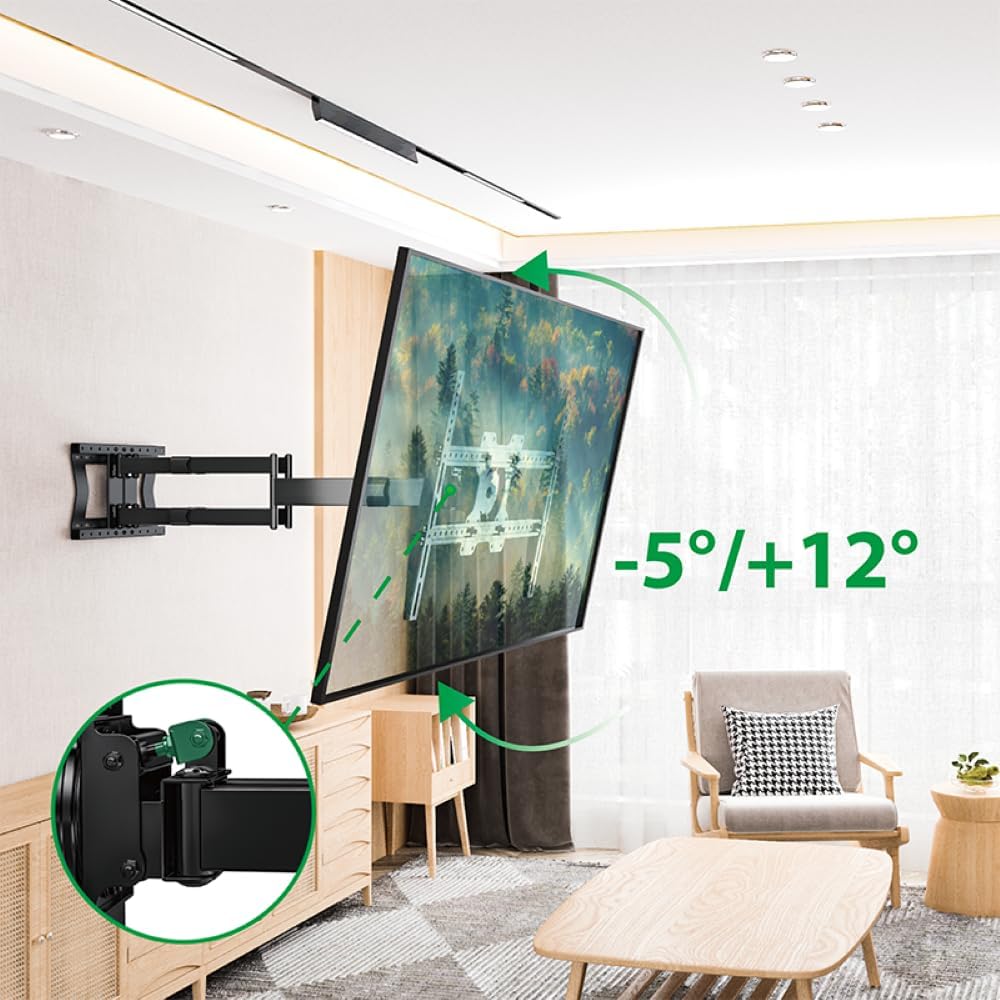
Figure 5.3: Tilt adjustment range and mechanism.
5.4 Rotation Adjustment
The mount allows for a 90-degree rotation, enabling you to switch between landscape and portrait orientation for your TV.

Figure 5.4: 90-degree rotation capability.
5.5 කේබල් කළමනාකරණය
Use the provided hook-and-loop straps to bundle and organize cables along the mount arms for a tidy appearance and to prevent snagging during adjustments.
6. නඩත්තු කිරීම
නිතිපතා නඩත්තු කිරීම ඔබේ රූපවාහිනී බිත්ති සවිකිරීමේ ආයු කාලය සහ ආරක්ෂිත ක්රියාකාරිත්වය සහතික කරයි.
- පිරිසිදු කිරීම: මෘදු, වියළි රෙද්දකින් සවි කිරීම පිස දමන්න. නිමාවට හානි කළ හැකි උල්ෙල්ඛ පිරිසිදු කරන්නන් හෝ ද්රාවක භාවිතා කිරීමෙන් වළකින්න.
- සම්බන්ධතා පරීක්ෂා කරන්න: සියලුම ඉස්කුරුප්පු සහ බෝල්ට් තදින් පවතින බව සහතික කර ගැනීම සඳහා වරින් වර පරීක්ෂා කරන්න. අවශ්ය නම් නැවත තද කරන්න, නමුත් ඕනෑවට වඩා තද නොකරන්න.
- ඇඳීම සඳහා පරීක්ෂා කරන්න: Regularly inspect the mount for any signs of wear, damage, or corrosion. If any issues are found, discontinue use and contact customer support.
7. දෝශ නිරාකරණය
If you encounter any issues with your XTRARM TiTon Double TV Wall Mount, refer to the following common problems and solutions:
| ගැටලුව | විය හැකි හේතුව | විසඳුම |
|---|---|---|
| රූපවාහිනිය මට්ටමේ නැහැ. | Wall plate or TV brackets not level during installation. | Carefully remove the TV, adjust the wall plate or TV brackets using a spirit level, and re-mount. |
| Difficulty moving the mount | Joints may be too tight or require lubrication. | Check for any overtightened bolts. Apply a small amount of silicone-based lubricant to moving joints if necessary. |
| කන්ද අස්ථාවර බවක් දැනේ | Loose wall plate, incorrect anchors, or exceeding weight capacity. | Immediately remove the TV. Re-check all wall plate fasteners. Ensure correct anchors were used for your wall type. Verify TV weight does not exceed 80 kg. If issues persist, consult a professional installer. |
8. වගකීම් සහ සහාය
For information regarding warranty coverage, technical support, or replacement parts, please refer to the documentation provided at the time of purchase or visit the official XTRARM webවෙබ් අඩවිය. මිලදී ගැනීම පිළිබඳ සාක්ෂියක් ලෙස ඔබේ මිලදී ගැනීමේ රිසිට්පත තබා ගන්න.


