1. හැඳින්වීම
The CrossBeats Hawk Gaming TWS in-Ear Buds are designed to provide an immersive audio experience for gaming and music. Featuring ultra-low latency, dynamic RGB lighting, and environmental noise cancellation, these earbuds offer high-performance audio and clear communication. This manual provides detailed instructions for setup, operation, and maintenance to ensure optimal use of your device.
2. පෙට්ටියේ ඇති දේ
- CrossBeats Hawk Gaming TWS Earbuds
- Charging Case with Type-C Dongle
- USB ආරෝපණ කේබලය
- පරිශීලක අත්පොත
- කන් කුෂන් (විවිධ ප්රමාණ)
- වගකීම් කාඩ්පත
3. නිෂ්පාදන අවසන්view
Familiarize yourself with the components and features of your CrossBeats Hawk earbuds.
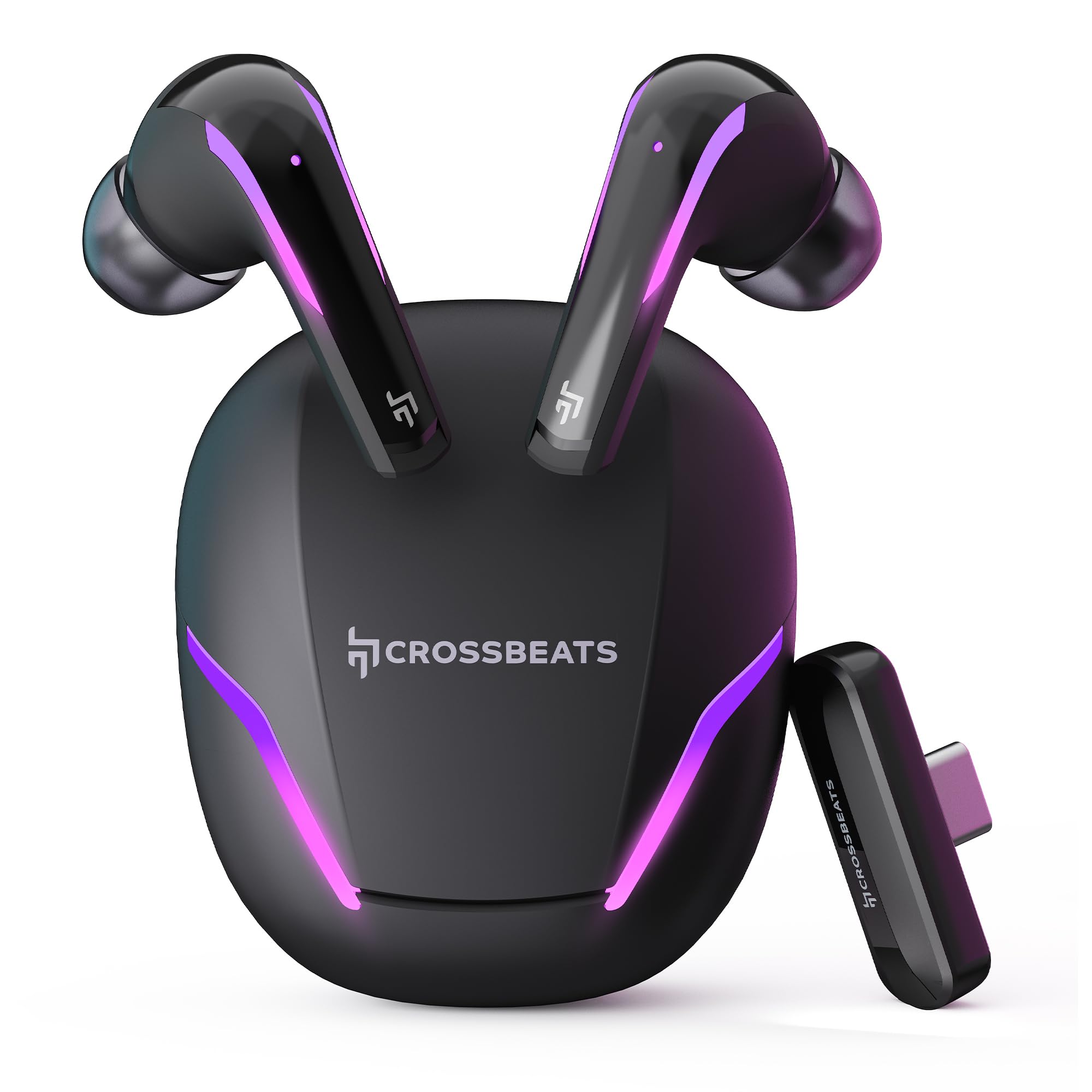
Figure 1: CrossBeats Hawk Gaming TWS Earbuds and Charging Case with highlighted features.
3.1 Charging Case and Dongle

Figure 2: The 2.4G Type C Dongle for direct connection to compatible devices.
3.2 Earbud Design and Features

රූපය 3: අභ්යන්තර view of an earbud showcasing the 14mm Titanium Driver.

Figure 4: Earbud with Dedicated Gaming DSP for optimized audio processing.

Figure 5: Earbud with AI Environmental Noise Cancellation (ENC) for clear calls.

Figure 6: Illustration of Music Mode and Gaming Mode.
4. පිහිටුවීම
4.1 මූලික බ්ලූටූත් යුගලනය
- ඉයර්බඩ් ආරෝපණය කර ඇති බව සහතික කර ගන්න.
- Open the charging case. The earbuds will automatically enter pairing mode, indicated by flashing RGB lights.
- ඔබගේ උපාංගයේ (ස්මාර්ට්ෆෝන්, ටැබ්ලටය, ලැප්ටොප්), බ්ලූටූත් සැකසුම් වෙත ගොස් බ්ලූටූත් ක්රියාත්මක කරන්න.
- ඒ සඳහා සොයන්න available devices and select "CrossBeats Hawk" from the list.
- සම්බන්ධ වූ පසු, ඉයර්බඩ් සාර්ථක යුගලනය පෙන්නුම් කරයි.
4.2 Connecting via Type-C Dongle (2.4GHz Wireless)
For ultra-low latency gaming, use the included Type-C dongle.
- Remove the Type-C dongle from its slot in the charging case.
- Plug the dongle into the Type-C port of your compatible gaming device (smartphone, tablet, PC, console).
- The earbuds will automatically connect to the dongle, entering dedicated Game Mode.
- Ensure your device's audio output is set to the dongle if necessary.
Video 1: Demonstration of connecting the Type-C dongle to a smartphone and launching a mobile game, showcasing the seamless integration for gaming.
5. මෙහෙයුම් උපදෙස්
5.1 බලය සක්රිය / අක්රිය
- බල ගැන්වීම: ආරෝපණ පෙට්ටිය විවෘත කරන්න, නැතහොත් ඉයර්බඩ් පෙට්ටියෙන් ඉවතට ගන්න. ඒවා ස්වයංක්රීයව ක්රියාත්මක වනු ඇත.
- විදුලිය විසන්ධි කිරීම: ඉයර්බඩ් නැවත ආරෝපණ පෙට්ටියට දමා පියන වසා දමන්න. ඒවා ස්වයංක්රීයව ක්රියා විරහිත වේ.
Video 2: Visual guide on opening the CrossBeats Hawk charging case, removing the earbuds, and observing the dynamic RGB lighting effects.
5.2 ස්පර්ශ පාලන
The CrossBeats Hawk earbuds feature touch controls for various functions:
- වාදනය/විරාමය: ඉයර්බඩ් දෙකෙන් එකක් මත එක තට්ටු කරන්න.
- ඊළඟ ධාවන පථය: දකුණු ඉයර්බඩ් එක දෙවරක් තට්ටු කරන්න.
- පෙර ධාවන පථය: වම් ඉයර්බඩ් එක දෙවරක් තට්ටු කරන්න.
- පිළිතුර/අවසන් ඇමතුම: ඉයර්බඩ් දෙකෙන් එකක් මත එක තට්ටු කරන්න.
- ඇමතුම ප්රතික්ෂේප කරන්න: ඉයර්බඩ් එකක් තත්පර 2ක් ඔබාගෙන සිටින්න.
- හ oice සහකාර සක්රිය කරන්න: ඉයර්බඩ් දෙකෙන් එකක් තුන් වරක් තට්ටු කරන්න.
- Switch EQ Mode (Music/Gaming): තත්පර 2 ක් දකුණු ඉයර්බඩ් එක ඔබාගෙන සිටින්න.
5.3 Switching EQ Modes
The earbuds support two Equalizer (EQ) modes: E-Sports (Gaming) and Music. To switch between modes, press and hold the right earbud for 2 seconds. A voice prompt will confirm the mode change.
6. Gaming Mode with Dongle
The dedicated Game Mode, activated via the Type-C dongle, provides ultra-low latency (under 10ms) for a synchronized audio and video experience, crucial for competitive gaming.

Figure 7: Ultra-low latency for instant action in gaming.

Figure 8: Sonic-Link Technology for high-speed wireless connection.
When the dongle is connected, the earbuds prioritize the 2.4GHz wireless connection for minimal audio delay. This mode is ideal for fast-paced games where audio cues are critical.
7. ආරෝපණය කිරීම
To charge the CrossBeats Hawk earbuds and charging case:
- ඉයර්බඩ් දෙකම ආරෝපණ පෙට්ටියට දමන්න. ඒවා නිසි ලෙස සවි කර ඇති බවට වග බලා ගන්න.
- සපයා ඇති USB Type-C ආරෝපණ කේබලය නඩුවේ ආරෝපණ වරායට සහ බල ප්රභවයකට සම්බන්ධ කරන්න.
- The RGB lights on the case will indicate charging status. A full charge takes approximately 2 hours.
- The earbuds offer up to 10 hours of listening time on a single charge, with the charging case extending total playtime to 100 hours.

Figure 9: Charging case and earbuds illustrating extended battery life.
8. නඩත්තු කිරීම
ඔබේ ඉයර්බඩ් වල ආයු කාලය සහ ක්රියාකාරිත්වය සහතික කිරීම සඳහා:
- පිරිසිදු කිරීම: මෘදු, වියලි, ලින්ට් රහිත රෙද්දකින් ඉයර්බඩ් සහ ආරෝපණ පෙට්ටිය නිතිපතා පිරිසිදු කරන්න. රළු රසායනික ද්රව්ය හෝ උල්ෙල්ඛ ද්රව්ය භාවිතා නොකරන්න.
- කන් ඉඟි: කන් ඉඟි වරින් වර ඉවත් කර පිරිසිදු කරන්න. නැවත සවි කිරීමට පෙර ඒවා සම්පූර්ණයෙන්ම වියළී ඇති බවට වග බලා ගන්න.
- ආරෝපණ සම්බන්ධතා: ඉයර්බඩ් සහ කේස් එක යන දෙකෙහිම ආරෝපණ සම්බන්ධතා පිරිසිදුව හා සුන්බුන් වලින් තොරව තබා ගන්න.
- ගබඩා: භාවිතයේ නොමැති විට, ඉයර්බඩ් ආරක්ෂා කර ගැනීමට සහ ආරෝපණය කර තබා ගැනීමට ඒවායේ ආරෝපණ පෙට්ටියේ ගබඩා කරන්න.
- ජල ප්රතිරෝධය: ඉයර්බඩ් ජල-ප්රතිරෝධී වේ, නමුත් ජල ආරක්ෂිත නොවේ. ඒවා ජලයේ ගිල්වීමෙන් හෝ අධික වර්ෂාවට නිරාවරණය වීමෙන් වළකින්න. ඒවා තෙත් වුවහොත් හොඳින් වියළන්න.
9. දෝශ නිරාකරණය
If you encounter issues with your CrossBeats Hawk earbuds, refer to the following common solutions:
- No Sound/Connection:
- ඉයර්බඩ් ආරෝපණය කර බලගන්වා ඇති බව සහතික කර ගන්න.
- Check Bluetooth settings on your device and ensure "CrossBeats Hawk" is connected.
- If using the dongle, ensure it is securely plugged in and your device's audio output is directed to the dongle.
- Try resetting the earbuds by placing them in the case, closing the lid for 10 seconds, then reopening.
- ඉයර්බඩ් ආරෝපණය නොවේ:
- ආරෝපණ කේබලය නඩුවට සහ බල ප්රභවයට ආරක්ෂිතව සම්බන්ධ කර ඇති බවට වග බලා ගන්න.
- Verify the charging contacts on the earbuds and case are clean.
- වෙනස් ආරෝපණ කේබලයක් හෝ බල ඇඩැප්ටරයක් උත්සාහ කරන්න.
- Low Latency Issues:
- Ensure you are using the Type-C dongle for Game Mode. Bluetooth connection will have higher latency.
- Minimize interference by staying close to your device.
- මයික්රෆෝන ගැටළු:
- මයික්රෆෝන අවහිර නොවන බවට වග බලා ගන්න.
- Check your device's audio input settings to confirm the earbuds are selected.
10. පිරිවිතර
| විශේෂාංගය | පිරිවිතර |
|---|---|
| මාදිලියේ නම | Hawk (CB-Hawk) |
| සම්බන්ධතා තාක්ෂණය | Wireless (Bluetooth 5.4, 2.4GHz Dongle) |
| බ්ලූටූත් අනුවාදය | 5.4 |
| බ්ලූටූත් පරාසය | මීටර් 10 |
| ශ්රව්ය ධාවක වර්ගය | 14mm Titanium Dynamic Driver |
| ප්රමාදය | Ultra Low <10ms (with Dongle) |
| මයික්රොෆෝන | 6 (4 with AI ENC) |
| බැටරි ආයු කාලය | පැය 100ක් දක්වා (ආරෝපණ නඩුවක් සමඟ) |
| ආරෝපණ කාලය | පැය 2 යි |
| ශබ්ද පාලනය | Sound Isolation, AI ENC |
| පාලන වර්ගය | ස්පර්ශ පාලනය |
| ජල ප්රතිරෝධක මට්ටම | වතුර කාන්දු නොවන |
| අයිතමයේ බර | ග්රෑම් 48 යි |
| ද්රව්ය | ප්ලාස්ටික් |
| විශේෂ ලක්ෂණ | RGB Lights, AI ENC, Ultra-Low Latency Gaming Mode, Water Resistance |
11. වගකීම් සහ සහාය
Your CrossBeats Hawk Gaming TWS in-Ear Buds come with a manufacturer's warranty. Please refer to the included Warranty Card for detailed terms and conditions. For technical support, product inquiries, or warranty claims, please contact CrossBeats customer service through their official webවෙබ් අඩවිය හෝ වගකීම් කාඩ්පතේ සපයා ඇති සම්බන්ධතා තොරතුරු.


