1. හැඳින්වීම
This manual provides comprehensive instructions for the Mycket portable DAB/DAB+/FM radio, Model D009. It covers setup, operation, maintenance, and troubleshooting to ensure optimal performance and longevity of your device. Please read this manual carefully before using the product.
The Mycket D009 radio features advanced signal reception technology for clear audio, Bluetooth 5.0 for wireless streaming, USB playback, AUX-in connectivity, a dual alarm clock, and a sleep timer. Its integrated rechargeable battery offers portability for use in various environments.
2. ආරක්ෂිත උපදෙස්
- උපාංගය වර්ෂාව, තෙතමනය හෝ අධික උෂ්ණත්වයන්ට නිරාවරණය නොකරන්න.
- උපාංගය ප්රබල බලපෑම්වලට වැටීමෙන් හෝ යටත් කිරීමෙන් වළකින්න.
- උපාංගය ඔබම විසුරුවා හැරීම හෝ අලුත්වැඩියා කිරීමට උත්සාහ නොකරන්න. සියලුම සේවා සුදුසුකම් ලත් පුද්ගලයින් වෙත යොමු කරන්න.
- උපාංගය රේඩියේටර්, තාප රෙජිස්ටර්, උදුන් හෝ වෙනත් උපකරණ (ඇතුළුව) වැනි තාප ප්රභවයන්ගෙන් ඈත් කර තබන්න. ampලිෆයර්) තාපය නිපදවන.
- Use only the specified charging cable and power adapter (5V via USB) to charge the device.
- Ensure proper ventilation around the device during operation and charging.
- දේශීය රෙගුලාසි වලට අනුව බැටරි සහ ඉලෙක්ට්රොනික උපාංග වගකීමෙන් යුතුව බැහැර කරන්න.
3. නිෂ්පාදන අවසන්view
3.1 පැකේජයේ අන්තර්ගතය
- 1 x Mycket Portable DAB Radio (Model D009)
- 1 x USB ආරෝපණ කේබලය
- 1 x පරිශීලක අත්පොත
3.2 උපාංග පිරිසැලසුම සහ පාලනයන්
Familiarize yourself with the main components and controls of your Mycket radio.

රූපය 1: ඉදිරිපස view of the Mycket D009 portable DAB radio, showing the speaker grille, LCD display, control buttons (MODE, OK, O/M, FAV, 1-4), and the telescopic antenna extended. The right side shows the DC 5V USB-C port, reset button, and headphone jack.
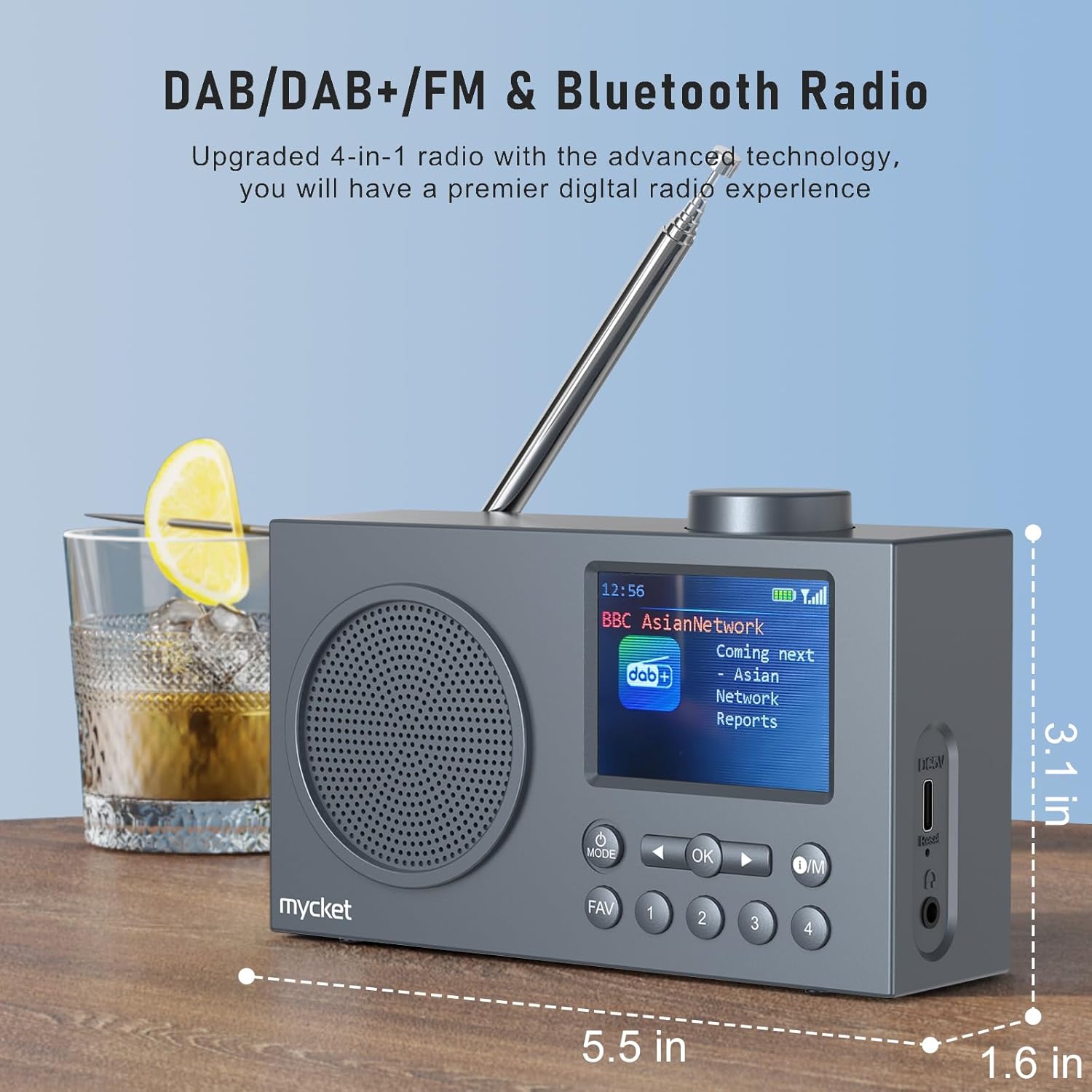
රූපය 2: පැත්ත view of the Mycket D009 radio illustrating its compact dimensions: approximately 5.5 inches (length), 1.6 inches (width), and 3.1 inches (height). The image also highlights its DAB/DAB+/FM and Bluetooth capabilities.
- සංදර්ශකය: 2.4-inch TFT color display for station information, time, and settings.
- කථානායක: Integrated Hi-Fi speaker for audio output.
- දුරේක්ෂ ඇන්ටනාව: For optimal radio signal reception.
- මාදිලි බොත්තම: Switches between DAB, FM, Bluetooth, USB, and AUX modes.
- හරි බොත්තම: Confirms selections or enters menus.
- O/M බොත්තම: Power On/Off and Menu access.
- FAV බොත්තම: Accesses favorite presets.
- අංක බොත්තම් (1-4): Direct access to stored presets.
- සංචාලන බොත්තම් (වම/දකුණ): Navigates menus or tunes stations.
- වෙළුම් බොත්තම: ශ්රව්ය පරිමාව සීරුමාරු කරයි.
- DC 5V USB-C Port: අභ්යන්තර බැටරිය ආරෝපණය කිරීම සඳහා.
- යළි පිහිටුවීමේ බොත්තම: Resets the device (use a thin object to press).
- 3.5mm හෙඩ්ෆෝන් ජැක්: පුද්ගලික සවන්දීම සඳහා.
4. පිහිටුවීම
4.1 බැටරිය ආරෝපණය කිරීම
The radio is equipped with a built-in 2200mAh lithium battery. Before first use, fully charge the device.
- Connect the provided USB charging cable to the DC 5V USB-C port on the side of the radio.
- USB කේබලයේ අනෙක් කෙළවර අනුකූල USB බල ඇඩැප්ටරයකට (ඇතුළත් කර නැත) හෝ පරිගණක USB පෝට් එකකට සම්බන්ධ කරන්න.
- The charging indicator on the display will show the charging status. A full charge typically takes approximately 2.5 hours and provides up to 12 hours of playback time at 70% volume.

රූපය 3: The Mycket D009 radio display showing a full battery indicator, emphasizing its long playback time on a single charge.
4.2 ඇන්ටෙනා ගැලපීම
ප්රශස්ත රේඩියෝ පිළිගැනීමක් සඳහා, දුරේක්ෂ ඇන්ටනාව සම්පූර්ණයෙන්ම දිගු කරන්න. හොඳම සංඥා ගුණාත්මකභාවය සඳහා එහි පිහිටීම සකසන්න.
4.3 ආරම්භක බලය සක්රීය කිරීම
ඔබා අල්ලාගෙන සිටින්න සාමාන්ය පෙළ button to power on the radio. The display will light up, and the device will typically start in the last used mode or initiate a DAB scan if it's the first use.
5. මෙහෙයුම් උපදෙස්
5.1 මාරුවීම් මාතයන්
ඔබන්න මාදිලිය button repeatedly to cycle through available modes: DAB, FM, Bluetooth, USB, and AUX.
5.2 DAB/DAB+ Radio Operation
- භාවිතා කර DAB මාදිලියට මාරු වන්න මාදිලිය බොත්තම.
- The radio will automatically perform a full scan for available DAB/DAB+ stations upon first use or if no stations are found. To initiate a manual scan, press and hold the OK button, then select "Full Scan" from the menu.
- Once the scan is complete, use the navigation buttons (Left/Right) to browse through the list of available stations.
- ඔබන්න OK to select and listen to a station.

රූපය 4: The Mycket D009 radio display showing a DAB station and highlighting the auto-scan and 40 preset features (20 DAB & 20 FM).
5.2.1 Storing DAB Presets
The radio supports up to 20 DAB presets.
- Tune to the desired DAB station.
- Press and hold one of the number buttons (1-4) හෝ FAV button to save the current station to a preset slot. Follow the on-screen prompts to select a slot if using the FAV button.
- To recall a preset, briefly press the corresponding number button or the FAV button and select from the list.
5.3 FM රේඩියෝ ක්රියාකාරිත්වය
- භාවිතා කර FM මාදිලියට මාරු වන්න මාදිලිය බොත්තම.
- FM මධ්යස්ථාන සඳහා ස්වයංක්රීයව පරිලෝකනය කිරීමට, ඔබා අල්ලාගෙන සිටින්න OK button. The radio will scan and store available stations.
- To manually tune, use the navigation buttons (Left/Right) to adjust the frequency.
- ඔබන්න OK to confirm the station.
5.3.1 FM පෙරසිටුවීම් ගබඩා කිරීම
The radio supports up to 20 FM presets, similar to DAB presets.
- අවශ්ය FM මධ්යස්ථානයට සුසර කරන්න.
- Press and hold one of the number buttons (1-4) හෝ FAV button to save the current station.
- To recall a preset, briefly press the corresponding number button or the FAV button and select from the list.
5.4 Bluetooth 5.0 Pairing
Connect your smartphone or tablet to the radio via Bluetooth for wireless audio streaming.
- භාවිතා කර බ්ලූටූත් ප්රකාරයට මාරු වන්න මාදිලිය button. The radio display will show "Bluetooth Pairing" or similar.
- ඔබගේ ජංගම උපාංගයේ, බ්ලූටූත් සබල කර පවතින උපාංග සොයන්න.
- Select "Mycket D009" from the list of devices.
- Once paired, the radio will confirm the connection, and you can play audio from your device through the radio.

රූපය 5: The Mycket D009 radio displaying "Playing" in Bluetooth mode, next to a smartphone showing "Mycket D009" as a connected Bluetooth device.
5.5 USB නැවත ධාවනය
MP3 ශ්රව්ය වාදනය කරන්න files කෙලින්ම USB ධාවකයකින්.
- MP3 අඩංගු USB ධාවකයක් ඇතුළු කරන්න fileUSB පෝට් එකට s.
- භාවිතා කර USB මාදිලියට මාරු වන්න මාදිලිය බොත්තම.
- රේඩියෝව ස්වයංක්රීයව MP3 හඳුනාගෙන වාදනය කිරීමට පටන් ගනී. files. Use the navigation buttons to skip tracks.
5.6 AUX-in සම්බන්ධතාවය
3.5mm ශ්රව්ය කේබලයක් භාවිතයෙන් බාහිර ශ්රව්ය උපාංග සම්බන්ධ කරන්න (ඇතුළත් නොවේ).
- Connect one end of a 3.5mm audio cable to the AUX-in port on the radio.
- අනෙක් කෙළවර ඔබේ බාහිර උපාංගයේ හෙඩ්ෆෝන් ජැක් එකට හෝ ශ්රව්ය ප්රතිදානයට සම්බන්ධ කරන්න.
- භාවිතා කර AUX මාදිලියට මාරු වන්න මාදිලිය බොත්තම.
- ඔබගේ බාහිර උපාංගයෙන් පසුධාවනය පාලනය කරන්න.
5.7 අනතුරු ඇඟවීමේ ඔරලෝසු ක්රියාකාරිත්වය
ස්වාධීන අනතුරු ඇඟවීම් දෙකක් දක්වා සකසන්න.
- ඔබා අල්ලාගෙන සිටින්න සාමාන්ය පෙළ මෙනුවට ඇතුළු වීමට බොත්තම.
- Navigate to "Alarm Settings" using the navigation buttons and press OK.
- එලාම් 1 හෝ එලාම් 2 තෝරන්න.
- Set the alarm time, source (DAB, FM, or Buzzer), and volume.
- එබීමෙන් සැකසුම් තහවුරු කරන්න OK.
5.8 නින්ද ටයිමර් ක්රියාකාරිත්වය
Set the radio to automatically turn off after a specified period.
- ඔබා අල්ලාගෙන සිටින්න සාමාන්ය පෙළ මෙනුවට ඇතුළු වීමට බොත්තම.
- Navigate to "Sleep Timer" and press OK.
- Select the desired duration (e.g., 15, 30, 60 minutes).
- The radio will automatically power off after the set time.
5.9 හෙඩ්ෆෝන් භාවිතය
Connect 3.5mm headphones to the headphone jack for private listening. The internal speaker will be muted automatically.
6. නඩත්තු කිරීම
- පිරිසිදු කිරීම: Use a soft, dry cloth to clean the radio's exterior. Do not use abrasive cleaners or solvents.
- බැටරි සත්කාර: බැටරි ආයු කාලය දීර්ඝ කිරීම සඳහා, බැටරිය නිතර නිතර සම්පූර්ණයෙන්ම විසර්ජනය කිරීමෙන් වළකින්න. දිගු කාලයක් භාවිතයේ නොතිබුණත්, උපාංගය නිතිපතා ආරෝපණය කරන්න.
- ගබඩා: සෘජු හිරු එළියෙන් සහ අධික උෂ්ණත්වයන්ගෙන් ඈත්ව සිසිල් වියළි ස්ථානයක රේඩියෝව ගබඩා කරන්න.
7. දෝශ නිරාකරණය
| ගැටලුව | විය හැකි හේතුව | විසඳුම |
|---|---|---|
| බලය නැත / රේඩියෝව ක්රියාත්මක නොවේ. | බැටරිය ක්ෂය වී ඇත. | සපයා ඇති USB කේබලය භාවිතයෙන් රේඩියෝව ආරෝපණය කරන්න. |
| දුර්වල ගුවන් විදුලි ග්රහණය (DAB/FM). | Antenna not fully extended or positioned correctly. Weak signal area. | Fully extend and adjust the telescopic antenna. Try moving the radio to a different location. Perform a full scan for stations. |
| බ්ලූටූත් යුගලනය අසමත් වේ. | Radio not in Bluetooth mode. Device too far. Bluetooth not enabled on external device. | Ensure the radio is in Bluetooth mode. Keep devices within range (approx. 10 meters). Enable Bluetooth on your external device and search for "Mycket D009". |
| කථිකයාගෙන් ශබ්දයක් නැත. | ශබ්දය ඉතා අඩුයි. හෙඩ්ෆෝන් සම්බන්ධ කර ඇත. | Increase the volume. Disconnect headphones if not intended for private listening. |
| USB නැවත ධාවනය ක්රියා නොකරයි. | USB drive not inserted correctly. Incompatible file ආකෘතිය. | USB ධාවකය සම්පූර්ණයෙන්ම ඇතුළත් කර ඇති බවට වග බලා ගන්න. පරීක්ෂා කරන්න fileඑස් MP3 ආකෘතියෙන් ඇත. |
| උපාංගය ප්රතිචාර නොදක්වයි. | තාවකාලික මෘදුකාංග දෝෂයක්. | Press the reset button on the side of the radio using a thin object (e.g., a paperclip). |
8. පිරිවිතර
| වෙළඳ නාමය | මයිකට් |
| ආකෘතිය | D009 |
| ගුවන්විදුලි මාදිලි | DAB, DAB+, FM |
| බ්ලූටූත් අනුවාදය | 5.0 |
| නැවත ධාවනය විකල්ප | FM, DAB, DAB+, Bluetooth, USB MP3, AUX-in |
| ස්පීකර් නිමැවුම් බලය | වොට් 5 |
| කථානායක ඒකකය | 4 Ω10 W 78 mm x 1 |
| ප්රදර්ශනය කරන්න | අඟල් 2.4 TFT වර්ණ LCD |
| පෙරසිටුවීම් | 40 (20 ඩබ්ලිව්ඒබී, 20 එෆ්එම්) |
| බැටරි වර්ගය | Built-in Lithium-ion (18650) |
| බැටරි ධාරිතාව | 2200 mAh (3.7V - 2.2 Ah) |
| පසුධාවන කාලය | Approx. 8-9 hours at 70% volume (up to 12 hours) |
| ආරෝපණ කාලය | ආසන්න වශයෙන්. පැය 2.5 යි |
| බල ආදානය | USB හරහා 5V |
| මානයන් (නිෂ්පාදන) | දළ වශයෙන් 14 සෙ.මී. (L) x 4 සෙ.මී. (W) x 7.8 සෙ.මී. (H) |
| ප්රතිදාන සම්බන්ධතා | 3.5mm හෙඩ්ෆෝන් ජැක් |
9. වගකීම් සහ සහාය
Mycket products are designed for reliability and performance. This product comes with:
- මාස 12 වගකීම: මිලදී ගත් දින සිට කරදරයකින් තොර මාස 12ක වගකීමක් භුක්ති විඳින්න.
- පාරිභෝගික සහාය: For any questions, issues, or support needs, please contact Mycket customer service.
වගකීම් හිමිකම් සඳහා කරුණාකර ඔබගේ මිලදී ගැනීමේ සාක්ෂි තබා ගන්න.


