1. හැඳින්වීම
This manual provides detailed instructions for setting up, operating, and maintaining your BenQ EW2790U 27-inch 4K monitor. Please read this manual thoroughly before using the monitor to ensure proper functionality and to prevent damage.
2 ආරක්ෂිත තොරතුරු
ගින්න, විදුලි කම්පනය සහ තුවාල ඇතිවීමේ අවදානම අවම කිරීම සඳහා සෑම විටම මෙම මූලික ආරක්ෂක පියවරයන් අනුගමනය කරන්න:
- මොනිටරය වැස්සට හෝ තෙතමනයට නිරාවරණය නොකරන්න.
- මොනිටරය විවෘත නොකරන්න casing; සුදුසුකම් ලත් පිරිස් වෙත සේවා සැපයීම යොමු කරන්න.
- මොනිටරය වටා නිසි වාතාශ්රය සහතික කරන්න.
- Use only the power cord and adapter provided by BenQ.
- අකුණු කුණාටු ඇති විට හෝ දිගු කාලයක් භාවිතා නොකළ විට මොනිටරය විසන්ධි කරන්න.
3. පැකේජ අන්තර්ගතය
ඔබගේ පැකේජයේ සියලුම අයිතම ඇති බව තහවුරු කරගන්න:
- BenQ EW2790U 27-inch 4K Monitor
- විදුලි රැහැන්
- HDMI කේබලය
- USB-C කේබලය
- ඉක්මන් ආරම්භක මාර්ගෝපදේශය
- වගකීම් කාඩ්පත
4. පිහිටුවීම
4.1 ස්ථාවරය එකලස් කිරීම
- සීරීම් වළක්වා ගැනීම සඳහා මොනිටරයේ මුහුණ මෘදු, පිරිසිදු මතුපිටක් මත තබන්න.
- ආධාරක පාදය ආධාරක බෙල්ලට සවි කර සපයා ඇති ඉස්කුරුප්පුවෙන් එය සවි කරන්න.
- මොනිටරයේ පිටුපස ඇති සවිකිරීමේ තව් සමඟ ස්ථාවර එකලස් කිරීම පෙළගස්වා එය ස්ථානයට ක්ලික් කරන තෙක් තල්ලු කරන්න.

Figure 4.1: Assembled BenQ EW2790U monitor.
4.2 සම්බන්ධක කේබල්
අවශ්ය කේබල් මොනිටරයට සහ ඔබේ පරිගණකයට සම්බන්ධ කරන්න:
- බලය: විදුලි රැහැන මොනිටරයේ බල ආදානයට සම්බන්ධ කර පසුව විදුලි අලෙවිසැලකට සම්බන්ධ කරන්න.
- වීඩියෝ:
- HDMI: Connect an HDMI cable from your computer's HDMI output to one of the monitor's HDMI ports (HDMI 1, 2, or 3).
- USB-C: Connect a USB-C cable from your computer's USB-C port to the monitor's USB-C (65W) port for video, data, and power delivery.
- USB පහළට: Connect USB-A devices to the USB-A 3.2 downstream ports on the monitor.
- ශ්රව්ය: අවශ්ය නම්, හෙඩ්ෆෝන් ජැක් වෙත හෙඩ්ෆෝන් සම්බන්ධ කරන්න.

රූපය 4.2: පසුපස view of BenQ EW2790U showing connectivity ports.

රූපය 4.3: සවිස්තරාත්මක view of BenQ EW2790U input/output ports.
4.3 Adjusting Ergonomics
The EW2790U monitor offers various adjustments for comfortable viewing:
- උස ගැලපීම: ඔබේ කැමති අක්ෂි මට්ටමට මොනිටරය ඔසවන්න හෝ පහත් කරන්න.
- ඇලවීම: තිරයේ සිරස් කෝණය සකසන්න.
- කරකැවීම: තිරය තිරස් අතට කරකවන්න.
- හැරවීම: Rotate the screen 90 degrees for portrait mode.

Figure 4.4: BenQ EW2790U monitor pivot adjustment.
5. මොනිටරය ක්රියාත්මක කිරීම
5.1 බලය සක්රිය / අක්රිය
Press the Power key located on the bottom right of the monitor to turn it on or off.

Figure 5.1: Monitor controls: Scenario hotkey, 5-way controller, and Power key.
5.2 තිරය මත සංදර්ශක (OSD) මෙනුව
Use the 5-way controller on the bottom bezel to navigate the OSD menu and adjust settings such as brightness, contrast, color mode, and input source.
5.3 Scenario Hotkey
The Scenario hotkey allows quick access to custom or preset optimal monitor settings for various uses like work, studying, gaming, or watching movies.
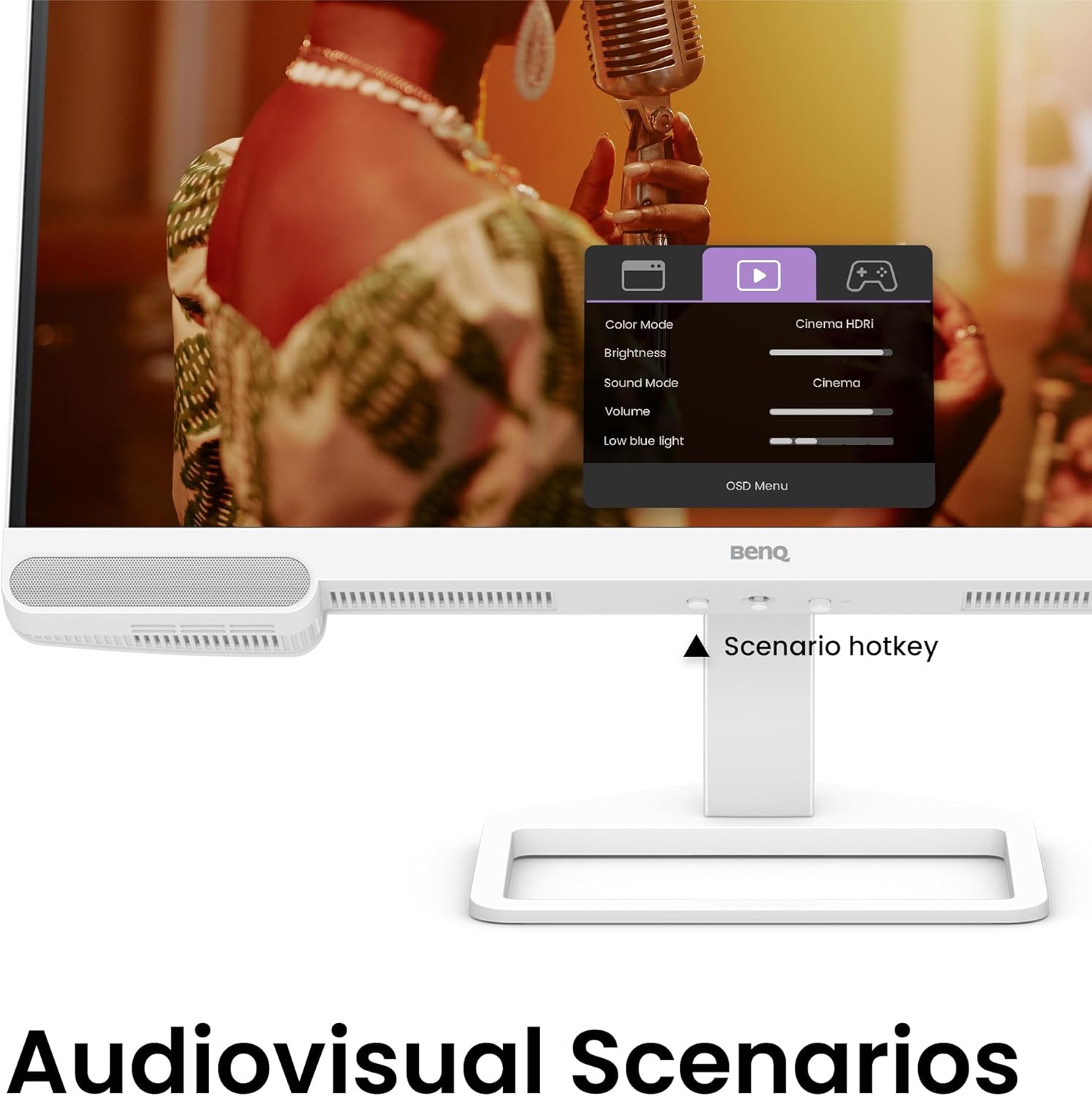
Figure 5.2: OSD menu accessed via Scenario hotkey.
5.4 AI Contrast Technology
The exclusive AI Contrast technology intelligently adjusts the contrast based on the displayed content, optimizing image quality without affecting other areas of the screen.

Figure 5.3: Demonstration of AI Contrast technology.
5.5 බිල්ට්-ඉන් ස්පීකර්
The monitor includes a pair of 5W built-in speakers for audio output. Adjust the volume through the OSD menu or your connected device.

Figure 5.4: BenQ EW2790U built-in 5W speakers.
6. නඩත්තු කිරීම
6.1 මොනිටරය පිරිසිදු කිරීම
- පිරිසිදු කිරීමට පෙර සෑම විටම මොනිටරය විසන්ධි කරන්න.
- මෘදු, ලින්ට් රහිත රෙද්දක් සැහැල්ලුවෙන් භාවිතා කරන්නampජලය හෝ මෘදු, සීරීම් රහිත පිරිසිදුකාරකයකින් ආලේප කර ඇත.
- පිරිසිදුකාරකය කෙලින්ම තිරය මත ඉසින්න එපා.
- ඇල්කොහොල්, ඇමෝනියා හෝ උල්ෙල්ඛ පිරිසිදු කරන්නන් තිරයට හෝ සීරීමට හානි කළ හැකි බැවින් ඒවා භාවිතා කිරීමෙන් වළකින්න.asing.
6.2 ගබඩා කිරීම
Store the monitor in a cool, dry place away from direct sunlight and extreme temperatures. If storing for an extended period, consider using the original packaging for protection.
7. දෝශ නිරාකරණය
| ගැටලුව | විය හැකි හේතුව | විසඳුම |
|---|---|---|
| තිරයේ රූපයක් නොමැත | බල කේබලය විසන්ධි කර ඇත; වීඩියෝ කේබලය විසන්ධි කර ඇත; වැරදි ආදාන මූලාශ්රය තෝරා ඇත. | Ensure power and video cables are securely connected. Press the Scenario hotkey to select the correct input source. |
| රූපය නොපැහැදිලි හෝ විකෘති වී ඇත. | වැරදි විභේදනය; ලිහිල් වීඩියෝ කේබලය. | Set the display resolution to 3840x2160. Check video cable connections. |
| කථිකයින්ගෙන් ශබ්දයක් නැත | ශබ්දය ඉතා අඩුයි; නිහඬ කර ඇත; පරිගණකයේ වැරදි ශ්රව්ය ප්රතිදානය තෝරා ඇත. | Adjust volume via OSD menu or computer settings. Ensure monitor is selected as audio output device. |
| AI Contrast not working as expected | Feature disabled; Specific content not optimized. | Check OSD settings to ensure AI Contrast is enabled. Performance may vary with different content. |
8. පිරිවිතර
| විශේෂාංගය | විස්තර |
|---|---|
| තිර ප්රමාණය | අඟල් 27 |
| විභේදනය | 3840x2160 (4K UHD) |
| දර්ශන අනුපාතය | 16:9 |
| වර්ණ ආවරණය | 95% පී 3 |
| AI Contrast Technology | ඔව් |
| බිල්ට් ස්පීකර් | 2 x 5W |
| සම්බන්ධතාවය | 1x USB Type-C (65W), 3x HDMI (2.0), USB-C 3.2 downstream, USB-A 3.2 downstream, Headphone Jack |
| Ergonomic Design | උස ගැලපීම, ඇලවීම, කරකැවීම, හැරීම |
| අයිතමයේ බර | රාත්තල් 21.4 කි |
| නිෂ්පාදන මානයන් (LxWxH) | අඟල් 17 x 8 x 21 |
9. වගකීම් සහ සහාය
Your BenQ EW2790U monitor is covered by a manufacturer's warranty. Please refer to the warranty card included in your package for specific terms and conditions. For technical support, product registration, or service inquiries, please visit the official BenQ webවෙබ් අඩවිය හෝ ඔවුන්ගේ පාරිභෝගික සේවා දෙපාර්තමේන්තුව අමතන්න.
Official BenQ Webඅඩවිය: www.benq.com