1. හැඳින්වීම
This manual provides detailed instructions for the setup, operation, maintenance, and troubleshooting of your Transformers TF-Crystal 85 Keys Mechanical Keyboard. Please read this manual thoroughly before using the product to ensure proper functionality and longevity.
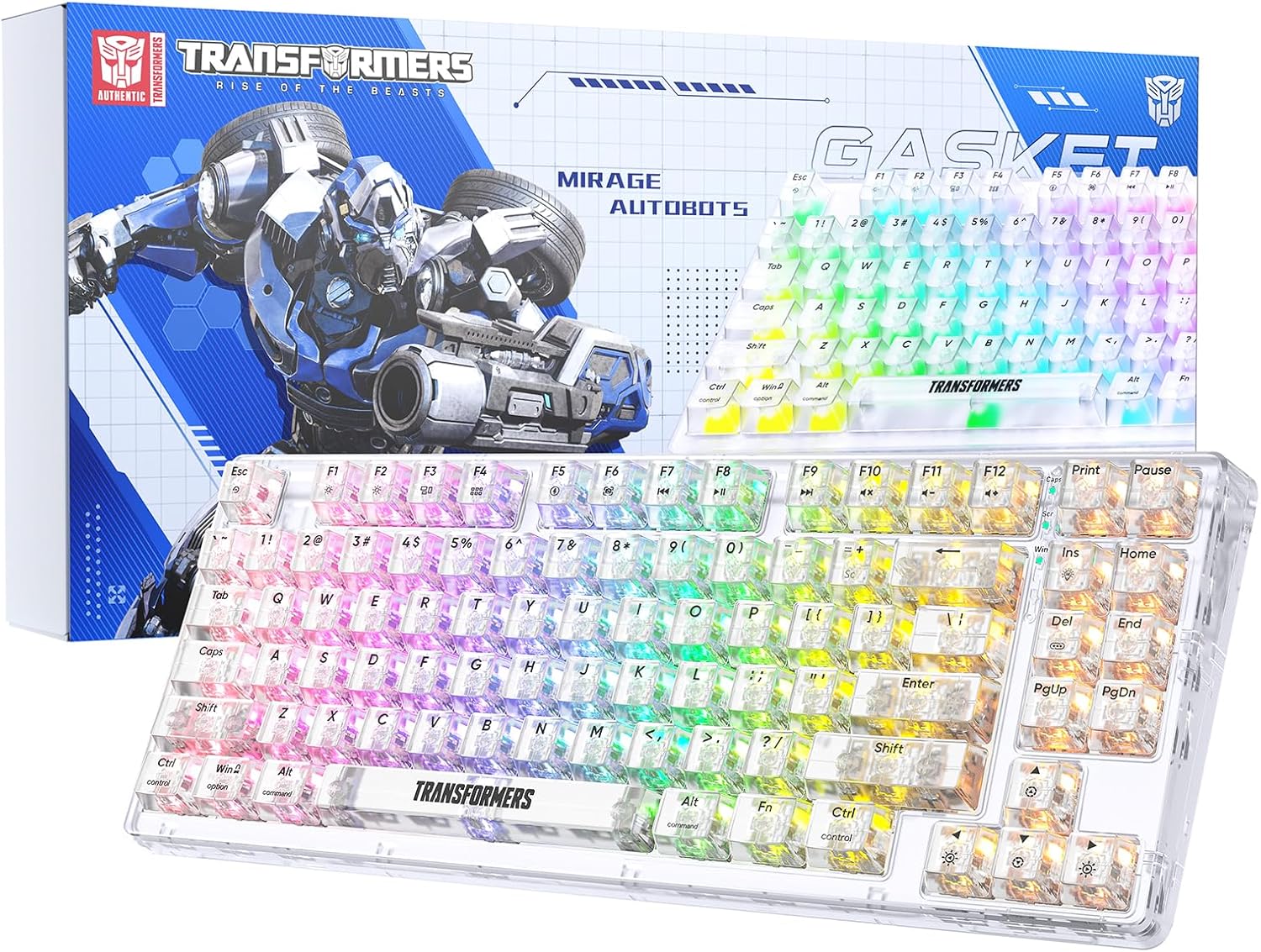
Image 1.1: Transformers TF-Crystal 85 Keys Mechanical Keyboard with its packaging, showcasing the transparent design and RGB lighting.
2. නිෂ්පාදන අවසන්view
2.1 ප්රධාන ලක්ෂණ
- 85-යතුරු පිරිසැලසුම: Compact 75% design retaining essential functions, arrow, and navigation keys.
- ත්රි-මාදිලි සම්බන්ධතාවය: Supports Bluetooth 5.0, 2.4GHz wireless, and USB-C wired connections.
- උණුසුම්-මාරු කළ හැකි PCB: Compatible with most 3-pin and 5-pin mechanical switches, allowing for easy customization and replacement.
- Linear Switches: Pre-lubricated switches with a 50 million keystroke lifespan for durability and smooth operation.
- ගෑස්කට් ව්යුහය: Incorporates high-quality gasket materials and a silicone pad to absorb vibrations and reduce typing noise.
- Customizable RGB Backlight: Features 20 built-in backlight modes, 16.8 million color options, and dynamic music rhythm effects.
- Programmable Driver: Enables macro customization, key function remapping, and advanced lighting control.
- දිගු බැටරි ආයු කාලය: Equipped with a 4000mAh battery, providing up to 240 hours of continuous use in 2.4GHz mode without backlighting.
- පුළුල් අනුකූලතාව: Supports Mac, Windows, iOS, Android, PC, Laptop, Smartphone, Tablet, Switch, Xbox, and PlayStation.
- විනිවිද පෙනෙන නිර්මාණය: Features transparent keycaps and base for enhanced aesthetic appeal.
3. පිහිටුවීම
3.1 යතුරු පුවරුව ආරෝපණය කිරීම
Before initial use, fully charge the keyboard. Connect the provided USB-C cable to the keyboard's USB-C port and the other end to a powered USB port (e.g., computer, wall adapter). The charging indicator will show the charging status.
3.2 Connecting via 2.4GHz Wireless Mode
- Locate the 2.4GHz USB receiver, typically stored in a compartment on the keyboard.
- USB ග්රාහකය ඔබේ පරිගණකයේ තිබෙන USB පෝට් එකකට සම්බන්ධ කරන්න.
- Toggle the mode switch on the keyboard to the 2.4G තනතුර.
- The keyboard will automatically connect to your device.
3.3 Connecting via Bluetooth 5.0 Mode
- Toggle the mode switch on the keyboard to the BT තනතුර.
- ඔබන්න එෆ්එන් + 1 (හෝ එෆ්එන් + 2, එෆ්එන් + 3) for 3-5 seconds until the indicator light flashes rapidly, indicating pairing mode.
- ඔබගේ උපාංගයේ (පරිගණකය, ටැබ්ලටය, ස්මාර්ට් ජංගම දුරකථනය), බ්ලූටූත් සක්රීය කර නව උපාංග සොයන්න.
- Select "TF-Crystal 85" from the list of available devices to pair.
- Once paired, the indicator light will stop flashing and remain solid. You can pair up to three Bluetooth devices using එෆ්එන් + 1, එෆ්එන් + 2, සහ එෆ්එන් + 3.
3.4 Connecting via USB-C Wired Mode
- සපයා ඇති USB-C කේබලය යතුරුපුවරුවේ USB-C තොටට සම්බන්ධ කරන්න.
- USB-C කේබලයේ අනෙක් කෙළවර ඔබේ පරිගණකයේ ඇති USB පෝට් එකකට සම්බන්ධ කරන්න.
- The keyboard will automatically switch to wired mode and function without battery power.

Image 3.1: Diagram illustrating the three connection modes: Bluetooth 5.0, 2.4GHz wireless, and USB-C wired, compatible with various devices.
4. මෙහෙයුම් උපදෙස්
4.1 මාතයන් අතර මාරුවීම
Use the physical switch located on the keyboard to select between BT (බ්ලූටූත්), 2.4G (2.4GHz wireless), and USB-C (wired) modes.
4.2 RGB පසුබිම් ආලෝක පාලනය
The keyboard features customizable RGB backlighting. Use the following key combinations to adjust:
- Fn + Ins: Cycle through 20 different backlight effects.
- Fn + Del: Switch backlight colors within certain modes.
- එෆ්එන් + ↑ / ↓: Adjust backlight brightness (5 levels).
- එෆ්එන් + ← / →: Adjust backlight effect speed (5 levels).
- Fn + Esc (hold for 3s): Reset backlight settings to default.

Image 4.1: Visual guide for controlling RGB backlight effects, brightness, and speed using Fn key combinations.
4.3 Programmable Driver Usage
The keyboard includes a programmable driver for advanced customization. This driver allows you to:
- මැක්රෝ සංස්කරණය: Record and edit complex key sequences.
- Key Redefinition: Customize the function of individual keys.
- RGB Effect Customization: Fine-tune lighting modes, colors, and speeds, including music rhythm lighting effects.
Refer to the software's dedicated user interface for detailed instructions on using these features.

Image 4.2: Screenshot of the programmable driver interface, showing options for macro editing, RGB effects, and key redefinition.
4.4 උණුසුම් හුවමාරු ස්විච
The TF-Crystal 85 keyboard features a hot-swappable PCB, allowing you to change mechanical switches without soldering. This supports most 3-pin and 5-pin mechanical switches.
- යතුරු පුවරුව ක්රියා විරහිත කරන්න හෝ ඔබගේ උපාංගයෙන් එය විසන්ධි කරන්න.
- අවශ්ය යතුරු කැප් එක ප්රවේශමෙන් ඉවත් කිරීමට සපයා ඇති යතුරු කැප් ඇදුම භාවිතා කරන්න.
- Use the provided switch puller to gently grip the switch from its top and bottom clips, then pull it straight up to remove it.
- PCB හි සිදුරු සමඟ නව ස්විචයේ අල්ෙපෙනති පෙළගස්වන්න. අල්ෙපෙනති කෙළින් ඇති බවට වග බලා ගන්න.
- Gently press the new switch into place until it clicks securely. Do not force it.
- යතුරු කැප් එක ප්රතිස්ථාපනය කරන්න.

Image 4.3: Illustration of the hot-swappable feature, showing how to remove and insert 3-pin/5-pin switches and the linear switch specifications.
5. නඩත්තු කිරීම
5.1 යතුරු පුවරුව පිරිසිදු කිරීම
- පිරිසිදු කිරීමට පෙර යතුරු පුවරුව සියලුම බල ප්රභවයන්ගෙන් විසන්ධි කරන්න.
- මෘදු, ලින්ට් රහිත රෙදි තරමක් භාවිතා කරන්න dampයතුරු කැප් සහ චැසිය පිස දැමීම සඳහා ජලය හෝ මෘදු පිරිසිදු කිරීමේ ද්රාවණයකින් ආලේප කර ඇත.
- යතුරු අතර දූවිලි හා සුන්බුන් සඳහා, සම්පීඩිත වාතය හෝ කුඩා බුරුසුවක් භාවිතා කරන්න.
- Avoid using harsh chemicals or abrasive materials that could damage the keyboard's surface.
5.2 බැටරි සත්කාර
- බැටරිය නිතර නිතර සම්පූර්ණයෙන්ම විසර්ජනය කිරීමෙන් වළකින්න.
- දීර්ඝ කාලයක් භාවිතයේ නොමැති විට යතුරු පුවරුව සිසිල් වියළි ස්ථානයක ගබඩා කරන්න.
- If the keyboard will not be used for a long time, charge it to about 50% before storage.
6. දෝශ නිරාකරණය
| ගැටලුව | විය හැකි හේතුව | විසඳුම |
|---|---|---|
| රැහැන් රහිත ප්රකාරයේදී යතුරු පුවරුව ප්රතිචාර නොදක්වයි. | Low battery, incorrect mode selected, receiver not connected, Bluetooth not paired. | Charge the keyboard. Ensure the mode switch is set correctly (2.4G or BT). Re-insert the 2.4G receiver. Re-pair Bluetooth. |
| යතුරු ලියාපදිංචි නොකිරීම හෝ දෙවරක් ටයිප් නොකිරීම. | Faulty switch, debris under keycap, software issue. | Clean under the keycap. Try hot-swapping the switch with a known working one. Restart your computer. |
| RGB backlight not working or incorrect. | Backlight turned off, incorrect settings, software conflict. | භාවිතා කර දීප්තිය සකසන්න Fn + ↑. Cycle modes with Fn + Ins. Reset backlight with Fn + Esc (hold 3s). Check programmable driver settings. |
| Keyboard not charging. | Faulty USB-C cable, power source issue, keyboard port damage. | Try a different USB-C cable. Use a different USB port or power adapter. Ensure the cable is fully inserted. |
7. පිරිවිතර
| විශේෂාංගය | විස්තර |
|---|---|
| ආදර්ශ අංකය | TF-Crystal 85 |
| යතුරු පිරිසැලසුම | 85 Keys (75% Compact) |
| සම්බන්ධතාවය | බ්ලූටූත් 5.0, 2.4GHz රැහැන් රහිත, USB-C රැහැන් සහිත |
| මාරු වර්ගය | Pre-lubricated Linear Mechanical Switches |
| ආයු කාලය මාරු කරන්න | මිලියන 50 යතුරු පහර |
| උණුසුම්-මාරු කළ හැකි | ඔව් (3-pin/5-pin අනුකූලයි) |
| පසුතල ආලෝකය | RGB (20 modes, 16.8 million colors) |
| බැටරි ධාරිතාව | 4000mAh |
| Battery Life (2.4G, no light) | පැය 240 දක්වා |
| Battery Life (Backlit ON) | ආසන්න වශයෙන් පැය 22 කි |
| මානයන් (L x W x H) | 34.7 cm x 14 cm x 4.5 cm |
| ගැළපුම | Mac, Windows, iOS, Android, PC, Laptop, Smartphone, Tablet, Switch, Xbox, PlayStation |

Image 7.1: Visual representation of the keyboard's battery life: 240 hours with backlight off, 22 hours with backlight on, powered by a 4000mAh battery.
8. වගකීම් සහ සහාය
Transformers is committed to providing exceptional customer service. If you encounter any problems with your TF-Crystal 85 Keys Mechanical Keyboard, our after-sales support team is available to assist you. This includes technical support, exchanges, or installation guidance.
Please contact our customer service for assistance. We guarantee a hassle-free service experience.


