1. නිෂ්පාදන අවසන්view
The Miofive S1 E Dash Cam is a high-performance 4K Ultra HD car camera designed to capture crystal-clear footage of your journeys. It features a 143-degree wide-angle lens, built-in GPS for precise route and speed recording, and Wi-Fi connectivity for easy access via the Miofive app. Advanced features include WDR Night Vision, 24-hour parking monitoring (requires separate hardwire kit), G-sensor for collision detection, and seamless loop recording.
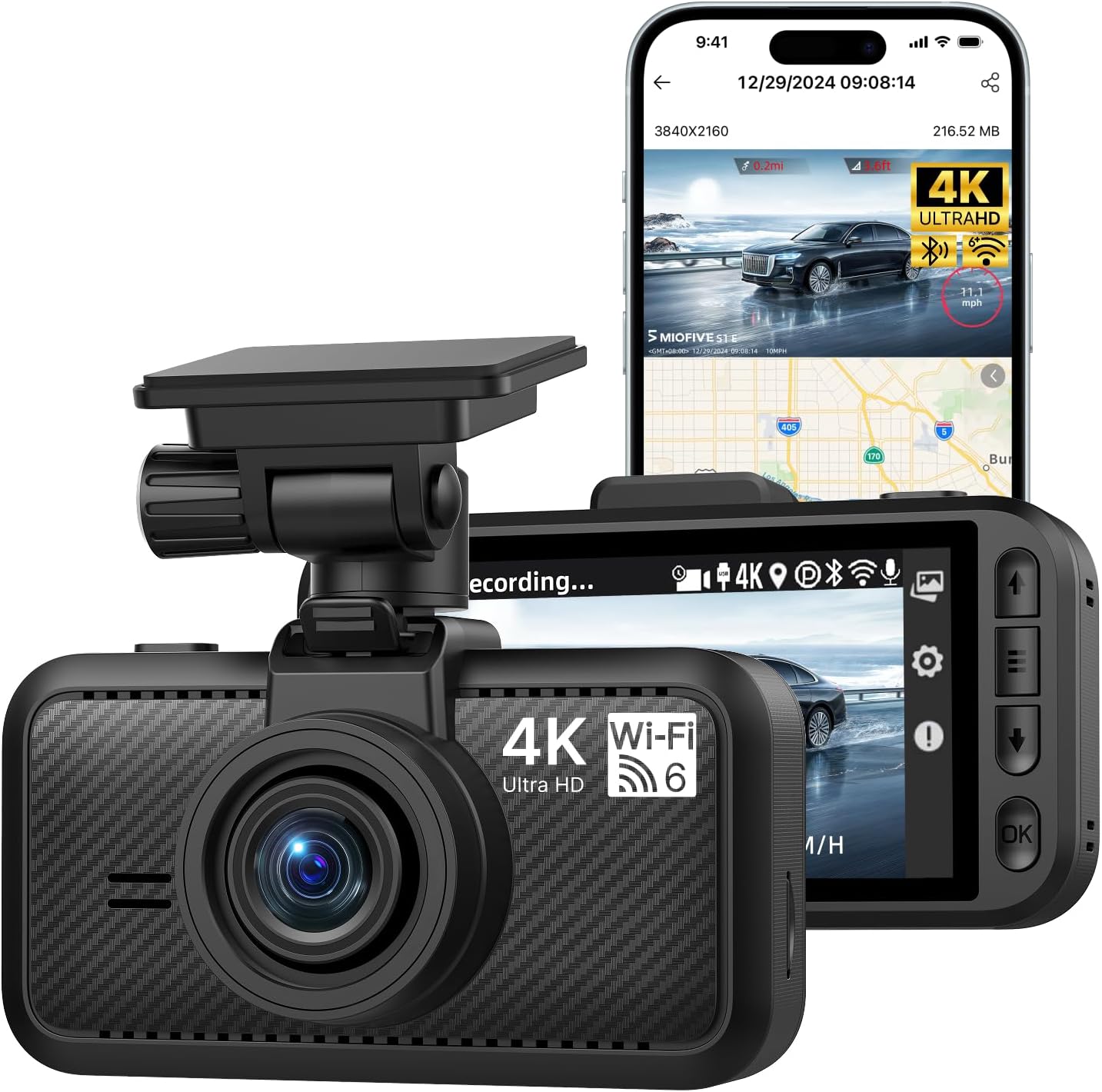
Image 1.1: Miofive S1 E Dash Cam and companion app interface.
2. පෙට්ටියේ ඇති දේ
සියලුම සංරචක පැකේජයේ ඇති බව තහවුරු කර ගන්න:
- S1 E Dash Cam x 1
- කාර් චාජර් x 1
- ආරෝපණ කේබල් x 1
- කේබල් ප්රයි කිරීමේ මෙවලම x 1
- දත්ත කේබල් x 1
- විද්යුත් ස්ථිතික පටල x 2
- ඇලවුම් x 1
- පරිශීලක අත්පොත x 1

Image 2.1: All included components of the Miofive S1 E Dash Cam package.
3. සැකසුම් මාර්ගෝපදේශය
3.1 Installing the Dash Cam
- සවිකරන ස්ථානයක් තෝරන්න: ඔබේ ඉදිරිපස වීදුරුවේ ඔබට බාධාවක් නොවන ස්ථානයක් තෝරන්න view of the road. The area behind the rearview mirror is often ideal.
- වින්ඩ්ෂීල්ඩ් එක පිරිසිදු කරන්න: Ensure the chosen area on the windshield is clean and dry before applying the electrostatic film and adhesive.
- විද්යුත් ස්ථිතික පටලයක් යොදන්න: Adhere one of the provided electrostatic films to the cleaned windshield area. This helps in easy removal and prevents adhesive residue.
- Attach Adhesive Mount: Apply the adhesive mount to the electrostatic film. Press firmly for 30 seconds to ensure a secure bond.
- ඩෑෂ් කැම් එක සවි කරන්න: Slide the dash cam onto the mounted bracket until it clicks into place. Adjust the camera angle to ensure a clear view ඉදිරි මාර්ගයේ.
3.2 බල සම්බන්ධතාවය
- Connect Car Charger: ඔබේ වාහනයේ 12V බල අලෙවිසැලට (සිගරට් සැහැල්ලු සොකට්) කාර් චාජරය ඇතුළු කරන්න.
- ආරෝපණ කේබලය සම්බන්ධ කරන්න: Connect the charging cable from the car charger to the USB Type-C port on the dash cam.
- කේබලය යොමු කරන්න: Use the provided cable prying tool to neatly tuck the charging cable along the edges of your windshield and dashboard to minimize obstruction.
3.3 Inserting and Formatting the Micro SD Card
The Miofive S1 E supports up to a 512GB Class 10 - U3 speed micro SD card (not included). A high-quality, reliable micro SD card is crucial for optimal performance.
- SD කාඩ්පත ඇතුළු කරන්න: With the dash cam powered off, carefully insert the micro SD card into the designated slot until it clicks into place.
- SD කාඩ් ආකෘතිය: It is essential to format the micro SD card before first use and periodically thereafter to ensure stable recording and prevent data corruption. This can typically be done through the dash cam's settings menu or via the Miofive app.

Image 3.1: Micro SD card insertion and compatibility information.
3.4 App Connection (Wi-Fi & GPS)
The Miofive S1 E features built-in Wi-Fi and GPS for enhanced functionality and easy management via the Miofive app.
- Download the Miofive App: ඒ සඳහා සොයන්න "Miofive" in your smartphone's app store (iOS or Android) and download the official application.
- Enable Wi-Fi on Dash Cam: Power on the dash cam. Navigate to the Wi-Fi settings on the dash cam's screen and enable Wi-Fi.
- යෙදුම හරහා සම්බන්ධ වන්න: Open the Miofive app on your smartphone. Follow the in-app instructions to connect to the dash cam's Wi-Fi network. The default Wi-Fi name and password can be found on the dash cam's screen or in the included user manual.
- ප්රවේශ විශේෂාංග: සම්බන්ධ වූ පසු, ඔබට පුළුවන් view සජීවී footage, configure settings, download recorded videos, and track GPS data directly from your smartphone.

Image 3.2: Wi-Fi 6 connectivity for high-speed data transfer to the Miofive app.
4. මෙහෙයුම් උපදෙස්
4.1 මූලික මෙහෙයුම
- ස්වයංක්රීය පටිගත කිරීම: The dash cam will automatically power on and begin recording when connected to your vehicle's power supply and the engine starts.
- අතින් පටිගත කිරීම: Press the designated button on the dash cam to manually start or stop recording.
- පසුධාවනය: Use the dash cam's screen or the Miofive app to review පටිගත කළ වීඩියෝ.
4.2 ප්රධාන ලක්ෂණ
4.2.1 4K Ultra HD Resolution
The S1 E records in 4K (3840x2160P) Ultra HD, providing highly detailed and clear video footage. This resolution allows for better recognition of license plates and road signs.

Image 4.1: Visual representation of 4K resolution clarity.
4.2.2 Super Night Vision
Equipped with a large F/1.8 aperture and a 7-glass lens, the dash cam enhances light intake, ensuring clear video recording even in low-light conditions and at night.

Image 4.2: Super Night Vision technology details.
4.2.3 බිල්ට්-ඉන් GPS
The integrated GPS module precisely records your driving route, speed, and location data. This information is embedded in the video files සහ විය හැක viewed on the dash cam's screen or through the Miofive app, providing crucial evidence in case of incidents.

Image 4.3: GPS Route Tracking functionality.
4.2.4 පැය 24 පුරා වාහන නැවැත්වීමේ නිරීක්ෂකය
When properly installed with the optional Miofive hardwire kit (ASIN: B0CRHJQ3WQ, sold separately), the dash cam can provide continuous 24-hour parking monitoring. This feature records events when your vehicle is parked, protecting against potential incidents.

Image 4.4: 24-Hour Parking Monitor feature.
4.2.5 G-සංවේදකය (හදිසි පටිගත කිරීම)
The built-in G-sensor detects sudden impacts or collisions. In the event of a detected incident, the dash cam automatically locks the current video segment, preventing it from being overwritten by loop recording. This ensures critical footage සාක්ෂි ලෙස සංරක්ෂණය කර ඇත.

Image 4.5: G-Sensor functionality for emergency recording.
4.2.6 ලූප් පටිගත කිරීම
The loop recording feature ensures continuous recording by automatically overwriting the oldest unlocked video files when the micro SD card reaches its storage capacity. This eliminates the need for manual deletion of old footage.

Image 4.6: Seamless Loop Recording process.
4.2.7 Super Capacitors
The Miofive S1 E utilizes supercapacitors instead of traditional lithium batteries. This design provides superior temperature resistance (-4°F to 158°F / -20°C to 70°C) and extends the product's lifespan, ensuring reliable operation in various climates.

Image 4.7: Super Capacitor technology for enhanced durability.
5. නඩත්තු කිරීම
- Regular SD Card Formatting: To maintain optimal recording performance and prevent data corruption, it is recommended to format the micro SD card once a month. Back up any important videos before formatting.
- කාච පිරිසිදු කිරීම: Gently clean the camera lens with a soft, lint-free cloth to ensure clear video quality. Avoid using abrasive materials or harsh chemicals.
- ස්ථිරාංග යාවත්කාලීන කිරීම්: Periodically check for firmware updates via the Miofive app. Firmware updates can improve performance, add new features, and resolve bugs.
6. දෝශ නිරාකරණය
6.1 පොදු ගැටළු සහ විසඳුම්
| ගැටලුව | විය හැකි හේතුව | විසඳුම |
|---|---|---|
| ඩෑෂ් කැමරාව ක්රියාත්මක නොවේ. | බල සැපයුමක් නැත; දෝෂ සහිත කේබල්/ආරෝපණය. | Check car charger connection and vehicle's 12V outlet. Ensure charging cable is securely connected. Test with another power source if possible. |
| පටිගත කිරීම නතර වේ හෝ foo වේtage දූෂිතයි. | SD card issue (not Class 10 U3, full, corrupted, or fake). | Ensure you are using a Class 10 - U3 speed micro SD card (Miofive Ultimate Micro SD Cards recommended). Format the SD card. Replace the SD card if the issue persists. |
| වාහන නැවැත්වීමේ මොනිටරය ක්රියා නොකරයි. | Hardwire kit not installed or incorrectly installed. | The 24-hour parking monitor requires the Miofive hardwire kit (ASIN: B0CRHJQ3WQ), sold separately. Ensure it is correctly installed according to its instructions. |
| Wi-Fi සම්බන්ධතා ගැටළු. | Incorrect password; too far from dash cam; app issues. | Ensure correct Wi-Fi password. Stay within 3-5 meters of the dash cam. Restart the app and dash cam. |
| වීඩියෝ ගුණාත්මකභාවය දුර්වලයි. | Dirty lens; protective film still on lens; low light conditions. | Clean the camera lens. Remove any protective film from the lens. Ensure WDR Night Vision is enabled in settings for low light. |
7. පිරිවිතර
| විශේෂාංගය | විස්තර |
|---|---|
| මාදිලියේ නම | S1E(4K) |
| වීඩියෝ ග්රහණ විභේදනය | 2160p (4K UHD) |
| නිෂ්පාදන මානයන් | අඟල් 6 x 4 x 4 |
| අයිතමයේ බර | අවුන්ස 15.8 කි |
| සම්බන්ධතා තාක්ෂණය | Bluetooth, Wi-Fi (Wi-Fi 6) |
| විශේෂ ලක්ෂණ | Built-in Bluetooth Pairing, Wi-Fi, GPS, Supercapacitor, Microphone, Loop Recording, Parking Monitor, Night Vision, G-Sensor, Free Miofive App, Over-the-Air Firmware Updates, Up to 512GB External Storage Support (NOT INCLUDED) |
| සවිකිරීමේ වර්ගය | වින්ඩ්ෂීල්ඩ් කන්ද |
| පාලන ක්රමය | යෙදුම |
| වර්ණය | කළු |
| බලශක්ති ප්රභවය | සුපිරි කොලෙස්ටරෝල් |
8. වගකීම් සහ සහාය
Miofive offers an 18-month warranty for the S1 E Dash Cam. For any questions, suggestions, or technical assistance, please contact our dedicated customer support team.
- වගකීම් කාලය: මාස 18
- තාක්ෂණික සහාය: 24/7 availability
- ඊමේල් සහාය: support@miofive.com
- Lifetime Technical Solution Support

Image 8.1: Miofive Warranty and Support information.


