1. හැඳින්වීම සහ නිෂ්පාදනය අවසන්view
The GOOLOO A2 is a versatile 5-in-1 portable device designed for roadside emergencies and outdoor activities. It integrates a powerful car jump starter, a high-efficiency tire inflator, an SOS light, a bright LED illumination, and a mobile device charger. This manual provides detailed instructions for safe and effective use of your GOOLOO A2.

Image: The GOOLOO A2 unit, showcasing its compact design, integrated display, control buttons, jump starter ports, and air hose connection. Various air nozzles and a USB-C cable are also visible.
ප්රධාන ලක්ෂණ ඇතුළත් වේ:
- High-Efficient Jump Starter: 2500A peak current, capable of jump-starting vehicles with up to 8.0L gas or 6.0L diesel engines.
- Upgraded 150 PSI Cordless Air Compressor: Features smart preset auto shut-off and a turbocharged 35L/Min inflation rate for quick tire inflation.
- Emergency Lifesaver: Equipped with a bright LED light offering steady, SOS, and strobe modes, and functions as a power bank for mobile devices.
- ආරක්ෂිත විශේෂාංග: Incorporates 10 built-in intelligent safety protections, including spark-proof technology and reverse polarity protection.
- අතේ ගෙන යා හැකි නිර්මාණය: පහසු ගබඩා කිරීම සහ ප්රවාහනය සඳහා සංයුක්ත සහ සැහැල්ලු.
2. පැකේජ අන්තර්ගතය
කරුණාකර ඔබගේ පැකේජයේ සියලුම අයිතම ඇති බව තහවුරු කරගන්න:
- 1 x GOOLOO A2 Portable Car Jump Starter with Tire Inflator
- 1 x ස්මාර්ට් ජම්පර් කේබල්
- 1 x USB-A සිට USB-C කේබලය
- 1 x Pump Tube (Air Hose)
- 5 x Air Nozzles (British Valve Adapter, Short Tapered Nozzle, Presta Valve Adapter, Ball Needle Adapter, Long Tapered Nozzle)
- 1 x පරිශීලක අත්පොත
- 1 x රැගෙන යන බෑගය

Image: A visual representation of the GOOLOO A2 unit, its smart jumper cables, USB-C charging cable, air hose, various air nozzles, user manual, and carrying bag, all neatly arranged.
3. පිහිටුවීම සහ ආරෝපණය කිරීම
Before first use, ensure the GOOLOO A2 is fully charged. It comes with a built-in lithium polymer battery.
3.1 මූලික ආරෝපණය
- Connect the provided USB-A to USB-C cable to the USB-C input port on the GOOLOO A2.
- Connect the other end of the USB-A cable to a 5V/2A USB wall adapter (not included) or a compatible USB port.
- The LED display will indicate the charging status. Charge until the battery indicator shows full.
සටහන: For optimal performance and battery longevity, it is recommended to fully charge the unit every 3-6 months if not in regular use.

Image: A diagram of the GOOLOO A2 unit, highlighting the LED display, power button, up/down buttons, setting button, LED button, USB-C input (5V/2A), USB-A output (5V/2.1A), aerated port, LED flashlight, and jump cable socket.
4. මෙහෙයුම් උපදෙස්
4.1 වාහනයක් ආරම්භ කරමින් පැනීම
Ensure the GOOLOO A2 is sufficiently charged (at least 50% battery recommended) before attempting to jump start a vehicle.
- ජම්පර් කේබලය සම්බන්ධ කරන්න: Insert the blue end of the smart jumper cable into the 12V jump cable socket on the GOOLOO A2 unit. Ensure a firm connection.
- බැටරියට සම්බන්ධ වන්න: රතු cl අමුණන්නamp (+) වාහනයේ බැටරියේ ධන අග්රයට සහ කළු cl එකටamp (-) to the negative terminal. Ensure the clamps make good contact with the battery terminals.
- දර්ශකය පරීක්ෂා කරන්න: Observe the indicator light on the smart jumper cable.
- ඝන කොළ: Ready to jump start.
- Solid Red with Beep: Reverse polarity detected. Disconnect clamps and re-attach correctly.
- දිලිසෙන කොළ: බැටරි වෙළුමtage too low. Press the "BOOST" button on the smart cable if available, then proceed.
- වාහනය ආරම්භ කරන්න: දර්ශකය තද කොළ පැහැයට හැරුණු පසු, ඔබේ වාහනයේ එන්ජිම පණ ගන්වන්න.
- විසන්ධි කරන්න: As soon as the vehicle starts, remove the jumper clamps from the car battery, then disconnect the smart jumper cable from the GOOLOO A2 unit.

Image: The GOOLOO A2 unit connected to a car battery via its smart jumper cables, demonstrating the jump-starting process. The image highlights the 2500A peak current and compatibility with 12V, 8.0L gas, and 6.0L diesel engines.

Image: A three-step visual guide showing how to jump start a vehicle: 1. Insert the jumper cable into the unit. 2. Connect the red clamp ධනාත්මක බැටරි පර්යන්තය සහ කළු cl වෙතamp to the negative. 3. Start the car engine when the light on the smart cable turns green.
4.2 ටයර් උද්ධමනය
The GOOLOO A2 features an intelligent tire inflator with auto shut-off.
- වායු හෝස් අමුණන්න: Screw the air hose securely onto the aerated port of the GOOLOO A2.
- ටයර් කපාටයට සම්බන්ධ කරන්න: Attach the other end of the air hose to the tire valve stem. Ensure it is tightly screwed on to prevent air leakage.
- බලය සක්රිය කර ප්රකාරය තෝරන්න: Press the power button to turn on the unit. Use the "Setting" button (often represented by a gear icon or 'M') to cycle through inflation modes (Car, Motorcycle, Bicycle, Ball). The display will show the current pressure unit (PSI, BAR, KPA).
- ඉලක්ක පීඩනය සකසන්න: Use the "+" and "-" buttons to adjust the desired target pressure. The LCD display provides real-time pressure readings.
- උද්ධමනය ආරම්භ කරන්න: Press the power button again to begin inflation. The compressor will automatically stop once the preset pressure is reached.
- විසන්ධි කරන්න: Quickly unscrew the air hose from the tire valve and then from the GOOLOO A2 unit.
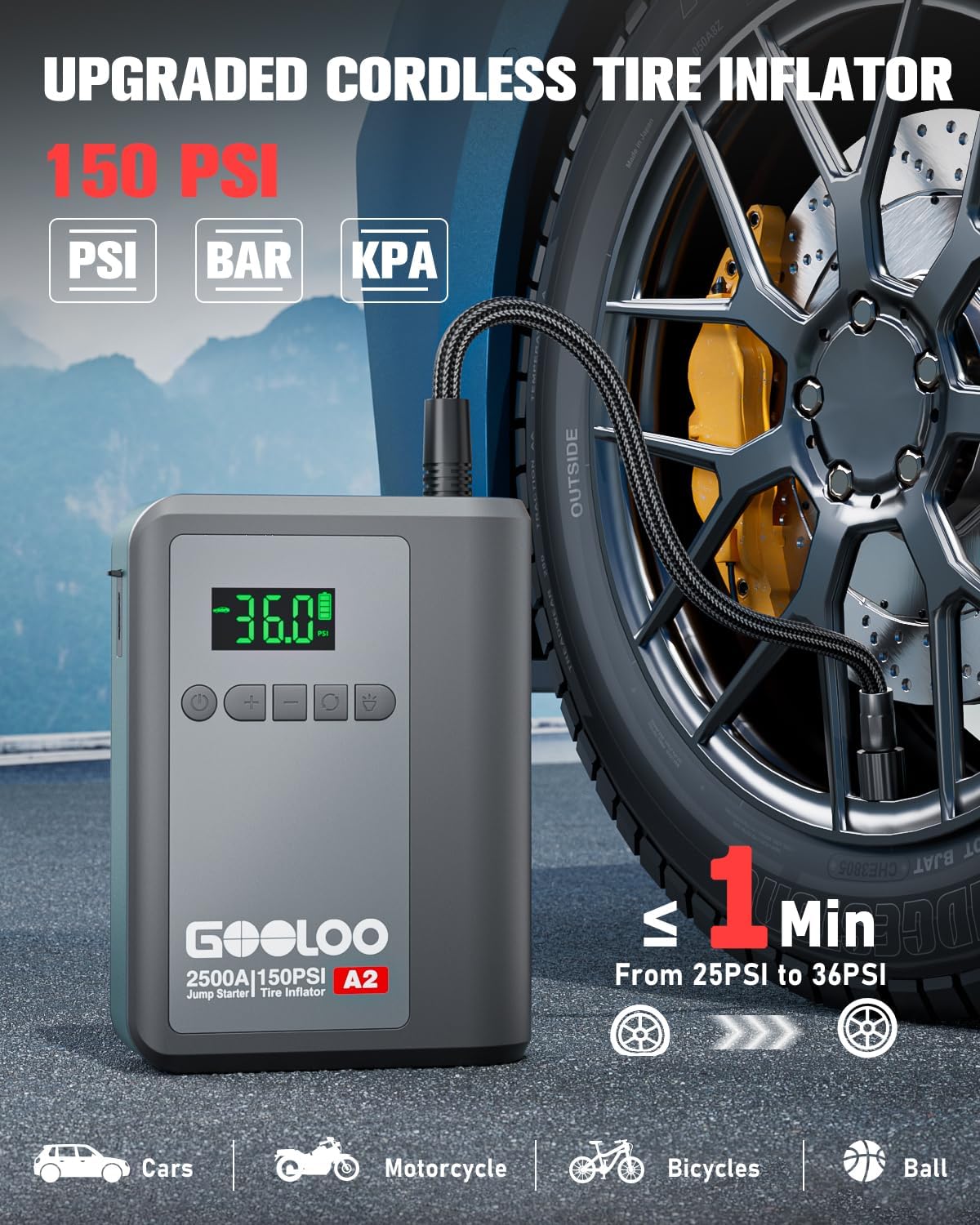
Image: The GOOLOO A2 unit connected to a car tire valve via its air hose, demonstrating the tire inflation process. The display shows "36.0" PSI, indicating the target pressure. The image highlights the 150 PSI capacity and quick inflation time.

Image: A four-step visual guide for tire inflation: 1. Attach the air hose and tighten it. 2. Press the mode button to choose the inflation mode. 3. Press the power button to start inflation. 4. Pull out the air hose when auto-stop occurs.
සටහන: Use the appropriate air nozzle for different inflatables (e.g., car tires, bicycle tires, sports balls).

Image: A visual guide showing the GOOLOO A2's capability to inflate various items, including car tires, motorcycle tires, bicycle tires, balls, and swimming rings, along with their recommended pressure ranges and adjustable ranges.
4.3 බලශක්ති බැංකු ක්රියාකාරිත්වය
The GOOLOO A2 can charge your electronic devices on the go.
- Connect your device's charging cable to the USB-A output port (5V/2.1A) on the GOOLOO A2.
- ඒකකය ස්වයංක්රීයව ඔබගේ උපාංගය ආරෝපණය කිරීම ආරම්භ කරයි.

Image: A person sitting in a car, charging their smartphone using the GOOLOO A2 unit, demonstrating its function as a portable power bank. Icons below indicate compatibility with phones, iPads, headsets, laptops, cameras, and consoles.
4.4 LED ආලෝක ක්රියාකාරිත්වය
The integrated LED light provides illumination and emergency signaling.
- Press the "LED" button (often represented by a light bulb icon) to cycle through the light modes:
- Steady On (Spotlight): සාමාන්ය ආලෝකකරණය සඳහා.
- SOS මාදිලිය: Flashes the international SOS signal (three short, three long, three short flashes).
- ස්ට්රෝබ් ප්රකාරය: Rapid flashing for warning or signaling.
- Press and hold the "LED" button to turn off the light.
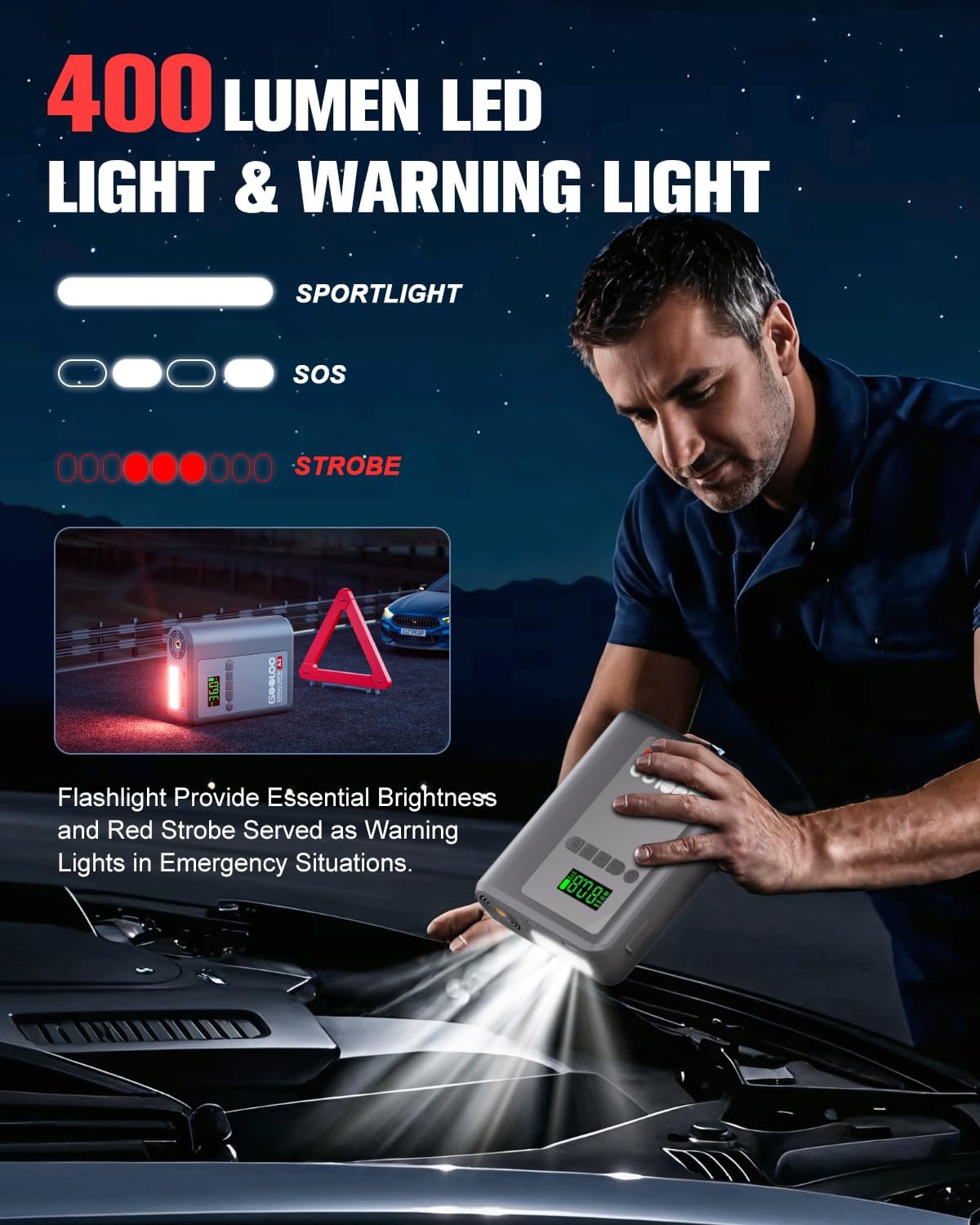
Image: A person using the GOOLOO A2's LED flashlight to illuminate a car engine bay at night, with a warning triangle in the background. The image illustrates the 400 lumen output and the spotlight, SOS, and strobe modes.
5. නඩත්තුව සහ රැකවරණය
Proper maintenance ensures the longevity and reliability of your GOOLOO A2.
- ගබඩා: Store the unit in a cool, dry place away from direct sunlight and extreme temperatures. Use the provided carrying bag for protection.
- අයකිරීම: බැටරි සෞඛ්යය පවත්වා ගැනීම සඳහා, භාවිතයේ නොමැති වුවද, සෑම මාස 3-6 කට වරක් ඒකකය නැවත ආරෝපණය කරන්න.
- පිරිසිදු කිරීම: මෘදු වියළි රෙද්දකින් ඒකකය පිස දමන්න. රළු රසායනික ද්රව්ය හෝ උල්ෙල්ඛ පිරිසිදු කරන්නන් භාවිතා නොකරන්න.
- ජලයෙන් වළකින්න: ඒකකය ජලයට හෝ අධික තෙතමනයට නිරාවරණය නොකරන්න.
- උෂ්ණත්වය: The unit is designed to operate in temperatures from -20℃ to 60℃. Avoid using or storing outside this range.

රූපය: එක්ස් කිරණ විලාසයක් view of the GOOLOO A2 unit, illustrating its internal design for efficient battery heat dissipation, with blue air currents flowing through. This design helps ensure longer product life and reliable operation in varying temperatures (-20°C to 60°C).
6. දෝශ නිරාකරණය
If you encounter issues with your GOOLOO A2, refer to the following common problems and solutions:
| ගැටලුව | විය හැකි හේතුව | විසඳුම |
|---|---|---|
| ඒකකය සක්රිය නොවේ. | බැටරිය ක්ෂය වී ඇත. | ඒකකය සම්පූර්ණයෙන්ම ආරෝපණය කරන්න. |
| වාහනය ජම්ප් ස්ටාර්ට් නොකරයි. | වැරදි clamp connection; Battery too dead; Vehicle issue. | cl සහතික කරන්නamps are connected correctly (red to +, black to -). Check smart cable indicator. If battery is extremely low, use "BOOST" function if available. Consult a mechanic if vehicle still won't start. |
| Tire inflator not working or slow. | Air hose not securely attached; Incorrect pressure setting; Unit battery low. | Ensure air hose is tightly screwed onto both the unit and tire valve. Verify target pressure. Charge the unit. |
| LED display is dim or unreadable in sunlight. | සෘජු හිරු එළියේ දීප්තිය. | The display is designed for sunlight readability, but extreme glare can still affect visibility. Try to shade the screen if possible. |
| භාවිතයේදී ඒකකය උණුසුම් වේ. | Normal operation during high power output (jump starting, inflating). | This is normal. The unit has built-in heat dissipation. If it becomes excessively hot or emits smoke, discontinue use immediately and contact support. |
If the problem persists after trying these solutions, please contact GOOLOO customer support.
7. පිරිවිතර
| විශේෂාංගය | විස්තර |
|---|---|
| ආකෘතිය | A2 portable jump starter with tire inflator |
| උපරිම ප්රතිදාන ධාරාව | 2500 Amps |
| එන්ජින් ගැළපුම | ගෑස් ලීටර් 8.0ක් / ඩීසල් ලීටර් 6.0ක් දක්වා |
| ටයර් පුම්බන පීඩනය | උපරිම 150 PSI |
| නිෂ්පාදන මානයන් | 4.84"D x 1.97"W x 6.54"H |
| අයිතමයේ බර | පවුම් 1.5ක් |
| බැටරි වර්ගය | ලිතියම් පොලිමර් (1ක් අවශ්යයි, ඇතුළත්) |
| USB-C ආදානය | 5V/2A |
| USB-A ප්රතිදානය | 5V/2.1A |
| මෙහෙයුම් උෂ්ණත්වය | -20℃ සිට 60℃ දක්වා (-4°F සිට 140°F) |
| LED ආලෝක ප්රතිදානය | 400 Lumens |
8. වගකීම් සහ සහාය
GOOLOO stands behind the quality of its products.
- වගකීම් කාලය: The GOOLOO A2 comes with an 18-month warranty from the date of purchase.
- ආපසු පැමිණීමේ සහතිකය: A 30-day unconditional return guarantee is offered.
- පාරිභෝගික සහාය: GOOLOO provides 24/7 customer support and lifetime technical support.
For warranty claims, technical assistance, or any inquiries, please contact GOOLOO customer service through their official website or the platform where you purchased the product. Please have your model number (A2) and purchase details ready.
You can visit the official GOOLOO store for more information: GOOLOO Official Store


