1. හැඳින්වීම
Thank you for choosing the Pelonis 5L Evaporative Cooler. This 3-in-1 device combines the functions of an air cooler, fan, and humidifier, providing a comfortable environment for your home or office. Please read this manual thoroughly before operation to ensure proper use, maintenance, and safety.
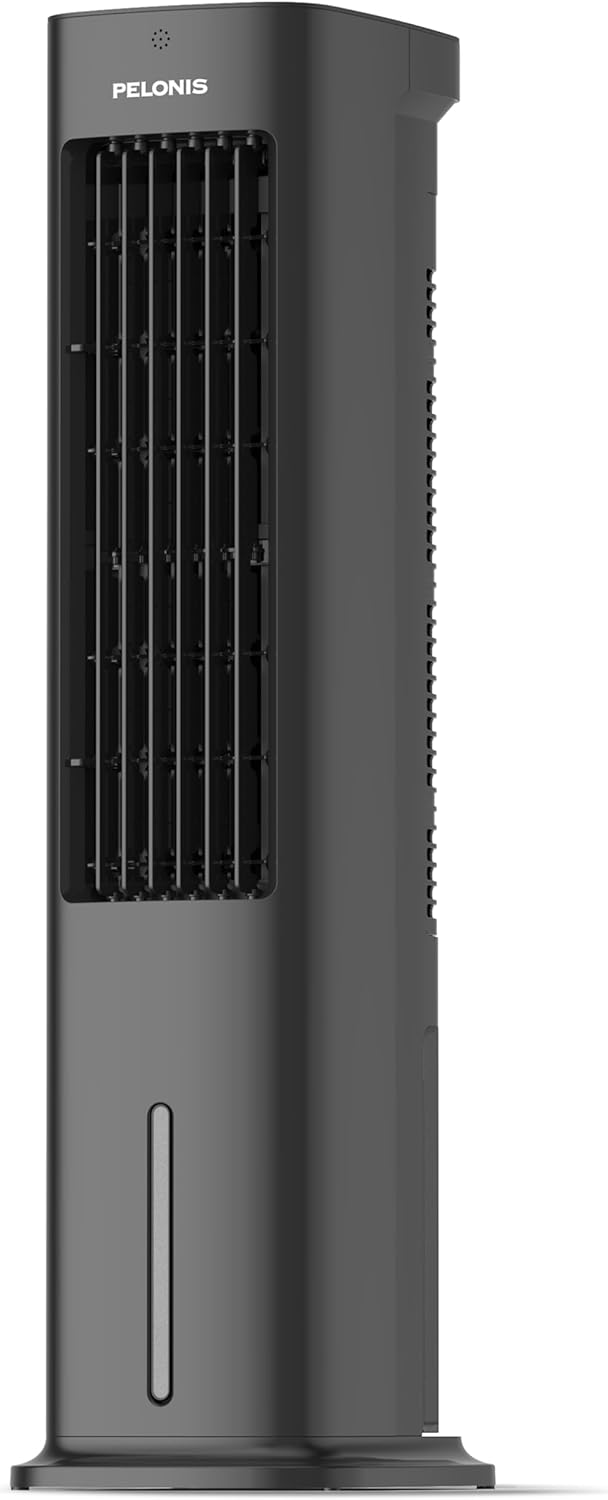
Figure 1.1: Pelonis 5L Evaporative Cooler (Side View)

Figure 1.2: The 3-in-1 functionality of the Pelonis Evaporative Cooler, illustrating its use as a fan, humidifier, and air cooler.
2. වැදගත් ආරක්ෂක උපදෙස්
ගින්න, විදුලි කම්පනය හෝ තුවාල ඇතිවීමේ අවදානම අවම කිරීම සඳහා, සෑම විටම මෙම මූලික ආරක්ෂක පියවරයන් අනුගමනය කරන්න:
- මෙම උපකරණය භාවිතා කිරීමට පෙර සියලුම උපදෙස් කියවන්න.
- හානියට පත් ලණුවක් හෝ ප්ලග් එකක් සහිත විදුලි පංකාවක් ක්රියාත්මක නොකරන්න. විදුලි පංකාව ඉවතලන්න හෝ විභාග සහ/හෝ අලුත්වැඩියාව සඳහා බලයලත් සේවා පහසුකමකට ආපසු යන්න.
- කාපට් යට ලණුව ධාවනය නොකරන්න. විසි කරන රග්, ධාවකයන් හෝ ඒ හා සමාන ආවරණ වලින් ලණුව ආවරණය නොකරන්න. ගෘහ භාණ්ඩ හෝ උපකරණ යට ලණුව ගමන් නොකරන්න. මාර්ග තදබදය ඇති ප්රදේශයෙන් සහ එය නොපැමිණෙන තැනින් ලණුව සකස් කරන්න.
- Always unplug the appliance from the power outlet when not in use, when moving it from one location to another, and before cleaning.
- උපකරණය ජලයේ හෝ වෙනත් දියර වල ගිල්වන්න එපා.
- ළමයින්ට උපකරණය සමඟ ක්රියා කිරීමට හෝ සෙල්ලම් කිරීමට ඉඩ නොදෙන්න.
- මෙම අත්පොතෙහි විස්තර කර ඇති පරිදි උපකරණය එහි අපේක්ෂිත ගෘහ භාවිතය සඳහා පමණක් භාවිතා කරන්න.
- පරිමාව සහතික කරන්නtagඋපකරණයෙහි දක්වා ඇති ඊ ඔබේ දේශීය ප්රධාන පරිමාවට අනුරූප වේtage උපකරණය සම්බන්ධ කිරීමට පෙර.
- Do not block air openings or operate near curtains or other objects that may block air intake.
- සෑම විටම උපකරණය ස්ථාවර, පැතලි මතුපිටක් මත තබන්න.
3. පැකේජ අන්තර්ගතය
කරුණාකර පහත අයිතම සඳහා පැකේජය පරීක්ෂා කරන්න:
- Pelonis 5L Evaporative Cooler Unit
- දුරස්ථ පාලකය (AAA බැටරි 2ක් ඇතුළත්)
- 2 Cooling Pads
- පරිශීලක අත්පොත
4. නිෂ්පාදන අවසන්view
Familiarize yourself with the main components of your Pelonis Evaporative Cooler.

රූපය 4.1: ඉදිරිපස view of the cooler, highlighting its fan, humidification, and cooling functions.

Figure 4.2: Illustration of the 60-degree oscillation feature for wide air distribution.

Figure 4.3: The evaporative cooler being controlled by its remote, emphasizing wireless convenience.
5. පිහිටුවීම
Follow these steps to set up your evaporative cooler:
5.1 මූලික එකලස් කිරීම
- ඒකකය එහි ඇසුරුම් වලින් ප්රවේශමෙන් ඉවත් කරන්න.
- Attach the base to the bottom of the main unit. Ensure it is securely fastened, typically by screwing it into place.
5.2 ජල ටැංකිය පිරවීම
The unit features a 5L water tank for humidification and cooling functions.
- ඒකකයේ පතුලේ ජල ටැංකිය සොයා ගන්න.
- වතුර ටැංකිය පරිස්සමෙන් එළියට ගන්න.
- පිරිසිදු ජලය සමග ටැංකිය පුරවන්න. උපරිම පිරවුම් රේඛාව නොඉක්මවන්න.
- For enhanced cooling, place the two cooling pads in the freezer until frozen, then place them into the water tank.
- ජල ටැංකිය නිසි තැනට වැටෙන තුරු එය නැවත ඒකකයට තල්ලු කරන්න.

Figure 5.1: Instructions for filling the 5L water tank, showing the maximum fill line and warning against overfilling or tipping.
5.3 දුරස්ථ පාලක බැටරි ස්ථාපනය
The remote control requires 2 AAA batteries (included).
- දුරස්ථ පාලකයේ පිටුපස බැටරි මැදිරිය විවෘත කරන්න.
- නිවැරදි ධ්රැවීයතාව (+/-) සහතික කරමින් AAA බැටරි 2 ඇතුළු කරන්න.
- බැටරි මැදිරිය වසා දමන්න.
6. මෙහෙයුම් උපදෙස්
Your Pelonis Evaporative Cooler offers multiple functions and settings for optimal comfort.
6.1 බලය සක්රිය / අක්රිය
- විදුලි රැහැන සුදුසු විදුලි අලෙවිසැලකට සම්බන්ධ කරන්න.
- ඔබන්න බලය ඒකකය සක්රිය හෝ අක්රිය කිරීමට පාලක පැනලයේ හෝ දුරස්ථ පාලකයේ බොත්තම ඔබන්න.
6.2 මාදිලිය තේරීම
The unit has three primary modes: Fan, Evaporative Cooler, and Humidifier.
- ඔබන්න මාදිලිය button to cycle through the available modes.
- පංකා ප්රකාරය: Circulates air without humidification or cooling.
- Evaporative Cooler Mode: Uses water and cooling pads to provide a cooling effect. Ensure the water tank is filled.
- ආර්ද්රතාකාරක මාදිලිය: Adds moisture to the air. Ensure the water tank is filled.

Figure 6.1: Visual representation of the three operational modes: Humidifier, Air Cooler, and Fan.
6.3 වේග සැකසුම්
Choose from three fan speeds: Quiet, Standard, or Strong.
- ඔබන්න වේගය විදුලි පංකාවේ වේගය සැකසීමට බොත්තම.
- The current speed setting will be indicated on the display.
6.4 දෝලන ශ්රිතය
The unit features a 60° automatic oscillation for wider air distribution.
- ඔබන්න දෝලනය button to activate or deactivate the automatic swing function.
- You can also manually adjust the vertical angle of the air outlet.
6.5 ටයිමර් කාර්යය
Set the unit to automatically turn off after a specified period, up to 7 hours.
- ඔබන්න ටයිමර් button repeatedly to set the desired operating time in 1-hour increments.
- The timer indicator will show the selected duration.
6.6 සුළං මාදිලි
Select from Natural, Sleep, or Normal wind modes for varied airflow patterns.
- ඔබන්න සුළං මාදිලිය button to cycle through Natural, Sleep, and Normal modes.
- ස්වභාවික මාදිලිය: විවිධ විදුලි පංකා වේග සමඟ ස්වභාවික සුළඟ අනුකරණය කරයි.
- නින්ද ප්රකාරය: බාධා රහිත නින්ද සඳහා අඩු, නිහඬ වේගයකින් ක්රියා කරයි.
- සාමාන්ය මාදිලිය: ස්ථාවර විදුලි පංකා වේගය.

Figure 6.2: The evaporative cooler operating in a bedroom, emphasizing its quiet night mode for optimal cooling during sleep.
7. නඩත්තු කිරීම
නිතිපතා නඩත්තු කිරීම ඔබේ වාෂ්පීකරණ සිසිලකයේ ප්රශස්ත ක්රියාකාරිත්වය සහ කල්පැවැත්ම සහතික කරයි.
7.1 ජල ටැංකිය පිරිසිදු කිරීම
පුස් සහ දිලීර වර්ධනය වැළැක්වීම සඳහා ජල ටැංකිය නිතිපතා පිරිසිදු කරන්න.
- විදුලිබල ජාලයෙන් ඒකකය විසන්ධි කරන්න.
- ජල ටැංකිය ඉවත් කරන්න.
- ඉතිරි ජලය හිස් කරන්න.
- මෘදු රෙද්දකින් සහ මෘදු ඩිටර්ජන්ට් එකකින් ටැංකිය පිරිසිදු කරන්න. පිරිසිදු ජලයෙන් හොඳින් සෝදන්න.
- නැවත ඇතුල් කිරීමට පෙර ටැංකිය සම්පූර්ණයෙන්ම වාතයේ වියළීමට ඉඩ දෙන්න.
7.2 Cleaning the Filter Screen
The removable filter screen should be cleaned periodically.
- ඒකකය විසන්ධි කරන්න.
- Locate and remove the filter screen from the back of the unit.
- Rinse the filter screen under running water to remove dust and debris. For stubborn dirt, use a soft brush.
- Allow the filter screen to dry completely before reinserting it into the unit.

Figure 7.1: Illustration of the removable filter screen and the process of cleaning it for improved air quality.
7.3 බාහිර පිරිසිදු කිරීම
- මෘදු, d සමග ඒකකයේ බාහිර පිස දමන්නamp රෙදි.
- උල්ෙල්ඛ පිරිසිදු කරන්නන් හෝ ද්රාවණ භාවිතා නොකරන්න.
7.4 ගබඩා කිරීම
- If storing the unit for an extended period, ensure the water tank is empty and clean, and the filter screen is dry.
- ඒකකය සෘජු හිරු එළියෙන් ඈත්ව සිසිල් වියළි ස්ථානයක ගබඩා කරන්න.
8. දෝශ නිරාකරණය
If you encounter issues with your Pelonis Evaporative Cooler, refer to the following table for common problems and solutions.
| ගැටලුව | විය හැකි හේතුව | විසඳුම |
|---|---|---|
| ඒකකය සක්රිය නොවේ | බල සැපයුමක් නැත බල බොත්තම ඔබා නැත | විදුලි රැහැන ආරක්ෂිතව සම්බන්ධ කර ඇත්දැයි පරීක්ෂා කරන්න. ඒකකයේ හෝ දුරස්ථ පාලකයේ බල බොත්තම ඔබන්න. |
| සිසිල් වාතය නැත / දුර්වල සිසිලනය | වතුර ටැංකිය හිස් Cooling pads not frozen Filter screen clogged | වතුර ටැංකිය පුරවන්න. Freeze the cooling pads before use. පෙරහන් තිරය පිරිසිදු කරන්න. |
| ඒකකය ඝෝෂාකාරී ය | ඒකකය පැතලි මතුපිටක් මත නොවේ ඇතුළත විදේශීය වස්තුව | ඒකකය ස්ථාවර, පැතලි මතුපිටක් මත තබන්න. පේනුව ගලවා කිසියම් බාධාවක් තිබේදැයි පරීක්ෂා කරන්න. |
| දුරස්ථ පාලකය ක්රියා නොකරයි | බැටරි මිය ගොස් හෝ වැරදි ලෙස ඇතුළත් කර ඇත දුරස්ථ පාලකය සහ ඒකකය අතර බාධාව | බැටරි ප්රතිස්ථාපනය කර ධ්රැවීයතාව පරීක්ෂා කරන්න. Ensure a clear line of sight to the unit's receiver. |
මෙම විසඳුම් උත්සාහ කිරීමෙන් පසුවත් ගැටලුව පවතින්නේ නම්, කරුණාකර පාරිභෝගික සහාය අමතන්න.
9. පිරිවිතර
| විශේෂාංගය | විස්තර |
|---|---|
| ආදර්ශ අංකය | PFC50A4AWGBDE |
| මානයන් (L x W x H) | 29.5 x 23 x 85 සෙ.මී |
| බර | කිලෝ ග්රෑම් 9.06 යි |
| ජල ටැංකි ධාරිතාව | ලීටර් 5 |
| වෙළුමtage | වෝල්ට් 220 |
| පාලන වර්ගය | දුරස්ථ පාලකය |
| විශේෂ ලක්ෂණ | Timer, Tower Base, Remote Controlled, Oscillating, Quiet Operation, Safety Certified |
| සහතික කිරීම | CE, RoHS |
| ඇතුළත් සංරචක | දුරස්ථ පාලකය |
10. වගකීම් සහ සහාය
This Pelonis Evaporative Cooler comes with a වසර 2ක වගකීමක් මිලදී ගත් දින සිට. මෙම වගකීම් සහතිකය සාමාන්ය භාවිතය යටතේ ද්රව්ය හා වැඩ කිරීමේ දෝෂ ආවරණය කරයි.
For warranty claims, technical support, or any questions regarding your product, please contact Pelonis customer service through the retailer where you purchased the product or visit the official Pelonis webසම්බන්ධතා තොරතුරු සඳහා අඩවිය.
වගකීම් අරමුණු සඳහා කරුණාකර ඔබේ මිලදී ගැනීමේ සාක්ෂි තබා ගන්න.


