1. හැඳින්වීම
The MSXTTLY U2C-AIR Pro Wireless CarPlay Adapter converts your vehicle's existing wired CarPlay system into a wireless one. This allows for a seamless and automatic connection between your iPhone and your car's infotainment system, providing convenient access to navigation, music, calls, and messages without the need for cables.
2 ආරක්ෂිත තොරතුරු
- උපාංගය අධික උෂ්ණත්වයන්ට, සෘජු හිරු එළියට හෝ තෙතමනයට නිරාවරණය නොකරන්න.
- Avoid disassembling or modifying the device, as this will void the warranty and may cause damage.
- උපාංගය ශක්තිමත් චුම්බක ක්ෂේත්ර වලින් ඈත් කරන්න.
- Ensure the device is securely placed to prevent it from interfering with driving.
3. පැකේජ අන්තර්ගතය
ඔබගේ පැකේජයේ සියලුම අයිතම ඇති බව තහවුරු කරගන්න:
- U2C-AIR Pro CarPlay Adapter (x1)
- USB A to C Cable (x1)
- USB A to A Cable (x1)
- 3M ඇලවුම් පටි (x1)

Image: What's in the Box. This image displays the U2C-AIR Pro adapter, a USB-A to USB-C cable, a USB-A to USB-A cable, and a user manual.
4. නිෂ්පාදන අවසන්view
The U2C-AIR Pro Wireless CarPlay Adapter is designed for convenience and performance. It features a compact design and gold-plated connectors for enhanced durability and conductivity.

Image: MSXTTLY U2C-AIR Pro Wireless CarPlay Adapter. This image shows the compact design of the adapter with its gold-plated USB connector.
ප්රධාන ලක්ෂණ:
- රැහැන් රහිත CarPlay: Converts wired CarPlay to wireless for seamless iPhone integration.
- Fast and Stable Connection: Equipped with a 5G chip, 5.8 GHz WiFi, and Bluetooth 5.3 for low-latency performance.
- සංයුක්ත නිර්මාණය: Small and stylish, minimizing space usage in your car.
- රන් ආලේපිත සම්බන්ධක: Enhances conductivity, reduces heat buildup, and boosts data speed.
- බහු සම්බන්ධතා විකල්ප: Compatible with various car ports using included USB A to C and USB A to A cables.
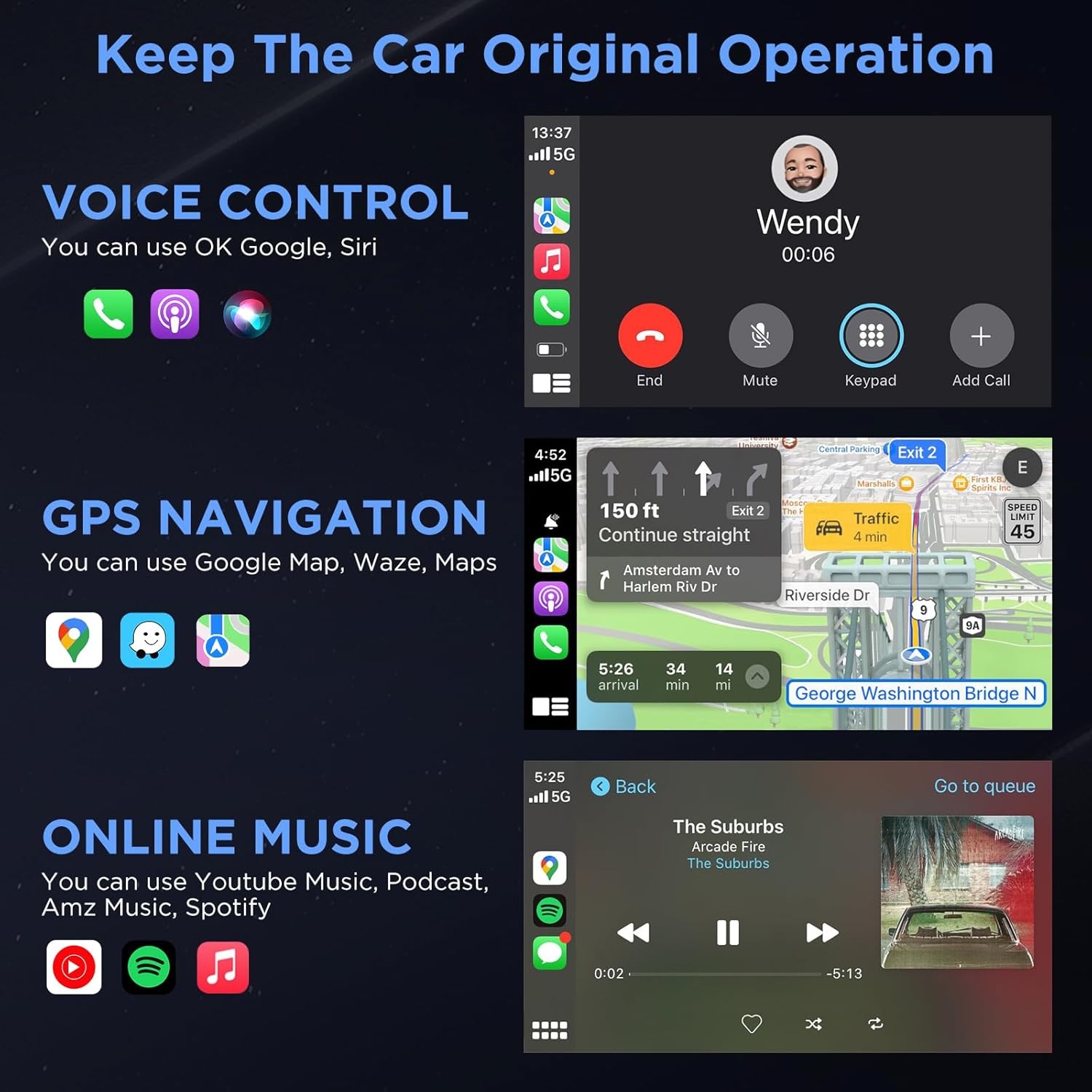
Image: Three Ways to Adapt to Car Various Ports. This image illustrates connecting the adapter via a built-in USB port, a USB-A to USB-C data cable, or a USB-A extension cable.

Image: Why Choose Gold-Plated Enclosure and Pins? This image explains the advantages of gold-plated connectors, including improved conductivity and durability.
5. සැකසුම් උපදෙස්
Follow these steps to connect your U2C-AIR Pro Wireless CarPlay Adapter:
- ප්ලග් ඉන්: Connect the U2C-AIR Pro adapter to your car's USB port that supports wired CarPlay. Use the appropriate cable (USB A to C or USB A to A) if needed.
- යුගල: On your iPhone, enable Bluetooth and Wi-Fi. ඒ සඳහා සොයන්න the adapter's Bluetooth name (e.g., "smartBox-XXXX") and pair with it. Confirm the CarPlay connection prompt on your iPhone.
- CarPlay භාවිතා කරන්න: Once paired, CarPlay will automatically launch on your car's display. The adapter will automatically connect to your iPhone each time you start your car after the initial setup.

Image: Connection Method - Just 3 Steps. This image visually guides users through the plug-and-play setup process.
6. මෙහෙයුම් උපදෙස්
Once connected, your car's display will show the CarPlay interface, allowing you to access various iPhone features safely while driving.
CarPlay Functions:
- හඬ පාලනය: Use Siri for hands-free commands, such as making calls, sending messages, or getting directions.
- GPS සංචලනය: Utilize Apple Maps, Google Maps, Waze, or other compatible navigation apps directly on your car's screen.
- Online Music & Podcasts: Stream audio from Spotify, Apple Music, podcasts, and other supported applications.
- ඇමතුම් සහ පණිවිඩ: Make and receive calls, and send/receive messages through the CarPlay interface.

Image: Keep The Car Original Operation. This image demonstrates the CarPlay interface with voice control, navigation, and music features.
පාලන ක්රම:
The adapter supports your car's original control systems:
- ස්පර්ශ තිරය: Interact directly with the CarPlay interface via your car's touchscreen.
- බොත්තම් පාලනය: Use your car's control knobs for navigation and selection.
- සුක්කානම් රෝද පාලනය: Utilize steering wheel buttons for audio, calls, and voice commands.

Image: Support Automobile Control System 100%. This image illustrates the various ways to control CarPlay using your car's built-in controls.
7. ගැළපුම
To ensure proper functionality, please check the following compatibility requirements:
- මෝටර් රථ අනුකූලතාව: Your car's OEM or aftermarket head unit must support රැහැන්ගත CarPlay. This adapter is designed for OEM wired car models from 2017 and newer.
- දුරකථන අනුකූලතාව: Requires an iPhone running iOS 11 හෝ ඊට වැඩි.
- නොගැලපීම: මෙම ඇඩැප්ටරය අනුකූල නොවේ with BMW or electric vehicles. It does not support video streaming applications.

Image: How to Check if Your Device is Compatible with This Product? This image provides a quick guide to verify car and iPhone compatibility.

Image: Car Compatible. This image provides a comprehensive list of car models and years that are compatible with the adapter.
8. දෝශ නිරාකරණය
If you encounter issues with your U2C-AIR Pro adapter, consider the following:
- සම්බන්ධතා ගැටළු: Ensure your car's USB port supports wired CarPlay. Try disconnecting and reconnecting the adapter. Verify Bluetooth and Wi-Fi are enabled on your iPhone.
- ප්රමාදය හෝ විසන්ධි කිරීම්: Wireless CarPlay may experience slight latency (0 to 1.5 seconds) depending on signal strength and usage. If disconnections are frequent, ensure no other devices are interfering with the Bluetooth or Wi-Fi signal.
- ස්ථිරාංග යාවත්කාලීන කිරීම්: The adapter supports online reporting and OTA (Over-The-Air) updates. Regularly check for and install updates to ensure optimal performance and resolve potential bugs.
- මෝටර් රථ අනුකූලතාව: Double-check your vehicle's compatibility with the adapter. Refer to the compatibility section or the detailed list provided.
9. පිරිවිතර
| විශේෂාංගය | විස්තර |
|---|---|
| ආදර්ශ අංකය | RE-CP-US-219 |
| බ්ලූටූත් අනුවාදය | 5.3 |
| Wi-Fi සංඛ්යාතය | 5.8 GHz |
| චිප්සෙට් | 5G චිප් |
| පැකේජ මානයන් | අඟල් 5.31 x 3.58 x 0.75 |
| අයිතමයේ බර | අවුන්ස 2.08 කි |
10. නඩත්තු කිරීම
To ensure the longevity and optimal performance of your U2C-AIR Pro adapter:
- මෘදු වියළි රෙද්දකින් පිස දැමීමෙන් උපාංගය පිරිසිදුව තබා ගන්න.
- දැඩි රසායනික ද්රව්ය හෝ උල්ෙල්ඛ පිරිසිදුකාරක භාවිතා කිරීමෙන් වළකින්න.
- උපාංගය භාවිතා නොකරන විට සිසිල් වියළි ස්ථානයක ගබඩා කරන්න.
- Ensure the USB ports are free from dust and debris.
11. වගකීම් සහ සහාය
MSXTTLY is committed to providing excellent customer service and product reliability.
- වගකීම්: The U2C-AIR Pro CarPlay Adapter comes with a 12-month warranty from the date of purchase.
- තාක්ෂණික සහාය: We offer 24/7 professional technical support to assist you with any questions or issues.
- ජීවිත කාලය පුරාම තාක්ෂණික සහාය: Enjoy lifetime technical support for your product.
For support, please refer to the contact information provided in your product packaging or visit the official MSXTTLY webඅඩවිය.

Image: Peace of Mind Service. This image highlights the warranty and support services offered by MSXTTLY.


