1. හැඳින්වීම
Thank you for choosing the occiam AI Translation Earbuds. These innovative open-ear earbuds are designed to provide seamless real-time language translation and high-quality audio playback. Featuring Bluetooth 5.3 connectivity and a comfortable earhook design, they are ideal for travel, business, and daily communication across language barriers. This manual provides detailed instructions on how to set up, operate, and maintain your earbuds to ensure optimal performance.
2 ආරක්ෂිත තොරතුරු
- ඉයර්බඩ් හෝ ආරෝපණ පෙට්ටිය අධික උෂ්ණත්වයන්ට, ආර්ද්රතාවයට හෝ ද්රවවලට නිරාවරණය නොකරන්න.
- උපාංගය බිම දැමීම, බලපෑම් කිරීම හෝ විසුරුවා හැරීමෙන් වළකින්න.
- සපයා ඇති ආරෝපණ කේබලය හෝ සහතික කළ සමාන ආරෝපණ කේබලයක් පමණක් භාවිතා කරන්න.
- ශ්රවණ හානිය වළක්වා ගැනීම සඳහා දිගු කාලයක් තිස්සේ අධික ශබ්දයකින් ඉයර්බඩ් භාවිතා නොකරන්න.
- ළමයින්ට සහ සුරතල් සතුන්ට ළඟාවිය නොහැකි ලෙස තබා ගන්න.
3. පැකේජ අන්තර්ගතය
කරුණාකර පහත අයිතම සඳහා පැකේජය පරීක්ෂා කරන්න:
- occiam AI Translation Earbuds (Left and Right)
- අයකිරීමේ නඩුව
- USB ආරෝපණ කේබලය
- පරිශීලක අත්පොත

Image: The occiam AI Translation Earbuds, featuring a black body with a yellow earhook, are shown alongside their sleek black charging case. The earbuds have small indicator lights, and the charging case displays four white LED indicators on its front.
4. නිෂ්පාදන අවසන්view
The occiam AI Translation Earbuds are designed for comfort and functionality. They feature an open-ear design with a flexible earhook for a secure fit, allowing you to stay aware of your surroundings while enjoying audio or translation.
ඉයර්බඩ් සංරචක:
- ප්රධාන ශරීරය: Houses the speaker and internal electronics.
- කන් කොක්ක: Flexible component that secures the earbud over the ear.
- දර්ශක ආලෝකය: තත්ත්වය (යුගලනය, ආරෝපණය, බලය) පෙන්වයි.
- මයික්රෆෝනය: For voice input during calls and translation.
- ස්පර්ශ පාලන ප්රදේශය: For managing playback, calls, and translation functions.
අයකිරීමේ නඩුව:
- ආරෝපණ වරායන්: Internal contacts for charging earbuds.
- USB-C වරාය: For charging the case itself.
- LED දර්ශක: Show the charging status of the case.

Image: A single occiam AI Translation Earbud is shown with a blue earhook, highlighting its comfortable fit design against a starry background with large blue spheres.
5. පිහිටුවීම
5.1 මූලික ආරෝපණය
- ඉයර්බඩ් දෙකම ආරෝපණ පෙට්ටියට දමන්න. ඒවා නිවැරදිව සවි කර ඇති බවට වග බලා ගන්න.
- USB ආරෝපණ කේබලය නඩුවේ ආරෝපණ තොටට සම්බන්ධ කර අනෙක් කෙළවර USB බල ඇඩැප්ටරයකට (ඇතුළත් කර නැත) හෝ පරිගණකයේ USB තොටකට සම්බන්ධ කරන්න.
- The LED indicators on the charging case will illuminate to show charging status. A full charge typically takes 1-2 hours for the case and earbuds.

Image: The occiam AI Translation Earbuds are shown with their charging case, illustrating the impressive battery life of up to 80 hours with the charging case, and 10 hours of playback per earbud.
5.2 බ්ලූටූත් යුගල කිරීම
- Open the charging case. The earbuds will automatically enter pairing mode, and their indicator lights will flash.
- ඔබගේ ස්මාර්ට් ජංගම දුරකථනයේ හෝ බ්ලූටූත් සක්රීය උපාංගයේ, බ්ලූටූත් සැකසුම් වෙත යන්න.
- ඒ සඳහා සොයන්න new devices and select "occiam D72" (or similar name) from the list.
- Once connected, the earbud indicator lights will stop flashing or turn off, and you will hear a confirmation tone.
5.3 App Download for Translation
For real-time translation functionality, you need to download the dedicated occiam translation app.
- Scan the QR code provided in the physical user manual or search for the "occiam Translate" app (or similar name) on your device's app store (iOS/Android).
- Install the app and follow the on-screen instructions to connect your earbuds within the app.
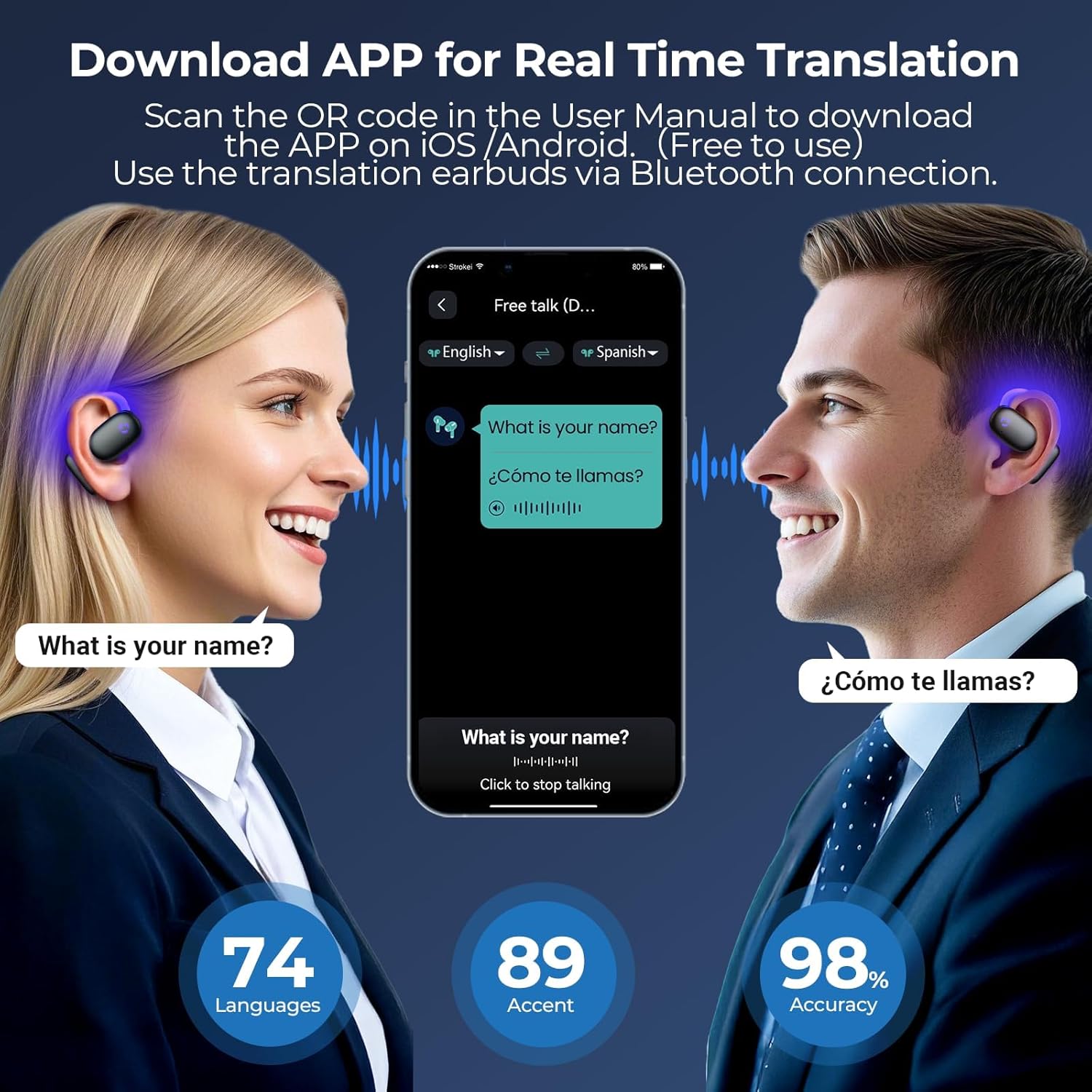
Image: Two individuals are shown using the occiam translation app on a smartphone, with speech bubbles indicating real-time translation between English and Spanish. The image highlights the app's ability to translate across 74 languages and 89 accents with 98% accuracy.
6. මෙහෙයුම් උපදෙස්
6.1 බලය සක්රිය / අක්රිය
- බල ගැන්වීම: ආරෝපණ පෙට්ටිය විවෘත කරන්න, එවිට ඉයර්බඩ් ස්වයංක්රීයව ක්රියාත්මක වේ.
- විදුලිය විසන්ධි කිරීම: ඉයර්බඩ් නැවත ආරෝපණ පෙට්ටියට දමා පියන වසා දමන්න. ඒවා ස්වයංක්රීයව ක්රියා විරහිත වී ආරෝපණය වීමට පටන් ගනී.
6.2 ශ්රව්ය නැවත ධාවනය
Once paired with your device, you can use the earbuds for music playback and calls.
- වාදනය/විරාමය: Single tap on either earbud's touch control area.
- ඊළඟ ධාවන පථය: දකුණු ඉයර්බඩ් එක දෙවරක් තට්ටු කරන්න.
- පෙර ධාවන පථය: වම් ඉයර්බඩ් එක දෙවරක් තට්ටු කරන්න.
- පිළිතුර/අවසන් ඇමතුම: ලැබෙන ඇමතුමක් අතරතුර ඉයර්බඩ් දෙකෙන් එකක් මත එක් වරක් තට්ටු කරන්න.
- ඇමතුම ප්රතික්ෂේප කරන්න: ලැබෙන ඇමතුමක් අතරතුර ඉයර්බඩ් දෙකෙන් එකක් තත්පර 2ක් ඔබාගෙන සිටින්න.

Image: Two occiam AI Translation Earbuds are depicted against a dark, textured background with glowing blue sound waves emanating from them, symbolizing a Hi-Fi Sound Experience.
6.3 Real-time Translation
The core feature of these earbuds is their AI-powered real-time translation. This functionality is managed through the dedicated occiam translation app.
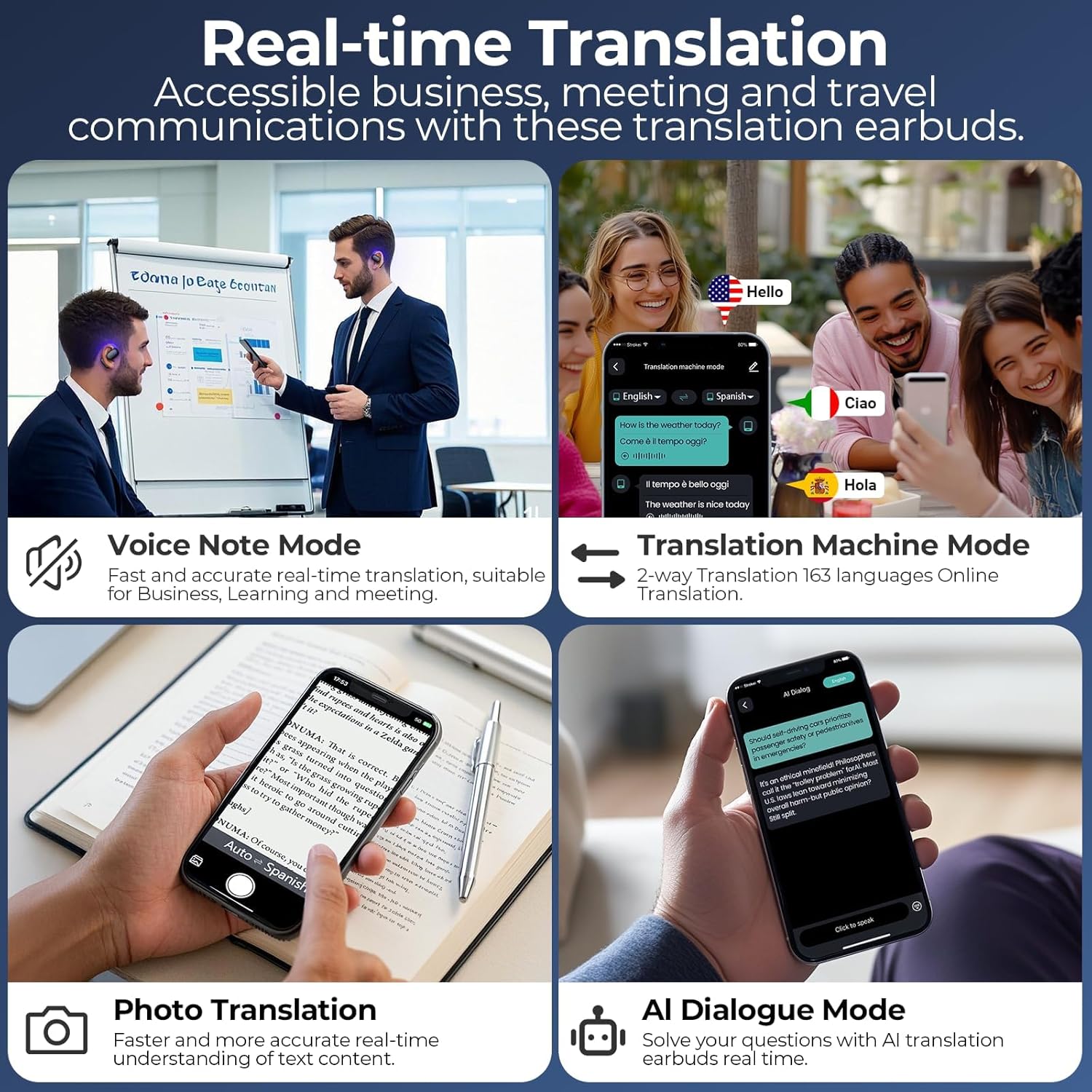
රූපය: කොලෙජ් සංදර්ශනයක්asing the real-time translation capabilities of the occiam earbuds, including Voice Note Mode for fast and accurate recording, Translation Machine Mode for 2-way translation in 163 languages, Photo Translation for text understanding, and AI Dialogue Mode for interactive conversations.
The app typically offers several translation modes:
- Translation Machine Mode (Two-Way Translation): Select the source and target languages in the app. Speak into your earbud's microphone, and the translation will be played through the other earbud or your phone's speaker, allowing for natural conversation. Supports 163 languages (74 languages, 89 accents).
- Voice Note Mode: Record spoken notes, and the app will transcribe and translate them. Useful for business meetings or lectures.
- ඡායාරූප පරිවර්තනය: Use your phone's camera through the app to translate text from images.
- AI සංවාද මාදිලිය: Engage in conversations with an AI, which can translate your speech and respond.
Refer to the in-app guide for detailed instructions on using each translation mode.
7. නඩත්තු කිරීම
7.1 පිරිසිදු කිරීම
- ඉයර්බඩ් සහ ආරෝපණ පෙට්ටිය මෘදු, වියලි, ලින්ට් රහිත රෙද්දකින් පිස දමන්න.
- උල්ෙල්ඛ පිරිසිදු කරන්නන්, මධ්යසාර හෝ රසායනික ද්රාවක භාවිතා නොකරන්න.
- අවශ්ය නම් වියළි කපු පුළුන් කැබැල්ලකින් ඉයර්බඩ් සහ කේස් දෙකෙහිම ආරෝපණ සම්බන්ධතා මෘදු ලෙස පිරිසිදු කරන්න.
7.2 ගබඩා කිරීම
- ඉයර්බඩ් ආරක්ෂා කිරීමට සහ ඒවා ආරෝපණය කර තබා ගැනීමට භාවිත නොකරන විට ඒවායේ ආරෝපණ පෙට්ටියේ ගබඩා කරන්න.
- සෘජු හිරු එළියෙන් සහ අධික උෂ්ණත්වයන්ගෙන් ඈත්ව සිසිල් වියළි ස්ථානයක ගබඩා කරන්න.
7.3 බැටරි සත්කාර
- Charge the earbuds and case regularly, even if not used frequently, to maintain battery health.
- දිගු කාලයක් බැටරි සම්පූර්ණයෙන්ම විසර්ජනය කිරීමෙන් වළකින්න.
8. දෝශ නිරාකරණය
| ගැටලුව | විය හැකි හේතුව | විසඳුම |
|---|---|---|
| ඉයර්බඩ් යුගල නොවේ | Low battery; Out of range; Not in pairing mode; Bluetooth interference. | Charge earbuds and case; Move closer to device; Ensure earbuds are in pairing mode (open case); Turn off other Bluetooth devices. |
| ඉයර්බඩ් වලින් ශබ්දයක් නැත | Volume too low; Not connected; Incorrect audio output selected on device. | Increase volume on device; Reconnect earbuds; Select earbuds as audio output. |
| පරිවර්තනය ක්රියා නොකරයි | No internet connection; App not connected to earbuds; Incorrect language settings; Microphone blocked. | Ensure stable internet connection; Check app connection status; Verify language settings in app; Ensure microphone is clear. |
| ඉයර්බඩ් ආරෝපණය නොවේ | Poor contact; Faulty cable/adapter; Case battery empty. | Ensure earbuds are properly seated; Clean charging contacts; Try different cable/adapter; Charge the case. |
9. පිරිවිතර
| විශේෂාංගය | විස්තර |
|---|---|
| වෙළඳ නාමය | ඔක්කම් |
| ආකෘතිය | D72 |
| සම්බන්ධතාවය | බ්ලූටූත් 5.3 |
| පරිවර්තන භාෂා | 163 (74 languages, 89 accents) |
| ඉයර්බඩ් පසුධාවන කාලය | පැය 10ක් දක්වා (තනි ආරෝපණයකින්) |
| මුළු පසුධාවන කාලය (අවස්ථාව සමඟ) | පැය 80 දක්වා |
| බැටරි වර්ගය | ලිතියම් පොලිමර් |
| නිෂ්පාදන මානයන් | 6.6 x 2.2 x 8.5 සෙ.මී |
| අයිතමයේ බර | 76 ග්රෑම් |
10. වගකීම් තොරතුරු
occiam products are manufactured to the highest quality standards. This product is covered by a limited warranty from the date of purchase. Please refer to the warranty card included in your product packaging or visit the official occiam website for detailed warranty terms and conditions. The warranty typically covers manufacturing defects but does not cover damage caused by misuse, accidents, unauthorized modifications, or normal wear and tear.
11. පාරිභෝගික සහාය
If you encounter any issues or have questions regarding your occiam AI Translation Earbuds, please do not hesitate to contact our customer support team. For the fastest service, please have your product model number (D72) and purchase details ready.
- විද්යුත් තැපෑල: Refer to your product packaging or the official occiam webසහාය ඊමේල් ලිපිනය සඳහා අඩවිය.
- Webඅඩවිය: පිවිසෙන්න www.occiam.com (placeholder, please check actual brand website) for FAQs, support resources, and contact forms.


