1. හැඳින්වීම
This manual provides essential instructions for setting up, operating, maintaining, and troubleshooting your MSI Katana 15 HX gaming laptop (Model B14WGK-016US). This high-performance laptop features an Intel Core i9-14900HX processor, NVIDIA GeForce RTX 5070 graphics, a QHD 165Hz display, and advanced cooling technology, designed to deliver a superior computing experience.

රූපය 1: ඉදිරිපස view of the MSI Katana 15 HX Gaming Laptop.
2. සැකසුම් මාර්ගෝපදේශය
2.1. මූලික බලය ක්රියාත්මක කිරීම
- බල ඇඩැප්ටරය සම්බන්ධ කරන්න: Plug the power adapter into the laptop's DC-in port and then into a power outlet.
- Open the Laptop: ලැප්ටොප් පියන ප්රවේශමෙන් විවෘත කරන්න.
- බල ගැන්වීම: සාමාන්යයෙන් යතුරුපුවරුවට ඉහළින් හෝ පැත්තේ පිහිටා ඇති බල බොත්තම ඔබන්න.
- Windows 11 Home Setup: Follow the on-screen instructions to complete the initial setup of Windows 11 Home. This includes setting up your region, language, network connection, and user account.
2.2. ජාල සම්බන්ධතාවය
- Wi-Fi 6E: To connect wirelessly, navigate to the network settings in Windows and select your Wi-Fi 6E network. Enter the password if required.
- ඊතර්නෙට් (RJ45): For a stable wired connection, plug an Ethernet cable into the RJ45 port on the side of the laptop.
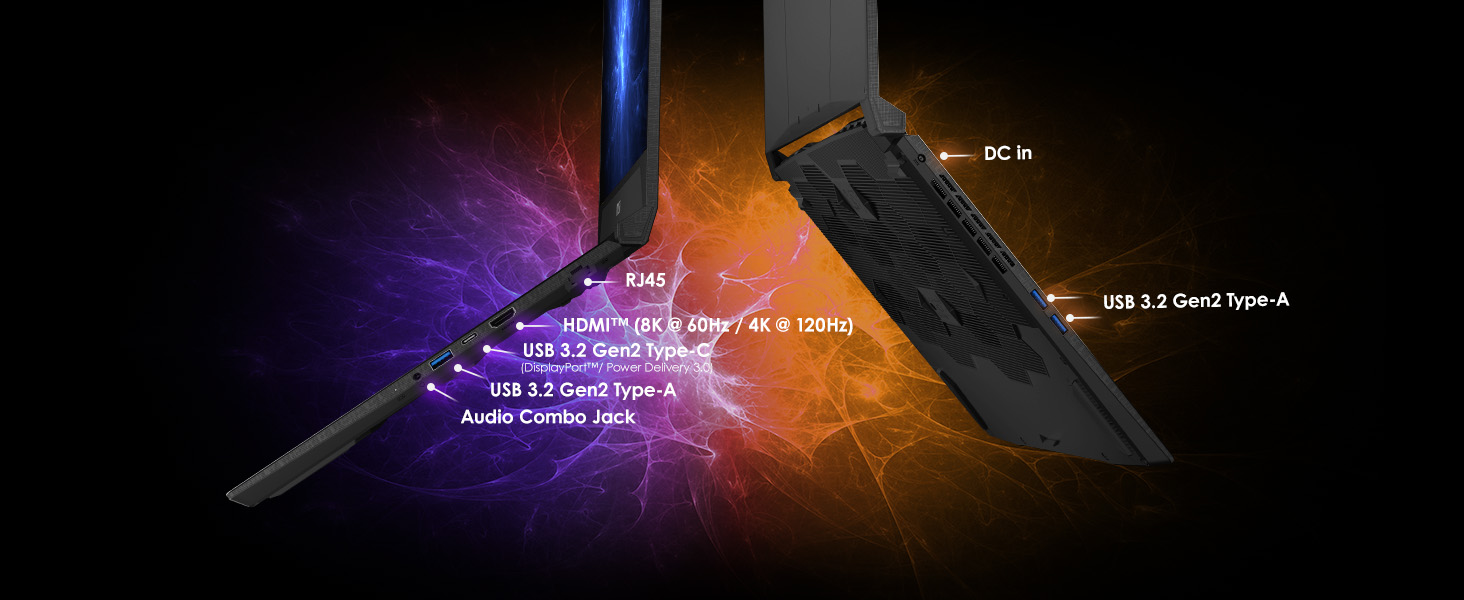
රූපය 2: පැත්ත view illustrating the available I/O ports for connectivity.
3. මෙහෙයුම් උපදෙස්
3.1. සංදර්ශක විශේෂාංග
The MSI Katana 15 HX features a 15.6-inch QHD (2560x1440 pixels) display with a 165Hz refresh rate and 100% DCI-P3 color gamut. This ensures sharp visuals, smooth motion, and accurate color reproduction for both gaming and professional tasks.

රූපය 3: ලැප්ටොප් පරිගණකයේ සංදර්ශකය පෙන්වයිasing its QHD resolution, 165Hz refresh rate, and 100% DCI-P3 color accuracy.
3.2. යතුරු පුවරුව සහ ආදානය
The laptop is equipped with a 4-zone RGB gaming keyboard, allowing for customizable backlighting. The WASD keys are highlighted for enhanced gaming control. A full number pad is also integrated for convenience.
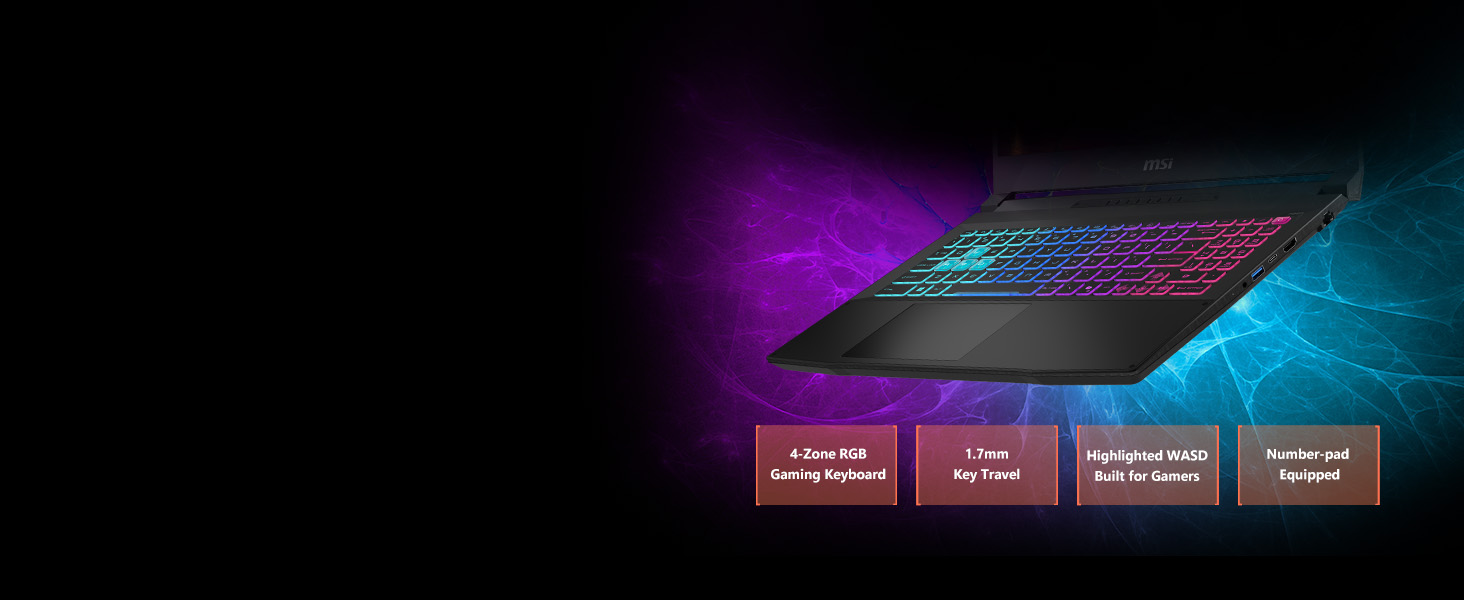
Figure 4: The 4-zone RGB gaming keyboard with highlighted WASD keys.
3.3. Performance Management
The MSI Katana 15 HX is powered by an Intel Core i9-14900HX processor and an NVIDIA GeForce RTX 5070 graphics card. Utilize the pre-installed MSI Center software to monitor system performance, adjust power settings, and optimize for gaming or productivity tasks. This software allows for switching between different performance modes to suit your current needs.

Figure 5: Visual representation of the Intel Core i9 processor powering the laptop.
3.4. ශ්රව්ය උපකරණ
Experience high-fidelity sound with Hi-Res Audio support. Adjust audio settings through the operating system's sound control panel or dedicated MSI audio software for an optimized listening experience.
4. නඩත්තු කිරීම
4.1. Cooling System (Cooler Boost 5)
The laptop incorporates Cooler Boost 5 technology, featuring dual fans and a 5-heat-pipe shared-pipe design. This system efficiently dissipates heat to maintain stable performance during intensive use. Ensure the vents are clear of obstructions to allow for proper airflow.
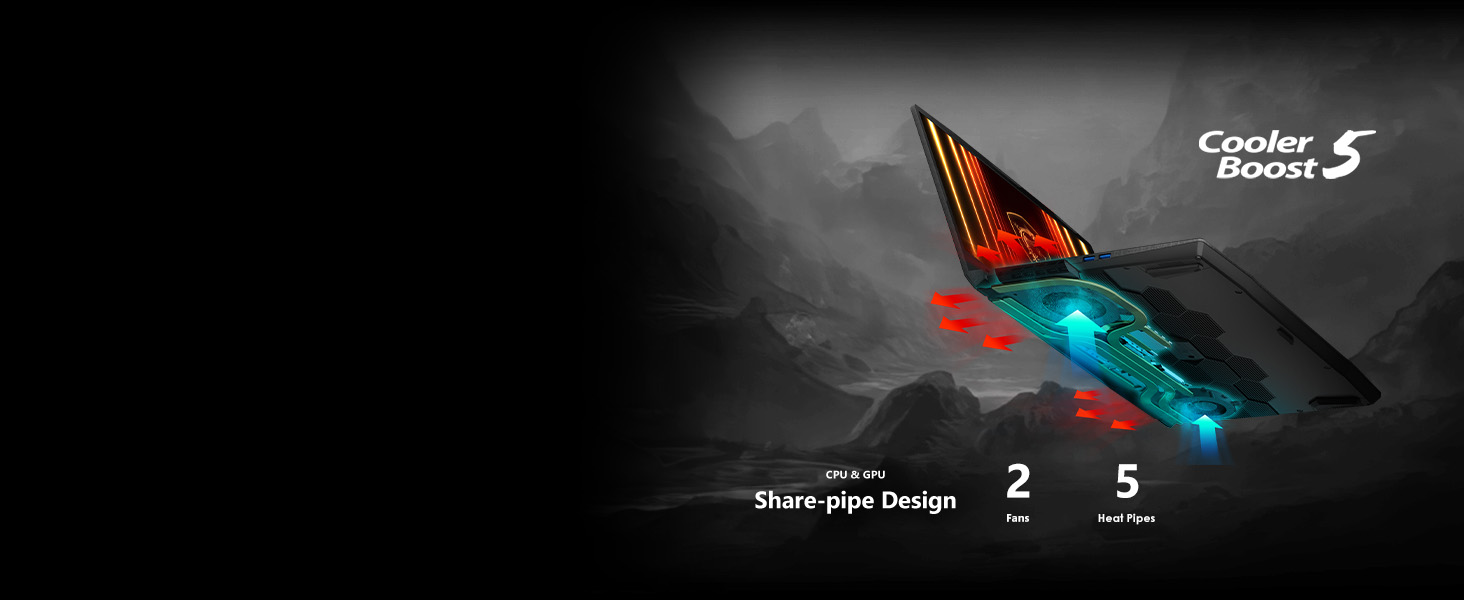
Figure 6: Diagram of the Cooler Boost 5 system, showing dual fans and heat pipe configuration.
4.2. පිරිසිදු කිරීම සහ රැකවරණය
- තිරය: මෘදු, ලින්ට් රහිත රෙද්දක් සැහැල්ලුවෙන් භාවිතා කරන්නampජලය හෝ තිර පිරිසිදු කරන්නෙකු සමඟ ආලේප කර ඇත. රළු රසායනික ද්රව්ය වලින් වළකින්න.
- යතුරුපුවරුව සහ චැසිය: Use a soft cloth to wipe surfaces. For dust in crevices, use compressed air.
- කුටි: වායු ප්රවාහයට බාධා කළ හැකි සහ අධික උනුසුම් වීමට හේතු විය හැකි දූවිලි එකතු වීම වැළැක්වීම සඳහා සිසිලන වාතාශ්රය නිතිපතා පරීක්ෂා කර පිරිසිදු කරන්න.
4.3. බැටරි රැකවරණය
To prolong battery life, avoid fully discharging the battery frequently. For extended periods of storage, ensure the battery is charged to approximately 50-60% and store the laptop in a cool, dry place.
5. දෝශ නිරාකරණය
5.1. බල ගැටළු
- ලැප්ටොප් පරිගණකය ක්රියාත්මක නොවේ: බල ඇඩැප්ටරය ආරක්ෂිතව සම්බන්ධ වී ඇති බවත් බල අලෙවිසැල ක්රියාකාරී බවත් සහතික කර ගන්න. වෙනත් අලෙවිසැලක් උත්සාහ කරන්න.
- බැටරි ආරෝපණය නොවේ: Verify the power adapter is correctly connected. Check for any damage to the adapter or charging port.
5.2. සංදර්ශක ගැටළු
- සංදර්ශකය නැත: Connect an external monitor to check if the issue is with the laptop's screen. Ensure the display cable is properly connected if using an external monitor.
- දිලිසෙන හෝ විකෘති වූ රූපය: ඔබේ ග්රැෆික් ධාවක යාවත්කාලීන කරන්න. Windows සැකසුම් තුළ දර්ශන විභේදනය සහ නැවුම් කිරීමේ අනුපාතය සකසන්න.
5.3. Performance Lag
- මන්දගාමී කාර්ය සාධනය: අනවශ්ය යෙදුම් වසන්න. ඉහළ CPU හෝ RAM පරිභෝජනය කරන පසුබිම් ක්රියාවලීන් සඳහා පරීක්ෂා කරන්න. සිසිලන වාතාශ්රය පැහැදිලි බව සහතික කර ගන්න.
- අධික උනුසුම් වීම: Activate Cooler Boost mode via MSI Center. Ensure the laptop is on a hard, flat surface to allow for proper ventilation.
6. පිරිවිතර
| විශේෂාංගය | පිරිවිතර |
|---|---|
| වෙළඳ නාමය | msi |
| මාදිලියේ නම | Katana 15 HX B14WGK-016US |
| ප්රොසෙසරය | Intel Core i9-14900HX |
| ග්රැෆික් කොප්රොසෙසරය | NVIDIA Geforce RTX 5070 (8 GB GDDR6) |
| RAM | 32 GB DDR5 |
| දෘඪ තැටිය | 1 TB NVMe SSD |
| තිර ප්රමාණය | අඟල් 15.6 |
| තිර විභේදනය | 2560 x 1440 පික්සල (QHD) |
| උපරිම තිර විභේදනය | පික්සල 2560x1440 |
| Refresh Rate | 165Hz |
| මෙහෙයුම් පද්ධතිය | Windows 11 Home |
| රැහැන් රහිත වර්ගය | 802.11ax (Wi-Fi 6E), බ්ලූටූත් |
| වරායන් | USB-C Gen 2, HDMI (up to 8K), Multiple USB-A, RJ45, Audio Combo Jack |
| අයිතමයේ බර | රාත්තල් 4.96 කි |
| නිෂ්පාදන මානයන් | අඟල් 14.13 x 0.98 x 10.2 |
| සාමාන්ය බැටරි ආයු කාලය | පැය 2 (භාවිතය මත රඳා පවතී) |
| විශේෂ ලක්ෂණ | Backlit Keyboard (4-zone RGB), HD Audio, Cooler Boost 5 |
7. වගකීම් සහ සහාය
Your MSI Katana 15 HX laptop may be eligible for various protection plans, including 2-Year, 4-Year, or monthly Complete Protect options. For detailed information regarding the specific warranty coverage for your product, including terms, conditions, and how to claim support, please refer to the documentation included with your purchase or visit the official MSI support webඅඩවිය.
MSI Official Support: www.msi.com/support


