හැඳින්වීම
Welcome and thank you for choosing the HTC Wireless Earbuds TWS6 5.3. This manual provides detailed instructions to help you set up, operate, and maintain your earbuds for optimal performance. Please read this manual thoroughly before using your device.
පැකේජයේ අන්තර්ගතය
කරුණාකර ඔබගේ පැකේජයේ සියලුම අයිතම ඇති බව තහවුරු කරගන්න:
- 2 x HTC Earbuds
- 1 x USB-C ආරෝපණ කේබලය
- 1 x ආරෝපණ නඩුව
- 2 Pairs x Rubber Eartips (S/L)
- 1 x Quick Start Guide (physical document)

නිෂ්පාදනය අවසන්view
Familiarize yourself with the components of your HTC TWS6 earbuds.
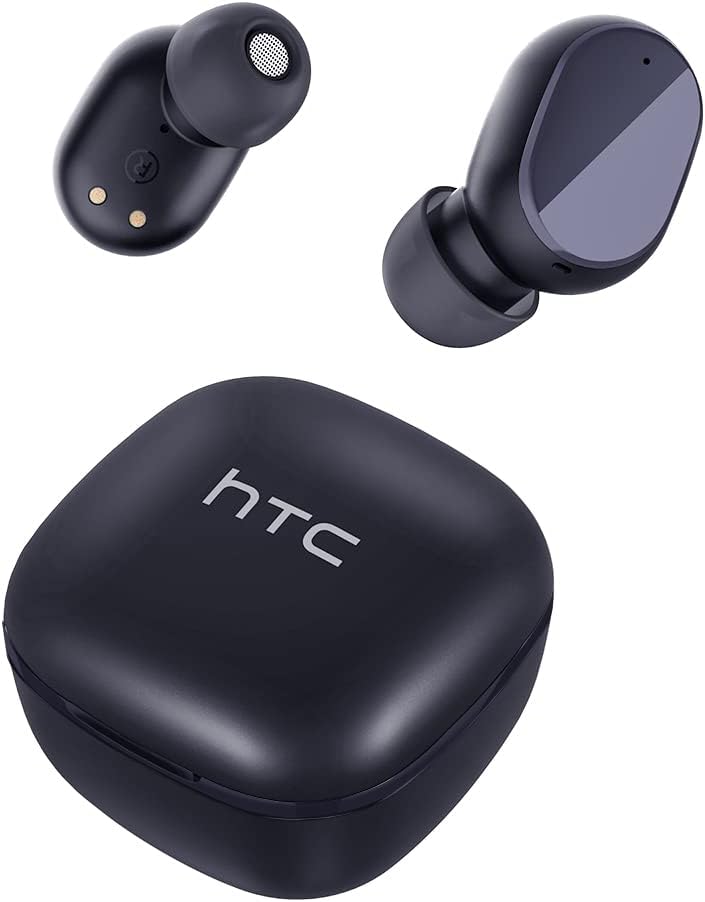

සැලසුම
ඉයර්බඩ් සහ කේස් ආරෝපණය කිරීම
පළමු භාවිතයට පෙර, ඉයර්බඩ් සහ ආරෝපණ පෙට්ටිය සම්පූර්ණයෙන්ම ආරෝපණය කරන්න.
- ඉයර්බඩ් ආරෝපණ පෙට්ටියට දමන්න.
- USB-C කේබලය නඩුවේ ආරෝපණ වරායට සහ බල ප්රභවයකට සම්බන්ධ කරන්න.
- නඩුවේ දර්ශක ආලෝකය ආරෝපණ තත්ත්වය පෙන්වයි.
- A full charge provides approximately 5 hours of playback for earbuds and up to 22 hours with the charging case.

බ්ලූටූත් යුගලනය
Follow these steps to pair your earbuds with your device:
- ආරෝපණ පෙට්ටිය විවෘත කරන්න. ඉයර්බඩ් ස්වයංක්රීයව යුගල කිරීමේ ප්රකාරයට ඇතුළු වනු ඇත.
- ඔබගේ උපාංගයේ (ස්මාර්ට්ෆෝන්, ටැබ්ලටය, ආදිය), බ්ලූටූත් සක්රීය කරන්න.
- ඒ සඳහා සොයන්න "HTC TWS6" in the list of available Bluetooth devices.
- Select "HTC TWS6" to connect. A voice prompt will confirm successful pairing.

ඉයර්බඩ් පැළඳීම
For optimal sound quality and comfort, choose the correct eartip size and wear the earbuds properly.
- Select the eartips (S, M, L) that best fit your ears.
- සෑම ඉයර්බඩ් එකක්ම ඔබේ කන ඇලට මෘදු ලෙස ඇතුළු කරන්න.
- Rotate slightly to ensure a secure and comfortable fit.
මෙහෙයුම් උපදෙස්
ස්මාර්ට් ස්පර්ශ පාලන
The HTC TWS6 earbuds feature intuitive touch controls:
- සංගීතය වාදනය/විරාම කරන්න: ඉයර්බඩ් දෙකෙන් එකක් මත එක තට්ටු කරන්න.
- ඊළඟ ධාවන පථය: දකුණු ඉයර්බඩ් එක දෙවරක් තට්ටු කරන්න.
- පෙර ධාවන පථය: වම් ඉයර්බඩ් එක දෙවරක් තට්ටු කරන්න.
- පරිමාව: දකුණු ඉයර්බඩ් එක තුන් වරක් තට්ටු කරන්න.
- ශබ්දය පහළට: වම් ඉයර්බඩ් එක තුන් වරක් තට්ටු කරන්න.
- පිළිතුර/අවසන් ඇමතුම: ඉයර්බඩ් දෙකෙන් එකක් මත එක තට්ටු කරන්න.
- ඇමතුම ප්රතික්ෂේප කරන්න: ඉයර්බඩ් එකක් තත්පර 2ක් ඔබාගෙන සිටින්න.
- හ oice සහකාර සක්රිය කරන්න: ඉයර්බඩ් එකක් තත්පර 3ක් ඔබාගෙන සිටින්න.

බලය සක්රිය / අක්රිය
The earbuds automatically power on when removed from the charging case and power off when placed back into the case and the lid is closed.
To manually power on, press and hold the touch area for 3 seconds. To manually power off, press and hold the touch area for 5 seconds.
නඩත්තු කිරීම සහ රැකවරණය
පිරිසිදු කිරීම
ප්රශස්ත ක්රියාකාරිත්වය සහ සනීපාරක්ෂාව සහතික කිරීම සඳහා ඔබේ ඉයර්බඩ් සහ ආරෝපණ පෙට්ටිය නිතිපතා පිරිසිදු කරන්න.
- ඉයර්බඩ් සහ ආරෝපණ පෙට්ටිය පිස දැමීමට මෘදු, වියලි, ලින්ට් රහිත රෙද්දක් භාවිතා කරන්න.
- කන් ඉඟි ඉවත් කර මෘදු සබන් හා වතුරෙන් පිරිසිදු කරන්න, පසුව නැවත සවි කිරීමට පෙර හොඳින් වියළා ගන්න.
- උල්ෙල්ඛ පිරිසිදු කරන්නන් හෝ ද්රාවණ භාවිතා නොකරන්න.
ජල ප්රතිරෝධය (IPX5)
The HTC TWS6 earbuds are IPX5 sweatproof, meaning they are resistant to splashes and sweat.
සටහන: They are not designed for submersion in water. Avoid exposing them to heavy rain, showering, or swimming. Ensure the charging port is dry before charging.

ගබඩා කිරීම
භාවිතයේ නොමැති විට, ඉයර්බඩ් ආරක්ෂා කර ගැනීමට සහ ආරෝපණය කර තබා ගැනීමට ඒවායේ ආරෝපණ පෙට්ටියේ ගබඩා කරන්න.
අධික උෂ්ණත්වයන්ගෙන් ඈත්ව සිසිල් වියළි ස්ථානයක ගබඩා කරන්න.
දෝෂගවේෂණය
| ගැටලුව | විසඳුම |
|---|---|
| ඉයර්බඩ් යුගල නොවේ | Ensure earbuds are charged. Turn off and on Bluetooth on your device. Forget "HTC TWS6" from your device's Bluetooth list and re-pair. |
| එක් ඉයර්බඩ් එකක් පමණක් ක්රියා කරයි | Place both earbuds back into the charging case, close the lid, then open it again. Ensure both earbuds are charged. |
| අඩු ශබ්දය හෝ දුර්වල ශබ්ද ගුණාත්මකභාවය | Adjust volume on your device. Clean eartips and earbud mesh. Try different eartip sizes for a better seal. |
| අයකිරීමේ ගැටලුව | Check USB-C cable and power adapter. Ensure charging contacts on earbuds and case are clean and dry. |
| ඉයර්බඩ් නිතර විසන්ධි වේ | Ensure your device is within the Bluetooth range (approx. 10 meters/33 feet) and there are no significant obstructions. |
ගැටළු දිගටම පවතින්නේ නම්, කරුණාකර පාරිභෝගික සහාය අමතන්න.
පිරිවිතර
| විශේෂාංගය | විස්තර |
|---|---|
| මාදිලියේ නම | TWS6 |
| බ්ලූටූත් අනුවාදය | 5.3 |
| සම්බන්ධතා තාක්ෂණය | රැහැන් රහිත |
| රැහැන් රහිත සන්නිවේදන තාක්ෂණය | බ්ලූටූත් |
| බැටරි ආයු කාලය (ඉයර්බඩ්) | පැය 5 යි |
| මුළු ක්රීඩා කාලය (නඩුව සමඟ) | පැය 22 යි |
| ආරෝපණ කාලය (නඩුව) | ආසන්න වශයෙන් පැය 5 යි |
| ජල ප්රතිරෝධක මට්ටම | IPX5 (දහඩිය ප්රතිරෝධී) |
| පාලන ක්රමය | ස්පර්ශ කරන්න |
| මයික්රෆෝනය | Yes (with ENC) |
| ගැළපෙන උපාංග | Android and iOS Smartphones, Gaming Devices |
| ද්රව්ය | ප්ලාස්ටික් |
| අයිතමයේ බර | අවුන්ස 3.17 කි |
| UPC | 734257974554 |
| ශබ්ද පාලනය | අනුවර්තන ශබ්ද අවලංගු කිරීම |
| ශ්රව්ය ධාවක වර්ගය | ගතික ධාවකය |
| සම්බාධනය | 199.99 ඕම් |
වගකීම් සහ සහාය
HTC provides a 360-day warranty extension for this product, as detailed in the product information.
For technical assistance, warranty claims, or any inquiries, please contact HTC customer support.
පාරිභෝගික සහාය: Refer to the contact information provided in your product packaging or visit the official HTC webවඩාත්ම යාවත්කාලීන සහාය විකල්ප සඳහා අඩවිය.


