1. හැඳින්වීම
ස්තූතියි, උදව් කළාටasing the FiiO SA1 High-Fidelity Desktop Speaker. This manual provides essential information for the proper setup, operation, and maintenance of your device. Please read it thoroughly before use to ensure optimal performance and longevity of your speakers.
2 ආරක්ෂිත තොරතුරු
- බල සැපයුම: Use only the provided power cable and adapter. Ensure the power source matches the voltagඋපාංගයේ නිශ්චිතව දක්වා ඇති e අවශ්යතා.
- වාතාශ්රය: කිසිදු වාතාශ්රය විවරයක් අවහිර නොකරන්න. නිෂ්පාදකයාගේ උපදෙස් අනුව ස්ථාපනය කරන්න.
- ජලය සහ තෙතමනය: මෙම උපකරණය වැස්සට හෝ තෙතමනයට නිරාවරණය නොකරන්න. බඳුන් වැනි ද්රව වලින් පිරුණු වස්තූන් උපකරණය මත තබන්න එපා.
- තාපය: රේඩියේටර්, තාප රෙජිස්ටර්, ලිප, හෝ වෙනත් උපකරණ (ඇතුළුව) වැනි තාප ප්රභවයන් අසල ස්ථාපනය නොකරන්න. ampලිෆයර්) තාපය නිපදවන.
- පිරිසිදු කිරීම: වියළි රෙද්දකින් පමණක් පිරිසිදු කරන්න.
- සේවා: සියලුම සේවා සුදුසුකම් ලත් සේවා පුද්ගලයින් වෙත යොමු කරන්න. බල සැපයුම් ලණුවකට හෝ ප්ලග් එකට හානි වූ විට, දියර කාන්දු වී ඇති විට හෝ උපකරණයට වස්තූන් වැටී ඇති විට, උපකරණය වර්ෂාවට හෝ තෙතමනයට නිරාවරණය වී ඇති විට, සාමාන්යයෙන් ක්රියා නොකරන විට, උපකරණයට යම් ආකාරයකින් හානි වී ඇති විට, සේවා සැපයීම අවශ්ය වේ. , හෝ අතහැර දමා ඇත.
3. පැකේජ අන්තර්ගතය
කරුණාකර ඔබගේ පැකේජයේ සියලුම අයිතම තිබේදැයි පරීක්ෂා කරන්න:
- FiiO SA1 Desktop Speaker (Pair)
- බල කේබලය
- දුරස්ථ පාලකය
- පරිශීලක අත්පොත (මෙම ලේඛනය)
4. නිෂ්පාදන අවසන්view
The FiiO SA1 is a high-fidelity desktop active speaker system designed for a superior audio experience. It features a robust construction with wood and aluminum-magnesium alloy, offering versatile connectivity and advanced sound customization.
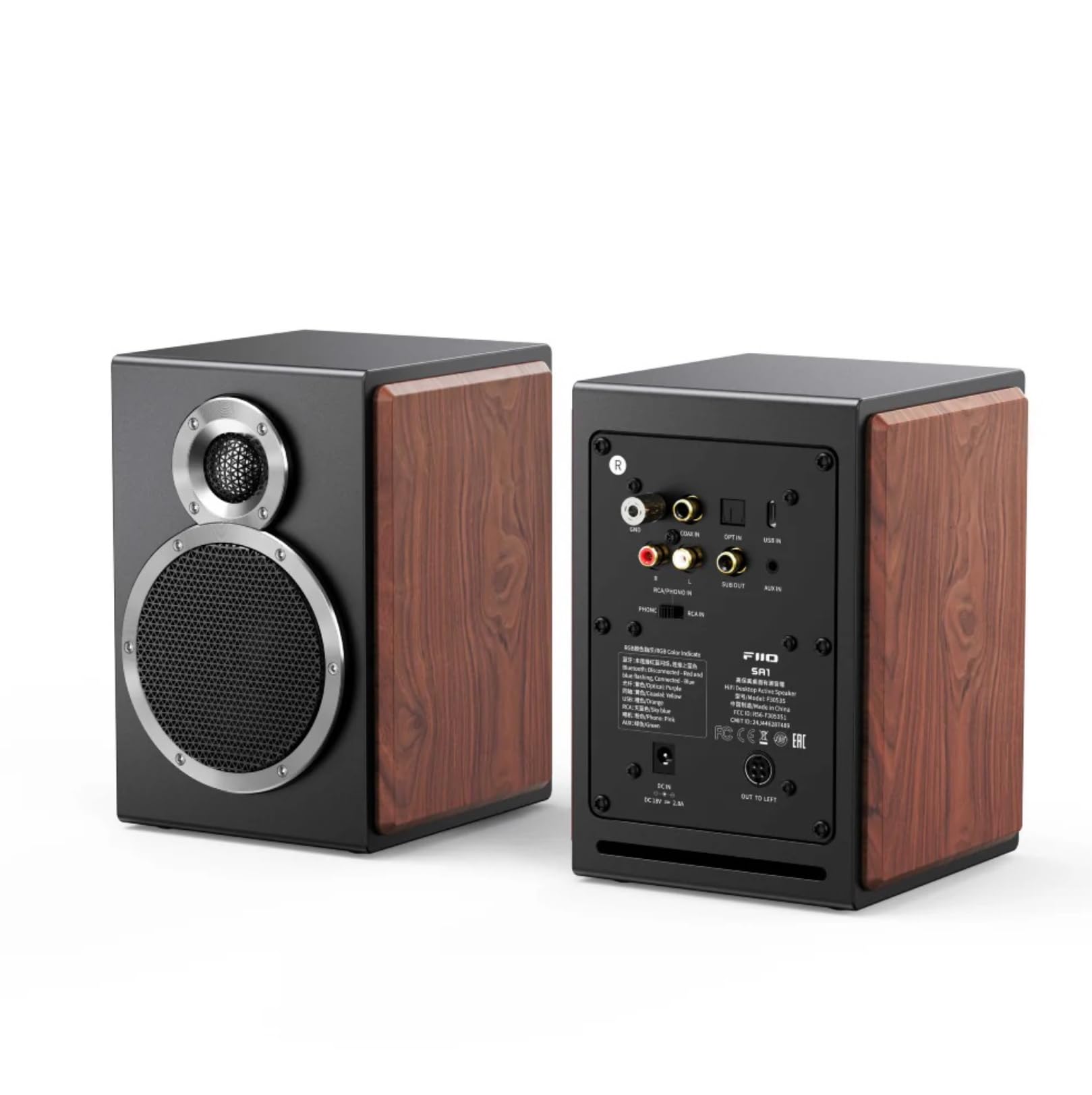
රූපය 1: ඉදිරිපස සහ පසුපස view of the FiiO SA1 Desktop Speakers. The image displays the speaker's elegant design with wood side panels and the various input/output ports on the rear.

රූපය 2: Close-up of the physical control knobs on the FiiO SA1 speaker. Two large physical knobs are visible, one with an RGB light indicator, and a large button on the right side of the main speaker for convenient operation.
ප්රධාන සංරචක:
- 3.5-inch Wood Fiber Woofer: Provides lush vocals and warm sound.
- 3/4 inch Aluminum-Magnesium Alloy Dome Tweeter: Delivers crisp, clear sound with rich detail.
- භෞතික ඉඟි: For convenient control of volume and other settings.
- දුරස්ථ පාලක: Included for full-featured control from a distance.
5. පිහිටුවීම
5.1 බල සම්බන්ධතාවය
Connect the provided power cable to the DC 12V input port on the rear of the main speaker, then plug it into a wall outlet.
5.2 කථානායක ස්ථානගත කිරීම
Place the speakers on a stable, flat surface, such as a desktop or bookshelf. For optimal stereo imaging, position them equidistant from your listening position and angled slightly inward.

රූපය 3: FiiO SA1 speakers integrated into a desktop gaming setup, demonstrating ideal placement beside a monitor.
5.3 ශ්රව්ය සම්බන්ධතා
The FiiO SA1 offers a variety of input and output options:

රූපය 4: Rear panel of the FiiO SA1, highlighting the diverse range of input and output ports available for connectivity.
- RCA and 3.5mm Analog Inputs: Connect traditional audio sources.
- USB, Coaxial, and Optical Digital Inputs: For high-resolution digital audio.
- බ්ලූටූත් 5.4: For wireless high-bit-rate audio (LDAC supported).
- බිල්ට්-ඉන් ෆොනෝ ප්රීamp: Connect a turntable directly (switch to PHONO setting if your turntable lacks a built-in preamp).
- සබ් වූෆර් ප්රතිදානය (RCA): Connect an active subwoofer to create a 2.1 system.
6. මෙහෙයුම
6.1 බලය සක්රිය / අක්රිය
Use the power button on the speaker or the remote control to turn the device on or off.
6.2 ආදාන තේරීම
Cycle through the available inputs (RCA, 3.5mm, USB, Coaxial, Optical, Bluetooth, Phono) using the input selector button on the speaker or remote control.
6.3 වෙළුම් පාලනය
Adjust the volume using the main knob on the speaker or the volume buttons on the remote control.
6.4 31-Band Lossless PEQ (Parametric Equalizer)
The SA1 supports a 31-band high-precision lossless PEQ for all input modes. This allows for fine-tuning and calibration of the frequency response curve to optimize sound for your listening environment. PEQ adjustment is currently supported only via the FiiO Control app.

රූපය 5: A smartphone screen showing the FiiO Control app's 31-band PEQ interface, allowing users to customize the sound profile of the SA1 speakers.
6.5 බ්ලූටූත් සම්බන්ධතාවය
The SA1 supports LDAC high-definition Bluetooth decoding and Bluetooth version 5.4, enabling wireless high-bit-rate audio up to 990kbps. This ensures high-quality wireless sound, certified for Hi-Res Audio and Hi-Res Audio Wireless.

රූපය 6: An illustration of the Bluetooth 5.4 chip, emphasizing the SA1's advanced wireless audio capabilities.
6.6 App Control and Sound Presets
The FiiO Control app allows fine-tune settings and offers eight built-in sound presets (e.g., pop, jazz, classical, R&B, dance). You can also save up to three custom PEQ setups. A specially-tuned monitoring-style curve compensates for frequency response, transforming the SA1 into active desktop studio monitor speakers.

රූපය 7: A hand holding a smartphone showing the FiiO Control app with various sound presets and customization options for the SA1 speakers.
6.7 ස්වයංක්රීය සූදානම සහ අවදි කිරීම
If the SA1 does not detect any input for 20 minutes, it will enter standby mode. The RGB light indicator will turn red and turn off after 20 minutes. When a signal input is detected, the device will automatically wake up, and the RGB light indicator will return to its original color.

රූපය 8: An illustration depicting the FiiO SA1 speaker's automatic standby and wake-up functionality, indicated by changing light colors.
7. පිරිවිතර
| විශේෂාංගය | විස්තර |
|---|---|
| මාදිලියේ නම | SA1 |
| ස්පීකර් වර්ගය | අතේ ගෙන යා හැකි කථානායක |
| ද්රව්ය | Wood, Aluminum-Magnesium Alloy |
| වර්ණය | කළු |
| නිෂ්පාදන මානයන් | 6.3"D x 5.51"W x 7.48"H |
| අයිතමයේ බර | රාත්තල් 9.68 (කිලෝග්රෑම් 4.4) |
| ස්පීකර් උපරිම නිමැවුම් බලය | 20 Watts (Woofer: 20W*2, Tweeter: 5W*2) |
| සම්බන්ධතා තාක්ෂණය | Bluetooth, Coaxial, Optical, RCA, USB |
| ශ්රව්ය ප්රතිදාන ප්රකාරය | ස්ටීරියෝ |
| සවිකිරීමේ වර්ගය | tabletop Mount |
| විශේෂ ලක්ෂණය | Hi-Res Audio, 31-Band Lossless PEQ, Phono Preamp |
| පාලන ක්රමය | දුරස්ථ |
8. නඩත්තු කිරීම
- පිරිසිදු කිරීම: Use a soft, dry cloth to clean the exterior of the speakers. Avoid using abrasive cleaners, waxes, or solvents.
- දූවිලි: Regularly dust the speaker grilles and surfaces to prevent accumulation that could affect sound quality or ventilation.
- පරිසරය: Keep the speakers in a cool, dry place away from direct sunlight, extreme temperatures, and high humidity.
9. දෝශ නිරාකරණය
- ශබ්දයක් නැත: Check power connection, input selection, volume levels on both the speaker and source device, and ensure cables are securely connected.
- විකෘති ශබ්දය: Reduce volume, check audio source quality, ensure cables are not damaged, and verify speaker placement.
- බ්ලූටූත් යුගල කිරීමේ ගැටළු: Ensure the speaker is in Bluetooth pairing mode, disable and re-enable Bluetooth on your source device, and clear previous pairings if necessary.
- දුරස්ථ පාලකය ක්රියා නොකරයි: Check battery in the remote control and ensure there are no obstructions between the remote and the speaker.
10. වගකීම් සහ සහාය
The FiiO SA1 Desktop Speaker comes with a සීමිත වගකීම්. Please refer to the warranty card included in your package for specific terms and conditions. For technical support, troubleshooting assistance, or service inquiries, please contact FiiO customer support through their official webඔබ භාණ්ඩය මිලදී ගත් ස්ථානය හෝ සිල්ලර වෙළෙන්දා.
සබැඳි සම්පත්: For the latest firmware updates, FAQs, and additional support, please visit the official FiiO webඅඩවිය.


