1. හැඳින්වීම
Thank you for choosing the OREiN OL17006 Bathroom Exhaust Fan with Light. This product is designed to enhance air quality and illumination in your bathroom, laundry room, or similar indoor spaces. It features a humidity sensor, adjustable airflow (CFM), a multi-color temperature LED light, and a nightlight function. Please read this manual thoroughly before installation and operation to ensure safe and efficient use.
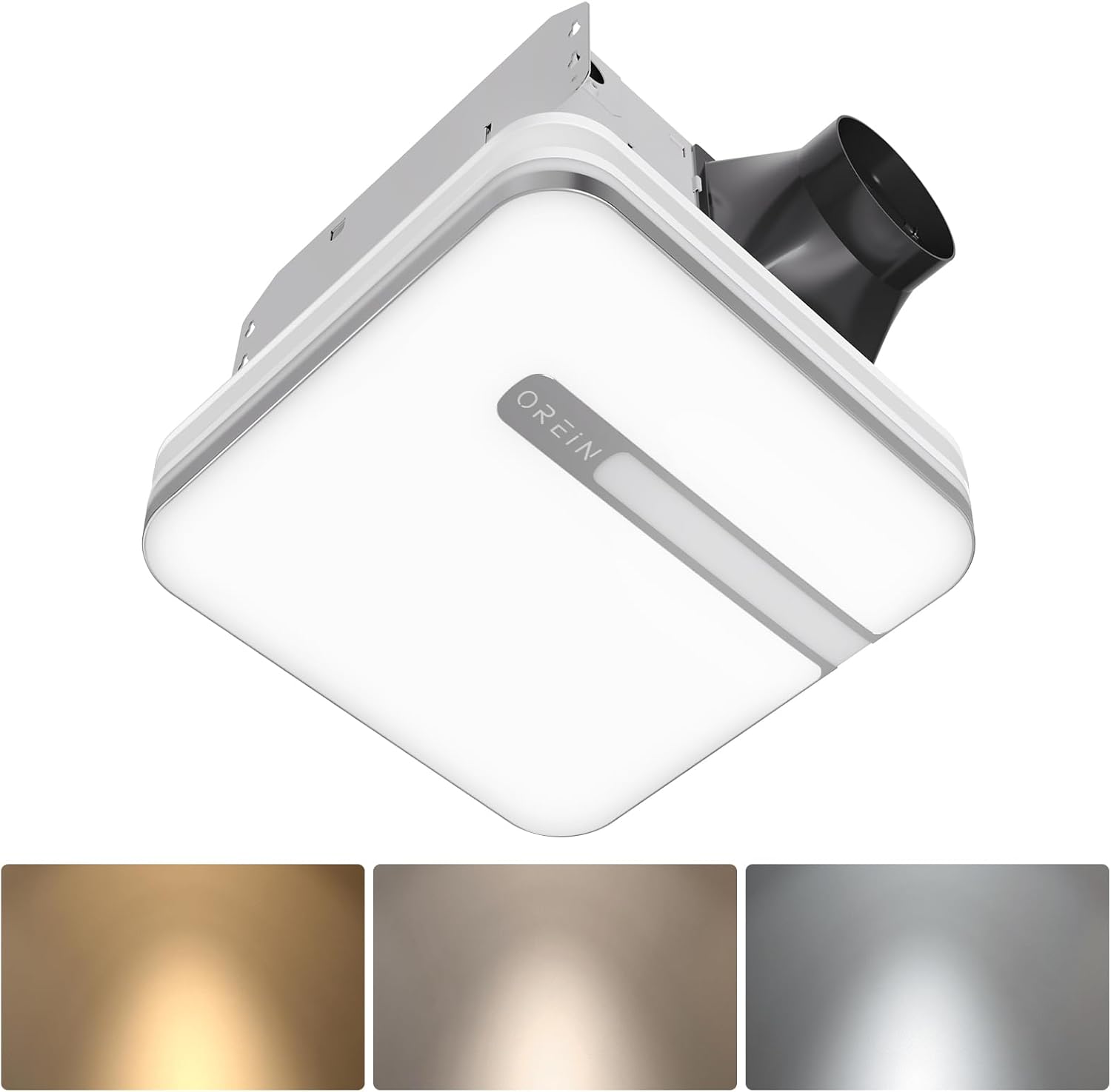
Image 1.1: The OREiN OL17006 Bathroom Exhaust Fan with Light, showcasing එහි සිනිඳු නිර්මාණය සහ ඒකාබද්ධ ආලෝකකරණය.
2 ආරක්ෂිත තොරතුරු
මෙම නිෂ්පාදනය ස්ථාපනය කිරීමේදී, ක්රියාත්මක කිරීමේදී සහ නඩත්තු කිරීමේදී ගින්නක්, විදුලි කම්පනයක් හෝ පුද්ගලයින්ට තුවාල සිදුවීමේ අවදානම අවම කිරීම සඳහා සෑම විටම මූලික ආරක්ෂක පියවරයන් අනුගමනය කරන්න.
- සියලුම උපදෙස් කියවන්න: Familiarize yourself with the product and its functions before use.
- විදුලි ආරක්ෂාව: Disconnect power at the service panel before wiring or servicing the unit. Ensure all wiring complies with local electrical codes and standards.
- සුදුසුකම් ලත් පිරිස්: Installation and wiring should be performed by a qualified electrician.
- භූගත කිරීම: මෙම ඒකකය නිසි ලෙස පදනම් විය යුතුය.
- වාතාශ්රය: Do not use this fan in kitchens or areas where it may be exposed to grease.
- නිෂ්කාශනය: Maintain proper clearance from combustible materials.
- හානිය: Do not operate any fan with a damaged cord or plug, or if the fan motor is dropped or damaged in any manner.
3. පැකේජ අන්තර්ගතය
ස්ථාපනය ආරම්භ කිරීමට පෙර සියලුම සංරචක පවතින බව තහවුරු කර ගන්න:
- OREiN OL17006 ආලෝකය සහිත නානකාමර පිටාර විදුලි පංකාව
- Fast Bracket for Installation
- පරිශීලක අත්පොත (මෙම ලේඛනය)
- Mounting Hardware (Screws, wire nuts, etc.)
4. පිරිවිතර
| විශේෂාංගය | පිරිවිතර |
|---|---|
| වෙළඳ නාමය | ඔරියන් |
| මාදිලියේ නම | OL17006 |
| වායු ප්රවාහ ධාරිතාව | 80 / 110 Cubic Feet Per Minute (CFM) selectable |
| ශබ්ද මට්ටම | 0.8 / 1.0 Sones |
| වට්tage | 30 watts (Fan) |
| වෙළුමtage | වෝල්ට් 120 |
| සැහැල්ලු ප්රතිදානය | ලුමෙන් 1500 ක් |
| වර්ණ උෂ්ණත්වය | 3000K (Soft White), 4000K (Bright White), 5000K (Daylight) selectable |
| රාත්රී ආලෝකය | 2200K |
| විශේෂ ලක්ෂණ | Humidity Sensor, Adjustable Color Temperature, LED Light |
| නාලිකා විෂ්කම්භය | අඟල් 4 |
| නිවාස මානයන් | 9.25" x 9.75" x 7.1" |
| Install Size | 10.24" x 9.37" (260 x 238 මි.මී.) |
| Light Cover Size | 13" x 13" |
| කාමර වර්ගය | Bathroom, Laundry Room |
5. පිහිටුවීම සහ ස්ථාපනය
The OREiN OL17006 fan is designed for easy installation in new construction or retrofit applications. It fits 10.24" x 9.37" ceiling constructions with a 4-inch duct.
5.1 පූර්ව ස්ථාපන පියවර
- විදුලිය විසන්ධි කිරීම: Ensure power is turned OFF at the circuit breaker before starting any installation work.
- ස්ථානය තේරීම: Choose a suitable location in the ceiling, ensuring adequate space for the fan housing and ductwork.
- නල මාර්ගය: Plan for a 4-inch duct connection to the exterior.
5.2 ස්ථාපන ක්රියා පටිපාටිය
The fan comes with a fast bracket for secure and easy installation. You can mount the exhaust fan between ceiling joists using the fast bracket, or nail/screw it directly to a joist.
- නිවාස සවි කිරීම: Secure the fan housing to the ceiling joists using the provided fast bracket or by nailing/screwing directly. Ensure the housing is level and firmly attached.
- නල සම්බන්ධතාවය: Connect the 4-inch ductwork to the fan's exhaust port. Seal all duct connections with appropriate tape or sealant to prevent air leakage.
- විදුලි රැහැන්: Connect the electrical wiring according to the wiring diagram provided with the unit and local electrical codes. Ensure proper grounding.
- Light Cover Installation: Once wiring is complete and tested, attach the light cover to the fan housing.

Image 5.1: Diagram illustrating the product dimensions, installation size (10.24" x 9.37"), and the fast bracket for mounting.
6. මෙහෙයුම් උපදෙස්
The OREiN OL17006 fan offers versatile operation modes and lighting options.
6.1 CFM Selection (Airflow Speed)
You can select between 80 CFM and 110 CFM airflow speeds to suit your ventilation needs. This is done by sliding a toggle switch located on the fan housing before final installation of the light cover.
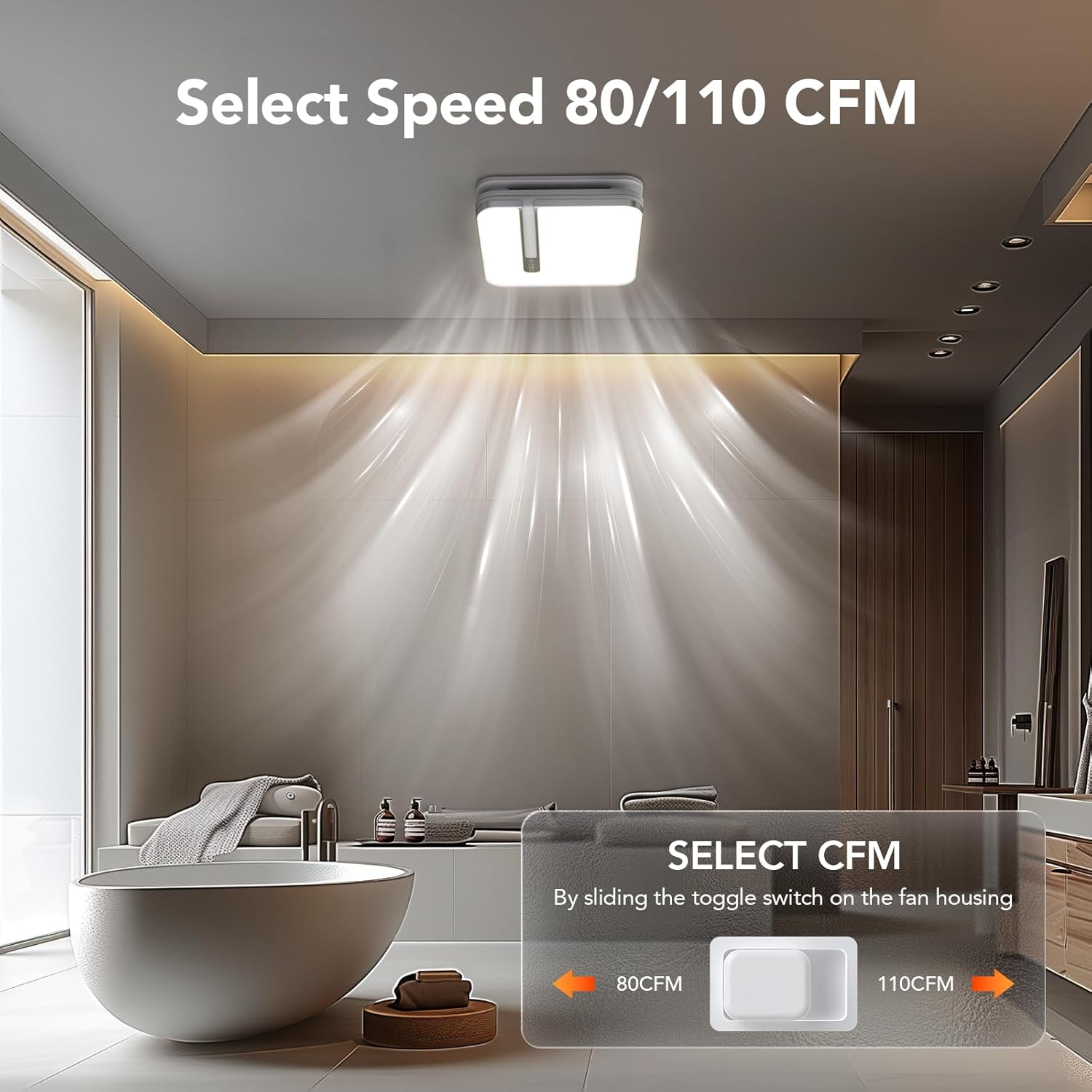
Image 6.1: Illustration of the toggle switch on the fan housing used to select between 80 CFM and 110 CFM airflow settings.
6.2 Light Color Temperature (CCT) Selection
The integrated LED light offers three color temperature options: 3000K (Soft White), 4000K (Bright White), and 5000K (Daylight). To select your desired CCT, slide the toggle switch located on the back of the bath fan shade before installing it.

Image 6.2: Visual guide for selecting the LED light's color temperature (3000K, 4000K, 5000K) using the switch on the lampසෙවන.
6.3 රාත්රී ආලෝක කාර්යය
The fan includes a 2200K nightlight. To activate the nightlight mode, cycle the wall switch of the light from OFF to ON-OFF-ON within 2 seconds. This quick sequence will switch the light to nightlight mode.

රූපය 6.3: හිටපු අයෙක්ample of the 2200K nightlight providing subtle illumination in a bathroom setting.
6.4 Humidity Sensing Mode
The built-in humidity sensor automatically turns the fan on when the humidity level in the room exceeds 60%. The LED indicator light on the back of the fan will be green when in humidity sensing mode.
To switch between Manual Mode (fan runs continuously) and Humidity Sensing Mode, cycle the wall switch of the fan to the "OFF" position and then back to the "ON" position. The fan will indicate the current mode by the color of its indicator light.
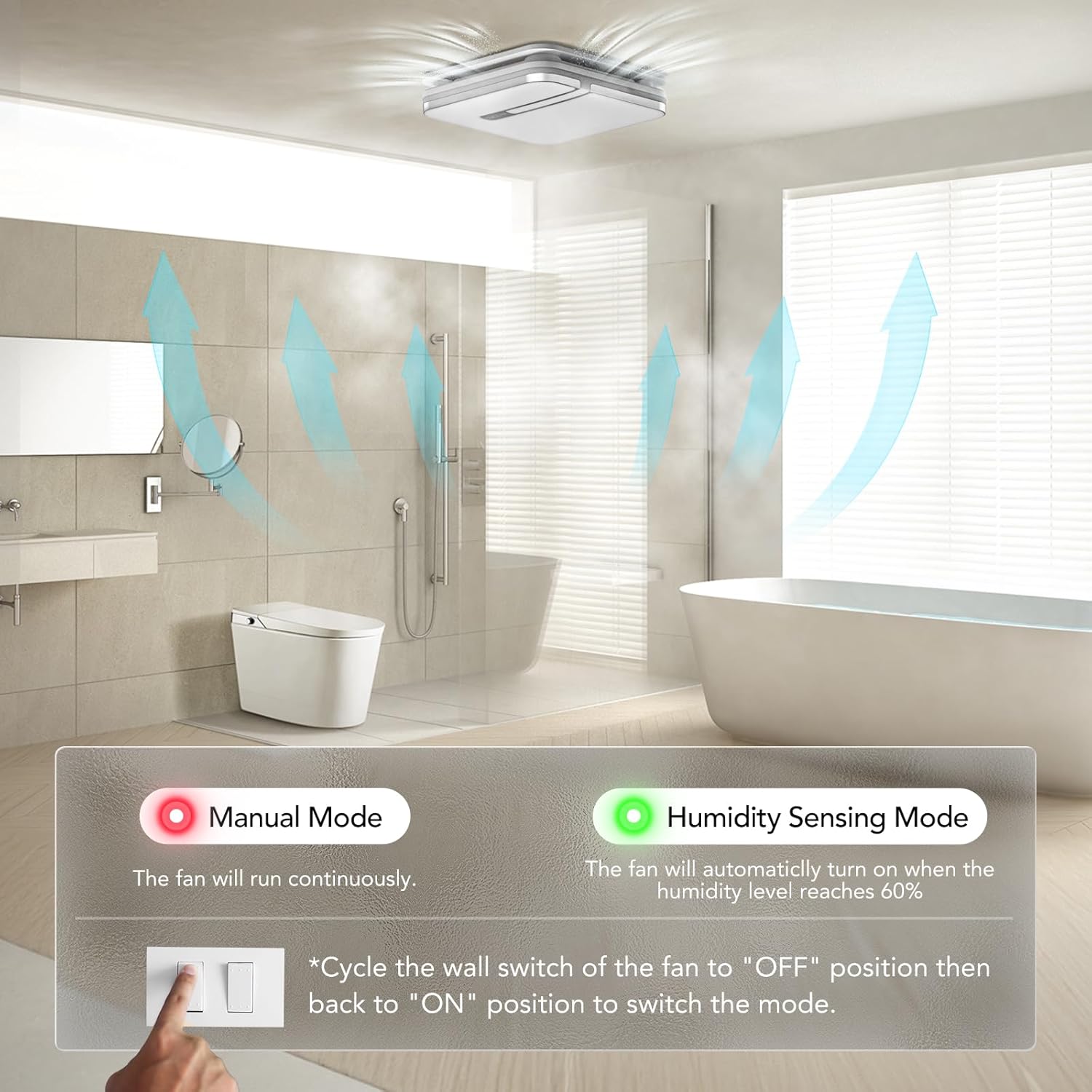
Image 6.4: Explanation of Manual Mode (red indicator, continuous operation) and Humidity Sensing Mode (green indicator, automatic activation at 60% humidity).
7. නඩත්තු කිරීම
නිතිපතා නඩත්තු කිරීම ඔබේ පිටාර විදුලි පංකාවේ ප්රශස්ත ක්රියාකාරිත්වය සහ කල්පැවැත්ම සහතික කරයි.
- විදුලිය විසන්ධි කිරීම: Always turn off power at the circuit breaker before performing any maintenance.
- Cleaning the Grille/Light Cover: Remove the light cover and wash it with mild soap and water. Rinse thoroughly and dry completely before reattaching.
- විදුලි පංකා තල පිරිසිදු කිරීම: දැන්වීම සමඟ විදුලි පංකා තල මෘදු ලෙස පිස දමන්නamp දූවිලි හා සුන්බුන් ඉවත් කිරීමට රෙදි. තල නැමෙන්න එපා.
- මෝටර් නඩත්තු: මෝටරය ස්ථිරවම ලිහිසි කර ඇති අතර අමතර තෙල් දැමීමක් අවශ්ය නොවේ.
- Ductwork Inspection: Periodically check ductwork for obstructions or damage.
8. දෝශ නිරාකරණය
If you encounter issues with your OREiN OL17006 fan, refer to the following common problems and solutions:
| ගැටලුව | විය හැකි හේතුව | විසඳුම |
|---|---|---|
| විදුලි පංකාව ක්රියා නොකරයි | බල සැපයුමක් නැත ලිහිල් රැහැන් මෝටර් අක්රිය වීම | පරිපථ කඩනය සහ බිත්ති ස්විචය පරීක්ෂා කරන්න Verify all wire connections are secure (ensure power is off) පාරිභෝගික සහාය අමතන්න |
| ආලෝකය දැල්වෙන්නේ නැත | බල සැපයුමක් නැත ලිහිල් රැහැන් LED අසමත් වීම | පරිපථ කඩනය සහ බිත්ති ස්විචය පරීක්ෂා කරන්න Verify all wire connections are secure (ensure power is off) පාරිභෝගික සහාය අමතන්න |
| විදුලි පංකාව ඝෝෂාකාරී ය | ලිහිල් සවි කිරීම Duct obstruction අපිරිසිදු විදුලි පංකා තල මෝටර් ගැටළුව | Ensure fan housing is securely mounted Check ductwork for debris Clean fan blades (ensure power is off) පාරිභෝගික සහාය අමතන්න |
| Humidity sensor not activating | වැරදි මාදිලිය තෝරා ඇත Humidity level below 60% සංවේදක අක්රිය වීම | Cycle wall switch to switch to Humidity Sensing Mode Ensure room humidity is above 60% පාරිභෝගික සහාය අමතන්න |
| Nightlight not activating | Incorrect switch sequence | Ensure ON-OFF-ON sequence is performed within 2 seconds |
9. වගකීම් සහ සහාය
OREiN products are manufactured with quality and reliability in mind. For specific warranty details, please refer to the warranty card included with your product or contact OREiN customer service directly.
9.1 පාරිභෝගික සහාය
For technical assistance, troubleshooting not covered in this manual, or warranty inquiries, please contact OREiN customer support:
- දුරකථනය: 1 (844) 506-1530 (24-Hour Service)
- සබැඳි: Visit the OREiN store on Amazon or search for OREiN on the internet to find contact options.

Image 9.1: OREiN customer service contact details, including a 24-hour service phone number.