1. හැඳින්වීම
ස්තූතියි, උදව් කළාටasing the Karlsson Vogue Alarm Clock. This versatile device combines a digital alarm clock, a wireless induction charger, and a Bluetooth speaker, designed to enhance your daily routine. Please read this manual carefully before using the product to ensure proper operation and to maximize its lifespan. Keep this manual for future reference.
ආරක්ෂිත පූර්වාරක්ෂාවන්
- උපාංගය ජලයට හෝ අධික ආර්ද්රතාවයට නිරාවරණය නොකරන්න.
- අධික උෂ්ණත්වයෙන් වළකින්න.
- උපාංගය ඔබම විසුරුවා හැරීමට හෝ අලුත්වැඩියා කිරීමට උත්සාහ නොකරන්න.
- Use only the provided or recommended USB adapter for power.
- ක්රියාත්මක වන අතරතුර උපාංගය වටා නිසි වාතාශ්රය සහතික කරන්න.
2. නිෂ්පාදන අවසන්view
The Karlsson Vogue Alarm Clock features a sleek design with a fabric-covered front and intuitive controls. Below is an overview of its main components and controls.
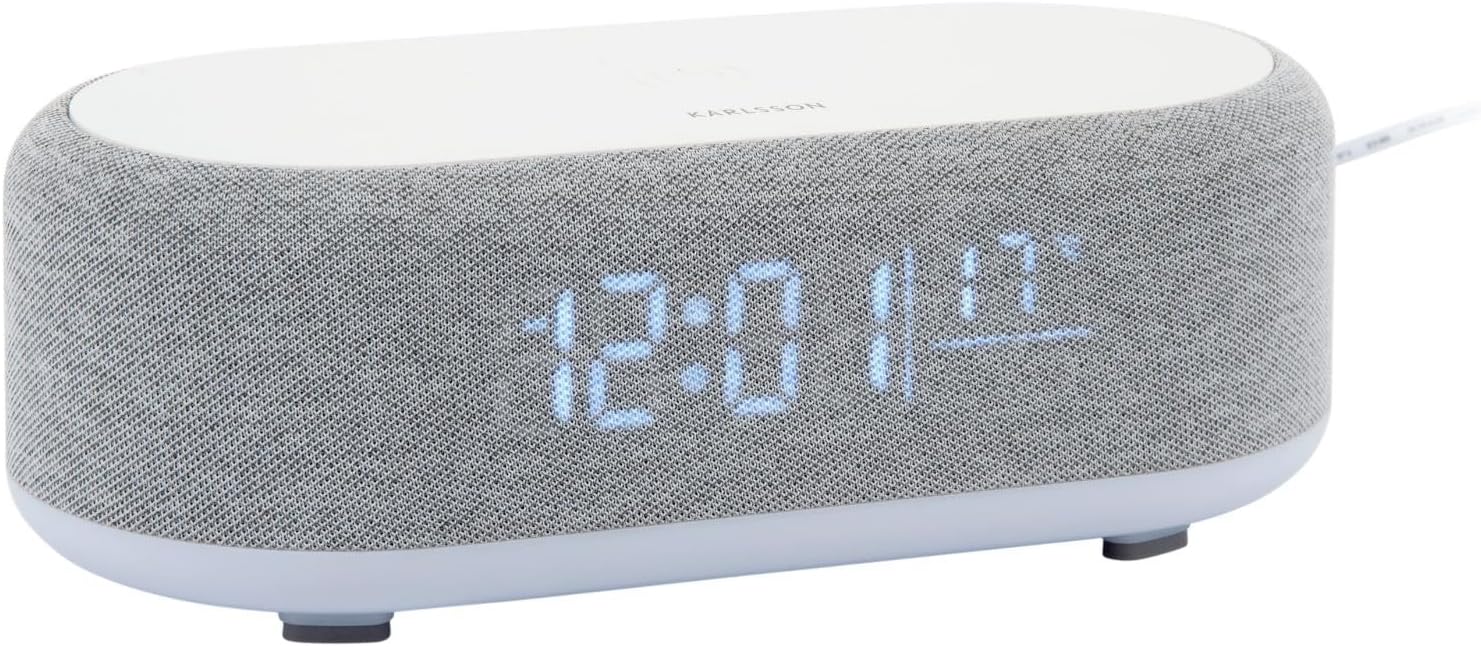
රූපය 2.1: ඉදිරිපස view of the Karlsson Vogue Alarm Clock, displaying the digital time and temperature.
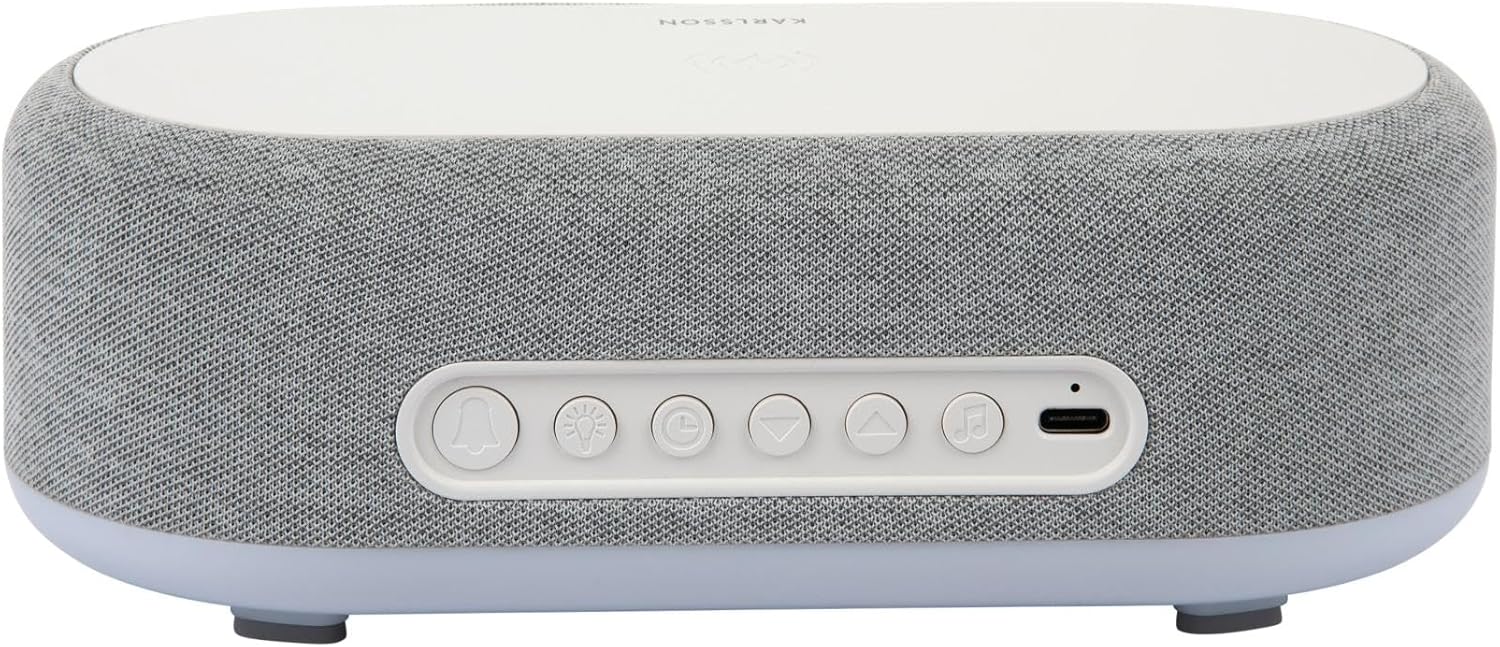
රූපය 2.2: පසුපස view of the alarm clock, highlighting the control buttons and USB-C power input.
Control Buttons (from left to right on rear panel):
- එලාම් 1 බොත්තම: Press to activate/deactivate Alarm 1. Long press to set Alarm 1 time.
- එලාම් 2 බොත්තම: Press to activate/deactivate Alarm 2. Long press to set Alarm 2 time.
- Brightness/Snooze Button: Press to adjust display brightness. When alarm sounds, press to snooze.
- වේලාව සැකසීමේ බොත්තම: කාල සැකසුම් ප්රකාරයට ඇතුළු වීමට දිගු වේලාවක් ඔබන්න.
- පහළ බොත්තම: Decrease values during setting, navigate menus.
- ඉහළ බොත්තම: Increase values during setting, navigate menus.
- Bluetooth/Play/Pause Button: Long press to enter Bluetooth pairing mode. Press to play/pause music.
- USB-C බල ආදානය: බල ඇඩැප්ටරය මෙහි සම්බන්ධ කරන්න.
ඉහළ පුවරුව:
- රැහැන් රහිත ආරෝපණ පෑඩ්: Place compatible devices here for wireless charging.
3. පිහිටුවීම
3.1 බල සම්බන්ධතාවය
- Connect the provided USB adapter to the USB-C Power Input port on the rear of the alarm clock.
- Plug the USB adapter into a standard wall outlet.
- The display will light up, indicating the device is powered on.
3.2 ආරම්භක කාල සැකසුම
- දිගු ඔබන්න කාල සැකසුම් බොත්තම (clock icon) on the rear panel. The hour digits will start flashing.
- භාවිතා කරන්න Up සහ පහළ බොත්තම් පැය සකස් කිරීමට.
- ඔබන්න කාල සැකසුම් බොත්තම පැය තහවුරු කර මිනිත්තු සැකසුම වෙත යාමට නැවතත්. මිනිත්තු ඉලක්කම් දැල්වෙනු ඇත.
- භාවිතා කරන්න Up සහ පහළ බොත්තම් මිනිත්තුව සකස් කිරීමට.
- ඔබන්න කාල සැකසුම් බොත්තම one more time to confirm the minute and exit time setting mode.
4. මෙහෙයුම් උපදෙස්
4.1 අනතුරු ඇඟවීම් සැකසීම
The device supports two independent alarms (Alarm 1 and Alarm 2).
- To set Alarm 1: දිගු ඔබන්න එලාම් 1 බොත්තම (bell icon with '1'). The hour digits for Alarm 1 will flash.
- භාවිතා කරන්න Up සහ පහළ බොත්තම් අනතුරු ඇඟවීමේ වේලාව සකස් කිරීමට.
- ඔබන්න එලාම් 1 බොත්තම again to confirm the hour and move to minute setting.
- භාවිතා කරන්න Up සහ පහළ බොත්තම් අනතුරු ඇඟවීමේ මිනිත්තුව සකස් කිරීමට.
- ඔබන්න එලාම් 1 බොත්තම one more time to confirm and exit alarm setting. The alarm icon will appear on the display.
- To set Alarm 2: භාවිතා කරමින් එම පියවරම අනුගමනය කරන්න එලාම් 2 බොත්තම (bell icon with '2').
4.2 අනතුරු ඇඟවීම් සක්රිය කිරීම/අක්රිය කිරීම
- අදාළ ඔබන්න එලාම් 1 බොත්තම or එලාම් 2 බොත්තම briefly to toggle the alarm on or off. The alarm icon on the display will indicate its status.
4.3 ස්නූස් කිරීමේ ක්රියාවලිය
- අනතුරු ඇඟවීමක් ඇසෙන විට, ඔබන්න Brightness/Snooze Button (light bulb icon) to activate snooze. The alarm will temporarily stop and sound again after approximately 9 minutes.
- To turn off the alarm completely, press any other button on the rear panel.
4.4 බ්ලූටූත් ස්පීකර් ක්රියාකාරිත්වය
- යුගල කිරීම: දිගු ඔබන්න Bluetooth/Play/Pause Button (music note icon) until the display shows "BT" and starts flashing, indicating pairing mode.
- On your mobile device, enable Bluetooth and search for "Karlsson Vogue". Select it to connect.
- Once connected, the "BT" indicator will stop flashing. You can now play audio through the alarm clock's speaker.
- පසුධාවනය: ඔබන්න Bluetooth/Play/Pause Button briefly to play or pause music.
- Volume control is managed via your connected mobile device.
4.5 Wireless Induction Charging
The top surface of the alarm clock features a wireless charging pad compatible with Qi-enabled devices.
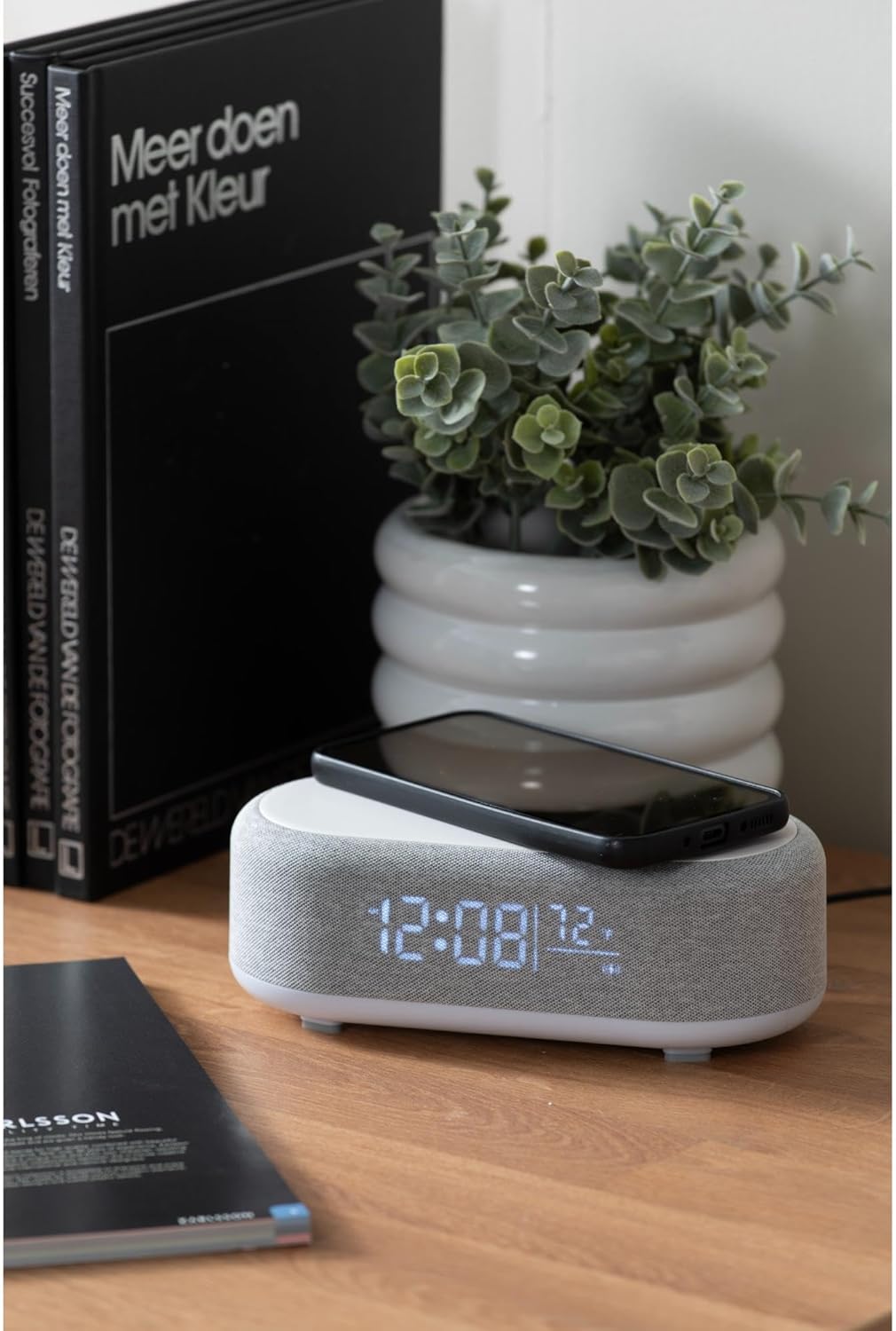
Figure 4.1: A smartphone placed on the wireless charging pad of the alarm clock.
- Place your Qi-compatible smartphone or other device directly onto the center of the top charging pad.
- Ensure the device is properly aligned. A charging indicator (usually on your phone screen) will confirm charging has begun.
- සම්පුර්ණයෙන්ම ආරෝපණය වූ පසු ඔබගේ උපාංගය ඉවත් කරන්න.
4.6 සංදර්ශක දීප්තිය ගැලපීම
- ඔබන්න Brightness/Snooze Button (light bulb icon) repeatedly to cycle through different brightness levels for the display.
5. නඩත්තු කිරීම
5.1 පිරිසිදු කිරීම
- පිරිසිදු කිරීමට පෙර, බල ඇඩැප්ටරය විසන්ධි කරන්න.
- Wipe the surface of the alarm clock with a soft, dry, or slightly damp රෙදි.
- උල්ෙල්ඛ පිරිසිදු කරන්නන්, ද්රාවක හෝ ශක්තිමත් රසායනික ද්රව්ය භාවිතා නොකරන්න, මන්ද ඒවා මතුපිටට හානි කළ හැකිය.
5.2 ගබඩා කිරීම
- If storing the device for an extended period, disconnect it from power.
- සෘජු හිරු එළියෙන් සහ අධික උෂ්ණත්වයන්ගෙන් ඈත්ව සිසිල් වියළි ස්ථානයක ගබඩා කරන්න.
6. දෝශ නිරාකරණය
| ගැටලුව | විය හැකි හේතුව | විසඳුම |
|---|---|---|
| උපාංගය ක්රියාත්මක නොවේ. | බල සම්බන්ධතාවයක් හෝ දෝෂ සහිත ඇඩැප්ටරයක් නොමැත. | Ensure the USB-C cable is securely connected and the adapter is plugged into a working outlet. Try a different outlet. |
| බ්ලූටූත් සම්බන්ධ නොවේ. | Device not in pairing mode; already connected to another device; mobile device Bluetooth off. | Long press the Bluetooth button to enter pairing mode. Ensure no other device is connected. Turn off and on Bluetooth on your mobile device. |
| රැහැන් රහිත ආරෝපණය ක්රියා නොකරයි. | Phone not Qi-compatible; phone not aligned; phone case too thick. | Ensure your device supports Qi wireless charging. Re-position the device on the center of the pad. Remove thick phone cases. |
| එලාම් නාද නොවේ. | Alarm deactivated; volume too low (for Bluetooth alarm). | Check if the alarm icon is displayed. Ensure the alarm time is set correctly. If using Bluetooth audio for alarm, ensure phone volume is adequate. |
7. පිරිවිතර
| විශේෂාංගය | විස්තර |
|---|---|
| වෙළඳ නාමය | Karlsson |
| ආදර්ශ අංකය | KA6033GY |
| වර්ණය | අළු |
| ද්රව්ය | ප්ලාස්ටික් (ABS) |
| මානයන් (L x W x H) | 19.8 x 9.8 x 7 cm (7.8 x 3.86 x 2.76 අඟල්) |
| බර | 0.46 kg (රාත්තල් 1.01) |
| බල ආදානය | USB (Adapter included) |
| රැහැන් රහිත ආරෝපණය | Induction (Qi-compatible) |
| සම්බන්ධතාවය | බ්ලූටූත් |
8. වගකීම් සහ සහාය
For warranty information and customer support, please refer to the documentation provided with your purchase or contact your retailer. You may also visit the official Karlsson webවැඩිදුර සහාය සඳහා අඩවිය.
Webඅඩවිය: Karlsson Official Store