හැඳින්වීම
This user manual provides important information for the safe and efficient operation of your Technaxx TX-315 10000mAh 3-in-1 Wireless Fast Charging Power Bank. Please read this manual thoroughly before using the device and keep it for future reference.
ආරක්ෂිත උපදෙස්
- බලශක්ති බැංකුව අධික උෂ්ණත්වයන්ට, සෘජු හිරු එළියට හෝ ගින්නට නිරාවරණය නොකරන්න.
- උපාංගය ඔබම විසුරුවා හැරීම, අලුත්වැඩියා කිරීම හෝ වෙනස් කිරීම නොකරන්න. සියලුම සේවා සුදුසුකම් ලත් පුද්ගලයින් වෙත යොමු කරන්න.
- බලශක්ති බැංකුව ජලය සහ අනෙකුත් දියර වලින් ඈත් කරන්න.
- Do not drop, hit, or subject the device to strong impacts.
- ආරෝපණය කිරීමේදී හෝ විසර්ජනය කිරීමේදී නිසි වාතාශ්රය සහතික කරන්න.
- දරුවන්ට ළඟා විය නොහැකි ලෙස තබා ගන්න.
- ඉලෙක්ට්රොනික අපද්රව්ය සඳහා වන දේශීය රෙගුලාසිවලට අනුව බලශක්ති බැංකුව බැහැර කරන්න.
නිෂ්පාදනය අවසන්view
Familiarize yourself with the components of your Technaxx TX-315 power bank:
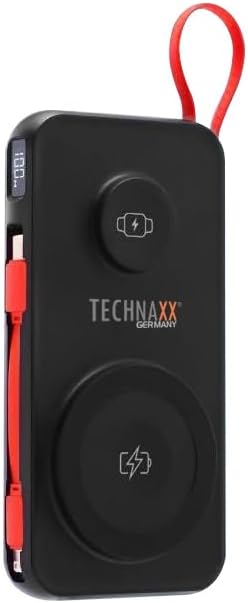
Image: The Technaxx TX-315 power bank, a black rectangular device with a red lanyard. It features a digital display on the side, a USB-C port, a USB-A port, a built-in red USB-C cable, a magnetic wireless charging pad for smartphones, and a smaller wireless charging pad for smartwatches. The Technaxx logo is visible on the front.
- සංඛ්යාංක දර්ශකය: බැටරි ප්රතිශතය පෙන්වයිtage.
- Magnetic Wireless Charging Pad (15W): අනුකූල ස්මාර්ට්ෆෝන් සඳහා.
- Smartwatch Wireless Charging Pad (3W): For compatible smartwatches.
- USB-A Output Port (22.5W): For wired charging of various devices.
- USB-C Input/Output Port (20W PD): For charging the power bank or wired charging of devices.
- බිල්ට් USB-C කේබලය: ආරෝපණ උපාංග සඳහා පහසු වේ.
- බල බොත්තම: Activates the display and charging functions.
සැලසුම
බලශක්ති බැංකුව ආරෝපණය කිරීම
- Connect the power bank to a USB wall charger (not included) using the built-in USB-C cable or a separate USB-C to USB-C cable via the USB-C port.
- ඩිජිටල් සංදර්ශකය මඟින් බැටරි ප්රතිශතය දක්වමින් ආරෝපණ ප්රගතිය පෙන්වනු ඇත.tage.
- The power bank is fully charged when the display shows "100%".
ක්රියාත්මක වෙනවා
Charging Smartphones Wirelessly (15W)
- බලශක්ති බැංකුව සක්රිය කිරීමට බල බොත්තම ඔබන්න.
- Place your MagSafe-compatible or Qi-enabled smartphone onto the larger magnetic wireless charging pad. Ensure proper alignment for optimal charging.
- The phone's charging indicator will confirm charging has begun.
Charging Smartwatches Wirelessly (3W)
- බලශක්ති බැංකුව සක්රිය කිරීමට බල බොත්තම ඔබන්න.
- Place your compatible smartwatch onto the smaller wireless charging pad.
- The smartwatch's display will indicate that it is charging.
Wired Charging via USB-A or USB-C Ports
- බලශක්ති බැංකුව සක්රිය කිරීමට බල බොත්තම ඔබන්න.
- Connect your device to the USB-A port or the USB-C port using an appropriate charging cable.
- බලශක්ති බැංකුව ස්වයංක්රීයව ඔබගේ උපාංගය ආරෝපණය කිරීම ආරම්භ කරයි.
- The built-in USB-C cable can also be used for convenient wired charging.
ඩිජිටල් සංදර්ශකය අවබෝධ කර ගැනීම
The digital display shows the current battery percentage of the power bank. This allows you to monitor the remaining power and know when to recharge the unit.
නඩත්තු කිරීම
- මෘදු වියළි රෙද්දකින් පවර් බෑන්ක් එක පිරිසිදු කරන්න. උල්ෙල්ඛ පිරිසිදු කරන්නන් හෝ ද්රාවක භාවිතා නොකරන්න.
- සෘජු හිරු එළියෙන් සහ අධික උෂ්ණත්වයන්ගෙන් ඈත්ව සිසිල් වියළි ස්ථානයක බලශක්ති බැංකුව ගබඩා කරන්න.
- දිගු කාලයක් භාවිතා නොකළහොත්, බැටරි සෞඛ්යය පවත්වා ගැනීම සඳහා අවම වශයෙන් මාස තුනකට වරක්වත් බලශක්ති බැංකුව ආරෝපණය කරන්න.
දෝෂගවේෂණය
| ගැටලුව | විය හැකි හේතුව | විසඳුම |
|---|---|---|
| පවර් බෑන්ක් එක චාජ් වෙන්නේ නෑ. | Cable not connected properly; charger not working; power bank battery depleted. | Check cable connections; try a different charger; allow power bank to charge for a few minutes. |
| උපාංගය පවර් බෑන්ක් එකෙන් ආරෝපණය නොවේ. | Power bank not activated; device not compatible; cable faulty; power bank battery low. | Press power button; ensure device supports wireless/wired charging; try a different cable; recharge power bank. |
| රැහැන් රහිත ආරෝපණය මන්දගාමී හෝ කඩින් කඩ සිදු වේ. | Misalignment of device; thick phone case; foreign objects between device and pad. | Realign device on charging pad; remove thick phone case; remove any metal objects or cards. |
| ඩිජිටල් සංදර්ශකය ක්රියා නොකරයි. | Power bank battery depleted; internal fault. | Recharge power bank; if issue persists, contact support. |
පිරිවිතර
- මාදිලියේ නම: TX-315
- බැටරි ධාරිතාව: 10000mAh
- බැටරි සෛල සංයුතිය: ලිතියම් පොලිමර්
- Wireless Charging (Smartphone): 15W (Magnetic)
- Wireless Charging (Smartwatch): 3W
- USB-A ප්රතිදානය: 22.5W
- USB-C ආදානය/ප්රතිදානය: 20W බල සැපයුම (PD)
- නිෂ්පාදන මානයන්: 144 x 73 x 16 mm (approx. 7.2L x 2W x 14Th centimetres)
- අයිතමයේ බර: 250g (approx. 0.56 Pounds)
- නිෂ්පාදකයා: Technaxx
- මුල් රට: චීනය
වගකීම් සහ සහාය
Your Technaxx TX-315 Power Bank comes with a standard manufacturer's warranty. For detailed warranty information, please refer to the warranty card included in the product packaging or visit the official Technaxx website. If you encounter any issues or require technical assistance, please contact Technaxx customer support or your retailer.
The product package includes the Powerbank 10000mAh TX-315 and this user manual.


