1. හැඳින්වීම
This manual provides essential information for the installation, operation, and maintenance of your FSP VITA GM 650W ATX 3.1 PC Power Supply. Please read this manual thoroughly before installation to ensure proper and safe usage of the product. The FSP VITA GM 650W is designed to deliver stable and efficient power to your computer system, adhering to the ATX 3.1 and PCIe Gen 5.1 specifications.
2 ආරක්ෂිත තොරතුරු
ඔබේ උපකරණවලට තුවාල හෝ හානි වැළැක්වීම සඳහා පහත සඳහන් ආරක්ෂක පියවරයන් සැමවිටම නිරීක්ෂණය කරන්න:
- බල සැපයුම් ඒකකය විවෘත නොකරන්න. ඉහළ වෝල්ටීයතාවයක්tages are present inside, and opening the casing voids the warranty and poses a risk of electric shock.
- තාප ප්රභවයන්ගෙන්, සෘජු හිරු එළියෙන් සහ තෙතමනයෙන් ඈත්ව, හොඳින් වාතාශ්රය ඇති ප්රදේශයක බල සැපයුම ස්ථාපනය කරන්න.
- Ensure the power supply is correctly installed and secured in your PC case.
- Use only the modular cables provided with the power supply. Using incompatible cables can cause damage.
- බල සැපයුම භූගත විදුලි අලෙවිසැලකට සම්බන්ධ කරන්න.
- Disconnect the AC power cord from the wall outlet before installing or removing the power supply or any other components.
- Avoid placing heavy objects on the power supply or its cables.
- If the power supply is damaged or malfunctioning, discontinue use immediately and contact FSP support.
3. පැකේජ අන්තර්ගතය
ඔබගේ පැකේජයේ සියලුම අයිතම ඇති බව තහවුරු කරගන්න:
- FSP VITA GM 650W ATX 3.1 PC Power Supply
- Modular Cable Set (Motherboard, CPU, PCIe, SATA, Peripheral)
- AC විදුලි රැහැන
- සවිකරන ඉස්කුරුප්පු
- පරිශීලක අත්පොත (මෙම ලේඛනය)
4. නිෂ්පාදන අවසන්view
The FSP VITA GM 650W is a high-efficiency power supply designed for modern PC systems. It features:
- ATX 3.1 Compliance: Designed to meet the latest Intel Power Design Guide ATX 3.1 specifications, ensuring compatibility with future hardware.
- PCIe Gen 5.1 Support: Ready for next-generation graphics cards.
- 80 PLUS Gold Certification: Achieves high efficiency, reducing power dissipation, heat, and noise.
- Synchronous Rectifier LLC Resonance Converter Topology: Reduces switching loss and enhances efficiency.
- +5V & 3.3V DC to DC Circuit Design: Improves efficiency and stabilizes output voltage.
- 105°C Japanese Bulk Capacitor: Ensures reliability and extended lifespan.

රූපය 4.1: ඉදිරිපස පැත්ත view of the FSP VITA GM 650W Power Supply, showcasing එහි සංයුක්ත නිර්මාණය සහ විදුලි පංකා ග්රිල් එක.
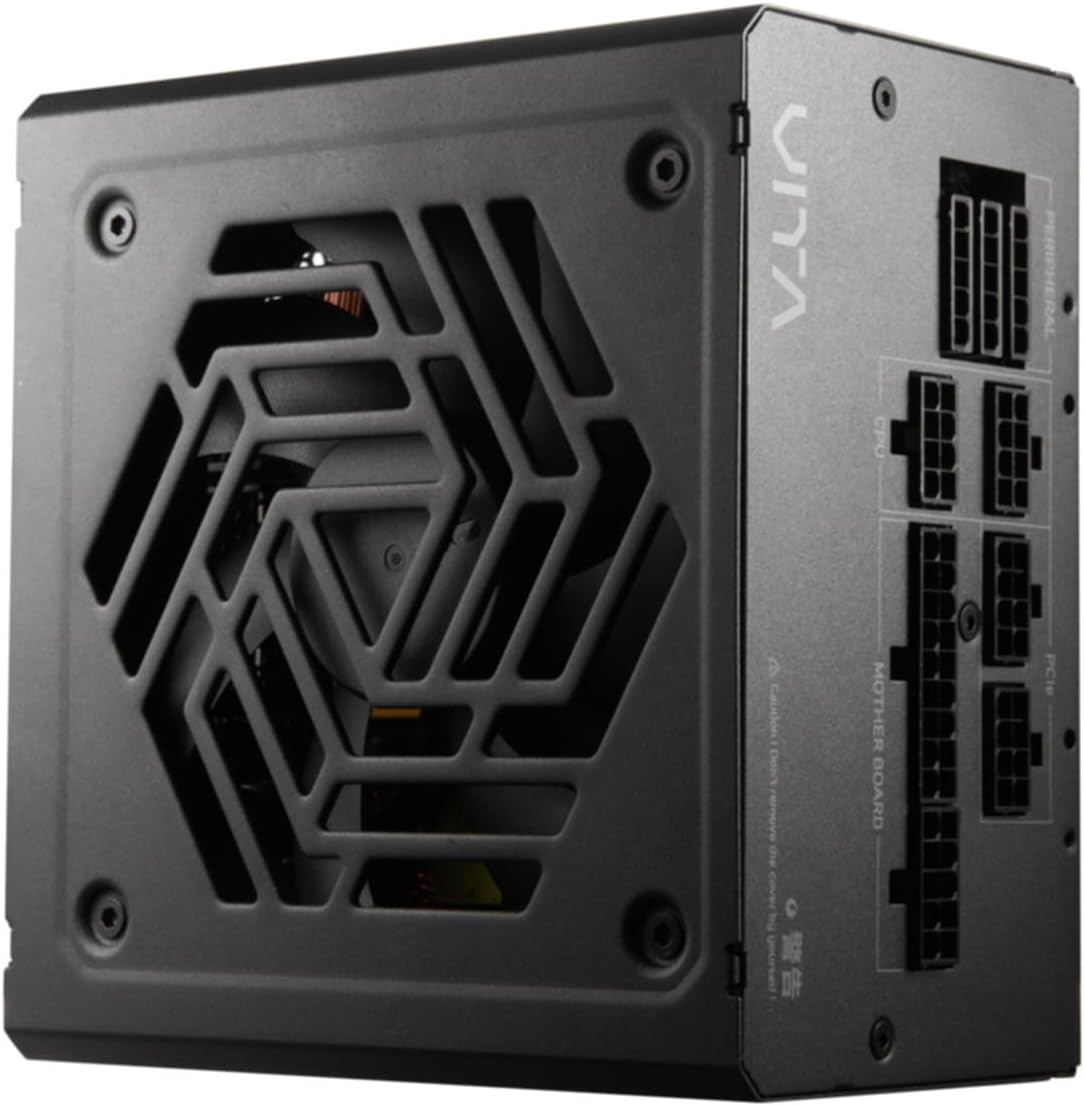
රූපය 4.2: ඉහළ-පහළ view of the FSP VITA GM 650W Power Supply, highlighting the fan and ventilation design.

රූපය 4.3: පැත්ත view of the FSP VITA GM 650W Power Supply, showing the FSP branding and VITA model name.
5. පිහිටුවීම සහ ස්ථාපනය
Follow these steps to install your FSP VITA GM 650W power supply:
- සකස් කිරීම:
- ඔබේ පරිගණකය ක්රියා විරහිත කර බිත්ති අලෙවිසැලෙන් AC විදුලි රැහැන විසන්ධි කරන්න.
- ඔබේ පරිගණක නඩුව විවෘත කරන්න.
- පවතින බල සැපයුමක් ප්රතිස්ථාපනය කරන්නේ නම්, පැරණි PSU එකෙන් සියලුම කේබල් විසන්ධි කර එය නඩුවෙන් ඉවත් කරන්න.
- PSU සවි කිරීම:
- Carefully place the FSP VITA GM 650W into the power supply bay of your PC case.
- PSU එකේ ඉස්කුරුප්පු සිදුරු කේස් එකේ ඇති ඒවා සමඟ පෙළගස්වන්න.
- සපයන ලද සවි කිරීම් ඉස්කුරුප්පු භාවිතයෙන් බල සැපයුම සුරක්ෂිත කරන්න.
- Connecting Modular Cables:
The FSP VITA GM 650W is a modular power supply. Connect only the cables required for your system components.

Figure 5.1: Modular cable connection panel. Ensure cables are firmly seated.
- මවු පුවරුවේ බලය: 24-පින් ATX කේබලය මවු පුවරුවට සම්බන්ධ කරන්න.
- CPU බලය: Connect the 4+4-pin or 8-pin EPS/ATX12V cable(s) to the CPU power connector(s) on your motherboard.
- PCIe බලය: Connect the 6+2-pin PCIe cables to your graphics card(s).
- SATA බලය: Connect SATA power cables to SSDs, HDDs, and optical drives.
- Peripheral Power: Connect 4-pin Molex cables to other peripherals as needed.
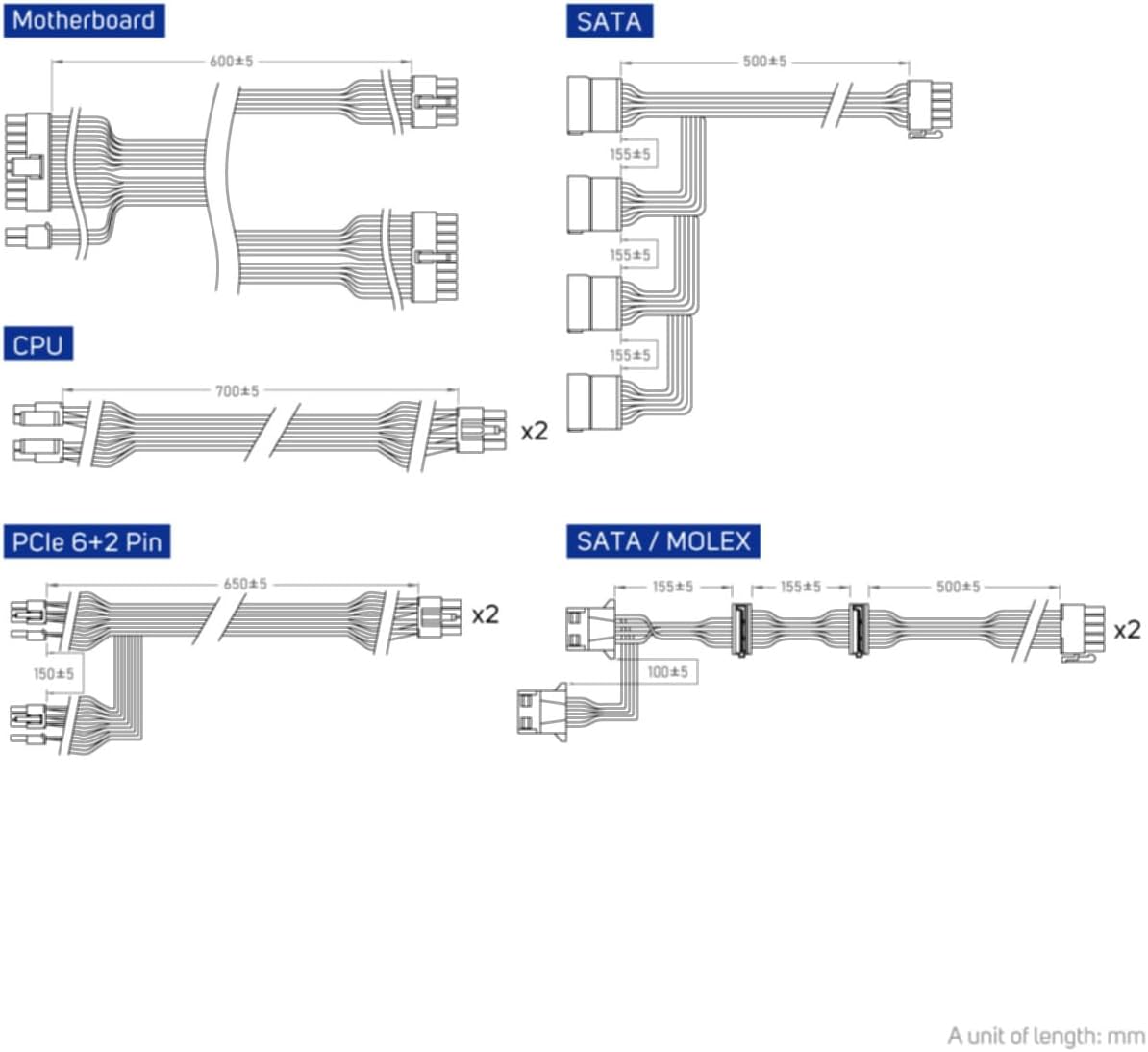
Figure 5.2: Diagram illustrating the various modular cables included and their approximate lengths (in mm).
- අවසාන චෙක්පත්:
- Ensure all cables are securely connected and routed to avoid obstructing airflow.
- ඔබේ පරිගණක නඩුව වසන්න.
- Connect the AC power cord to the power supply and then to a grounded wall outlet.
6. මෙහෙයුම් උපදෙස්
After installation, you can power on your system:
- Ensure the power switch on the back of the power supply is in the "ON" (I) position.
- ඔබේ පරිගණක ආවරණයේ බල බොත්තම ඔබන්න.
- The power supply will provide stable power to your components.

රූපය 6.1: පසුපස view of the power supply, showing the AC power input and the main power switch.
Bridge Time Importance: The FSP VITA GM 650W adheres to the recommended ATX 3.1 bridge time values. This feature ensures the power supply can maintain a stable output voltage for a critical duration after a power interruption, preventing system instability or damage during sudden power fluctuations or outages.
7. නඩත්තු කිරීම
To ensure optimal performance and longevity of your power supply:
- දූවිලි පිරිසිදු කිරීම: සම්පීඩිත වාතය භාවිතයෙන් බල සැපයුමේ විදුලි පංකා ග්රිල් සහ වාතාශ්රය වලින් දූවිලි වරින් වර පිරිසිදු කරන්න. පිරිසිදු කිරීමට පෙර පද්ධතිය විදුලිය විසන්ධි කර පේනුවෙන් ඉවත් කර ඇති බවට සහතික වන්න.
- කේබල් කළමනාකරණය: Maintain good cable management inside your PC case to ensure proper airflow and prevent overheating.
- පාරිසරික තත්ත්වයන්: Operate the power supply within recommended temperature and humidity ranges.
8. දෝශ නිරාකරණය
If you encounter issues with your FSP VITA GM 650W power supply, refer to the following common problems and solutions:
| ගැටලුව | විය හැකි හේතුව | විසඳුම |
|---|---|---|
| පද්ධතිය බලය සක්රිය නොවේ. |
|
|
| පද්ධතිය ක්රියාත්මක වන නමුත් වහාම වසා දමයි. |
|
|
| Unusual noises from PSU. |
|
|
If the problem persists after trying these solutions, please contact FSP customer support for further assistance.
9. පිරිවිතර
| විශේෂාංගය | විස්තර |
|---|---|
| ආදර්ශ අංකය | 790980 |
| වෙළඳ නාමය | පෙරටුගාමී සමාජවාදී පක්ෂයේ |
| වට්tage | 650W |
| ATX අනුවාදය | 3.1 |
| කාර්යක්ෂමතා සහතික කිරීම | 80 plus රන් |
| අයිතමයේ බර | කිලෝග්රෑම් 2.72 (රාත්තල් 5.98) |
| නිෂ්පාදකයා | පෙරටුගාමී සමාජවාදී පක්ෂයේ |
| පළමු දිනය තිබේ | 15 අගෝස්තු 2024 |
10. වගකීම් සහ සහාය
For warranty information, technical support, or service inquiries, please refer to the official FSP webවෙබ් අඩවියට පිවිසෙන්න හෝ ඔවුන්ගේ පාරිභෝගික සේවා දෙපාර්තමේන්තුව අමතන්න. වගකීම් හිමිකම් සඳහා ඔබේ මිලදී ගැනීමේ සාක්ෂි තබා ගන්න.
FSP Official Webඅඩවිය: www.fsp-group.com
11. ප්රතිචක්රීකරණය සහ බැහැර කිරීම
Please dispose of this product responsibly. Electronic waste should not be disposed of with household waste. Contact your local authorities or recycling center for information on proper disposal methods for electronic components.


