1. හැඳින්වීම
This manual provides detailed instructions for the ZORNHER ZH980 Wireless Mechanical Keyboard. Please read this manual thoroughly before using the product to ensure proper operation and to maximize its features. The ZH980 offers a 95% layout, triple-mode connectivity, hot-swappable switches, and customizable RGB lighting.

Figure 1: ZORNHER ZH980 Mechanical Keyboard
2. පැකේජ අන්තර්ගතය
සියලුම අයිතම පැකේජයේ ඇති බව තහවුරු කරගන්න:
- 1 x සම්පූර්ණයෙන්ම එකලස් කරන ලද යතුරු පුවරුව
- 1 x Keycap Puller
- 3 x ආදේශන ස්විච
- 1 x 2.4GHz ග්රාහකය
- 1 x USB Type-C කේබලය
- 1 x උපදෙස් අත්පොත

Figure 2: Package Contents of ZH980
3. නිෂ්පාදන අවසන්view
The ZORNHER ZH980 features a compact 95% layout, integrating a full number pad and essential function keys while saving desk space. It is designed with IMD PBT keycaps for durability and a gasket-mounted structure for a consistent typing feel.
- IMD PBT Keycaps: Made from high-purity PBT, these keycaps resist shine and fading. Side-printed legends are molded for enhanced durability and clear shine-through effects.
- 95% පිරිසැලසුම: Provides full functionality including a number pad, F-row, arrows, and navigation keys in a space-efficient design.
- Creamy Linear Switches: Factory-lubed switches offer a soft, audible typing sound.
- ගෑස්කට් සවිකර ඇති ව්යුහය: Enhances typing feel and sound by isolating the PCB from the case.
- විනිවිද පෙනෙන පදනම: Allows vibrant RGB lighting to shine through, creating an immersive visual experience.
- Ergonomic Design: Features a dual-angle kickstand and OEM-profile keycaps for comfortable typing during extended use.

Figure 3: Key Features of the ZH980

Figure 4: Gasket Structure Diagram

Figure 5: Creamy Custom Switch Details
4. පිහිටුවීම සහ සම්බන්ධ කිරීම
The ZORNHER ZH980 supports three connection modes: 2.4GHz wireless, Bluetooth 5.0, and USB-C wired.
4.1. රැහැන්ගත සම්බන්ධතාවය (USB-C)
- සපයා ඇති USB Type-C කේබලය යතුරුපුවරුවේ Type-C port එකට සම්බන්ධ කරන්න.
- කේබලයේ අනෙක් කෙළවර ඔබේ පරිගණකයේ තිබෙන USB පෝට් එකකට සම්බන්ධ කරන්න.
- යතුරුපුවරුව ස්වයංක්රීයව හඳුනාගෙන භාවිතයට සූදානම් වනු ඇත.
4.2. 2.4GHz රැහැන් රහිත සම්බන්ධතාවය
- 2.4GHz USB ග්රාහකය සොයා ගන්න (සාමාන්යයෙන් යතුරුපුවරුවේ මැදිරියක ගබඩා කර ඇත).
- ඔබේ පරිගණකයේ තිබෙන USB පෝට් එකකට ග්රාහකය සම්බන්ධ කරන්න.
- බල ස්විචය භාවිතයෙන් යතුරු පුවරුව ක්රියාත්මක කරන්න. යතුරු පුවරුව ස්වයංක්රීයව ග්රාහකයට සම්බන්ධ විය යුතුය.
4.3. බ්ලූටූත් 5.0 සම්බන්ධතාවය
The keyboard can connect to up to 5 devices via Bluetooth.
- යතුරුපුවරුව සක්රීය කර ඇති බව සහතික කර ගන්න.
- ඔබා අල්ලාගෙන සිටින්න Fn key along with one of the Bluetooth keys (e.g., එෆ්එන් + 1, එෆ්එන් + 2, etc.) for 3-5 seconds until the indicator light flashes rapidly, indicating pairing mode.
- ඔබගේ උපාංගයේ (පරිගණකය, ස්මාර්ට් ජංගම දුරකථනය, ටැබ්ලටය), බ්ලූටූත් සැකසුම් වෙත ගොස් නව උපාංග සොයන්න.
- Select "ZORNHER ZH980" from the list of available devices to pair.
- යුගල වූ පසු, දර්ශක ආලෝකය දැල්වීම නතර කර ඝන ලෙස පවතිනු ඇත.
- යුගල කළ බ්ලූටූත් උපාංග අතර මාරු වීමට, ඔබන්න Fn + [1-5] corresponding to the saved device.

Figure 6: Triple-Mode Connection
Video 1: Demonstration of ZORNHER ZH980 keyboard features and lighting effects.
5. මෙහෙයුම් උපදෙස්
5.1. RGB ආලෝකකරණ පාලනය
The ZH980 features vibrant RGB lighting with 22 preset modes. Use the following key combinations to control the lighting:
- Fn + ↑ (Up Arrow): Increase Main Backlight Brightness
- Fn + ↓ (Down Arrow): Decrease Main Backlight Brightness
- Fn + ← (Left Arrow): Increase Main Backlight Speed
- Fn + → (Right Arrow): Decrease Main Backlight Speed
- Fn + බැක්ස්පේස්: Cycle through Dynamic Light Direction Switching
- Fn + Backslash: Cycle through Lamp Effect Switching (22 preset modes)
- Fn + Esc: Restore to Factory Settings (also used for troubleshooting)
- Fn + ජයග්රහණය: වින්ඩෝස් යතුර අගුළු / අගුළු ඇරීම

Figure 7: RGB Backlight Control Functions
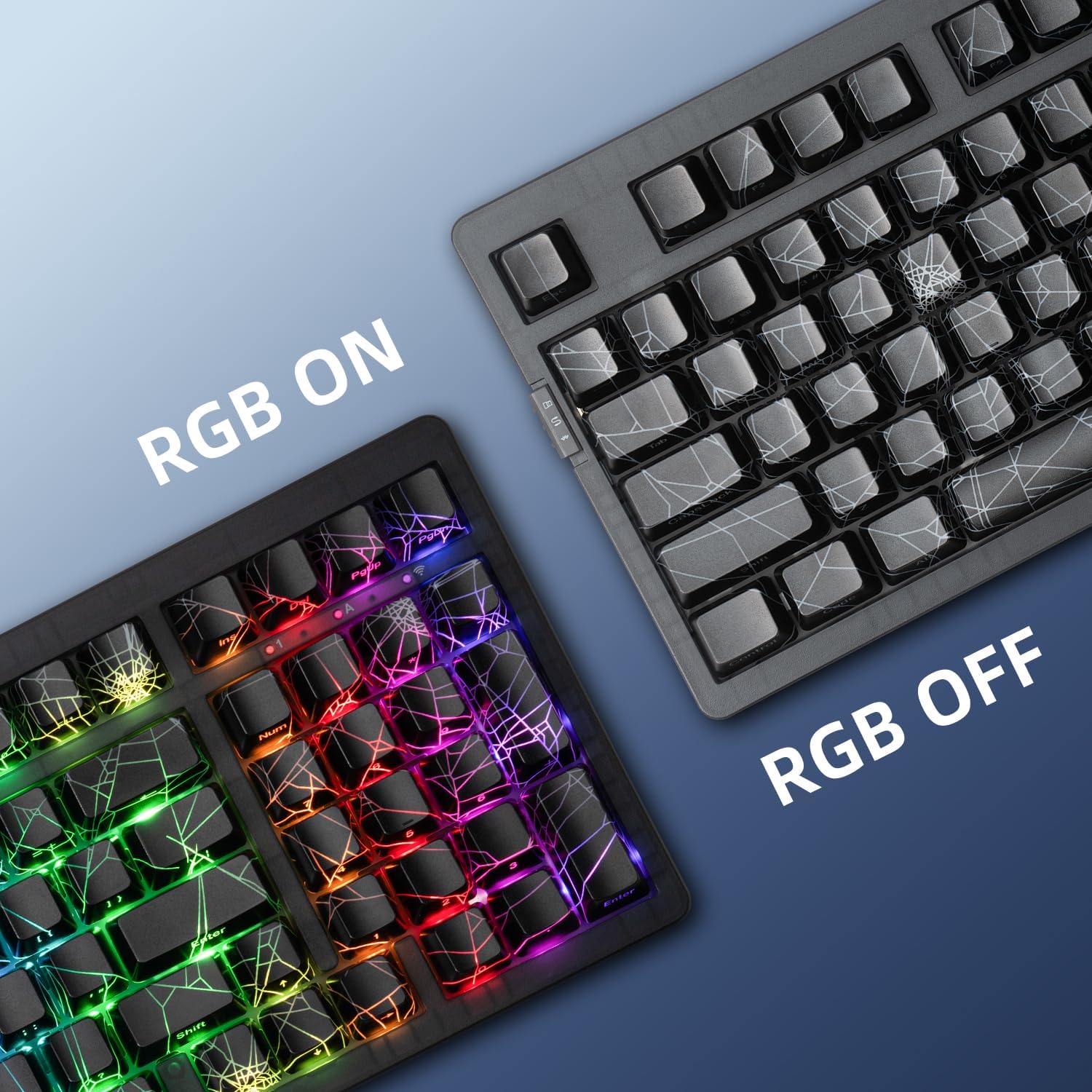
Figure 8: RGB Lighting On and Off
5.2. Customization Software
For advanced customization, driver software is available. This software allows you to remap keys, create macros, and tailor RGB effects to your preferences. Refer to the ZORNHER webමෘදුකාංග බාගත කිරීම සහ සවිස්තරාත්මක උපදෙස් සඳහා අඩවිය.

Figure 9: Customization Software Interface
6. නඩත්තු කිරීම
6.1 පිරිසිදු කිරීම
To clean your keyboard, power it off and disconnect it from your computer. Use a soft, dry cloth to wipe the surface. For deeper cleaning, use a can of compressed air to remove dust and debris from between the keycaps. A slightly damp cloth can be used for stubborn marks, ensuring no liquid enters the keyboard.
6.2. උණුසුම්-හුවමාරු කළ හැකි ස්විච
The ZH980 features a hot-swappable PCB, allowing you to change mechanical switches without soldering. It supports both 3-pin and 5-pin mechanical switches.
- අවශ්ය යතුරු කැප් එක ප්රවේශමෙන් ඉවත් කිරීමට සපයා ඇති යතුරු කැප් ඇදුම භාවිතා කරන්න.
- Use a switch puller (not included, but often comes with replacement switches) to gently extract the switch from the PCB.
- Align the pins of the new switch with the holes on the PCB and press firmly until it clicks into place. Ensure pins are not bent.
- යතුරු කැප් එක ප්රතිස්ථාපනය කරන්න.

Figure 10: Hot-Swappable PCB
6.3. බැටරි රැකවරණය
The keyboard is equipped with a 6000mAh Lithium Ion battery. To prolong battery life:
- බැටරිය නිතර නිතර සම්පූර්ණයෙන්ම විසර්ජනය කිරීමෙන් වළකින්න.
- දීර්ඝ කාලයක් භාවිතයේ නොමැති විට යතුරු පුවරුව සිසිල් වියළි ස්ථානයක ගබඩා කරන්න.
- ආරෝපණය කිරීම සඳහා සපයා ඇති USB-C කේබලය භාවිතා කරන්න.
7. දෝශ නිරාකරණය
If you encounter issues with your ZORNHER ZH980 keyboard, refer to the following common solutions:
- යතුරුපුවරුව ප්රතිචාර නොදක්වයි: Ensure the keyboard is charged and powered on. Check the connection mode (wired, 2.4GHz, or Bluetooth) and ensure it matches your device's connection. For 2.4GHz, ensure the receiver is properly plugged in. For Bluetooth, re-pair the device if necessary.
- Lights not working or incorrect: ඔබන්න Fn + Backslash to cycle through lighting modes. Adjust brightness with Fn + ඉහළ/පහළ ඊතලය. Ensure the keyboard is not in a low-power state.
- Keys typing incorrectly or double-typing: This can sometimes be resolved by resetting the keyboard to factory settings by pressing Fn + Esc. If the issue persists, consider replacing the affected switch using the hot-swappable feature.
- බ්ලූටූත් සම්බන්ධතා ගැටළු: Ensure your device's Bluetooth is enabled and the keyboard is in pairing mode (Fn + [1-5] for 3-5 seconds). Remove and re-add the keyboard from your device's Bluetooth settings.
- Windows key locked: ඔබන්න Fn+Win to toggle the Windows key lock.
වීඩියෝ 2: අවසන්view of the ZORNHER Mechanical Keyboard's design and functionality.
8. පිරිවිතර
| වෙළඳ නාමය | ZORNHER |
| ආදර්ශ අංකය | ZH980 |
| නිෂ්පාදන මානයන් | අඟල් 14.96 x 7.99 x 2.75 |
| අයිතමයේ බර | රාත්තල් 4.16 කි |
| සම්බන්ධතා තාක්ෂණය | බ්ලූටූත් 5.0, 2.4GHz රැහැන් රහිත, USB-C රැහැන් සහිත |
| යතුරුපුවරු විස්තරය | යාන්ත්රික |
| ගැළපෙන උපාංග | Laptop, Mac, PC, Smartphone |
| විශේෂ ලක්ෂණ | Backlit (RGB), Hot-Swappable, Rechargeable, Transparent Base |
| යතුරුපුවරු පසුබිම් ආලෝකකරණ වර්ණ සහාය | RGB (22 Preset Modes) |
| බැටරි | 1 Lithium Ion battery (6000mAh, included) |
9. වගකීම් සහ සහාය
The ZORNHER ZH980 Mechanical Keyboard is covered by a 2-year warranty. For warranty claims, technical support, or any inquiries not addressed in this manual, please contact ZORNHER customer service through the official website or your retailer's support channels. Please retain your proof of purchase for warranty validation.