1. හැඳින්වීම
The ALIGATOR AZA930B is a mobile phone designed with ease of use in mind, particularly for seniors. It features a large keypad, a clear 2.8-inch color display, and essential safety functions such as an SOS button and SOS locator. This manual provides detailed instructions on how to set up, operate, maintain, and troubleshoot your device to ensure optimal performance and safety.
2 ආරක්ෂිත තොරතුරු
Please read this section carefully before using your phone to ensure safe and proper operation.
- බැටරි ආරක්ෂාව: Use only ALIGATOR approved batteries and chargers. Do not short-circuit, puncture, or expose the battery to extreme temperatures. Dispose of batteries properly.
- අයකිරීම: The phone does not include a charger. Use a compatible USB-C charger (recommended model ALIGATOR CHA0047) with a power output of 2.5-3W. Avoid charging in damp කොන්දේසි.
- ශ්රවණ ආරක්ෂණය: ශ්රවණ හානිය වළක්වා ගැනීම සඳහා ඉහළ ශබ්ද මට්ටම්වල දිගු වේලාවක් සවන් දීමෙන් වළකින්න.
- රිය පැදවීමේ ආරක්ෂාව: Always prioritize driving safety. Use hands-free accessories and obey all local laws and regulations regarding mobile phone use while driving.
- වෛද්ය උපකරණ: Maintain a safe distance between the phone and medical devices such as pacemakers. Consult your physician and the medical device manufacturer for specific guidelines.
- ජල ප්රතිරෝධය: මෙම දුරකථනය ජලයට ඔරොත්තු නොදේ. ද්රවවලට නිරාවරණය වීමෙන් වළකින්න.
3. පැකේජ අන්තර්ගතය
ඔබගේ නිෂ්පාදන පැකේජයේ සියලුම අයිතම ඇති බව තහවුරු කරගන්න:
- ALIGATOR AZA930B Mobile Phone
- ආරෝපණ තටාකය
- පරිශීලක අත්පොත (මෙම ලේඛනය)
- සටහන: චාජරය ඇතුළත් නොවන අතර එය වෙන වෙනම මිලදී ගත යුතුය.
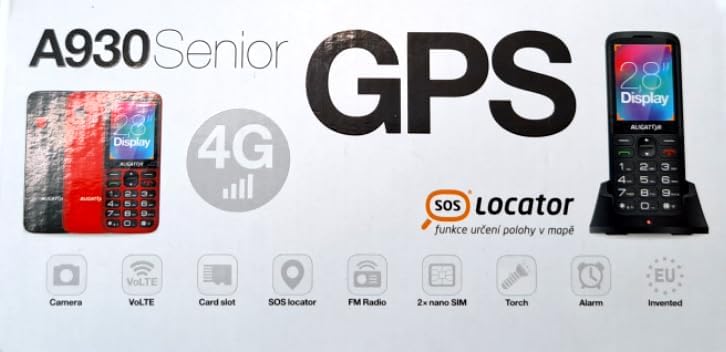
Figure 3.1: Product packaging illustrating the phone, charging dock, and various features such as 4G connectivity, GPS, SOS Locator, camera, VoLTE, card slot, FM radio, torch, and alarm. The box also indicates the 2.8-inch display.
4. පිහිටුවීම
4.1 SIM කාඩ්පත් ඇතුළත් කිරීම
The ALIGATOR AZA930B supports Dual SIM (2 x Nano SIM) functionality. To insert SIM cards:
- දුරකථනය විසන්ධි කරන්න.
- පිටුපස කවරය සහ බැටරිය ඉවත් කරන්න.
- Locate the SIM card slots. Insert your Nano SIM cards into the designated slots, ensuring the gold contacts face down and the cut corner aligns correctly.
- බැටරිය සහ පසුපස කවරය ප්රතිස්ථාපනය කරන්න.
4.2. මයික්රෝ SD කාඩ්පතක් ඇතුළු කිරීම
The phone supports a Micro SD memory card up to 256 GB for additional storage.
- Follow steps 1 and 2 from "4.1. Inserting SIM Cards".
- Locate the Micro SD card slot. Insert the Micro SD card with the gold contacts facing down until it clicks into place.
- බැටරිය සහ පසුපස කවරය ප්රතිස්ථාපනය කරන්න.
4.3. මූලික අයකිරීම
Before first use, fully charge the phone's 1700 mAh Li-ion battery.
- Connect the USB-C cable (not included) to the phone's USB-C port or place the phone in the charging dock.
- Connect the other end of the cable to a compatible charger (e.g., ALIGATOR CHA0047, 2.5-3W) or a powered USB port.
- The charging indicator will illuminate. A full charge may take several hours.

Figure 4.1: The ALIGATOR AZA930B phone placed in its dedicated charging dock. The phone's screen shows the current time and network signal indicators.

Figure 4.2: Detail from the product box, explicitly showing an icon indicating that a charger is not included and specifying a recommended charger power of 2.5-3W.
5. මෙහෙයුම් උපදෙස්
5.1. බලය සක්රිය / අක්රිය කරන්න
- බල ගැන්වීමට: තිරය දැල්වෙන තුරු Power/End Call බොත්තම (රතු බොත්තම) ඔබාගෙන සිටින්න.
- බලය අක්රිය කිරීමට: බලය අක්රිය කිරීමේ විකල්ප දිස්වන තුරු Power/End Call බොත්තම ඔබාගෙන සිටින්න, ඉන්පසු "Power off" තෝරන්න.
5.2. මූලික ඇමතුම් කාර්යයන්
- ඇමතුමක් ගැනීම: Enter the phone number using the large keypad and press the Call button (green button).
- ඇමතුමකට පිළිතුරු දීම: When the phone rings, press the Call button (green button).
- ඇමතුමක් අවසන් කිරීම: Press the Power/End Call button (red button).
- හෑන්ඩ්ස්-ෆ්රී: During a call, activate hands-free mode via the on-screen option or a dedicated button if available.
5.3. SOS Button and SOS Locator
The SOS button is a critical safety feature, allowing quick contact in emergencies.
- SOS බොත්තම: Located on the back of the phone (often red). Press and hold this button to activate the emergency sequence.
- SOS Presets: You can set up to 5 preset emergency contacts. When the SOS button is pressed, the phone will automatically call these numbers in sequence and send an emergency SMS.
- SOS Locator: This function sends the phone's location via SMS to the emergency contacts after the SOS button is pressed. The recipient can then view the location on a map via a web link provided in the SMS. This feature utilizes both GSM and GPS for location accuracy.

රූපය 5.1: පසුපස view of the ALIGATOR AZA930B, showing the prominent red SOS button and the speaker grille for clear audio.

රූපය 5.2: කෝණික පසුපස view of the ALIGATOR AZA930B, demonstrating the activated flashlight feature.
5.4. "Zachranka" Rescue Application
The "Zachranka" application is a mobile emergency call application pre-installed on the device.
- It provides quick contact with emergency medical services or mountain rescue.
- The application is valid in Austria, Hungary, the Czech Republic, and in the territories of the Slovak mountains.
- For more information, refer to the "Zachranka" app's official resources.

රූපය 5.3: ඉදිරිපස සහ පසුපස views of the ALIGATOR AZA930B, accompanied by the "Zachranka" rescue application logo, indicating its integration with the device.
5.5. වෙනත් විශේෂාංග
- දුරකථන නාමාවලිය: සම්බන්ධතා 500ක් දක්වා ගබඩා කරන්න.
- පණිවිඩ යැවීම: Send and receive SMS messages (memory for 100 SMS). Supports sending photos via MMS.
- බහුමාධ්ය:
- එෆ්එම් රේඩියෝ: එෆ්එම් ගුවන් විදුලි මධ්යස්ථානවලට සවන් දෙන්න.
- Media Player: ශ්රව්ය සහ දෘශ්ය වාදනය කරන්න files stored on the phone or Micro SD card.
- හඬ පටිගත කරන්නා: Record voice memos.
- ෆ්ලෑෂ් ලයිට්: ආලෝකකරණය සඳහා සාදන ලද ෆ්ලෑෂ් ලයිට් එක සක්රිය කරන්න.
- මෙවලම්: Includes Alarm, Calculator, and SIM toolkit support.
- බ්ලූටූත්: බ්ලූටූත් හෙඩ්සෙට් හෝ වෙනත් උපාංග වෙත සම්බන්ධ වන්න.
- කම්පන එලාමය: Set the phone to vibrate for incoming calls or notifications.
- තනු: Choose from 10+1 pre-installed melodies.
- ස්වයංක්රීය කාල ගැලපීම: The phone can automatically adjust its time.

රූපය 5.4: ඉදිරිපස view of the ALIGATOR AZA930B, highlighting its user-friendly large keypad and vibrant color display.
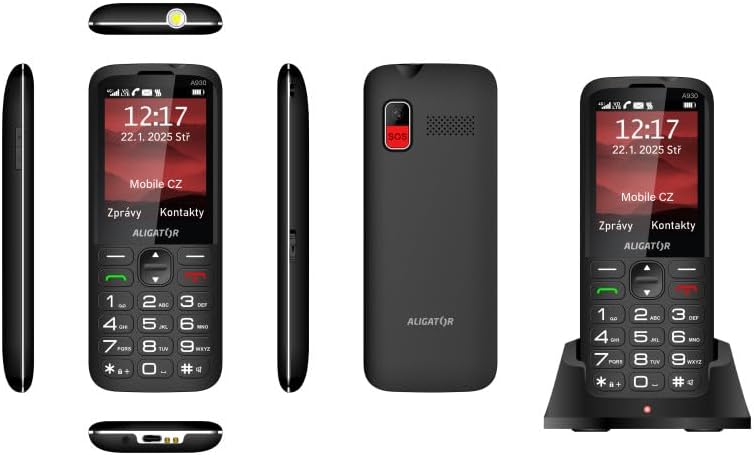
Figure 5.5: Comprehensive views of the ALIGATOR AZA930B, illustrating its design from the top, sides, front, back, and when seated in its charging dock.
6. නඩත්තු කිරීම
- පිරිසිදු කිරීම: දුරකථනයේ මතුපිට පිරිසිදු කිරීම සඳහා මෘදු වියළි රෙද්දක් භාවිතා කරන්න. රළු රසායනික ද්රව්ය හෝ උල්ෙල්ඛ ද්රව්ය භාවිතා කිරීමෙන් වළකින්න.
- බැටරි සත්කාර: To prolong battery life, avoid fully discharging the battery frequently. Store the phone in a cool, dry place if not used for extended periods.
- ගබඩා: Keep the phone away from extreme temperatures, direct sunlight, and dusty environments.
7. දෝශ නිරාකරණය
| ගැටලුව | විය හැකි හේතුව | විසඳුම |
|---|---|---|
| දුරකථනය ක්රියාත්මක නොවේ. | බැටරිය අවසන් වී හෝ නිසි ලෙස ඇතුළත් කර නොමැත. | බැටරිය ආරෝපණය කරන්න. බැටරිය නිවැරදිව ඇතුළු කර ඇති බවට වග බලා ගන්න. |
| ජාල සංඥා නැත. | SIM card not inserted correctly or out of network coverage. | Reinsert SIM card. Move to an area with better network coverage. |
| ඇමතුම් ගැනීමට හෝ ලබා ගැනීමට නොහැකිය. | No credit, SIM card issue, or network problem. | Check your account balance. Verify SIM card insertion. Contact your network provider. |
| SOS බොත්තම ක්රියා නොකරයි. | SOS numbers not set up or incorrect. | Ensure SOS numbers are correctly configured in settings. Check network signal. |
| බැටරිය ඉක්මනින් බැස යයි. | High usage, background apps, or aging battery. | Reduce screen brightness. Close unnecessary applications. Consider replacing the battery if it's old. |
8. පිරිවිතර
| විශේෂාංගය | විස්තර |
|---|---|
| ආදර්ශ අංකය | AZA930B |
| ප්රදර්ශනය කරන්න | අඟල් 2.8 TFT වර්ණ සංදර්ශකය |
| SIM කාඩ්පත් තව් | Dual SIM (2 x Nano SIM) |
| මතක කාඩ්පත් සහාය | 256 GB දක්වා Micro SD |
| බැටරි | 1700 mAh Li-ion |
| කතා කාලය | මිනිත්තු 480 දක්වා |
| පොරොත්තු කාලය | දින 10 දක්වා |
| කැමරාව | 1.9 MP |
| සම්බන්ධතාවය | 4G/LTE/VoLTE, Bluetooth |
| ආරෝපණ වරාය | USB-C |
| හෙඩ්ෆෝන් ජැක් | 3.5 මි.මී |
| මානයන් | 14.3 x 5.8 x 1.36 සෙ.මී |
| බර | 95 ග්රෑම් |
| මෙහෙයුම් පද්ධතිය | සිම්බියන් 9.1 |
| වර්ණය | කළු |
සටහන: පූර්ව දැනුම්දීමකින් තොරව පිරිවිතර වෙනස් වීමට යටත් වේ.
9. වගකීම් සහ සහාය
ALIGATOR products are designed and manufactured to the highest quality standards. For detailed warranty information, including terms, conditions, and duration, please refer to the warranty card included with your product or visit the official ALIGATOR webඅඩවිය.
For technical support, service, or inquiries regarding your ALIGATOR AZA930B mobile phone, please contact ALIGATOR customer service or visit their official support channels. Keep your purchase receipt and product serial number (IMEI) handy when seeking support.
- IMEI 1: 357140835088496
- IMEI 2: 357140835088504
- Barcode/UPC: 8596426108267


