1. නිෂ්පාදන අවසන්view
The DOOGEE Tab A9 is a 10.1-inch Android 15 tablet designed for versatile use, from productivity to entertainment. It features a quad-core processor, ample memory, and a high-capacity battery, complemented by a suite of accessories for enhanced functionality.
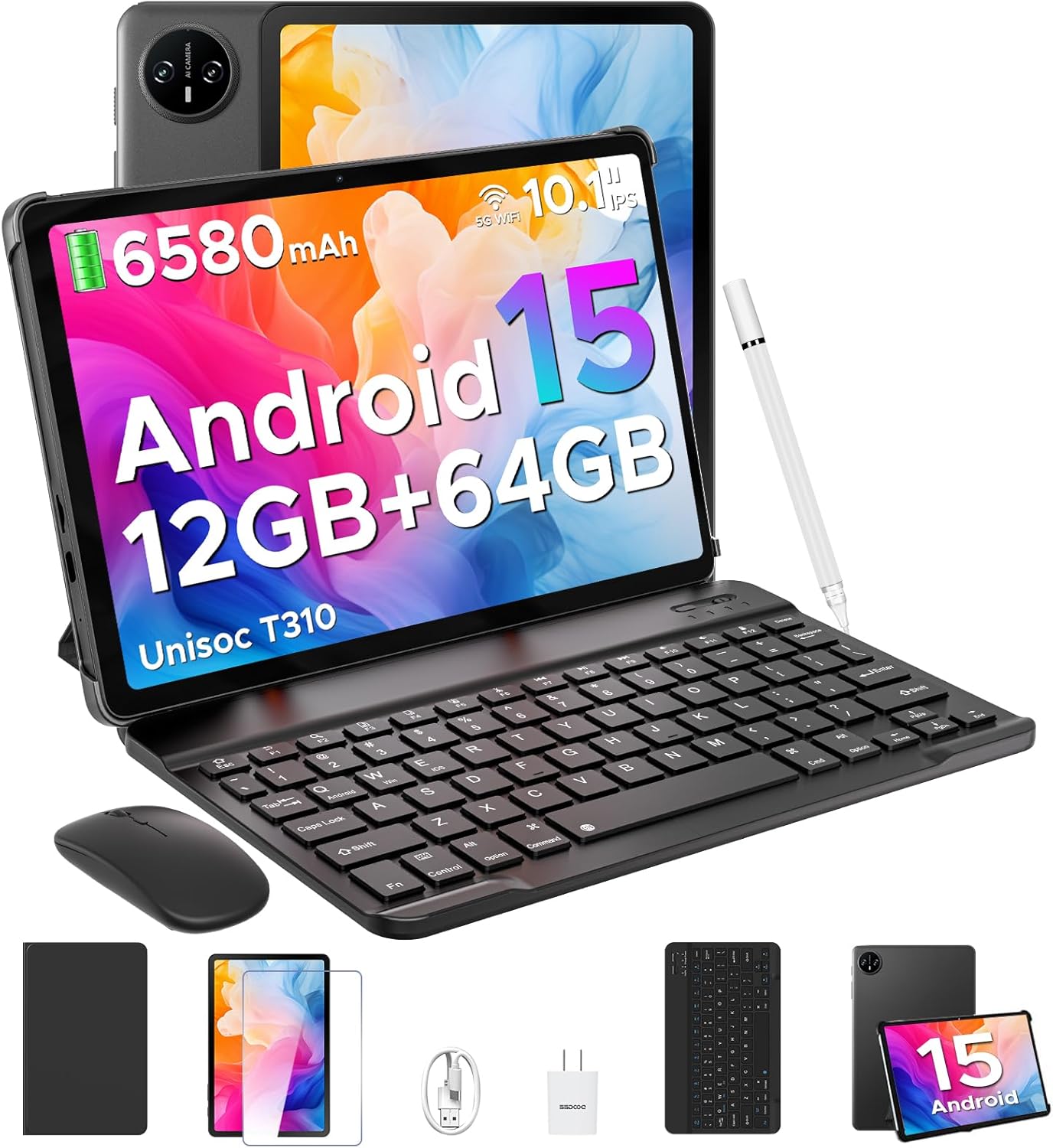
Image 1.1: DOOGEE Tab A9 tablet with its complete accessory kit.
ප්රධාන ලක්ෂණ:
- මෙහෙයුම් පද්ධතිය: Android 15 for enhanced performance and privacy.
- සකසනය: Unisoc T310 Quad-Core, 2.0GHz.
- මතකය සහ ගබඩාව: 12GB RAM (3GB physical + 9GB virtual) and 64GB internal storage, expandable up to 2TB via microSD.
- සංදර්ශකය: 10.1-inch IPS HD (1280x800) touchscreen.
- බැටරි: 6580mAh for extended use.
- කැමරා: 8MP rear camera and 5MP front camera.
- සම්බන්ධතාවය: 2.4G/5G Dual-band WiFi, Bluetooth 5.0.
- ආරක්ෂාව: මුහුණෙන් අගුලු හැරීම.
- ශ්රව්ය: Dual speakers and 3.5mm headphone jack.
2. ඇතුළත් කර ඇති දේ
Your DOOGEE Tab A9 package includes the following items:

Image 2.1: Contents of the DOOGEE Tab A9 package.
- DOOGEE Tab A9 Tablet
- බ්ලූටූත් යතුරු පුවරුව
- බ්ලූටූත් මවුස්
- ස්ටයිලස් පෑන
- තිර ආරක්ෂකයා
- ආරක්ෂිත නඩුව
- චාජර්
- USB Type-C කේබලය
- පරිශීලක අත්පොත
3. පිහිටුවීම
3.1 මූලික ආරෝපණය
Before first use, fully charge your tablet using the provided charger and USB Type-C cable. Connect the cable to the tablet's charging port and the charger to a power outlet. The battery indicator on the screen will show charging status.
3.2 බලය සක්රිය / අක්රිය
- බල ගැන්වීමට: Press and hold the Power button (located on the side of the tablet) until the DOOGEE logo appears.
- බලය අක්රිය කිරීමට: බල බොත්තම ඔබා අල්ලාගෙන සිටින්න, ඉන්පසු තිරයේ දිස්වන විකල්ප වලින් "පවර් ඕෆ්" තෝරන්න.
- නැවත ආරම්භ කිරීමට: බල බොත්තම ඔබා අල්ලාගෙන සිටින්න, ඉන්පසු විකල්ප වලින් "නැවත ආරම්භ කරන්න" තෝරන්න.
3.3 Connecting Accessories (Keyboard & Mouse)
The included keyboard and mouse connect via Bluetooth:
- යතුරුපුවරුව/මූසිකය ආරෝපණය කර බලගන්වා ඇති බවට වග බලා ගන්න.
- ඔබගේ ටැබ්ලටයේ, යන්න සැකසීම් > සම්බන්ධිත උපාංග > බ්ලූටූත්.
- බ්ලූටූත් ක්රියාත්මක කර ලබා ගත හැකි උපාංග සඳහා ස්කෑන් කරන්න.
- Select the keyboard or mouse from the list and follow any on-screen pairing instructions.
3.4 MicroSD කාඩ්පතක් ඇතුළු කිරීම
To expand storage, insert a microSD card (up to 2TB, sold separately):
- ටැබ්ලටයේ පැත්තේ SIM/microSD කාඩ්පත් තැටිය සොයා ගන්න.
- තැටිය විවෘත කිරීමට සපයා ඇති SIM ඉජෙක්ටර් මෙවලම භාවිතා කරන්න.
- මයික්රෝ එස්ඩී කාඩ්පත තැටියේ නම් කර ඇති තව් එකට දමන්න.
- තැටිය ප්රවේශමෙන් ටැබ්ලටයට නැවත ඇතුළු කරන්න.
4. මෙහෙයුම් උපදෙස්
4.1 ඇන්ඩ්රොයිඩ් 15 පද්ධතිය
Your DOOGEE Tab A9 runs on Android 15, offering improved app launch speeds, system smoothness, and enhanced privacy controls. Explore the intuitive interface and customize settings to your preference.
වීඩියෝ 4.1: අවසන්view of the DOOGEE Tab A9 tablet's features, including its display, speakers, and connectivity.

Image 4.1: The Android 15 system logo, highlighting its intelligent, seamless, and secure features.
4.2 දර්ශන සැකසුම්
The 10.1-inch IPS HD display offers clear visuals. You can adjust display settings for comfort:
- අක්ෂි සත්කාර මාදිලිය: Reduces blue light to minimize eye strain. Activate it in Settings > Display > Eye Care Mode.
- අඳුරු මාදිලිය: Changes the system theme to a darker palette, ideal for low-light environments. Activate it in Settings > Display > Dark Mode.

Image 4.2: Visual representation of the tablet's 10.1-inch IPS HD display and its key specifications.
4.3 කැමරා භාවිතය
Capture photos and videos with the tablet's cameras:
- පසුපස කැමරාව (8MP): Suitable for general photography.
- ඉදිරිපස කැමරාව (5MP): වීඩියෝ ඇමතුම් සහ සෙල්ෆි සඳහා වඩාත් සුදුසුය.
Open the Camera app from the home screen or app drawer to start. Tap the shutter button to take a photo or switch to video mode to record.

රූපය 4.3: උදාamples of photos taken with the 8MP main camera.

Image 4.4: The 5MP front camera is suitable for clear video calls.
4.4 ශ්රව්ය විශේෂාංග
The tablet is equipped with dual speakers for clear audio output and a 3.5mm audio jack for private listening with headphones.

Image 4.5: Illustration of the tablet's dual speaker system for enhanced audio.
4.5 සම්බන්ධතාවය
- Wifi: Supports 2.4G and 5G dual-band Wi-Fi for stable and fast internet access. Connect via සැකසීම් > ජාලය සහ අන්තර්ජාලය > Wi-Fi.
- බ්ලූටූත් 5.0: For connecting wireless peripherals like headphones, speakers, and the included keyboard and mouse. Manage connections in සැකසීම් > සම්බන්ධිත උපාංග > බ්ලූටූත්.

Image 4.6: Features of the tablet's WiFi 5 connectivity.
4.6 මුහුණු අගුළු ඇරීම
For convenient and secure access, set up Face Unlock:
- වෙත යන්න සැකසීම් > ආරක්ෂාව සහ පෞද්ගලිකත්වය > මුහුණු අගුළු ඇරීම.
- ඔබේ මුහුණ ලියාපදිංචි කිරීමට තිරයේ ඇති උපදෙස් අනුගමනය කරන්න.
- Ensure you are in a well-lit area during registration for optimal performance.

Image 4.7: The tablet's facial recognition unlock feature in action.
4.7 Multitasking with Split-Screen
Utilize the split-screen feature to run two apps simultaneously:
- පළමු යෙදුම විවෘත කරන්න.
- මෑත කාලීන යෙදුම් වෙත ප්රවේශ වීමට තිරයේ පහළ සිට ඉහළට ස්වයිප් කර අල්ලාගෙන සිටින්න.
- Tap the app icon at the top of the first app's card and select "Split screen".
- Choose the second app from your recent apps or app drawer to fill the other half of the screen.

Image 4.8: Demonstrating efficient split-screen multitasking on the tablet.
4.8 කාර්ය සාධනය සහ ගබඩා කිරීම
The Unisoc T310 Quad-Core processor and 12GB RAM (3GB physical + 9GB virtual) ensure smooth operation for daily tasks and multitasking. The 64GB internal storage provides space for essential apps and files, with expandable storage up to 2TB via microSD card.
Video 4.2: Highlights of the DOOGEE Tab A9's processor, RAM, and storage capabilities.

Image 4.9: Visual representation of the Unisoc T310 Quad-Core processor.

Image 4.10: Illustrates the tablet's memory and storage capacity, including expandable memory.
4.9 බැටරි ආයු කාලය
The 6580mAh battery, combined with smart battery management, provides all-day usage. Actual battery life may vary based on usage patterns and settings.

Image 4.11: Details on the 6580mAh battery capacity and estimated usage times.
5. නඩත්තු කිරීම
- මෘදුකාංග යාවත්කාලීන: ප්රශස්ත කාර්ය සාධනය සහ ආරක්ෂාව සහතික කිරීම සඳහා පද්ධති යාවත්කාලීන කිරීම් නිතිපතා පරීක්ෂා කර ස්ථාපනය කරන්න. වෙත යන්න සැකසීම් > පද්ධතිය > පද්ධති යාවත්කාලීන කිරීම.
- පිරිසිදු කිරීම: ටැබ්ලටයේ තිරය සහ බඳ පිරිසිදු කිරීම සඳහා මෘදු, ලින්ට් රහිත රෙද්දක් භාවිතා කරන්න. උල්ෙල්ඛ ද්රව්ය හෝ රළු රසායනික ද්රව්යවලින් වළකින්න.
- බැටරි සත්කාර: To prolong battery life, avoid extreme temperatures and do not let the battery fully discharge frequently.
- ගබඩා කළමනාකරණය: වරින් වර අනවශ්ය දේ ඉවත් කරන්න files and apps to maintain system speed.
6. දෝශ නිරාකරණය
පොදු ගැටළු සහ ඒවාට විසඳුම් සඳහා පහත වගුව බලන්න:
| කලාපය | හැකි විසඳුම |
|---|---|
| ටැබ්ලටය ක්රියාත්මක නොවේ | Ensure the battery is charged. Connect the charger and try again. If unresponsive, press and hold the Power button for 10-15 seconds to force a restart. |
| Wi-Fi සම්බන්ධතා ගැටළු | Restart the tablet and your Wi-Fi router. Check Wi-Fi settings to ensure the correct network is selected and the password is entered correctly. |
| බ්ලූටූත් උපාංගය යුගල නොවේ | Ensure the Bluetooth device is in pairing mode and within range. Restart both the tablet and the Bluetooth device. Check tablet's Bluetooth settings. |
| මන්දගාමී කාර්ය සාධනය | භාවිතයට නොගත් යෙදුම් වසන්න. හැඹිලිය සහ තාවකාලිකව හිස් කරන්න files. Consider uninstalling rarely used apps. Perform a system update if available. |
| තිරය ප්රතිචාර නොදක්වයි | ටැබ්ලටය නැවත ආරම්භ කරන්න. ගැටලුව දිගටම පවතී නම්, තිරය පිරිසිදුව හා සුන්බුන් වලින් තොර බවට වග බලා ගන්න. |
7. පිරිවිතර
| විශේෂාංගය | විස්තර |
|---|---|
| මාදිලියේ නම | ටැබ් A9 |
| මෙහෙයුම් පද්ධතිය | Android 15 |
| ප්රොසෙසරය | Unisoc T310 Quad-Core, 2 GHz |
| RAM | 12GB (3GB භෞතික + 9GB අතථ්ය) |
| අභ්යන්තර ගබඩාව | 64 GB |
| පුළුල් කළ හැකි ගබඩාව | MicroSD කාඩ්පත හරහා 2TB දක්වා |
| තිර ප්රමාණය | අඟල් 10.1 |
| තිර විභේදනය | 1280 x 800 pixels (IPS HD) |
| පසුපස කැමරාව | 8 MP |
| ඉදිරිපස කැමරාව | 5 MP |
| බැටරි ධාරිතාව | 6580 mAh |
| රැහැන් රහිත වර්ගය | 802.11ac, 802.11b, 802.11g, 802.11n (2.4G/5G WiFi) |
| බ්ලූටූත් | බ්ලූටූත් 5.0 |
| මානයන් (LxWxH) | අඟල් 9.54 x 6.33 x 0.38 |
| අයිතමයේ බර | රාත්තල් 1.12 කි |
8. වගකීම් සහ සහාය
Your DOOGEE Tab A9 tablet comes with a වසර 2ක වගකීමක් සහ ජීවිත කාලය තාක්ෂණික සහාය. For any questions, issues, or support needs, please contact DOOGEE customer service. Refer to the warranty card included in your package for specific terms and conditions.