හැඳින්වීම
Thank you for choosing the Trevi XF 3150 KB Portable Karaoke Speaker. This powerful 130W speaker is designed to deliver high-quality audio with a Bass Reflex system, two 8-inch speakers, and a 1-inch tweeter. It features wireless audio connectivity, USB/SD card playback, AUX input, and dedicated inputs for microphones and guitars. Enjoy the integrated multicolor LED disco lights and the True Wireless Stereo (TWS) function for an enhanced audio experience. The speaker operates on an integrated rechargeable battery or via the included power adapter, offering versatility for any occasion. This manual provides essential information for safe and efficient use of your device.

ඉදිරිපස view of the Trevi XF 3150 KB portable karaoke speaker, showcasing its design and active multicolor LED lights.
ස්ථාපනය සහ පළමු භාවිතය
1. පෙට්ටි ඉවත් කිරීම සහ සංරචක
Carefully remove all components from the packaging. Ensure the following items are included:
- Trevi XF 3150 KB Portable Karaoke Speaker
- මයික්රෆෝනය
- දුරස්ථ පාලකය
- බල කේබලය
- වගකීම් කාඩ්පත
2. බලගැන්වීම සහ ආරෝපණය කිරීම
The speaker can be powered by its internal rechargeable 7.4V battery or by connecting it to a power outlet using the included power adapter. For first use, it is recommended to fully charge the battery.
- අයකිරීම: Connect the power cable to the DC IN port on the rear panel of the speaker and then to a power outlet. The charging indicator will illuminate.
- බලය සක්රිය / අක්රිය: ඔබා අල්ලාගෙන සිටින්න බලය button on the control panel or remote control to turn the speaker on or off.
3. පාලන පැනලය අවසන්view
Familiarize yourself with the main controls located on the top panel of the speaker.

සවිස්තරාත්මක view of the speaker's control panel, showing various input and sound adjustment knobs, along with function buttons.
4. දුරස්ථ පාලන කාර්යයන්
The included remote control allows convenient operation from a distance.

The remote control for the Trevi XF 3150 KB speaker, featuring buttons for mute, mode, record, playback, volume, channel selection, scan, EQ, and power.
5. රැහැන් රහිත (බ්ලූටූත්) සම්බන්ධතාවය
Connect your smartphone, tablet, or laptop wirelessly to the speaker.
- ස්පීකරය ක්රියාත්මක කරන්න.
- ඔබන්න මාදිලිය බ්ලූටූත් මාදිලිය දක්වමින් සංදර්ශකය මත "නිල්" දිස්වන තුරු බොත්තම ඔබාගෙන සිටින්න.
- Enable Bluetooth on your device and search for "Trevi XF 3150 KB".
- Select the speaker to pair. A confirmation sound will indicate a successful connection.

Illustration of connecting a smartphone to the speaker via Bluetooth for wireless music streaming.
6. TWS (සත්ය රැහැන් රහිත ස්ටීරියෝ) ක්රියාකාරිත්වය
For an enhanced stereo experience, you can connect two Trevi XF 3150 KB speakers wirelessly.
- Ensure both speakers are turned on and in Bluetooth mode.
- On one speaker (the primary), press and hold the TWS/REP බොත්තම.
- The primary speaker will search for and connect to the secondary speaker. A confirmation sound will indicate successful pairing.
- Once connected, pair your device to the primary speaker via Bluetooth as described above.

Diagram illustrating the True Wireless Stereo (TWS) function, allowing two speakers to connect for a wider soundstage.
7. USB/SD කාඩ් නැවත ධාවනය
ශ්රව්ය වාදනය කරන්න files directly from a USB flash drive or micro-SD card.
- USB ෆ්ලෑෂ් ධාවකය ඇතුල් කරන්න USB port or a micro-SD card into the SD slot on the rear panel.
- ඔබන්න මාදිලිය button to select USB or SD mode.
- Playback will start automatically. Use the playback controls (Play/Pause, Next/Previous Track) on the control panel or remote.
8. AUX ආදානය
3.5mm ශ්රව්ය කේබලයක් භාවිතයෙන් බාහිර ශ්රව්ය උපාංග සම්බන්ධ කරන්න.
- 3.5mm ශ්රව්ය කේබලයක එක් කෙළවරක් සම්බන්ධ කරන්න AUX IN port on the speaker and the other end to the audio output of your external device.
- ඔබන්න මාදිලිය AUX මාදිලිය තේරීමට බොත්තම.
- ඔබගේ බාහිර උපාංගයෙන් නැවත ධාවනය සහ ශබ්දය පාලනය කරන්න.
9. මයික්රෆෝන සහ ගිටාර් ආදාන
Connect the included microphone or a guitar for karaoke or live performances.
- වෙත මයික්රෆෝනය සම්බන්ධ කරන්න MIC IN port (6.3mm jack) or a guitar to the ගිටාර් ඉන් port (6.3mm jack) on the rear panel.
- භාවිතා කර මයික්රෆෝන ශබ්දය සීරුමාරු කරන්න MIC VOL knob and guitar volume using the GUITAR VOL knob on the control panel.
- භාවිතා කරන්න MIC BASS, MIC TREBLE, ECHO, සහ ප්රමාදය knobs to fine-tune the microphone sound.
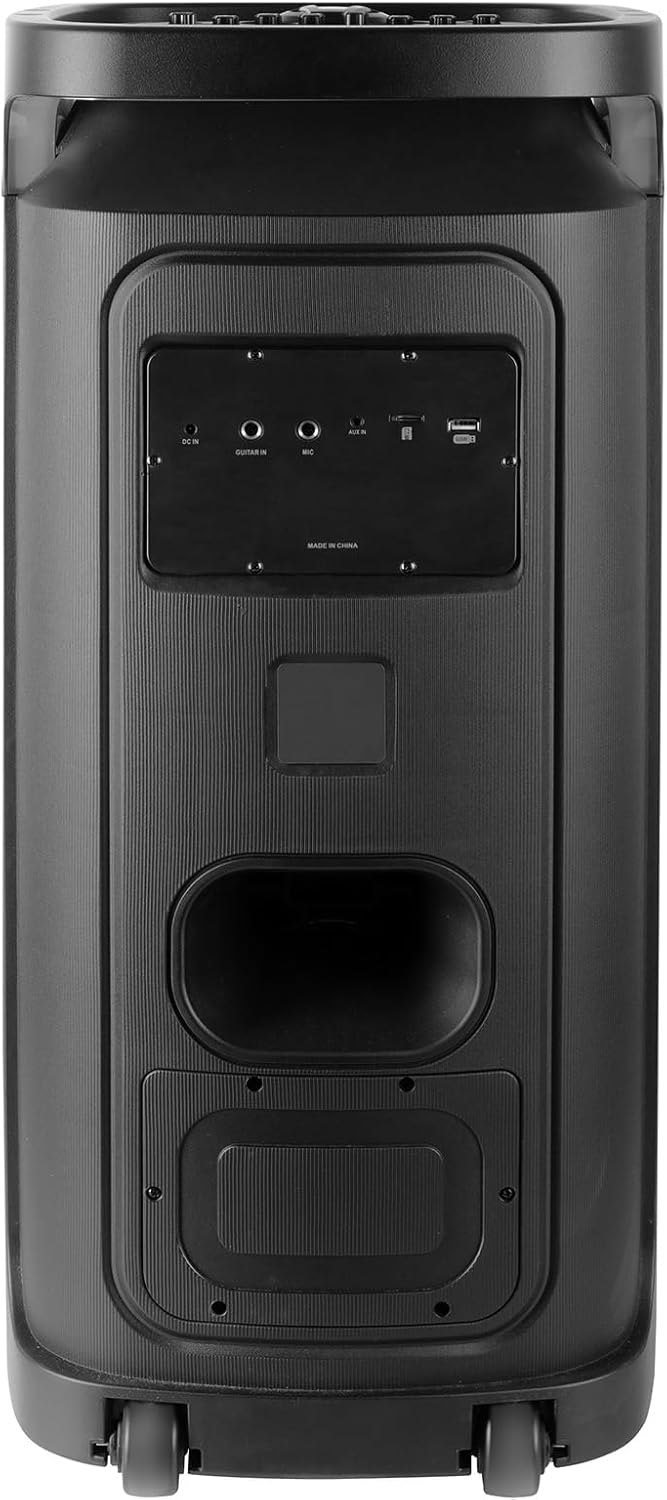
Rear panel of the Trevi XF 3150 KB speaker, displaying the various input ports including DC IN, AUX IN, MIC IN, GUITAR IN, USB, and SD card slot.
මෙහෙයුම් උපදෙස්
1. මූලික ශ්රව්ය නැවත ධාවනය
Once an audio source is connected (Bluetooth, USB, SD, AUX), use the following controls:
- පරිමාව: Adjust the main volume using the large central knob or the VOL + / VOL- දුරස්ථ පාලකයේ බොත්තම්.
- වාදනය/විරාමය: ඔබන්න වාදනය / විරාමය බොත්තම.
- ඊළඟ / පෙර ධාවන පථය: භාවිතා කරන්න ඊළඟ සහ පෙර බොත්තම්.
- සමීකරණය: ඔබන්න EQ button on the remote to cycle through preset equalization modes (e.g., Pop, Rock, Jazz, Classic, Flat).
- Bass/Treble: භාවිතා කරන්න බාස් සහ ට්රිබල් knobs on the control panel for manual sound adjustment.
- අමතර බාස්: ඔබන්න අමතර බාස් button for enhanced bass output.
2. කැරෝකී කාර්යය
Utilize the included microphone and dedicated controls for karaoke sessions.
- Connect the microphone as described in the Setup section.
- සකස් කරන්න MIC VOL ඔබ කැමති මට්ටමට.
- භාවිතා කරන්න ECHO සහ ප්රමාදය knobs to add vocal effects.
- ද පීආර්අයි (Microphone Priority) button can be pressed to lower the music volume automatically when speaking into the microphone.
3. Disco Light Effects
Enhance your listening experience with dynamic multicolor LED lights.
- ඔබන්න LED button on the control panel to turn the disco lights on or off.
- The lights will cycle through various colors and patterns automatically.

The Trevi XF 3150 KB speaker displaying its dynamic multicolor LED disco light effects, creating a party atmosphere.
නඩත්තු කිරීම
1 පිරිසිදු කිරීම
ඔබේ කථිකයාගේ පෙනුම සහ ක්රියාකාරීත්වය පවත්වා ගැනීමට:
- පිරිසිදු කිරීමට පෙර සෑම විටම විදුලි රැහැන විසන්ධි කරන්න.
- බාහිර පෘෂ්ඨයන් පිස දැමීමට මෘදු වියළි රෙද්දක් භාවිතා කරන්න.
- උල්ෙල්ඛ පිරිසිදු කරන්නන්, ඉටි හෝ ද්රාවක භාවිතා නොකරන්න, මන්ද ඒවා නිමාවට හානි කළ හැකිය.
- ඕනෑම විවරයකට තෙතමනය ලබා ගැනීමෙන් වළකින්න.
2. බැටරි රැකවරණය
To prolong the life of the integrated rechargeable battery:
- පළමු භාවිතයට පෙර බැටරිය සම්පූර්ණයෙන්ම ආරෝපණය කරන්න.
- බැටරිය නිතර නිතර සම්පූර්ණයෙන්ම බැස යාමෙන් වළකින්න.
- If storing the speaker for an extended period, charge the battery to approximately 50% and recharge every few months.
- Do not expose the speaker to extreme temperatures, as this can affect battery performance.
දෝෂගවේෂණය
If you encounter issues with your Trevi XF 3150 KB speaker, refer to the following common problems and solutions:
| ගැටලුව | විය හැකි හේතුව | විසඳුම |
|---|---|---|
| ස්පීකරය ක්රියාත්මක නොවේ. | බැටරිය අවසන් වී හෝ විදුලි රැහැන සම්බන්ධ වී නොමැත. | Connect the power cable and charge the battery. Ensure the power button is pressed correctly. |
| ශබ්ද ප්රතිදානයක් නැත. | Volume is too low, incorrect input mode, or audio source issue. | ශබ්දය වැඩි කරන්න. බොත්තම ඔබන්න මාදිලිය button to select the correct input. Check the audio source device. |
| බ්ලූටූත් උපාංගය යුගල කළ නොහැක. | Speaker is not in Bluetooth mode, device is too far, or already paired to another device. | Ensure speaker is in Bluetooth mode. Move device closer. Disconnect from other devices and try again. |
| මයික්රෆෝනය ක්රියා නොකරයි. | Microphone not connected properly, MIC VOL is low, or microphone is faulty. | Ensure microphone is securely plugged into the MIC IN port. Increase MIC VOL. Test with another microphone if available. |
| TWS connection fails. | Speakers are too far apart, or one speaker is not in Bluetooth mode. | Ensure both speakers are in Bluetooth mode and within close proximity. Repeat the TWS pairing steps. |
පිරිවිතර
| මාදිලියේ නම | XF 3150 KB |
| වෙළඳ නාමය | ට්රෙවි |
| ප්රතිදාන බලය | 130W (උපරිම) |
| ස්පීකර් ප්රමාණය | 2 x 8-inch woofers, 1 x 1-inch tweeter |
| සම්බන්ධතා තාක්ෂණය | බ්ලූටූත්, USB, SD, AUX |
| රැහැන් රහිත සන්නිවේදන තාක්ෂණය | බ්ලූටූත් |
| බලශක්ති ප්රභවය | Battery, Corded Electric (7.4V rechargeable battery) |
| විශේෂ ලක්ෂණ | Built-in Microphone, Wireless Connectivity, Disco Lights, TWS Function |
| නිෂ්පාදන මානයන් | 34D x 32.6W x 74H සෙ.මී. |
| අයිතමයේ බර | 1 කිලෝ ග්රෑම් |
| පාලන ක්රමය | දුරස්ථ |
| ශ්රව්ය ප්රතිදාන ප්රකාරය | ස්ටීරියෝ |
| සවිකිරීමේ වර්ගය | බිම් ස්ථාවරය |
| නිර්දේශිත භාවිතයන් | For smartphones or tablets, For computers, For home parties, For karaoke |
| ගැළපෙන උපාංග | Smartphone, Tablet, Laptop, MP3 Player, Computer, Karaoke System |
වගකීම් තොරතුරු
මෙම නිෂ්පාදනය A සමඟ පැමිණේ සීමිත වගකීම්. Please refer to the included warranty card for detailed terms and conditions, including coverage period and claim procedures. Keep your proof of purchase for warranty service.
සහාය
For further assistance, product information, or to explore other Trevi products, please visit the official Trevi brand store: