හැඳින්වීම
Thank you for choosing the Kiwi KAP 6730 Air Purifier. This manual provides essential information for the safe and efficient use of your device. Please read it thoroughly before operation and retain it for future reference.
The Kiwi KAP 6730 is designed to improve indoor air quality using advanced filtration technology, including a medical-grade H13 HEPA filter, to capture various airborne particles and odors.
වැදගත් ආරක්ෂක උපදෙස්
ගින්න, විදුලි කම්පනය සහ තුවාල ඇතිවීමේ අවදානම අවම කිරීම සඳහා විදුලි උපකරණ භාවිතා කරන විට සෑම විටම මූලික ආරක්ෂක පියවරයන් අනුගමනය කරන්න.
- උපාංගය භාවිතා කිරීමට පෙර සියලුම උපදෙස් කියවන්න.
- බල සැපයුම පරිමාවට ගැලපෙන බව සහතික කර ගන්නtage උපකරණ ලේබලය මත නිශ්චිතව දක්වා ඇත.
- හානියට පත් ලණුවකින් හෝ ප්ලග් එකකින් උපකරණය ක්රියාත්මක නොකරන්න.
- විදුලි රැහැන රත් වූ පෘෂ්ඨ වලින් ඈත් කරන්න.
- උපකරණය, ලණුව, හෝ ප්ලග් එක ජලයේ හෝ වෙනත් දියර වල ගිල්වන්න එපා.
- පිරිසිදු කිරීමට හෝ නඩත්තු කිරීමට පෙර වායු පවිතකාරකය විසන්ධි කරන්න.
- වායු ඇතුල්වීම් හෝ පිටවන ස්ථාන අවහිර නොකරන්න.
- මෙම උපකරණය ගෘහස්ථ භාවිතය සඳහා පමණි.
- දරුවන්ට ළඟා විය නොහැකි ලෙස තබා ගන්න.
නිෂ්පාදනය අවසන්view
The Kiwi KAP 6730 Air Purifier features a compact design with an intuitive control panel and multi-stagඊ පෙරීමේ පද්ධතිය.

රූපය: ඉහළ view of the Kiwi KAP 6730 Air Purifier, highlighting the circular control panel with various function icons including power, fan speed, timer, and Wi-Fi connectivity. The top grille for air output is also visible.

රූපය: An exploded diagram of the Kiwi KAP 6730 Air Purifier, illustrating its internal components. The image shows the outer casing, the fan assembly, and the cylindrical multi-layer filter system, with arrows indicating airflow and the capture of dust and pet hair by different filter stages.
ප්රධාන ලක්ෂණ:
- Medical-grade H13 HEPA filter for effective air purification.
- බහු-එස්tagඊ පෙරීමේ පද්ධතිය.
- බුද්ධිමය පාලන පැනලය.
- සංයුක්ත සහ සැහැල්ලු නිර්මාණය.
- Smart connectivity (Wi-Fi enabled).
සැලසුම
අසුරනවා
- වායු පවිතකාරකය එහි ඇසුරුම්වලින් ප්රවේශමෙන් ඉවත් කරන්න.
- Remove all packaging materials, including any protective films or bags.
- ප්රවාහනය අතරතුර කිසියම් හානියක් සිදුවී ඇත්දැයි පරීක්ෂා කරන්න. හානි වී ඇත්නම්, ක්රියාත්මක නොකර පාරිභෝගික සහාය අමතන්න.
Filter Installation (if not pre-installed)
The air purifier comes with a multi-layer filter. Ensure it is properly installed before first use.
- වායු පවිතකාරකය උඩු යටිකුරු කරන්න.
- අගුළු ඇරීමට සහ ඉවත් කිරීමට මූලික කවරය වාමාවර්තව කරකවන්න.
- ෆිල්ටරයෙන් ප්ලාස්ටික් ඇසුරුම් ඉවත් කරන්න.
- Insert the filter into the air purifier, ensuring it sits securely.
- Replace the base cover and twist clockwise to lock it into place.
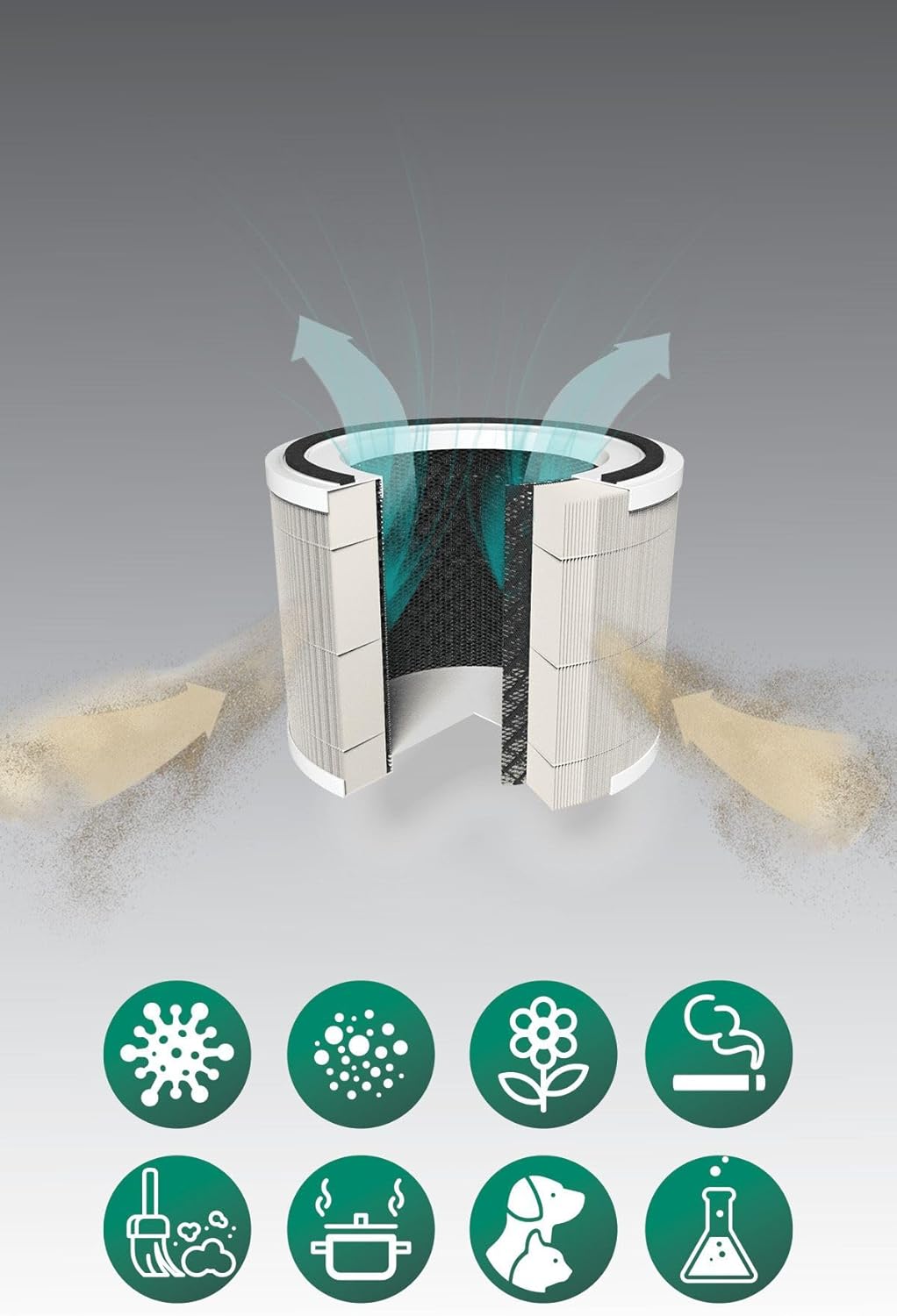
රූපය: A cutaway diagram illustrating the multi-layer filter system of the Kiwi KAP 6730 Air Purifier. Arrows show air entering and exiting the filter. Below the filter, icons represent various airborne pollutants that the system is designed to filter, including bacteria, dust, pollen, smoke, pet dander, cooking odors, and chemical fumes.
ස්ථානගත කිරීම
- ස්ථිර, මට්ටමේ මතුපිටක් මත වායු පවිතකාරකය තබන්න.
- Ensure there is at least 15-30 cm (6-12 inches) of space around all sides for optimal airflow.
- Avoid placing near heat sources, direct sunlight, or in damp පරිසරයන්.
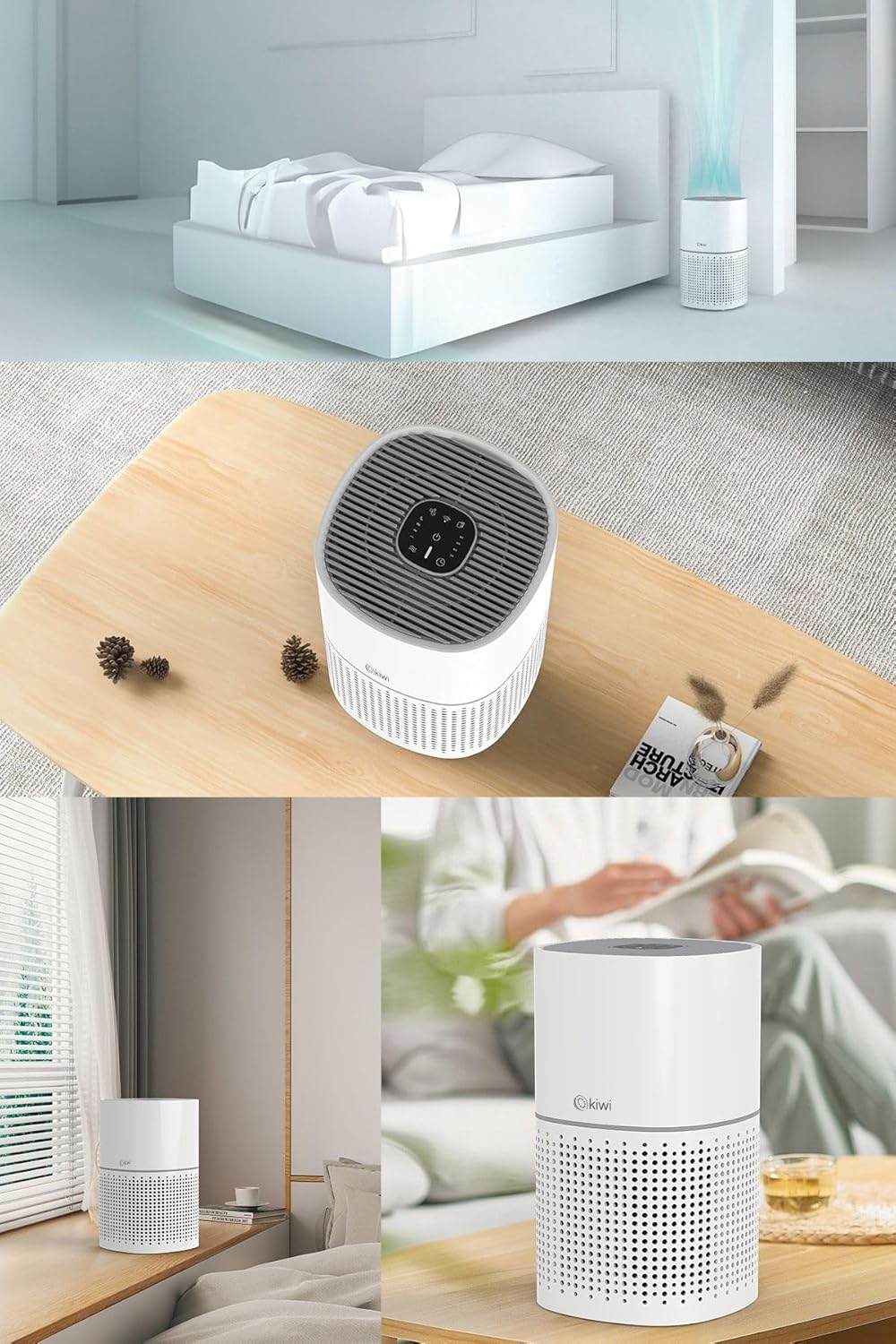
රූපය: A collage of images showing the Kiwi KAP 6730 Air Purifier in different home environments. It is depicted on a bedside table in a bedroom, on a wooden table in a living area, and on a windowsill, demonstrating its compact size and versatility for placement.
බල සම්බන්ධතාවය
විදුලි රැහැන සුදුසු විදුලි අලෙවිසැලකට සම්බන්ධ කරන්න.
මෙහෙයුම
පාලන පැනල් කාර්යයන්
The control panel is located on the top of the air purifier.
රූපය: සවිස්තරාත්මක view of the circular control panel on the top of the Kiwi KAP 6730 Air Purifier. Icons for power, fan speed, timer settings (1H, 2H, 4H, 8H), sleep mode, and Wi-Fi connectivity are clearly visible, along with an indicator light.
- බල බොත්තම (⏻ ⏻ ශ්රේණිය): Press to turn the air purifier ON or OFF.
- විදුලි පංකා වේග බොත්තම (💨 💨 💨): Press to cycle through different fan speeds (e.g., Low, Medium, High, Auto).
- ටයිමර් බොත්තම (⏱ ⏱ დარ): Set the operating time (e.g., 1 hour, 2 hours, 4 hours, 8 hours). The unit will automatically turn off after the set time.
- නිද්රා ප්රකාර බොත්තම (🌙): Activates sleep mode, reducing fan speed and dimming indicator lights for quiet operation.
- Wi-Fi Button (📶): Press and hold to activate Wi-Fi pairing mode for smart control via a mobile application.
- පෙරහන් යළි පිහිටුවීමේ දර්ශකය: Illuminates when the filter needs replacement. Press and hold after filter replacement to reset.
ස්මාර්ට් පාලනය (යෙදුම)
The Kiwi KAP 6730 can be controlled via a dedicated mobile application. Follow the app's instructions for pairing and remote control.

රූපය: The Kiwi KAP 6730 Air Purifier positioned in a room, with a hand holding a smartphone in the foreground. The smartphone screen displays a mobile application interface, indicating that the air purifier can be controlled remotely via a smart app, showing air quality readings and control options.
නඩත්තු කිරීම
නිතිපතා නඩත්තු කිරීම ප්රශස්ත ක්රියාකාරිත්වය සහතික කරන අතර ඔබේ වායු පවිතකාරකයේ ආයු කාලය දීර්ඝ කරයි.
බාහිර පිරිසිදු කිරීම
- පිරිසිදු කිරීමට පෙර සෑම විටම වායු පවිතකාරකය විසන්ධි කරන්න.
- මෘදු, d සමග බාහිර පෘෂ්ඨයන් පිස දමන්නamp රෙදි.
- උල්ෙල්ඛ පිරිසිදු කරන්නන්, ඉටි හෝ ද්රාවක භාවිතා නොකරන්න.
- Ensure no water enters the interior of the appliance.
පෙරහන් ප්රතිස්ථාපනය
The filter life depends on air quality and usage. The filter replacement indicator will illuminate when a new filter is needed (typically every 6-12 months).
- වායු පවිතකාරකය විසන්ධි කරන්න.
- වායු පවිතකාරකය උඩු යටිකුරු කරන්න.
- අගුළු ඇරීමට සහ ඉවත් කිරීමට මූලික කවරය වාමාවර්තව කරකවන්න.
- පැරණි පෙරහන ඉවත් කර නිසි ලෙස බැහැර කරන්න.
- Unpack the new filter and insert it into the air purifier.
- Replace the base cover and twist clockwise to lock it into place.
- Plug in the air purifier. Press and hold the Filter Reset button (often the Wi-Fi or a dedicated filter icon) for 3-5 seconds until the indicator light turns off.
සටහන: Only use genuine Kiwi replacement filters to ensure proper performance and maintain warranty validity.
දෝෂගවේෂණය
| ගැටලුව | විය හැකි හේතුව | විසඳුම |
|---|---|---|
| වායු පවිතකාරකය ක්රියාත්මක නොවේ. | පේනුගත කර නැත; බල සැපයුම් පද්ධතිය ක්රියා විරහිත වී ඇත; බල බොත්තම ඔබා නැත. | Ensure the power cord is securely plugged in. Try a different outlet. Press the power button firmly. |
| වායු ප්රවාහය හෝ පිරිසිදු කිරීමේ කාර්යක්ෂමතාව අඩු වීම. | Blocked air inlets/outlets; Dirty filter; Filter packaging not removed. | Check for obstructions and clear them. Replace the filter if the indicator is on or if it appears dirty. Ensure all filter packaging is removed. |
| අසාමාන්ය ශබ්දය. | Filter not installed correctly; Foreign object inside; Unit not on a level surface. | Check filter installation. Unplug and inspect for foreign objects. Place on a stable, level surface. |
| පෙරහන වෙනස් කිරීමෙන් පසුවද පෙරහන් ප්රතිස්ථාපන දර්ශකය ක්රියාත්මකව පවතී. | පෙරහන් යළි පිහිටුවීම සිදු කර නොමැත. | Press and hold the Filter Reset button for 3-5 seconds until the light turns off. |
| Wi-Fi/යෙදුම වෙත සම්බන්ධ විය නොහැක. | Incorrect Wi-Fi password; Router too far; App not updated; Wi-Fi pairing mode not activated. | Ensure correct password. Move unit closer to router. Update app. Press and hold Wi-Fi button to activate pairing mode. Consult app instructions. |
පිරිවිතර
| විශේෂාංගය | විස්තර |
|---|---|
| ආකෘතිය | KAP-6730 |
| වෙළඳ නාමය | කීවි |
| වර්ණය | සුදු |
| පෙරීමේ වර්ගය | H13 HEPA Filter (Medical Grade) |
| බලශක්ති ප්රභවය | රැහැන්ගත විදුලි |
| නිෂ්පාදන බර | 2 කිලෝ ග්රෑම් |
| සම්බන්ධතාවය | Wi-Fi (Smart App Control) |
| මානයන් (ආසන්න වශයෙන්) | සංයුක්ත නිර්මාණය |
වගකීම් සහ සහාය
For warranty information and customer support, please refer to the warranty card included with your product or visit the official KIWI webඅඩවිය.
You can also contact customer service for assistance with troubleshooting or replacement parts.
KIWI Official Webඅඩවිය: www.kiwi.com.tr (සටහන: මෙය ස්ථාන දරණුවකි URL, please refer to your product documentation for the correct support webඅඩවිය.)


