1. හැඳින්වීම
This manual provides essential information for the proper use and maintenance of your DigiLand Android Tablet S10. Please read it thoroughly before operating the device to ensure optimal performance and longevity. The DigiLand S10 is a 10.1-inch Android 14 tablet designed for versatile use, featuring an Octa-Core processor, ample memory, and a high-definition display.
2 ආරක්ෂිත තොරතුරු
- ටැබ්ලටය අධික උෂ්ණත්වයන්ට, සෘජු හිරු එළියට හෝ අධික ආර්ද්රතාවයට නිරාවරණය නොකරන්න.
- ටැබ්ලටය බිම හෙළීමෙන් හෝ දැඩි බලපෑම්වලට ලක් කිරීමෙන් වළකින්න.
- Use only the original charger and accessories provided with the tablet.
- ටැබ්ලටය ඔබම විසුරුවා හැරීමට හෝ අලුත්වැඩියා කිරීමට උත්සාහ නොකරන්න. සුදුසුකම් ලත් සේවා නිලධාරීන් වෙත යොමු වන්න.
- ටැබ්ලටය ජලයෙන් සහ අනෙකුත් ද්රව වලින් ඈත් කර තබන්න.
- දේශීය රෙගුලාසිවලට අනුව වගකීමෙන් යුතුව ටැබ්ලටය සහ එහි බැටරිය බැහැර කරන්න.
3. පැකේජ අන්තර්ගතය
පැකේජය විවෘත කිරීමෙන් පසු, පහත ලැයිස්තුගත කර ඇති සියලුම අයිතම පවතින බවත් හොඳ තත්ත්වයේ පවතින බවත් කරුණාකර තහවුරු කරගන්න:
- DigiLand Android Tablet S10 (Blue)
- USB Type-C ආරෝපණ කේබලය
- බල ඇඩැප්ටරය
- ඉක්මන් ආරම්භක මාර්ගෝපදේශය

Figure 3.1: Items included in the DigiLand Tablet S10 package. This image displays the tablet itself, its packaging box, a USB Type-C charging cable, a power adapter, and a quick start guide, ensuring users can confirm all components are present.
4. නිෂ්පාදන අවසන්view
The DigiLand S10 tablet features a sleek design with essential ports and controls for user convenience.
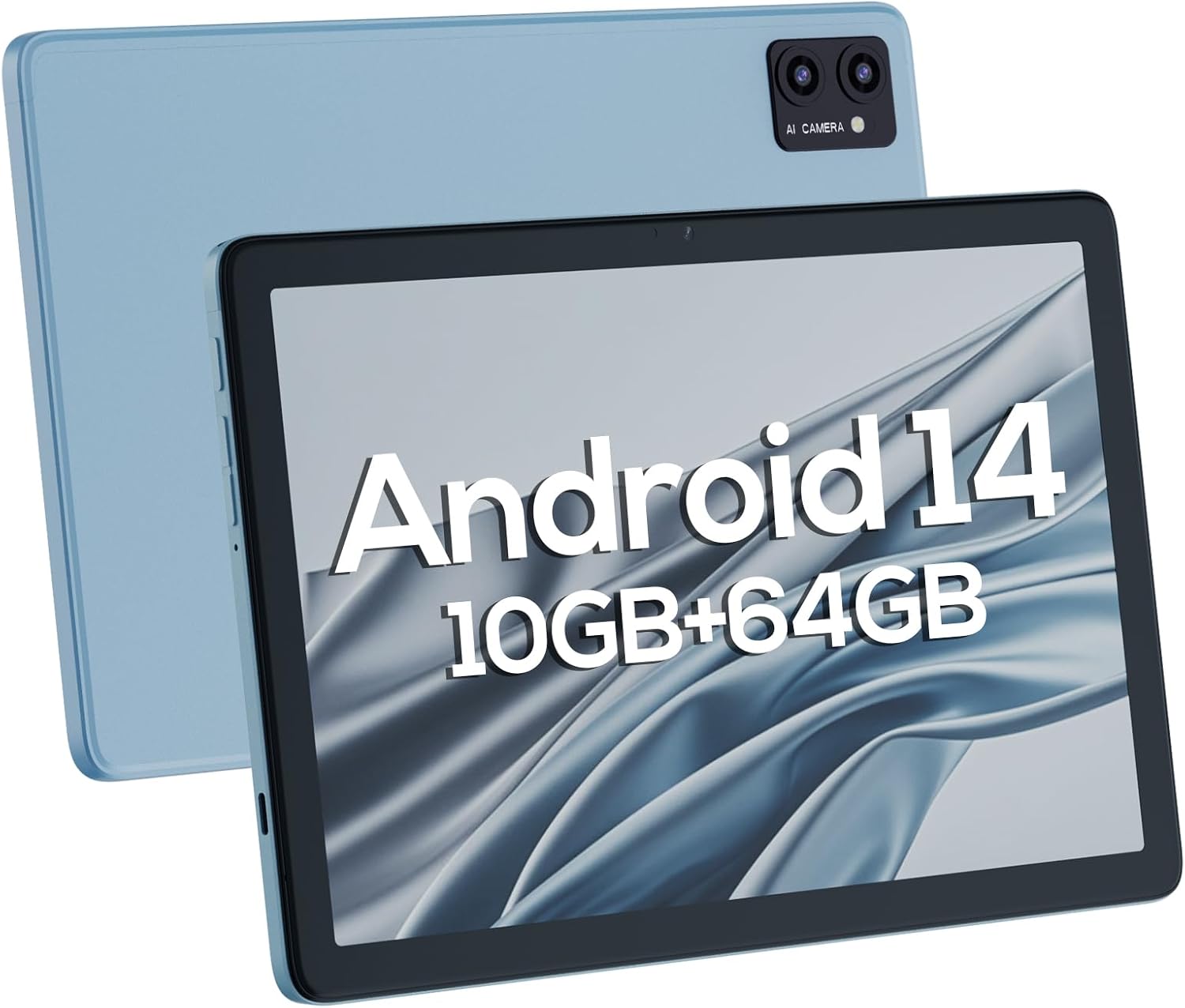
රූපය 4.1: ඉදිරිපස සහ පසුපස views of the DigiLand Android Tablet S10. The image highlights the tablet's 10.1-inch display on the front and the dual camera module on the blue-colored back panel.
ප්රධාන සංරචක:
- අඟල් 10.1 IPS HD සංදර්ශකය: Provides vibrant visuals with 800x1280 resolution.
- ඉදිරිපස කැමරාව (5MP): Located on the front bezel, suitable for video calls and selfies.
- පසුපස කැමරාව (8MP): Located on the back, for capturing photos and videos.
- බල බොත්තම: Used to turn the tablet on/off or put it to sleep/wake.
- වෙළුම් බොත්තම්: ශ්රව්ය පරිමාව සකසන්න.
- USB Type-C Port: අයකිරීම් සහ දත්ත හුවමාරුව සඳහා.
- 3.5mm හෙඩ්ෆෝන් ජැක්: රැහැන්ගත හෙඩ්ෆෝන් සම්බන්ධ කිරීම සඳහා.
- MicroSD කාඩ් පත: 256GB දක්වා ගබඩාව පුළුල් කිරීම සඳහා.
- ද්විත්ව කථිකයින්: ශ්රව්ය ප්රතිදානය ලබා දෙන්න.
5. පිහිටුවීම
5.1 මූලික ආරෝපණය
Before first use, fully charge your tablet. Connect the USB Type-C cable to the tablet's charging port and the power adapter to a wall outlet. The battery indicator on the screen will show charging status. A full charge typically takes several hours.
5.2 බල ගැන්වීම සක්රිය / අක්රිය කිරීම
- බල ගැන්වීමට: Press and hold the Power button until the DigiLand logo appears.
- බලය අක්රිය කිරීමට: Press and hold the Power button until a power-off menu appears. Select "Power off" and confirm.
- නිදා ගැනීමට/අවදි කිරීමට: කෙටියෙන් බල බොත්තම ඔබන්න.
5.3 ආරම්භක සැකසුම් විශාරදයා
Upon first power-on, the Android 14 setup wizard will guide you through basic configurations:
- ඔබේ භාෂාව තෝරන්න.
- Wi-Fi ජාලයකට සම්බන්ධ කරන්න.
- ඔබගේ Google ගිණුම සමඟින් පුරනය වන්න හෝ අලුත් එකක් සාදන්න.
- Review සහ නියමයන් සහ කොන්දේසි පිළිගන්න.
- තිර අගුල සකසන්න (PIN, රටාව හෝ මුරපදය).
- Configure other settings as prompted.
5.4 ගබඩාව පුළුල් කිරීම
The tablet supports MicroSD cards up to 256GB for additional storage. Locate the MicroSD card slot (often near the headphone jack or power button, as shown in Figure 4.1) and insert the card gently until it clicks into place. You may need to format the card via the tablet's settings for optimal use.
6. ටැබ්ලටය ක්රියාත්මක කිරීම
6.1 මූලික සංචාලනය
- මුල් තිරය: ඔබට යෙදුම් සහ විජට් වෙත ප්රවේශ විය හැකි ප්රධාන තිරය.
- යෙදුම් ලාච්චුව: මුල් තිරයේ සිට ඉහළට ස්වයිප් කරන්න view සියලුම ස්ථාපිත යෙදුම්.
- දැනුම්දීම් පැනලය: දැනුම්දීම් සහ ඉක්මන් සැකසුම් වෙත ප්රවේශ වීමට තිරයේ ඉහළ සිට පහළට ස්වයිප් කරන්න.
- මෑත යෙදුම්: Tap the square navigation button (or swipe up and hold from the bottom if using gestures) to see recently opened applications.
6.2 Wi-Fi සහ බ්ලූටූත් වෙත සම්බන්ධ වීම
- Wifi: වෙත යන්න සැකසීම් > ජාලය සහ අන්තර්ජාලය > Wi-Fi. Wi-Fi සක්රිය කර ඔබට අවශ්ය ජාලය තෝරන්න. අවශ්ය නම් මුරපදය ඇතුළත් කරන්න.
- බ්ලූටූත්: වෙත යන්න සැකසීම්> සම්බන්ධිත උපාංග> සම්බන්ධතා මනාප> බ්ලූටූත්. බ්ලූටූත් ක්රියාත්මක කර ඇති උපාංග සමඟ යුගල කරන්න.
6.3 කැමරා භාවිතා කිරීම
ටැබ්ලටයේ 5MP ඉදිරිපස කැමරාවක් සහ 8MP පසුපස කැමරාවක් ඇත.
- කැමරා යෙදුම විවෘත කරන්න.
- ඉදිරිපස සහ පසුපස කැමරා අතර මාරු වීමට කැමරා ස්විච් නිරූපකය තට්ටු කරන්න.
- ඡායාරූපයක් ගැනීමට හෝ වීඩියෝ පටිගත කිරීම ආරම්භ කිරීමට/නවත්වා ගැනීමට ෂටර් බොත්තම තට්ටු කරන්න.

Figure 6.1: Visual representation of the tablet's camera capabilities, showing sample images captured by both the 5MP front and 8MP rear cameras.
6.4 බැටරි කළමනාකරණය
6000mAh බැටරිය දීර්ඝ කාලීන භාවිතයක් සපයයි. බැටරි ආයු කාලය ප්රශස්ත කිරීම සඳහා:
- තිරයේ දීප්තිය අඩු කරන්න.
- භාවිතයේ නොමැති විට Wi-Fi සහ Bluetooth අක්රිය කරන්න.
- පසුබිමේ ධාවනය වන භාවිතයට නොගත් යෙදුම් වසා දමන්න.
- සැකසීම් තුළ බැටරි සුරැකුම් ප්රකාරය සබල කරන්න.

Figure 6.2: Battery performance details for the DigiLand Tablet S10. This graphic illustrates the 6000mAh battery capacity and provides estimated usage durations for various activities like video playback (9 hours), music (14 hours), and browsing (15 hours).
7. නඩත්තු කිරීම
- පිරිසිදු කිරීම: Use a soft, lint-free cloth to clean the screen and body. Avoid abrasive cleaners.
- මෘදුකාංග යාවත්කාලීන: ප්රශස්ත කාර්ය සාධනය සහ ආරක්ෂාව සහතික කිරීම සඳහා පද්ධති යාවත්කාලීන කිරීම් නිතිපතා පරීක්ෂා කර ස්ථාපනය කරන්න. වෙත යන්න සැකසීම් > පද්ධතිය > පද්ධති යාවත්කාලීන කිරීම.
- ගබඩා කළමනාකරණය: වරින් වර හැඹිලිය හිස් කරන්න, අනවශ්ය දේ මකන්න files භාවිතා කර, ගබඩා ඉඩ නිදහස් කර ගැනීමට භාවිතයට නොගත් යෙදුම් අස්ථාපනය කරන්න.
- උපස්ථ දත්ත: Regularly back up important data to a cloud service or external storage device to prevent data loss.
8. දෝශ නිරාකරණය
| ගැටලුව | හැකි විසඳුම |
|---|---|
| ටැබ්ලටය ක්රියාත්මක නොවේ | බැටරිය ආරෝපණය කර ඇති බවට වග බලා ගන්න. නැවත ආරම්භ කිරීමට බල කිරීම සඳහා බල බොත්තම තත්පර 10-15ක් ඔබාගෙන සිටින්න. |
| මන්දගාමී කාර්ය සාධනය | Close unused apps, clear cache, restart the tablet. Consider a factory reset if issues persist (backup data first). |
| Wi-Fi සම්බන්ධතා ගැටළු | ටැබ්ලටය සහ රවුටරය නැවත ආරම්භ කරන්න. ජාලය අමතක කර නැවත සම්බන්ධ කරන්න. Wi-Fi සබල කර ඇති බවට වග බලා ගන්න. |
| යෙදුම් බිඳ වැටීම | Clear app cache/data (Settings > Apps), update the app, or reinstall it. |
| තිරය ප්රතිචාර නොදක්වයි | Force restart the tablet. If issue persists, contact support. |
9. පිරිවිතර
Below are the detailed technical specifications for the DigiLand Android Tablet S10:
| විශේෂාංගය | විස්තර |
|---|---|
| වෙළඳ නාමය | DigiLand |
| මාදිලියේ නම | DigiLand-S10 |
| මෙහෙයුම් පද්ධතිය | Android 14 |
| තිර ප්රමාණය | අඟල් 10.1 |
| තිර විභේදනය | 800 x 1280 (IPS HD Display) |
| ප්රොසෙසරය | A523, Octa core, Cortex A55@1.8 GHz, 22nm |
| RAM | 10GB (4+6GB) |
| අභ්යන්තර ගබඩාව | 64 GB |
| පුළුල් කළ හැකි ගබඩාව | Up to 256GB via TF card (MicroSD) |
| ඉදිරිපස කැමරාව | 5MP |
| පසුපස කැමරාව | 8MP |
| බැටරි ධාරිතාව | 6000mAh |
| සම්බන්ධතාවය | Wi-Fi (2.4G+5G), Bluetooth 5.0, USB Type-C, 3.5mm Headphone Jack |
| මානයන් (LxWxH) | අඟල් 7 x 4 x 0.5 |
| අයිතමයේ බර | රාත්තල් 2.42 (දළ වශයෙන් ග්රෑම් 510) |
| වර්ණය | නිල් |

රූපය 9.1: අවසන්view of the DigiLand Tablet S10's core specifications. This graphic highlights features such as Android 14, MTK Helio A523 Octa-Core Processor, 10GB RAM, 64GB ROM (expandable to 256GB), 10.1-inch HD display, 6000mAh battery, 5MP front camera, 8MP rear camera, 510g weight, and 8.8mm thickness.
10. වගකීම් සහ සහාය
10.1 වගකීම් තොරතුරු
DigiLand products typically come with a limited manufacturer's warranty. Please refer to the warranty card included in your product packaging or visit the official DigiLand website for detailed terms and conditions regarding warranty coverage, duration, and limitations. Keep your proof of purchase for warranty claims.
10.2 පාරිභෝගික සහාය
For technical assistance, troubleshooting, or any inquiries regarding your DigiLand Android Tablet S10, please contact DigiLand customer support. Contact information can usually be found in the Quick Start Guide or on the official DigiLand website. When contacting support, please have your product model (DigiLand-S10) and purchase details ready.
Thank you for choosing DigiLand. We hope you enjoy your new tablet!


