හැඳින්වීම
Welcome to the world of effortless home baking with your new Neretva PE9806 Automatic Bread Machine. This appliance is designed to simplify the bread-making process, allowing you to enjoy fresh, delicious bread with minimal effort. Please read this manual thoroughly before operating your machine to ensure safe and optimal performance.
නිෂ්පාදනය අවසන්view
The Neretva PE9806 is a versatile bread machine featuring a durable stainless steel exterior and a user-friendly interface. It offers a wide range of programs and settings to cater to various bread types and preferences.
- බහු වැඩසටහන්: Choose from 20 pre-programmed settings for different bread types, cakes, jams, yogurt, and more.
- Adjustable Loaf Sizes: Select between 1.0 lb, 1.5 lb, and 2.0 lb loaf sizes to suit your needs.
- Crust Color Control: Customize your bread's crust to light, medium, or dark.
- Non-Stick Ceramic Pan: The bread pan features a healthy ceramic non-stick coating, ensuring easy release and cleaning.
- ස්වයංක්රීය ඩිස්පෙන්සර්: An integrated dispenser automatically adds nuts, fruits, or other mix-ins at the optimal time during the baking cycle.
- ප්රමාද කාල සටහන: Program your machine up to 15 hours in advance to wake up to freshly baked bread.
- උණුසුම් කාර්යය තබා ගන්න: Keeps your bread warm for up to 1 hour after baking.
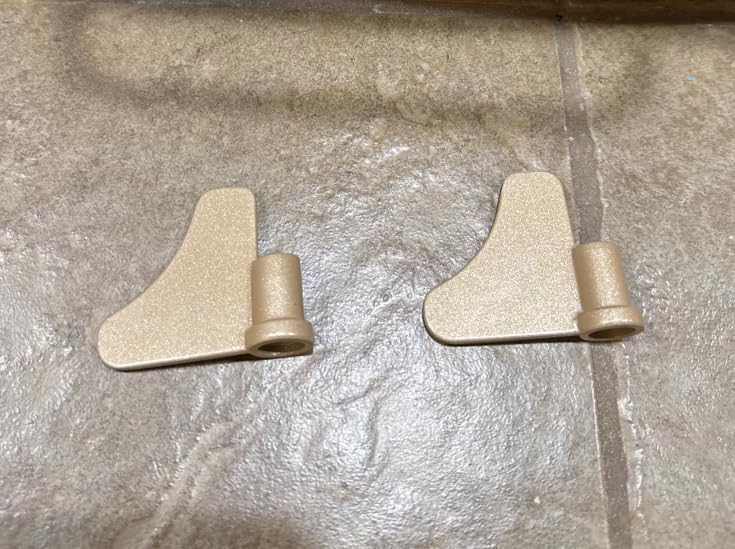
Image: Two kneading paddles, essential components for mixing dough in the bread machine.
සැලසුම
- ඇසුරුම්: Carefully remove the bread machine and all accessories from its packaging.
- පිරිසිදු: Before first use, wash the bread pan, kneading paddle(s), and measuring accessories with warm, soapy water. Rinse thoroughly and dry completely. Wipe the exterior of the machine with a damp රෙදි.
- Install Kneading Paddle: Insert the kneading paddle(s) onto the shaft(s) at the bottom of the bread pan. Ensure it is securely in place.
- පාන් පෑන් තබන්න: Insert the bread pan into the baking chamber of the machine. Press down and twist clockwise until it locks securely into position.
- සම්බන්ධක බලය: Plug the power cord into a grounded electrical outlet. The machine will beep, and the display will light up.
මෙහෙයුම් උපදෙස්
- අමුද්රව්ය එකතු කරන්න: Add ingredients to the bread pan in the order specified by your recipe (typically liquids first, then dry ingredients, with yeast placed last on top of the dry ingredients, away from liquids and salt).
- පියන වසන්න: පියන ආරක්ෂිතව වසා දමන්න.
- වැඩසටහන තෝරන්න: Use the 'MENU' button or dial to select the desired program (e.g., Basic Bread, Whole Wheat, Gluten-Free). The corresponding time will appear on the display.
- රොටියේ ප්රමාණය තෝරන්න: Press the 'LOAF' button to select your desired loaf size (1.0 lb, 1.5 lb, or 2.0 lb).
- කබොල වර්ණය තෝරන්න: Press the 'COLOR' button to choose your preferred crust color (Light, Medium, or Dark).
- ෙබ්කිං කිරීම ආරම්භ කරන්න: Press the 'START/STOP/PAUSE' button to begin the baking process. The machine will automatically perform all steps: kneading, rising, and baking.
- ප්රමාද ටයිමරය (විකල්ප): To use the delay timer, set your program, loaf size, and crust color. Then, use the '+' and '-' buttons to adjust the delay time (up to 15 hours). Press 'START/STOP/PAUSE' to activate the delay.
- වැදගත් සටහන: Do not open the lid during the rising cycles, as this can cause the bread to collapse.
- After Baking: Once the program is complete, the machine will beep. You can remove the bread immediately or allow it to stay in the machine for up to 1 hour with the 'Keep Warm' function.
නඩත්තු කිරීම සහ පිරිසිදු කිරීම
නිතිපතා පිරිසිදු කිරීම ඔබේ පාන් යන්ත්රයේ ආයු කාලය සහ සනීපාරක්ෂාව සහතික කරයි.
- විසන්ධි කරන්න: සෑම විටම යන්ත්රය විසන්ධි කර පිරිසිදු කිරීමට පෙර එය සම්පූර්ණයෙන්ම සිසිල් වීමට ඉඩ දෙන්න.
- පාන් පෑන් ඉවත් කරන්න: Twist the bread pan counter-clockwise and lift it out of the baking chamber.
- Clean Pan and Paddle: Wash the bread pan and kneading paddle(s) with warm, soapy water. Use a non-abrasive sponge to protect the non-stick coating. For stubborn residue, soak the pan in warm water for 10-15 minutes. Rinse and dry thoroughly.
- පිරිසිදු අභ්යන්තරය: බේකින් කුටියේ අභ්යන්තරය දැන්වීමකින් පිස දමන්න.amp රෙදි. දරුණු රසායනික ද්රව්ය හෝ උල්ෙල්ඛ පිරිසිදු කරන්නන් භාවිතා නොකරන්න.
- පිරිසිදු බාහිර: යන්ත්රයේ බාහිර කොටස මෘදු, ඩී සමඟ පිස දමන්නamp රෙදි.
- ගබඩා: Ensure all parts are dry before reassembling and storing the machine in a cool, dry place.
දෝෂගවේෂණය
If you encounter any issues with your bread machine, refer to the following common problems and solutions:
- පාන් ඉහළ නොයෑම: Check yeast expiration date, ensure water temperature is correct (lukewarm, not hot), and verify ingredients are added in the correct order.
- Bread Collapses: Too much liquid or yeast, or opening the lid during the rise cycle. Ensure accurate measurements and avoid disturbing the machine during rising.
- Uneven Crust: Ensure the bread pan is correctly seated and the machine is on a stable, level surface.
- යන්ත්රය ආරම්භ නොවේ: Check power connection. Ensure the lid is fully closed and the bread pan is correctly installed.
For further assistance, please contact Neretva customer support.
පිරිවිතර
| විශේෂාංගය | විස්තර |
|---|---|
| ආකෘතිය | PE9806 |
| වෙළඳ නාමය | නෙරෙත්වා |
| වැඩසටහන් | 20 (e.g., Basic, Whole Wheat, Gluten-Free, Cake, Jam, Yogurt) |
| රොටි ප්රමාණයන් | රාත්තල් 1.0, රාත්තල් 1.5, රාත්තල් 2.0 |
| කබොල වර්ණ | සැහැල්ලු, මධ්යම, අඳුරු |
| පෑන් ද්රව්ය | Non-Stick Ceramic |
| මානයන් (ආසන්න වශයෙන්) | 34.3 සෙ.මී. (L) x 30.5 සෙ.මී. (H) x 21.6 සෙ.මී. (W) |
| වර්ණය | රිදී |
වගකීම් සහ සහාය
For warranty information, product registration, or technical support, please refer to the warranty card included with your purchase or visit the official Neretva webවෙබ් අඩවිය. ඕනෑම වගකීම් හිමිකම් සඳහා ඔබේ මිලදී ගැනීමේ සාක්ෂි තබා ගන්න.
Thank you for choosing Neretva. Enjoy your homemade bread!


