1. නිෂ්පාදන අවසන්view
The ULANZI TT53 Camera Tripod is a versatile and portable support system designed for various photography and videography needs. It features an adjustable height, a 360° rotatable ball head, and a quick-release plate for efficient camera mounting. Its multi-mode functionality allows for use as a standard tripod, monopod, or selfie stick, and it supports low-angle shooting.
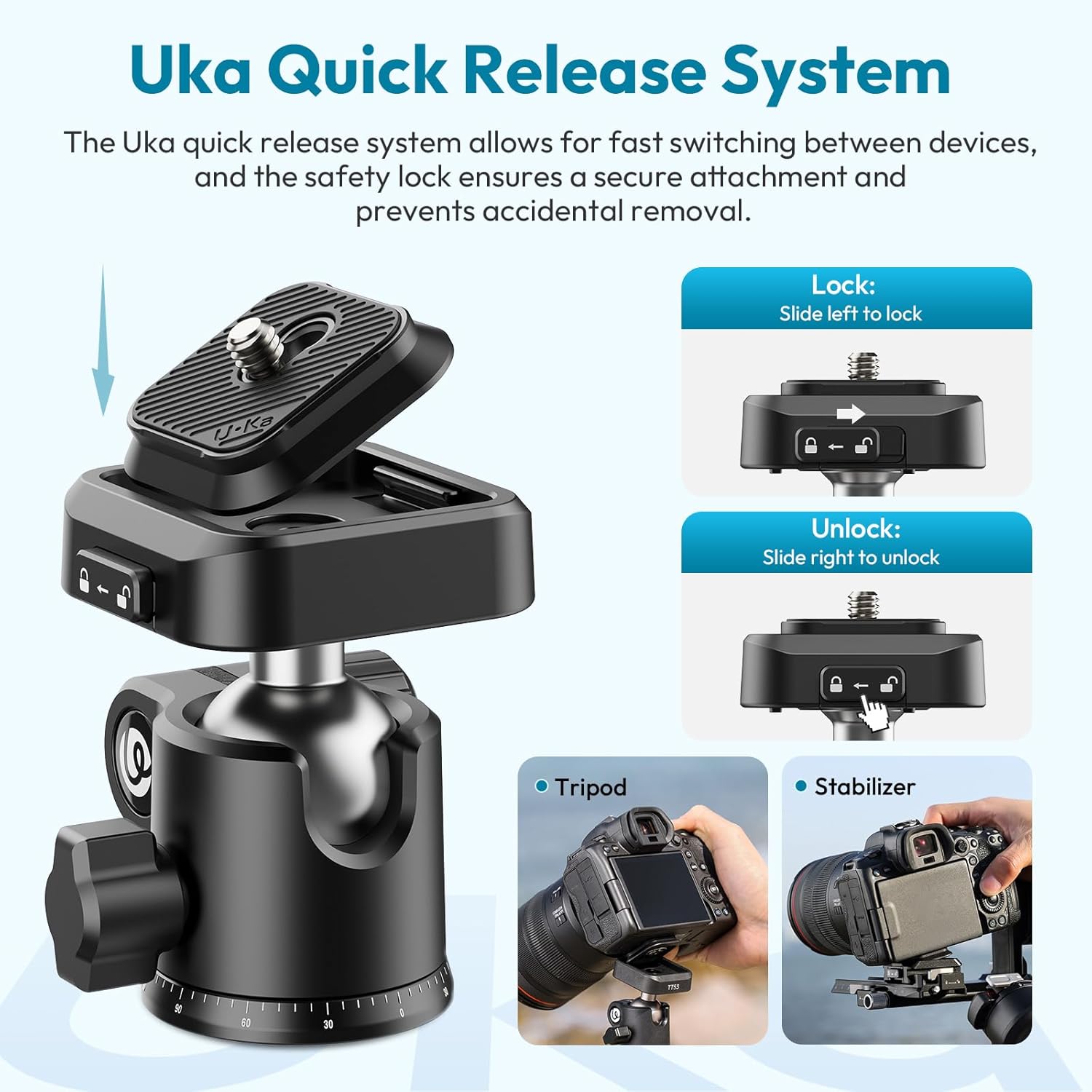
Image: The ULANZI TT53 Camera Tripod, showcasing එහි සැලසුම සහ අතේ ගෙන යා හැකි බව.
2. පෙට්ටියේ ඇති දේ
- Tripod * 1
- ගබඩා බෑගය * 1
- Spanner * 1
3. සැකසුම් උපදෙස්
3.1 ත්රිපාදය දිග හැරීම
- Grasp the tripod legs and gently extend them outwards until they lock into position.
- Adjust the leg angles by pressing the leg angle adjustment locks located at the top of each leg. The legs can be set to 23°, 53°, or 83°.

රූපය: විස්තරාත්මක view of the tripod legs, illustrating the adjustable leg angles (23°, 53°, 83°), the foam comfort grip, and the secure hook attachment.
3.2 Adjusting Tripod Height
- To extend the legs, unlock the leg section locks and pull each leg section to the desired length. Securely fasten the locks.
- To adjust the central column, loosen the central column locking knob. Extend the central column to the desired height and tighten the knob to secure it. The tripod can extend from 20.47 inches to 70.86 inches.

Image: Visual representation of the tripod's height adjustment capabilities, showing its folded size and various extended heights.
4. මෙහෙයුම් උපදෙස්
4.1 Attaching Your Camera (UKA Quick Release System)
- Ensure the quick-release plate is detached from the ball head. If attached, slide the safety lock to 'unlock' and remove the plate.
- Screw the quick-release plate onto the bottom of your camera or device using the 1/4" screw. Ensure it is tightened securely.
- Align the quick-release plate with the receiver on the ball head and press down until it clicks into place.
- Slide the safety lock to 'lock' to prevent accidental release.

Image: Instructions for using the Uka Quick Release System, demonstrating how to lock and unlock the plate and its compatibility with cameras on tripods and stabilizers.
4.2 Using the 360° Ball Head
- Loosen the main locking knob on the ball head to adjust the camera's angle freely.
- For panoramic shots, use the base panning knob to rotate the camera 360 degrees horizontally.
- For portrait orientation, tilt the camera 90 degrees into the designated notch on the ball head.
- Once the desired angle is achieved, tighten the respective locking knobs to secure the camera.

Image: The ball head demonstrating its 360° rotation and 90° tilt for versatile shooting angles, including its 3/8" mounting thread.
4.3 Multi-Mode Flexibility
The TT53 tripod offers several configurations to suit different shooting scenarios:
- ට්රයිපොඩ් ප්රකාරය: Standard three-leg setup for stable shots.
- මොනොපොඩ් ප්රකාරය: The central column can be detached and used as a monopod for increased mobility and support.
- සෙල්ෆි ස්ටික් මාදිලිය: The detached central column can also function as a selfie stick when combined with a phone clamp (ඇතුළත් කර නැත).
- පහත් කෝණ වෙඩි තැබීම: Invert the central column to achieve extremely low-angle or macro shots.

Image: The tripod configured for various shooting modes: standard tripod, with a stabilizer, low-angle photography, and as a selfie stick.

Image: Demonstrating low-angle shooting by inverting the central column, ideal for macro photography or unique perspectives.
4.4 Accessory Mounting
The tripod includes 1/4" and ARRI locating holes on the side, allowing for the attachment of additional accessories such as lights, microphones, or monitors using compatible magic arms (accessories sold separately).

Image: The tripod's integrated 1/4" and ARRI locating holes, designed for expanding your setup with various photographic accessories.
4.5 නිල නිෂ්පාදන වීඩියෝව
Video: An official ULANZI video demonstrating the features and usage of the TT53 Traveler Uka Tripod, including its portability, adjustable height, quick-release system, and multi-mode functionality.
5. නඩත්තු කිරීම
- දූවිලි හා සුන්බුන් ඉවත් කිරීම සඳහා මෘදු වියළි රෙද්දකින් ත්රිපාද කකුල් සහ සන්ධි නිතිපතා පිරිසිදු කරන්න.
- ත්රිපාදය අධික උෂ්ණත්වයන්ට හෝ රළු රසායනික ද්රව්යවලට නිරාවරණය කිරීමෙන් වළකින්න.
- Ensure all locking mechanisms are free of obstructions and operate smoothly.
- Store the tripod in its provided storage bag when not in use to protect it from scratches and dust.
6. දෝශ නිරාකරණය
6.1 ත්රිපාද අස්ථාවරත්වය
- කලාපය: Tripod feels wobbly or unstable.
- විසඳුම: Ensure all leg section locks and the central column locking knob are securely tightened. Verify that the leg angles are evenly set.
6.2 Quick Release Plate Not Securing
- කලාපය: Camera does not securely attach to the ball head.
- විසඳුම: Check that the quick-release plate is correctly aligned and fully inserted into the receiver. Ensure the safety lock is slid to the 'lock' position. Inspect the plate and receiver for any damage or obstructions.
6.3 Ball Head Movement Issues
- කලාපය: Ball head is too stiff or too loose.
- විසඳුම: Adjust the main locking knob on the ball head. If it remains stiff, check for any debris. If it's too loose, ensure the knob is fully tightened.
7. පිරිවිතර
| විශේෂාංගය | පිරිවිතර |
|---|---|
| වෙළඳ නාමය | උලන්සි |
| ආකෘතිය | TT53 |
| ද්රව්ය | ඇලුමිනියම් මිශ්ර ලෝහය, ABS ප්ලාස්ටික් |
| අයිතමයේ බර | රාත්තල් 2.65 (කිලෝග්රෑම් 1.2) |
| Folded Dimensions | අඟල් 16.92 (සෙ.මී. 43) |
| අවම උස | අඟල් 20.47 (සෙ.මී. 52) |
| උපරිම උස | අඟල් 70.87 (සෙ.මී. 180) |
| කකුල් කොටස් | 4 |
| මධ්යම තීරු කොටස් | 2 |
| බෝල හිස පැටවීමේ ධාරිතාව | රාත්තල් 6.62 (කිලෝග්රෑම් 3) |
| ට්රයිපොඩ් පැටවීමේ ධාරිතාව | රාත්තල් 17.63 (කිලෝග්රෑම් 8) |
| ට්රයිපොඩ් හෙඩ් වර්ගය | බෝල හිස |
| ගැළපෙන උපාංග | 1/4'' Thread Devices, 1/4'' Thread Phone Clamp, 3/8'' Thread Devices, Camera, Stabilizer |
Note: Manually measured weight and size may not be exact.
8. වගකීම් සහ සහාය
For warranty information and customer support, please refer to the official ULANZI webවෙබ් අඩවියට පිවිසෙන්න හෝ ඔබේ සිල්ලර වෙළෙන්දා අමතන්න. වගකීම් හිමිකම් සඳහා ඔබේ මිලදී ගැනීමේ රිසිට්පත තබා ගන්න.


