හැඳින්වීම
Thank you for choosing the Nerf GAM83056A-BLU Gaming Headphones. These headphones are designed to enhance your gaming experience with comfortable wear, clear audio, and seamless communication. Featuring a built-in microphone and a sleek black and blue design, they are suitable for extended gaming sessions across various platforms.
ආරක්ෂිත තොරතුරු
මෙම නිෂ්පාදනය භාවිතා කිරීමට පෙර කරුණාකර සියලුම ආරක්ෂක උපදෙස් හොඳින් කියවන්න. අනාගත යොමුව සඳහා මෙම අත්පොත තබා ගන්න.
- ශ්රවණ හානිය වළක්වා ගැනීම සඳහා ඉහළ ශබ්ද මට්ටම්වල දිගු වේලාවක් සවන් දීමෙන් වළකින්න.
- හෙඩ්ෆෝන් අධික උෂ්ණත්වයන්ට, ආර්ද්රතාවයට හෝ ද්රවවලට නිරාවරණය නොකරන්න.
- හෙඩ්ෆෝන් විසුරුවා හැරීමට හෝ වෙනස් කිරීමට උත්සාහ නොකරන්න. මෙය වගකීම් අවලංගු කරයි.
- හුස්ම හිරවීමේ අවදානමක් ඇති කළ හැකි කුඩා කොටස් නිසා කුඩා දරුවන්ට ළඟා විය නොහැකි ලෙස තබා ගන්න.
- Use only with compatible devices and accessories.
පැකේජයේ අන්තර්ගතය
සියලුම අයිතම පැකේජයේ ඇති බවට වග බලා ගන්න:
- 1 x Nerf GAM83056A-BLU Gaming Headphones with Integrated Microphone
- 1 x User Instruction Manual (this document)

Image: The Nerf GAM83056A-BLU Gaming Headphones shown in their retail box, highlighting the product and its key features.
නිෂ්පාදනය අවසන්view
Familiarize yourself with the components of your new gaming headphones:
- සකස් කළ හැකි හෙඩ්බෑන්ඩ්: For a comfortable fit on various head sizes.
- Cushioned Ear Cups: Ergonomically designed for extended wear and passive noise cancellation.
- ඒකාබද්ධ මයික්රෆෝනය: Flexible boom microphone for clear voice communication.
- 3.5mm ඕඩියෝ ජැක්: Standard connector for compatibility with multiple devices.
- Inline Control (if applicable): For volume adjustment and microphone mute (refer to specific model features).
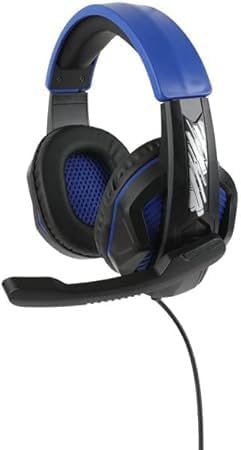

Image: Left: Side view of the headphones showing the adjustable headband, ear cup, and the extended microphone. Right: Front view of the headphones, highlighting the ear cup design and overall structure.
සැලසුම
Follow these steps to set up your Nerf GAM83056A-BLU Gaming Headphones:
- උපාංගයට සම්බන්ධ කරන්න: Locate the 3.5mm audio jack on your gaming console controller, PC, laptop, or other compatible device. Insert the 3.5mm plug from your headphones firmly into the audio jack.
- හෙඩ්බෑන්ඩ් සීරුමාරු කරන්න: Gently slide the adjustable headband to fit comfortably over your head. The ear cups should fully enclose your ears without excessive pressure.
- මයික්රෆෝනයේ පිහිටීම: Adjust the flexible microphone boom so that the microphone is positioned near your mouth for optimal voice pickup. Ensure it is not obstructing your vision.
- Initial Volume Check: Before starting your game or communication, set the volume on your device to a low level. Gradually increase the volume to a comfortable listening level.
මෙහෙයුම් උපදෙස්
Using your Nerf GAM83056A-BLU Gaming Headphones for various activities:
ක්රීඩා කිරීම
- Once connected, the headphones will provide immersive stereo sound for your games.
- Utilize the integrated microphone for in-game voice chat with teammates. Ensure your device's audio settings recognize the headphone's microphone as the input source.
- Adjust game audio and chat volume independently through your gaming platform's settings for balanced sound.
Communication (Voice Calls, Online Meetings)
- For voice calls or online meetings on PC/laptop, ensure the headphones are selected as both the audio output and microphone input device in your system's sound settings or the application's settings.
- Speak clearly into the microphone for optimal voice clarity.
Volume Control and Microphone Mute (if applicable)
If your headphones feature an inline control:
- Volume Wheel/Slider: Rotate or slide to increase or decrease the audio volume.
- මයික්රෆෝන නිශ්ශබ්ද ස්විචය: Toggle the switch to mute or unmute your microphone. This is useful for privacy during calls or when you don't want your voice transmitted in-game.
නඩත්තු කිරීම
ඔබේ හෙඩ්ෆෝන් වල ආයු කාලය සහ ප්රශස්ත ක්රියාකාරිත්වය සහතික කිරීම සඳහා, මෙම නඩත්තු මාර්ගෝපදේශ අනුගමනය කරන්න:
- පිරිසිදු කිරීම: Use a soft, dry, lint-free cloth to wipe down the ear cups and headband. For stubborn dirt, slightly dampරෙදි කැබැල්ල වතුරෙන් පුරවන්න. සැර රසායනික ද්රව්ය හෝ උල්ෙල්ඛ පිරිසිදු කරන්නන් භාවිතා නොකරන්න.
- ගබඩා: When not in use, store the headphones in a clean, dry place away from direct sunlight and extreme temperatures. Avoid tangling the cable.
- කේබල් රැකවරණය: Do not pull on the cable to disconnect the headphones. Always grasp the plug. Avoid sharp bends or kinks in the cable.
දෝෂගවේෂණය
ඔබේ හෙඩ්ෆෝන් සමඟ ගැටලු ඇති වුවහොත්, පහත පොදු ගැටලු සහ විසඳුම් වෙත යොමු වන්න:
| ගැටලුව | විය හැකි හේතුව | විසඳුම |
|---|---|---|
| හෙඩ්ෆෝන් වලින් ශබ්දයක් නැත |
|
|
| මයික්රෆෝනය ක්රියා නොකරයි |
|
|
| ශබ්දය විකෘති කිරීම හෝ ස්ථිතික |
|
|
මෙම විසඳුම් උත්සාහ කිරීමෙන් පසුවත් ගැටලුව පවතින්නේ නම්, කරුණාකර පාරිභෝගික සහාය අමතන්න.
පිරිවිතර
| විශේෂාංගය | විස්තර |
|---|---|
| මාදිලියේ නම | GAM83056A-BLU |
| සම්බන්ධතා තාක්ෂණය | රැහැන් සහිත (3.5 මි.මී. ජැක්) |
| කන් ස්ථානගත කිරීම | කනට උඩින් |
| ශ්රව්ය ධාවක ප්රමාණය | මිලිමීටර් 40 යි |
| සංවේදීතාව | 100 dB |
| සම්බාධනය | 32 ඕම් |
| ශබ්ද පාලනය | උදාසීන ශබ්දය අවලංගු කිරීම |
| මයික්රෆෝනය | Built-in, Flexible Boom |
| ද්රව්ය | Plastic, Memory Foam, Metal |
| වර්ණය | Black And Blue |
| අයිතමයේ බර | අවුන්ස 10 (දළ වශයෙන් ග්රෑම් 283) |
| ගැළපෙන උපාංග | PC, ක්රීඩා කොන්සෝල, ලැප්ටොප් |
| නිර්දේශිත වයස් පරාසය | 8 Years And Up |
| නිෂ්පාදකයා | නර්ෆ් |
| මුල් රට | චීනය |
වගකීම් සහ සහාය
This product comes with a standard manufacturer's warranty. Please refer to the warranty card included with your purchase for specific terms and conditions, or visit the manufacturer's official webසවිස්තරාත්මක වගකීම් තොරතුරු සඳහා අඩවිය.
For technical support, troubleshooting assistance beyond this manual, or warranty claims, please contact Nerf customer service. Contact information can typically be found on the product packaging or the manufacturer's webඅඩවිය.
Please have your product model number (GAM83056A-BLU) and proof of purchase ready when contacting support.


